• how to create torrent with vuze

    9
    0 Votes
    9 Posts
    41 Views
    T
    To select a single file, select the Single File option. To select a folder containing files and folders, select the Directory option. To select one or more files, select the Add Files option. To select a folder containing files and folders, select the Add Folder option.
  • Uploading a JustForFans siterip

    18
    0 Votes
    18 Posts
    167 Views
    K
    @wewe1221 can't visit the site I'm not member of that tracker.
  • Error on QuickTorrentMaker

    4
    1
    0 Votes
    4 Posts
    35 Views
    MrMazdaM
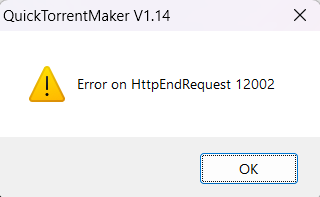
    @chicko This error happens when there is already a torrent somewhere in the system with the exact same info hash. In other words, the error is exactly as it sounds.... It is already on the site somewhere.
  • Torrent page says 1.19GB but my torrent is 1.28GB

    8
    0 Votes
    8 Posts
    47 Views
    T
    @john32123666 Your statements are true, but this is different than what I was saying. Mine is about inconsistent nomenclature; yours is mostly about allocation overhead on disks and the overhead of various data formats.
  • DVD title from a converted video ...

    4
    1
    1 Votes
    4 Posts
    19 Views
    john32123666J
    @ianfontinell ... I am referring to a DVD torrent title [misleading members from a converted content] not any type of format ... In addition altering DVD content from original folder is forbidden ... DVD/Blue Ray are example of disc format that can be copy into a hdd drive ... While : MP4. MP4 (MPEG-4 Part 14) is the most common type of video file format. ... MOV. MOV (QuickTime Movie) stores high-quality video, audio, and effects, but these files tend to be quite large. ... WMV. ... AVI. ... AVCHD. ... FLV, F4V, and SWF. ... MKV. ... WEBM or HTML5. are Types of video format extensions transcoded/converted from disc material ...
  • Transmision port closed

    4
    0 Votes
    4 Posts
    17 Views
    MrMazdaM
    @fetoso123-0 On a home connection, you need to make sure your modem or router is forwarding the port that your torrent client uses to your computer. As long as this step is in place, you should be good to go.
  • Not receiving credit for seeding

    3
    0 Votes
    3 Posts
    43 Views
    MrMazdaM
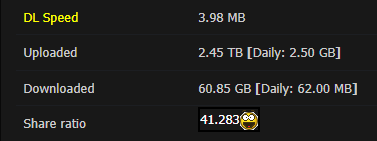
    @Bammm As @1ushost mentioned, there is a difference between torrent client data and site profile data. Your torrent client will show the total amount of data including overhead traffic that has occurred for the torrent since it was added to your torrent client. The site however will only show the amount of data transferred for the current session. If for any reason you stop then restart a torrent, the data totals will reset to zero as it will register as a new session.
  • 0 Votes
    3 Posts
    25 Views
    K
    @ianfontinell Thats what the client reports. Just to be clear, there is no way to know if its "dead" ok "killed" (by takedown) from the client side right? Because in that case, I simply will delete the torrents as you suggest.
  • Constant re-downloading instead of seeding!

    2
    0 Votes
    2 Posts
    27 Views
    ?
    Welp... i'm trying to understand why you are so mad that everything is working as expected. You are aware that renaming files/directories will lead to inexistent paths. Either you're indiscriminately renaming stuff like a psychopath or there's something misconfigured with your NAS, but I think it's the first option. You should stick to a single torrent client if you download from multiple devices and check if your server is available 24h or if there's any kind of operation happening that could lead to its unavailability. Not only that but you could also swtich to a torrent client that will stop torrents with missing files instead of redownloading them. qBittorrent is a good option, if you rename stuff directly using the operating system, or for some other reason the file or entire path become unavailable, the torrent will stop and you'll receive an error warning within the app. Additionally, if you need to move files or folders from one directory to another you should always do it using the torrent client instead of using the operating system file explorer. This is important regardless of running a NAS or offline storage, always manage your torrent data using the torrent client. Additionally, if you use multiple devices, don't ever try to have more than one client seeding the same torrents if the torrent app data is stored offline. You can install a portable version of the torrent client within the NAT as well, so whenever you rename something using the client it won't lead to stuff becoming unavailable in other devices.
  • Will not seed

    2
    0 Votes
    2 Posts
    30 Views
    ?
    @calgboi if you are too concerned over your ratio you should start uploading instead of only relying on seeding already available stuff. You might find success in maintaining a good ratio doing just that in other sites, but gaytorrent is huge, the userbase is very active and the number of torrents that people upload daily is very high. Usually something gets a high demand for the first few hours or first day of upload and then it just fades into forgetfulness. You might have success downloading stuff that was uploaded 15 years ago, but that's because there's someone who didn't bother deleting it from their PC/torrent app. The only torrents with high demand are the ones on the homepage and don't even bother downloading just for trying to seed them, it will not work.
  • Website shows no uploading torrents even when seeding

    5
    0 Votes
    5 Posts
    49 Views
    MrMazdaM
    @Poernerlook Just out of curiosity, are you using uTorrent 3.6.0 or BitTorrent 7.11 by any chance? This is one of many known issues with these torrent clients. While we recommend uTorrent 2.2.1, the latest version that works properly with our system is 3.5.5.
  • co-seeding ...

    5
    2 Votes
    5 Posts
    44 Views
    T
    @eobox91103 said in co-seeding ...: @tnar I think we have to distinguish two cases: Somebody uploads a new torrent, and somebody else "jumps on" this torrent, depriving the uploader of some upload credit. This is impolite. I think the is the situation that the OP is referring to. The torrent is old, and bears the "recycle" logo. If there's only one person seeding it, they're probably not the original seeder. In that case, "jumping on" helps the user community by getting the material out faster. I agree. In fact, helping to reseed (your second case) seems like the right thing to do, in general.
  • my penis.

    my penis
    4
    5
    1 Votes
    4 Posts
    54 Views
    R
    Nice penis
  • Stats (Upload) not updating or not in sync

    seeding upload
    3
    0 Votes
    3 Posts
    27 Views
    P
    @MrMazda I see. But I've also left my computer on overnight and the stats on the site is just a fraction of what's on the client.
  • Des Re-Up ça vous tente?

    2
    0 Votes
    2 Posts
    10 Views
    F
    @Poupipou-0 said in Des Re-Up ça vous tente?: J'ai deux Téra de donnée que je stock depuis mathusalem! lol Je trie les liens dead mais ça me prends un temps fou. Recherchez-vous des médias? A bientôt Poupipou I have two Tera of data that I store since Methuselah! lol I'm sorting out the dead links but it's taking me forever. Are you looking for media? See you soon Poupipou
  • Files on site aren't green while seeding

    11
    0 Votes
    11 Posts
    59 Views
    john32123666J
    they are appearing grey like the third one in this image despite me having fully downloaded it and started seeding. Torrent will remain Grey only if you posted [your own] and downloaded in order to seed ... These will change if you accidentally move or deleted some content and re-download [your own] material from other peers ...
  • Tracker HTTP Response 404

    2
    1
    0 Votes
    2 Posts
    39 Views
    ?
    @rickrarey1 Scrape is a feature that allows clients to fetch peer data from a torrent without being part of any swarm, this feature is not supported by GayTorrent. This likely means that your torrent client is refusing to seed based on your own settings. I don't know much about Transmission so I can't help you with that. If you have any difficulty finding it I recommend you to try a different client just to test really. qBittorrent is super lightweight and easy to configure if you wan't to give it a try.
  • Is my ISP throttling upload speeds?

    Solved
    8
    0 Votes
    8 Posts
    43 Views
    P
    Thanks everyone -- these are all great suggestions and replies! I'm going to do some more due diligence and research as time permits and report back in case anyone is interested. Again thanks for the ideas. You're all great!
  • Upload a torrent I have from another tracker??

    1
    0 Votes
    1 Posts
    21 Views
    No one has replied
  • Pictures not visible on the frontpage

    12
    2
    0 Votes
    12 Posts
    60 Views
    Y
    @yepyep7891 And I think I hovered my mouse multiple times over the pictures, but I did not see any clarifying text. Can't test it now, of course.