@ianfontinell Are we at all surprised by any crap done by Micros**t? [He said smugly, having recently switched to Linux ... then hoping desperately that there's a Gridplayer version for that OS too!]
 Offline
Posts
-
RE: Gridplayer - MUST TRY
-
RE: Trying to remember name of latino performer
@frostycab OK. Well, I've still got H-Z to look through, and I'll narrow down my search with the new info. I don't keep a record of which torrent I got stuff from, so I'll give it a little thought, and maybe upload a small themed collection based around this scene if I can't recall.
-
RE: Trying to remember name of latino performer
@frostycab Any of these? I'm concentrating on skinny, bird-like tattoos and baseball caps. I'm up to "G" in my Latinboyz collection:
![Agustin [s] {427502}.jpg](/assets/uploads/files/1784823439511-agustin-s-427502.jpg)
![Alejandro [s] {427498}.jpg](/assets/uploads/files/1784823634813-alejandro-s-427498.jpg)
![Andres [s] {427047}.jpg](/assets/uploads/files/1784823699822-andres-s-427047.jpg)
![Antony [s] {416470}.jpg](/assets/uploads/files/1784823797958-antony-s-416470.jpg)
![Axel [s] {427469}.jpg](/assets/uploads/files/1784823899865-axel-s-427469.jpg)
![Damiano [s] {427428}.jpg](/assets/uploads/files/1784823918352-damiano-s-427428.jpg)
-
RE: Greek calendar
@covili Did you try searching with "Including dead" set? Though in this case it doesn't appear to be here but unseeded. I've tried searching "Greek", "Calendar" and "Calender". If none of those words were in the original title, of course, it wouldn't find it.

The most likely explanation is that it has been deleted because of a DMCA request. Or it was never fully seeded at least once, so got taken down because of that. My searches didn't show any older torrents that looked relevant, so it's unlikely that it was reported as a duplicate.
-
RE: Invalid torrent file
@jokuihmemies Yeah, as @ianfontinell says, there are options to do the same thing in qB, once you know how.
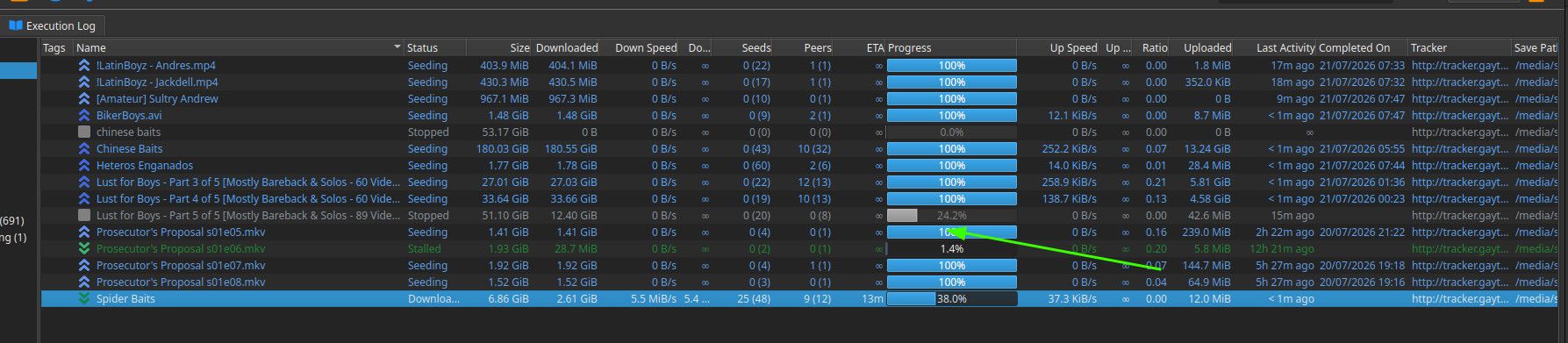
About the only difference I'm aware of is the progress bar, which just displays as a percentage rather than showing individually which piece. I admit I kinda do miss that, cos part of my weirdness used to be loving that get "randomly" filled up in real time. I wouldn't be surprised if I used to spend more time watching that bar than I did the porn I was downloading!
-
RE: is it possibile to avoid dowload screencaps on the pages of the torrrents?
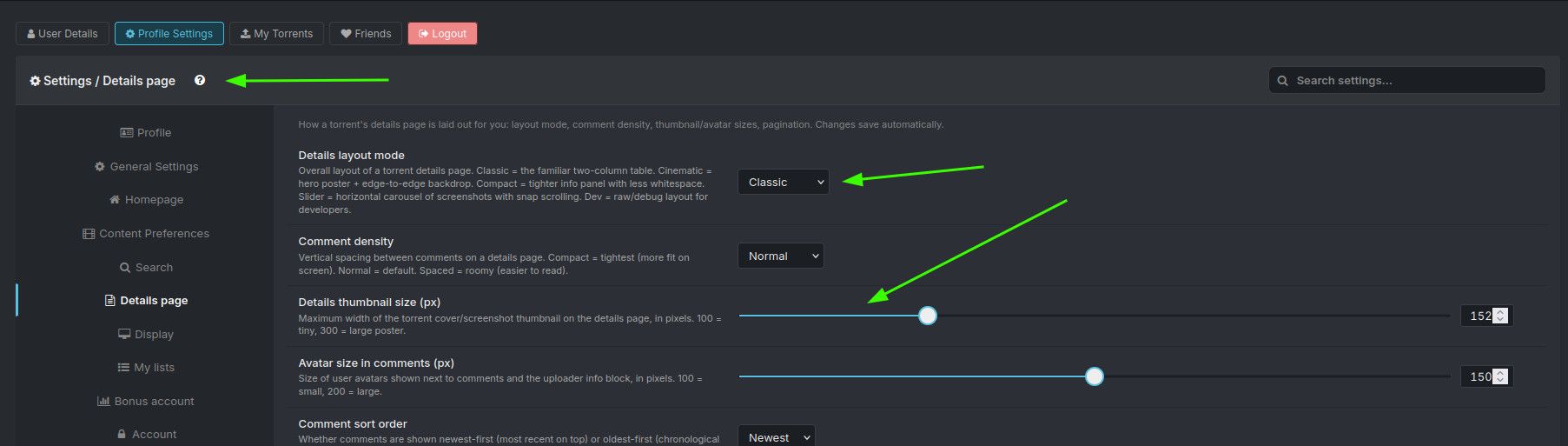
@zwinna Pixels. Click the question mark on that page for a guide, if needed.
-
RE: Asian guys getting facials
@keevextra1 When I first saw this, I thought "Seriously? I must have hundreds!"
And then I actually looked, and am surprised at just how right you are! The Asian "format" seems to be cumming on the bottom's stomach rather than moving to the face. I'm intrigued now! I've got a pretty large collection from several different Asian studios. I'll take a closer look as time allows, and let you know if I do find any that follow the more 'Western' style!
-
RE: is it possibile to avoid dowload screencaps on the pages of the torrrents?
@zwinna Have you considered just posting a screenshot of what you're talking about? Do you, perhaps, mean each torrent's "Details" page?
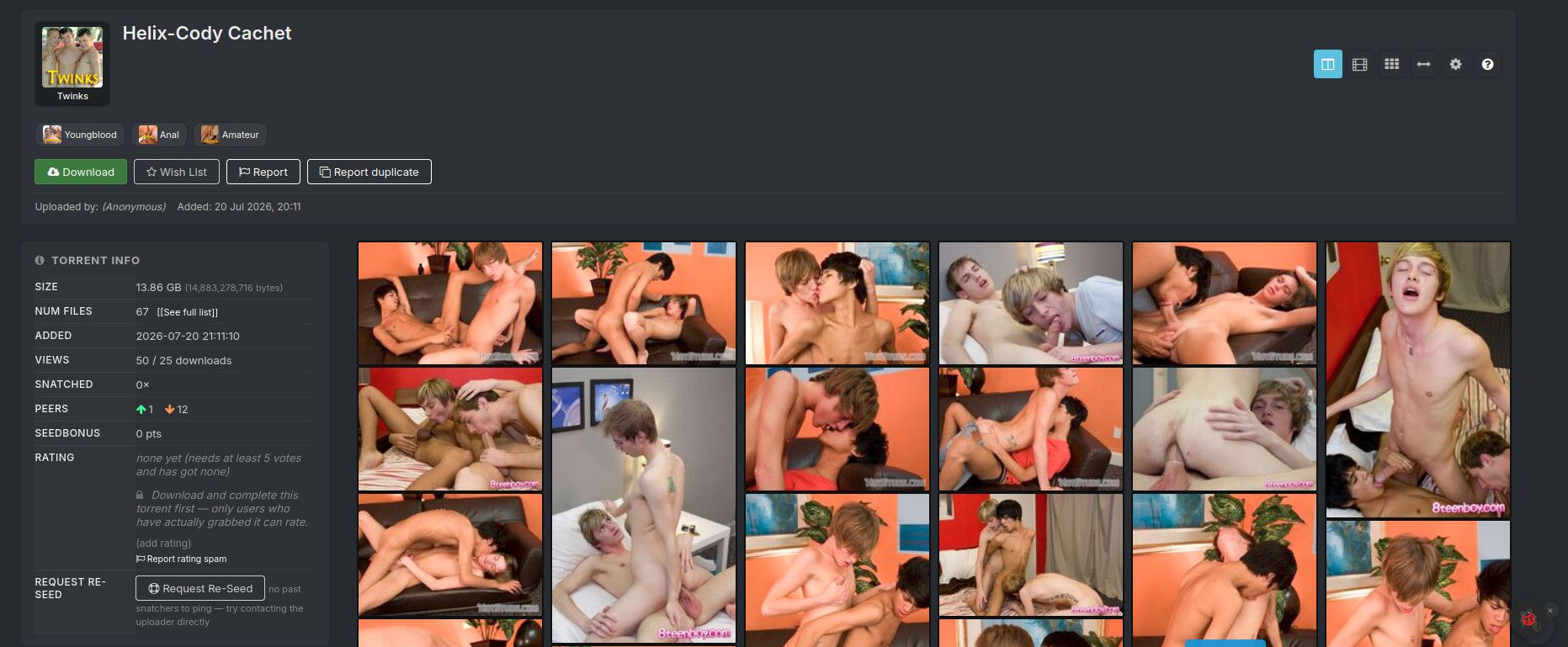
Have you tried adjusting the configuration in your profile? For instance, this is what the above page ( https://www.gaytor.rent/details.php?id=FmEVXA38qXffpprl7VNhVw ) looks like with the view set to "Slider" and image size set to 100px:
-
RE: Invalid torrent file
@jokuihmemies It's a personal opinion, I guess, but I switched from uT to qB ages ago, and would be seriously upset if I were to have to change back.
It has a lot of functionality if/when you want it, but it's also pretty much plug'n'play if that's your preference. I'm the kind of person who gets more excited about collecting than what it is I'm collecting, and a lot of its features are key to how I operate. uTorrent may have them too, I can't remember, but I never found them when I was using it.
Also, I've seen quite a few comments here about how bloated uTorrent has become. I think that's the main reason staff here stopped at, and recommend, uT 2.2.1, because that was the last version prior to it being 'ruined'.
I don't recall seeing any serious complaints about qB. When it's mentioned by non-users it tends to be simply "I prefer uT" not "I hate qB".
-
RE: Invalid torrent file
@jokuihmemies Oh, OK. I guess @ianfontinell 's comment sums it up, though it's Interesting that no-one else has commented on the post itself about difficulties with it, especially with uTorrent being such a popular client, and your version number the one recommended by the staff here.
The only thing I can think of, if you're dead set on grabbing this one, is to install a second - backup - client. I used Transmission to test something a short while ago. It seems a really simple basic tool with hardly any 'learning curve' and it was free, so cheap enough to use once then discard, or shove in a drawer in case you ever need it again.
-
RE: is it possibile to avoid dowload screencaps on the pages of the torrrents?
@zwinna OK. So you're not talking about the torrent itself, but the images that are displayed as part of each torrent's description when you look at a list, such as a search list.
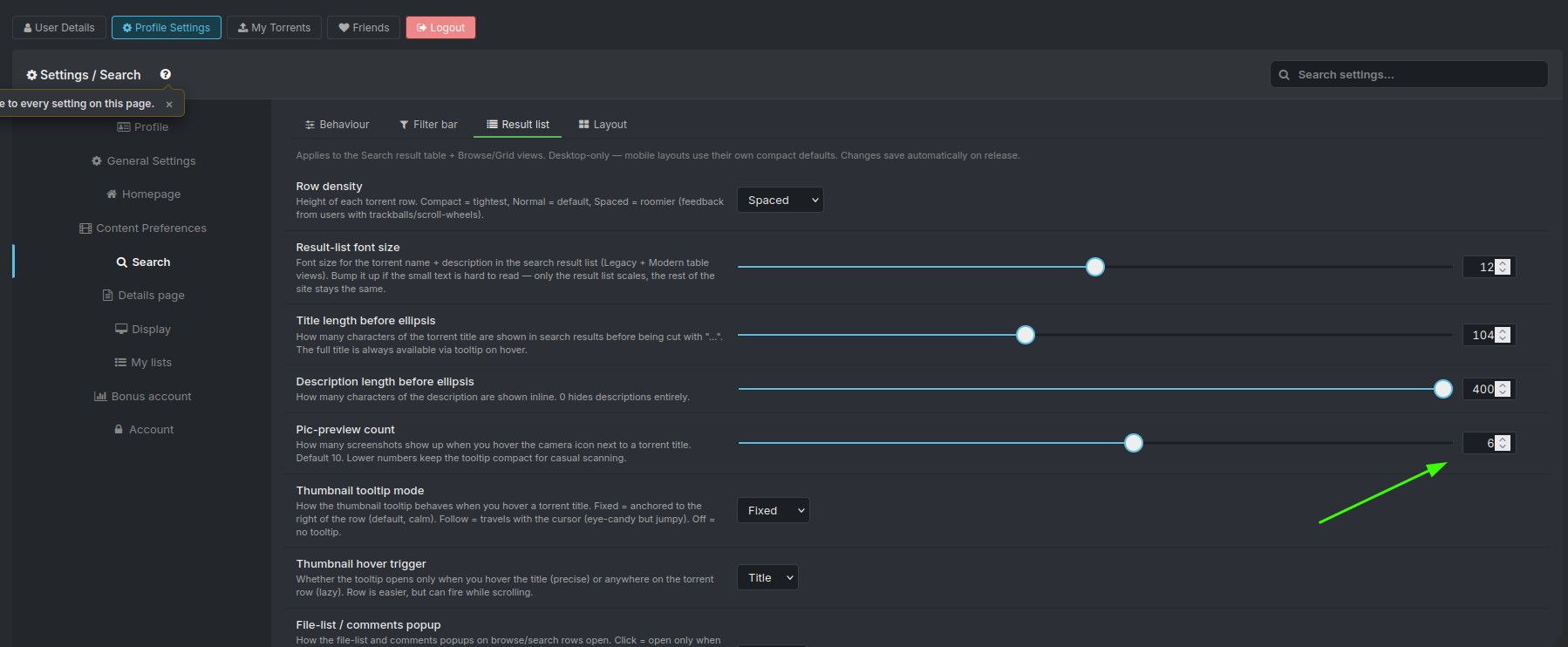
Have you tried setting the number of pix to be shown to one, or zero, in your profile?
-
RE: is it possibile to avoid dowload screencaps on the pages of the torrrents?
@zwinna Do you mean the thumbnail images which are often included in a torrent, like these:

These are included specifically so you CAN preview what the files actually are. If these are not what you mean, could you clarify?
-
RE: Invalid torrent file
@jokuihmemies It's working fine for me in qBittorrent. It contains one or two files with names in Chinese characters, but I'm sure that wouldn't affect anything.
No chance you launched the .torrent file before it had fully downloaded? I assume you've already tried simply deleting it from uT and redownloading it?
-
RE: What torrent client should I use?
@ianfontinell My AI friend assures me there's a way to do it in Linux, but it's a bit of a pain. (My words, not Foan's.) I don't need to reboot often enough for me to start getting annoyed at the moment, but no doubt those days are not far off.
Maybe it's something you could share with @aestet? Though he'll likely need assistance with setting it up.
-
RE: What torrent client should I use?
@Aestet Sorry back, was distracted. So qB downloading and seeding, and hidden behind your VPN. Perfect.
You need to put the "Active Port" number into qB:
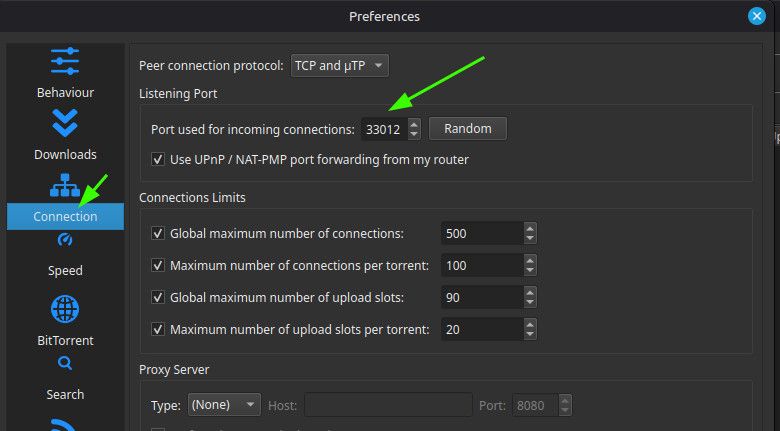
When you reboot, you need to check the number in Proton matches the number in qB. They're liable to change when you reboot, though not definitely will.
One last test that's worth doing: While qB is working - preferably actually uploading or downloading something - disconnect the VPN. qB should stop what it's doing. It'll still be open, but with no activity. This tests the binding has worked, and that qB can only work while your VPN is connected.
-
RE: What torrent client should I use?
@Kevin4fm Yes, I've done that!
OK. Next is port forwarding. Ian has made me realise that as I'm using Linux, what you're seeing won't be identical to mine. But it should be close enough.
You probably need to first disconnect the VPN. Don't "close" it, just click on "Disconnect". Then go into the menu - hamburger bar (1) then turn on port forwarding (2). This MAY be where I got the IP address from. If one pops up, make a note of it, to enter into that Advanced" field I pointed to earlier.
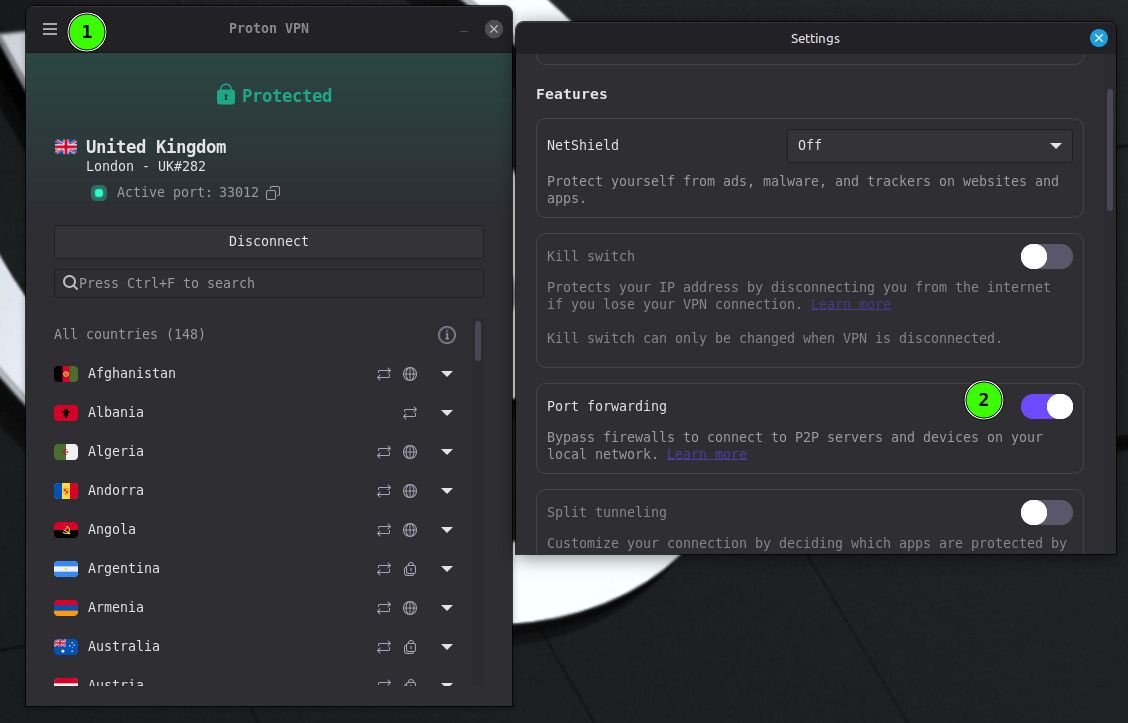
Then close settings and reconnect the VPN. You should now see "Active Port: " then a number. Yes?
-
RE: What torrent client should I use?
is there any promotions to test protonvpn for free?
Not that I'm aware of, but it might be worth looking at their site. They have their own AI offering, so it would be worth asking that. It should have a better idea of what's available than most!
-
RE: What torrent client should I use?
@ianfontinell Ah... yeah. I forget I'm now part of the "lesser" crowd. Roll on EU switch to Linux!