• Categories
    • Recent
    • Tags
    • Popular
    • Users
    • Groups
    • Torrents
    • Login
    1. Home
    2. Kevin4fm
    3. Posts
    Offline
    • Profile
    • Following 1
    • Followers 4
    • Topics 8
    • Posts 421
    • Groups 0

    Posts

    Recent Best Controversial
    • RE: What torrent client should I use?

      @Aestet OK. Well, we're back to having a conversation with McAfee's AI. I can't easily do this for you, as you will have access to the answers, and to implementing its suggestions.

      You just have to keep on with that. BTW, you're allowed to tell AI "you're wrong!". I'm currently having an argument - kinda - with mine about Proton Mail / Thunderbird behaviour!

      posted in BitTorrent & Internet News
      Kevin4fmK
      Kevin4fm
    • RE: What torrent client should I use?

      @Aestet By "still doesn't work" are you talking about not working with VPN? It still works when your VPN is turned off, yes?

      posted in BitTorrent & Internet News
      Kevin4fmK
      Kevin4fm
    • RE: What torrent client should I use?

      @Aestet Before you do, go back to "Advanced" and set it to "All Interfaces", or it won't work even with the VPN turned off.

      posted in BitTorrent & Internet News
      Kevin4fmK
      Kevin4fm
    • RE: What torrent client should I use?

      @Aestet Yeah, that makes sense. Is the torrent you've added another freeleech one? No point in using up your download allowance while you're still trying to get it working.

      What is the McAfee AI saying?

      posted in BitTorrent & Internet News
      Kevin4fmK
      Kevin4fm
    • RE: What torrent client should I use?

      @Aestet OK. By "both don't work" are you talking about the torrents in qB? Have you tried setting both "McAfee VPN" and "McAfee_VPN"?

      posted in BitTorrent & Internet News
      Kevin4fmK
      Kevin4fm
    • RE: What torrent client should I use?

      @Aestet Simple test is to just change it and try it. Choose the first and select OK, or Apply and OK if that's a thing - I can't remember.

      It may be worth properly closing qB once you've made the change, then restarting it. Once it starts, watch for a while and see if the torrents begin. It should only take a minute or two, if it's going to happen.

      If the first one doesn't work, try the second one, in exactly the same way.

      posted in BitTorrent & Internet News
      Kevin4fmK
      Kevin4fm
    • RE: What torrent client should I use?

      @Aestet OK. "Any interface" should work. That's just saying to qB "to get to the internet use this road". "Any" means rthat it will take any road that goes to the internet.

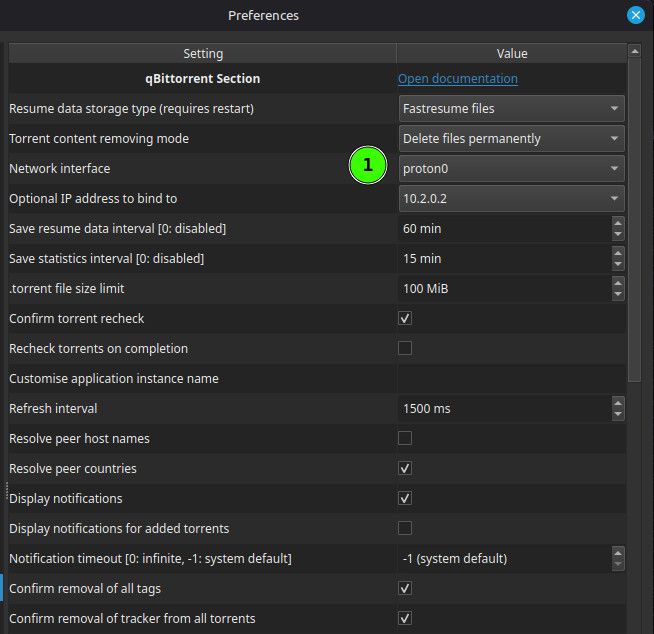
      What other options are there when you dropdown that box? VPNs sometimes create their own. If there is one, and you set it to that, qB will stop working if that isn't available for some reason. This is called "binding", and it's a good thing. It stops qB carrying on happily torrenting even though you've accidentally stopped or disconnected your VPN.

      If it has created one - like in my image I shared, it's set to "Proton0", which is the route set up by my Proton VPN - try using that. If there isn't one (or an obvious one) don't worry about it for now. That just adds another layer of complication.

      posted in BitTorrent & Internet News
      Kevin4fmK
      Kevin4fm
    • RE: What torrent client should I use?

      @Aestet Oh well. Worth a try at least. It can be as useful / insightful to know what DOESN'T work as what does. Carry on with McAfee's chat to find a solution. In particular, ask him about "binding".

      Actually, before you ask it, take a look in qB Tools > Preference > Advanced. Look at the options you have in (1). Anything look McAfee..ish? Try changing the setting to that, if so.

      26a11839-2131-42c8-83fc-a414b19ca90c-image.jpeg

      posted in BitTorrent & Internet News
      Kevin4fmK
      Kevin4fm
    • RE: What torrent client should I use?

      @Aestet Yes. You definitely DON'T want split tunnelling. Or at least, you don't want qB outside of it. It is, as you say, the same as not using it.

      You'd use split tunnelling where you specifically don't want something to go through the VPN. Some websites won't accept VPN traffic, so you can have one browser that uses split tunnelling that you use specifically to access those websites.

      For now, so as not to confuse things, I'#d just say "forget split tunnelling". One thing that might be worth trying, which the AI did mention to me, is changing the server location. I was chatting to someone using Torguard's VPN, and that wouldn't allow torrenting on US servers. When he changed it to one in Canada, it started straight away.

      posted in BitTorrent & Internet News
      Kevin4fmK
      Kevin4fm
    • RE: What torrent client should I use?

      @Aestet Small as in text size? Yeah, mine's a bit small too, though I have a lot of columns displayed so that suits me. I'll go do a little research on that while you're looking into qB and McAfee playing nicely together.

      posted in BitTorrent & Internet News
      Kevin4fmK
      Kevin4fm
    • RE: What torrent client should I use?

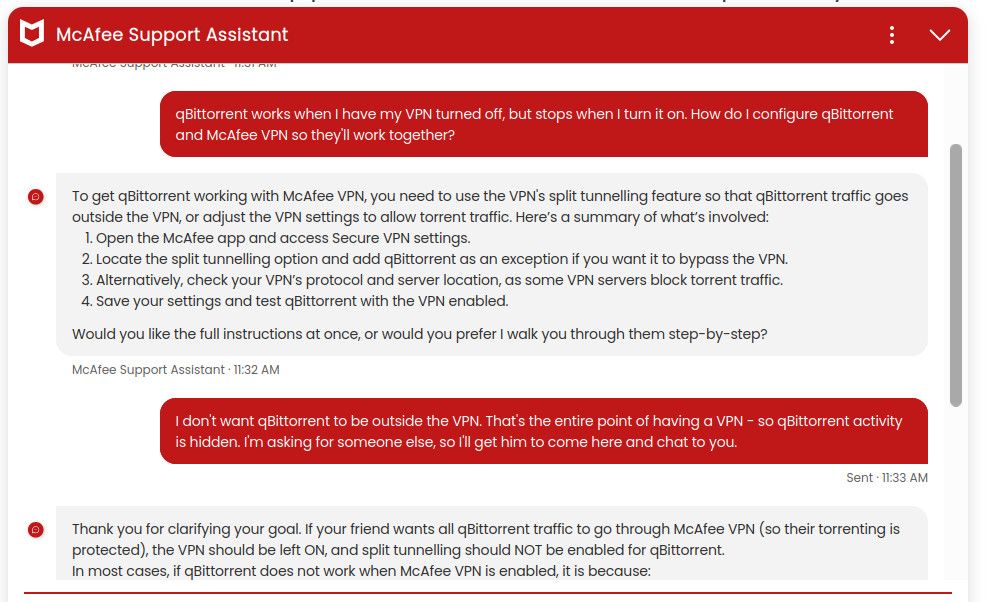
      Sorry, I cut off the last part of its last reply, which contains some useful info / questions:

      df2d7b4b-84f9-4173-9f0b-eb487cbeee16-image.jpeg

      posted in BitTorrent & Internet News
      Kevin4fmK
      Kevin4fm
    • RE: What torrent client should I use?

      If it starts asking you questions you're unsure about, or things seem odd, feel free to come back here and I'll try to help.

      posted in BitTorrent & Internet News
      Kevin4fmK
      Kevin4fm
    • RE: What torrent client should I use?

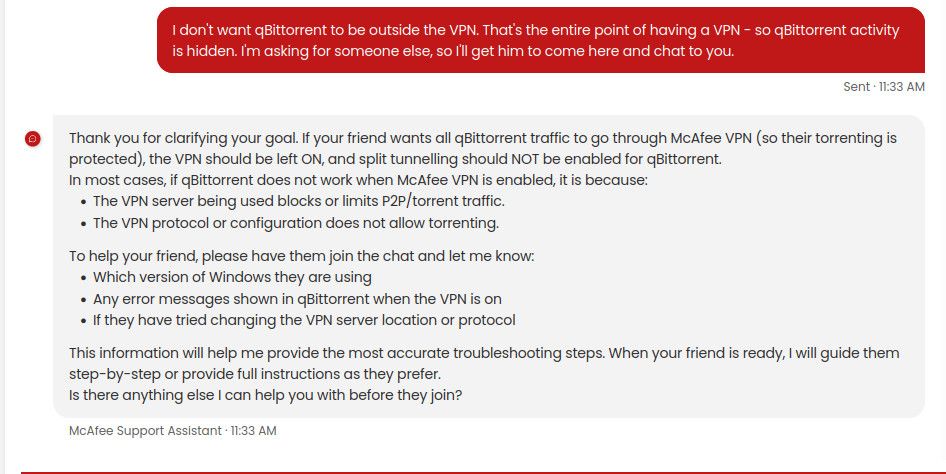
      OK. I've just had a quick chat with McAfee's AI assistant:

      74a2b8e3-64ed-4c46-8ce0-0166c8f0d14f-image.jpeg

      I suggest you go chat with it directly, to see if it can walk you through how to set things up for your particular needs. https://www.mcafee.com/support/s/?language=en_US should take you there. If not, simply go to McAfee's homepage and select "Contact Us" under "Support".

      posted in BitTorrent & Internet News
      Kevin4fmK
      Kevin4fm
    • RE: What torrent client should I use?

      @Aestet OK. Let me go do a bi of research / familiarisation over at McAfee';s website. BRB.

      posted in BitTorrent & Internet News
      Kevin4fmK
      Kevin4fm
    • RE: What torrent client should I use?

      @Aestet said:

      Anyway, I'm trying without vpn, and now it's working

      Excellent. That's a step forward. So we know your qB configuration is working, it's just not playing nicely with your VPN. Which provider do you use? Is there a "main" settings screen you could take a screenshot of?

      posted in BitTorrent & Internet News
      Kevin4fmK
      Kevin4fm
    • RE: What torrent client should I use?

      @Aestet Understood. Main thing is we're likely to be awake at similar times as we're in similar timezones.

      Any change to your qB status? Or is it as we left it?

      posted in BitTorrent & Internet News
      Kevin4fmK
      Kevin4fm
    • RE: What torrent client should I use?

      @Aestet LOL. OK. Either I'm older than you or more British than you! Why mess about with perfectly good letters!?

      posted in BitTorrent & Internet News
      Kevin4fmK
      Kevin4fm
    • RE: What torrent client should I use?

      @Aestet No problem. It's actually late for me too. I'm GMT+1. You?

      posted in BitTorrent & Internet News
      Kevin4fmK
      Kevin4fm
    • RE: What torrent client should I use?

      @Aestet OK. Try it without the VPN for a short while. If it works when not behind the VPN, that's where the problem lies. If it doesn't, it's more fundamental.

      posted in BitTorrent & Internet News
      Kevin4fmK
      Kevin4fm
    • RE: What torrent client should I use?

      Also, what VPN provider do you use? They sometimes have instructions on torrent client settings, so it's worth a look.

      One other suggestion, and ONLY for a short time. Try turning your VPN off to see if qB works when it's not forced through there. Do this literally for just a few minutes, so your risk of exposure is very low. It would be worth setting your VPN not to start automatically on system start, then rebooting, before doing this, just to be sure everything is "clean".

      posted in BitTorrent & Internet News
      Kevin4fmK
      Kevin4fm
    • 1
    • 2
    • 3
    • 4
    • 5
    • 6
    • 21
    • 22
    • 4 / 22