Also, what's the "Super Seeding Mode" in Qbittorrent (I'm assuming other torrenting clients also have that) supposed to do?
I have absolutely no idea on that one. I've never felt drawn to investigate!
Also, what's the "Super Seeding Mode" in Qbittorrent (I'm assuming other torrenting clients also have that) supposed to do?
I have absolutely no idea on that one. I've never felt drawn to investigate!
I'm not absolutely sure the torrent file itself (i.e the file called "filename.torrent") isn't included, but even if it is, it's tiny - maybe 40kb, which is 0.0001% of a 4gb file. I think. It's been a long day. I may have added an extra 0. Or left one out.
It's the totla size of the files within that torrent that are counted. In the above screenshot, it's the column "Size".
Seeding and seeding availability are two different things. You get upload credit (1 to 1) for the volume you actually upload. Obviously, you have to have them available - i.e. in qBittorrent and shown as "Seeding" for someone to download them. You bonus points for seeding availabilty, even if no-one actually leeches from you. This is relatively small, and there's a cap on the number of torrents you get it for, but over a long time it adds up. You can exchange these bonus points for upload credit and other stuff, or you can give some to people who have uploaded a torrent as a "Thank you". Click on your bonus points number in the top bar to see a list of what you can do with them.
"Constantly" swapping torrents is relative. I've currently got about 2.8TB of files in my short term seeding space. I constantly add to it. Pretty much everything I download goes in there, unless I know for a fact I'll be keeping it long term (e.g BL shows) in which case I store it elsewhere, tag it as LT seeding, and leave it there "forever" in case someone wants it.
I go through my ST seeds now and then and delete stuff that hasn't seeded for a month. You need to be sure when you delete it that you delete the files as well as the torrent, i.e. ensure you tick "Also permanently delete..." (1), otherwise th files themselves stay where you've saved them, taking up space.

If by "is this why" you're referring to port forwarding on a VPN then no, it doesn't affect speed. (though I'm sure someone will point out there are instances when it does - see @MrMazda's comment for an example). That simply affects whether you can or cannot download, full stop. You can have people available to seed, and people wanting to leech, but if there's no "broker" - for want of a better way of putting it - it just won't happen until / unless someone who does have port forwarding (a "broker") joins the swarm.
Generally, a VPN doesn't significantly slow downloads. I do seem to have recently noticed a significant drop myself in both download speed and the amount I'm uploading. My download speed is usually 8mb/s but recently it's more like 5 mb/s on a good day. And the amount I'm uploading has dropped a lot too. I'm unaware of any changes I've made in my own set-up, so it may be related to some of the recent site improvements and I need to adjust my settings. But I've not investigated so this may just be my imagination.
I should have added somewhere, if you do decide to get a paid VPN subscription that supports port forwarding, this will put you miles ahead of many (most?) other members here, and will I'm sure help your seeding tremendously.
There has to be at least one member of a swarm (the term for all the seeders and leechers within a torrent) for it to work properly. If you're that one person, or one of them, you'll likely be one of the first to link up with others wanting what you've got.
I'm assuming that as a new member, you haven't actually downloaded or uploaded much yet. Those absolute numbers are important when looking at how uploading affects your ratio. Whether you've uploaded 11gb and downloaded 10gb, or uploaded 990gb and downloaded 900gb, you still have a ratio of 1.1. But if you then upload a further 1gb, you're suddenly at 1.2 with the former, while it hardly registers with the latter.
Theoretically (and probably simplistically) if you can download, you should be able to upload. I'd start by making sure you can actually see what's happening. You're using qBittorrent, yes?
You can change which columns are displayed by hovering over the column header names bar and right-clicking (1). This brings up a list of all the columns that can be shown. Simply click one to add or remove it. You can sort the list of torrents by any column simply by clicking on that column's name. The ones I find most useful for monitoring uploading are "Uploaded" and "Last Activity" (2) and "Up Speed". (3) In the below screenshot, I've sorted by "Last Activity", so I can see what is currently uploading and what has been active recently.

Display those columns on your app, and it will show you what is / has been uploading, and how much. This will at least help establish that you can upload, and are doing so. Assuming that's working OK, the question then becomes one of choosing the best torrents for seeding.
Before getting into that, let's address how much file storage you can use. I split my seeding files into "Short term" and "Long term". qBittorrent has a handy tagging feature so I tag my torrents appropriately (4). These also work as filters, so you'll notice in the screenshot I've selected "!!S" (my "Short term" tag) so all the torrents listed in the main panel are only the short term ones.
The long term ones I'm going to keep regardless of whether I seed them or not. There's some messing around to point to where I've saved them and getting the file names to match, so I don't find it worth it for most stuff, but I collect a lot of BL series where it's worthwhile to do so. They don't seed often individually, but I've got a LOT, so there's always a slow top-up trickle. "Short term" are what I mainly seed from.
I have a finite amount of space dedicated to short term seeding. When that space is getting full, I can easily sort the list to see what's is still seeding and what is no longer worth keeping. I can then simply delete those torrents, and associated files, to create room for more recent stuff to seed.
Freeleech is a good choice because what you download doesn't count against your ratio, whereas regular stuff does. Because of this, you don't even need to particularly want what you're downloading. You just grab it, use it to seed while it's wanted by others, then you can delete it. You can grab a 100gb torrent, and even if you only upload 10gb back, that full 10gb gets added to your ratio, without any cost of getting it.
Whether Freeleech or normal, though, I find the important thing is getting in early to maximise the chance of others then also wanting to grab it. To best apply this to Freeleech, sort the list by "Freeleech most recent", This puts the torrents that have most recently been added to Freeleech at the top. Sorting by when the torrent was first added, or when Freeleech will end doesn't do this.
Another good way to get upload traffic is to create a new torrent yourself, if you have anything that isn't on here already. There's obviously no download cost and you'll get at least 100% of the torrent size in upload credit. I mention that percentage because it's important to understand that if twenty people download it, that doesn't mean you'll get twenty times its size. Hopefully you will get considerably more than 100% though. Plus, it has other benefits, like increasing the number of torrents you can download each day.
By "the actual media", do you mean the video and image files contained within each torrent? Those are what count for downloading / uploading when calculating the ratio. I'm not sure if the actual .torrent file even counts against your download number. Whether or not they do, that's largely irrelevant. They're (relatively) tiny - usually no more than 50-60kb. My largest one was 1mb, which was for a torrent containing about 760gb worth of files.
@DeepSeaTide Yeah, Proton was going to be my likely go-to when I renew, but @MrMazda also mentioned PrivateVPN.com and that he uses it. Given that he demonstrates time and agin that he knows his stuff, that seems worth investigating too before making a final decision.
BTW, I'm not ignoring your earlier question. I'm midway through a fairly lengthy answer in another tab right now! 
...you will likely get stuck in a situation where despite the presence of seeders, no connection can be made to any of them...
Yeah, this was exactly what caused me to find out about port forwarding. I have several torrents where I'm theoretically seeding, but one or two people have been waiting for days, or weeks, but we can't connect to each other so nothing happens.
The port forwarding issue doesn't seem to be that well known / understood, or at least it's only recently I've seen anyone mention it. Perhaps that's 'cos I didn't understand what I was looking for before.
A VPN supporting port forwarding next time is now a prerequisite for me. I just wish I'd known that before renewing my annual contract three months ago!
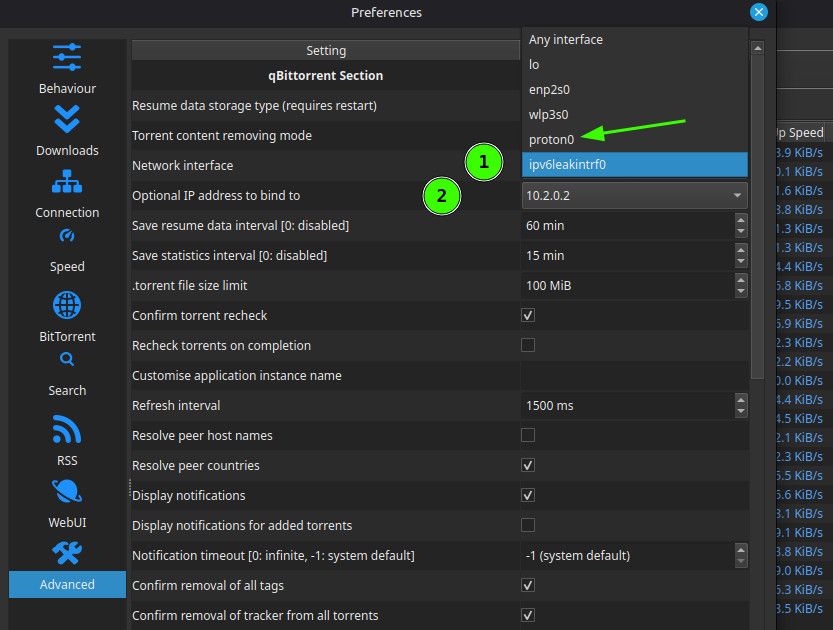
@DeepSeaTide "Network Interface" tells qB which route(s) it can use to the internet to work.
If you use "Any interface", even though it might normally use your VPN if the VPN fails for any reason, it will just fall back to direct internet access.
Giving a specific access - e.g. your VPN - means that if the VPN stops working, perhaps because you've simply disconnected it, or actually closed down the VPN app, qB will stop working. You can tell your VPN to only let qB work through it (or at least I can in ExpressVPN. This is fine WHEN THE VPN APP IS RUNNING, whether it's connected or not. But if the app isn't running, there's nothing telling qB "hey, you gotta go through me".
Therefore, binding it to your VPN through qB is a very good idea - assuming you want "No VPN = No torrenting"!
@Playmate The hurdles may well not apply to this particular link, especially as it's a non-porn site. But others may not know that when they just see a link and dismiss it without even trying. It's also easy to forget others may face impediments that you don't, because they're one-off hurdles that you dealt with ages ago and no longer need worry about.
A lot depends on where you're located. In the UK, it's becoming mandatory for sites to require age verification. I don't just mean porn sites, but social media sites, etc. too. I'm not totally up-to-date with the current state, but it seems the next logical step that ALL sites be required to have age verification gates. After all, there's no way of knowing until you get there what they contain.
I don't know about the differences between VPNs myself, was just posting what my AI told me when I asked about those which provide port forwarding. I suggest just googling (or DuckDuckGoing, given how intrusive and AIcentric Google has become) "Best VPN for torrenting".
Your sidenote: Yes! "Torrenting" is the collective term for the whole thing. The "torrent" is the file that matches people who want a file with people who have it. Torrents can be "public" or "private". If you download a torrent from, say "thepiratebay", these are public. You'll see there are multiple trackers. If you look at the torrents you download here, they'll have only one tracker - gaytor.rent. These are private. They're only accessible / usable by other members of this site.
While you are downloading the file, it's called "leeching". Once you have it, if you leave the torrent running so others can download from you, it's called "seeding". The two aren't mutually exclusive, so you may well be seeding whilst still leeching. You're sharing those bits of the file you've got so far with others who need them. But technically, you're still a "leecher".
If a torrent has four files but you only want two of them, so untick them in qBittorrent so the two you don't want aren't downloaded, you'll still be a "leecher" even when the two files you wanted have downloaded and you're seeding them. This is relevant because they'll always be counted in the downloading side (down arrow) here in your to menu bar.

This means that they'll always be taking up some of your download slots, of which you have a specified number according to your ratio, how many torrents you're seeding, and other variables.
To get them out of the download count you either need to complete the torrent (download all four files) or delete the torrent from qBittorrent... which means you're also no longer seeding it.
@DeepSeaTide I use ExpressVPN, which I find really good on the whole. It has one important feature: "Split tunnelling". This allows you to set a general rule to use the VPN or not use the VPN, but then specify something different on a 'per app' basis. So, for example, you can set qBittorrent to only work if the VPN is connected. If it stops for any reason, qBittorrent stops too, so you don't risk being exposed. But your browser you can set to use the VPN if it's working, but carry on if it's not. Or even, to never use the VPN. There are some sites I visit that just won't connect if it's via a VPN. With that setting, I can happily browse, while qBittorrent is still working away through the VPN.

The one downside of ExpressVPN is that it doesn't allow / support port forwarding. Most VPNs don't. Torrents will work without it, so long as one person in the swarm has it. Think of it as everyone being able to talk and saying "have you got...?" or "I've got...". But only one person can hear what's being said so know when and what they've been asked. (Not a brilliant analogy, but close enough for now.)
According to my AI friend, here are some VPNs worth checking out:
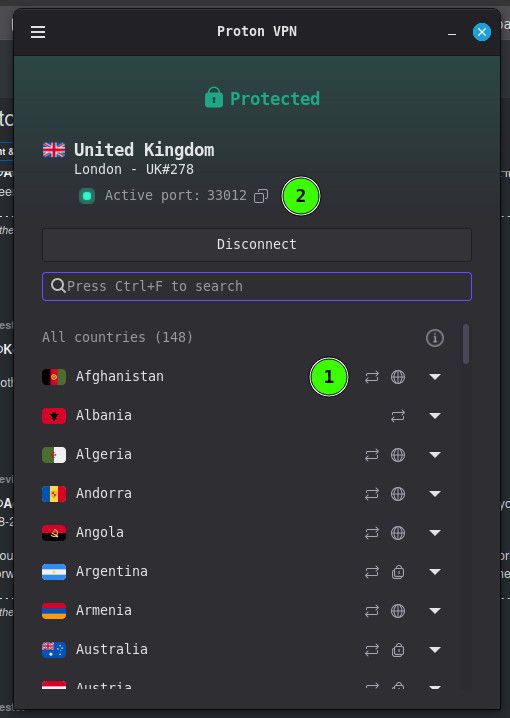
Proton VPN - Included in paid plans - Probably the easiest mainstream option. Dynamic port assigned by the VPN.
AirVPN - Included - Long-time favourite among torrent users. Supports multiple forwarded ports. More technical interface.
Private Internet Access (PIA) Included - Still supports port forwarding and is often recommended specifically for qBittorrent users.
PureVPN - Included on supported plans - Less commonly recommended by torrent enthusiasts but still offers it.
I've not looked at any of these myself yet, but will definitely be doing so when I need to renew my annual subscription.
This could be down to free VPNs' monthly torrent download limits. 10-15gb isn't very much so you may have already reached it with both VPN services.
I'd start by making sure qBittorrent works with no VPN in the mix. Make sure the VPN(s) are properly closed, not just disconnected. If you're using Windows, use Task Manager to make sure all VPN services are stopped, not just the main interface. If you're still not sure, reboot. But first, make sure your VPN is NOT set to start when the system does. There's usually a simple toggle switch or dropdown to turn this feature on and off. Also, pause all of the torrents in qBittorrent.
Once you're sure there's no VPN anywhere in the mix, start qBittorrent, then start one or two torrents. See if they start downloading. Of course, seeders may not be connected to the one(s) you've chosen, so if they don't start, pause them again, and try a couple more.
Once we've confirmed qBittorrent works with no VPN interference, we can start looking at why it doesn't work when the VPN is running.
@DeepSeaTide I'm not familiar with Windscribe, but according to my AI friend, whilst it used to allow torrenting on its free plan, with a monthly data cap of maybe 10-15gb, reports are that it doesn't any more, allowing it only on its paid plan.
Torrents starting to download when you turned it off and stopping when you turned it on may have been a coincidence if it happened once, but seems unlikely. Simply try it a few more times. If it keeps happening, it's not a coincidence. They're definitely related, and that way round - on doesn't work, off does - I can't think of any other explanation other than that the VPN is blocking the traffic.
@Playmate The point @frostycab was making - which I agree with, tbh - is that when you post just a link, anyone wanting to view it has to click on it. For many, this will involve hurdles such as age verification and changing VPN location to be able to do so.
This will put many people off bothering to follow the link, and means that everyone who does may have to each jump through these hoops.
If you take a screenshot of the article and post it as a picture, that's instantly viewable to everyone without further effort. There's no reason why you couldn't post both, for example if it's a long article that's difficult to screenshot in one hit. You then simply add: "Read the full article here", or similar.
"Stalled" means there's no activity.
If it's showing in the main window against an individual torrent (1), it means that a torrent either hasn't started downloading yet or the download has been interrupted - for instance the seeder you were downloading from has temporarily disconnected. You're downloading "leeching") it, but it hasn't yet completed.
"Stalled" in the left-hand summary panel is a total of torrents that are not currently active (2). In my qBittorrent, it shows the total, and the split between stalled downloading and stalled uploading. Uploading (or in this case available for upload) show against the individual torrents as "seeding", but with no current activity. These are the torrents you'll get bonus points for - you're not actually seeding them, but are ready to, should anyone want them.

@kalayaan Thanks. Your mention of Google made me realise "Why not try Google Image Search?", and it was surprisingly easy!
For anyone seeking the same answer, the image is from Journey with You, an eight episode/400 minute Chinese drama which, at the time of writing this, is midway through airing (May 8, 2026 - Jun 19, 2026).

@DeepSeaTide Interestingly, Albo hasn't been online since a day after his post here, so I'll try to answer for him. If I've read that wrong and I'm stepping on toes, apologies in advance.
First thing: Yes, a VPN is kinda essential as it hides who you are so protects you against legal action by copyright holders.
[Side note: If you don't yet currently have a VPN but plan to, try to find a provider that offers "port forwarding". It's not an absolute requirement to torrent, and few VPNs offer it, but it's a good feature to have. I won't go into why here, so I don't overload you with information!]
How are you currently downloading your torrents? Whichever app you use is often referred to as your 'client'. qBittorrent is one popular client, but there are others such as uTorrent and Transmission. Which is best for you depends a lot on your device, your operating system, and things like that. Personally I do prefer qBittorrent over other apps.
Whichever client you are using to download ("leech") should just as readily upload ("seed"). Once you have fully downloaded a torrent you cease to be a "leecher" and become a "seeder", for as long as you keep the torrent running and you have all of those files available, with their names and file types, etc., unaltered.
At this point, you get to two different seeding states: Availability and actual seeding. You get a small amount of bonus points here just for having them available should anyone want them. You get direct credit for the volume you actually "seed" (upload).
So to maximise what you upload, others need to want download it. A good way to ensure this is to grab new torrents, or newly freeleeched torrents. The advantage of the latter is that whatever you download doesn't count against your ratio. Once you've got them you can seed for as long as you like, but if your storage space is limited it's best to delete them once no-one else is downloading them from you, and replace them with newer torrents there's a demand for.
I may be explaining things you already understand, so I'll stop there. If anything is still unclear, or there's something you think I've missed, feel free to ask.
@ianfontinell Yeah. That's what I spent ages puzzling over. Had I - perhaps accidentally - tried to change my email address? Had I changed something else which also incorporated a need for it to be reconfirmed. I spent ages looking for such a possibility, but could find none.
Yet, as you say, it seems totally legitimate.
I have to ask if you can identify the two guys in the second picture - either their names or the show, if it is one. Pretty please? 
Judging by their period attire, this is a show I should definitely be tracking down and enjoying!
I received one of these yesterday. I'm normally fairly cautious about clicking unrequested email links, and it seemed a little strange as I'd not attempted to change my email address here.
However, after a little consideration and investigation, I decided to "verify my address". Clicking the link took me to (what appeared to be) a genuine gaytor.rent forum address with a thank you message.
I suspect the request was generated by some of the update work going on, or maybe because although I've been a member of the main site for ages, I've only recently gained forum access after the logon issues were resolved.
I can't be absolutely certain, obviously, but it seems genuine to me.
Kevin4fm said:
... maybe it was a UK thing ... I've not yet tested if it really was...
Thought I should follow up on this, in case anyone stumbles upon it in search of possible answers to their own problems!
I'm now back to connecting my torrents, using qBittorrent, through a UK VPN server, and I can access this site from the UK, both directly, and when going through my VPN. So this points to it being a "me" issue, not something wider.
One thing maybe worth mentioning. When I first reconnected through a server based in another country (Finland), qBittorrent ignored all my previous .fastresume files and rechecked every single torrent to create new ones, which now function exactly as they should. It's another variable to consider if you're having to troubleshoot.