Trouble seeding a new torrent
-
Are you able to download torrents from other sites (public or private)?
Have you been able to download and seed here before and this is a new problem, or is this your first attempt at anything? -
Sorry, having reread your post, I've realised that my questions were dumb! You've been downloading fine, possible issues with upload, and the one you've just created just isn't registering at all.
Personally, I'd treat the issue of the new torrent and the uploading of existing ones as separate, though they likely are related. Was the new torrent you created huge? If not, maybe try creating it again in qBittorrent, and uploading it anew using the "classic" route.
Before that, it would be worth double checking that the torrent really is pointing at the directory you expect it to be. I know I've had problems before where I've accidentally gone one directory too low, so instead of pointing to ".../itshere/" I've pointed to "/itshere/itshere/".
-
@Kevin4fm
Thanks for the suggestions. The torrent is only a few gigs, so it's not huge by any means. As for the target directory, I've checked that about forty times because I would expect it to report that I am seeding (like the torrents I downloaded are). I'll try recreating it in QBitTorrent add see how things go via that route. The other thing I have left to try to change external port to something else and reconfigure forwarding for it. -
@skwerl Do you use a VPN? If so, first try simply connecting to another location, perhaps in a different country.
I wouldn't worry too much about port forwarding at this stage. I used to upload and download fine without one via a VPN, and was easily able to seed my own torrents as soon as I'd created them.
The absolutely key things wit creating in qB, is to make sure your include your personal announce URL, shown in your profile.
-
@skwerl With reference to the directory, if you simply drop the files/folder you are trying to upload into the directory your torrent downloads go into and open the torrent itself the client should see it, check for existing files and then start seeding.
-
Aw, jeez. You guys are absolutely right regarding the folder. Apparently the torrent got created with a directory inside rather than a list of files. I misunderstood how that was going to be done when I selected the directory to use! Sorry I didn't quite grok that initially. Everything appears to be working now and it's uploading. How embarrassing. Thanks for the help!
-
-
@Dracula975
Truly old.
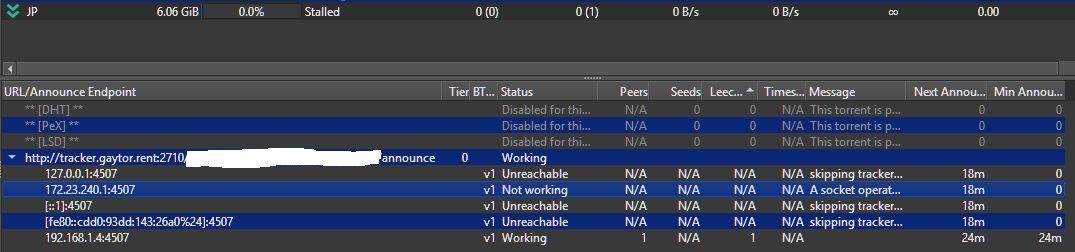
Ugh. I didn't realized that URL wasn't some public GUID. There doesn't seem to be a way to edit the post or delete the image. Thanks for reporting. -
from the image, the tracker is working just fine for you, if you're having troubles seeding it is likely related to port-forwarding, you might want to give a look at this topic I made about it recently: https://community.gaytor.rent/topic/69993/tutorial-how-to-check-if-you-re-able-to-port-forward
-
I edited the OP to remove the passkey




Hello! It looks like you're interested in this conversation, but you don't have an account yet.
Getting fed up of having to scroll through the same posts each visit? When you register for an account, you'll always come back to exactly where you were before, and choose to be notified of new replies (either via email, or push notification). You'll also be able to save bookmarks and upvote posts to show your appreciation to other community members.
With your input, this post could be even better 💗
Register Login