What torrent client should I use?
-
@Kevin4fm i didn't do anything at all, it is just there when the app launches, maybe it's because I'm on Windows.
-
@ianfontinell Ah... yeah. I forget I'm now part of the "lesser" crowd. Roll on EU switch to Linux!
-
@Kevin4fm Yes, I've done that!
-
is there any promotions to test protonvpn for free?
-
is there any promotions to test protonvpn for free?
Not that I'm aware of, but it might be worth looking at their site. They have their own AI offering, so it would be worth asking that. It should have a better idea of what's available than most!
-
@Kevin4fm Yes, I've done that!
OK. Next is port forwarding. Ian has made me realise that as I'm using Linux, what you're seeing won't be identical to mine. But it should be close enough.
You probably need to first disconnect the VPN. Don't "close" it, just click on "Disconnect". Then go into the menu - hamburger bar (1) then turn on port forwarding (2). This MAY be where I got the IP address from. If one pops up, make a note of it, to enter into that Advanced" field I pointed to earlier.
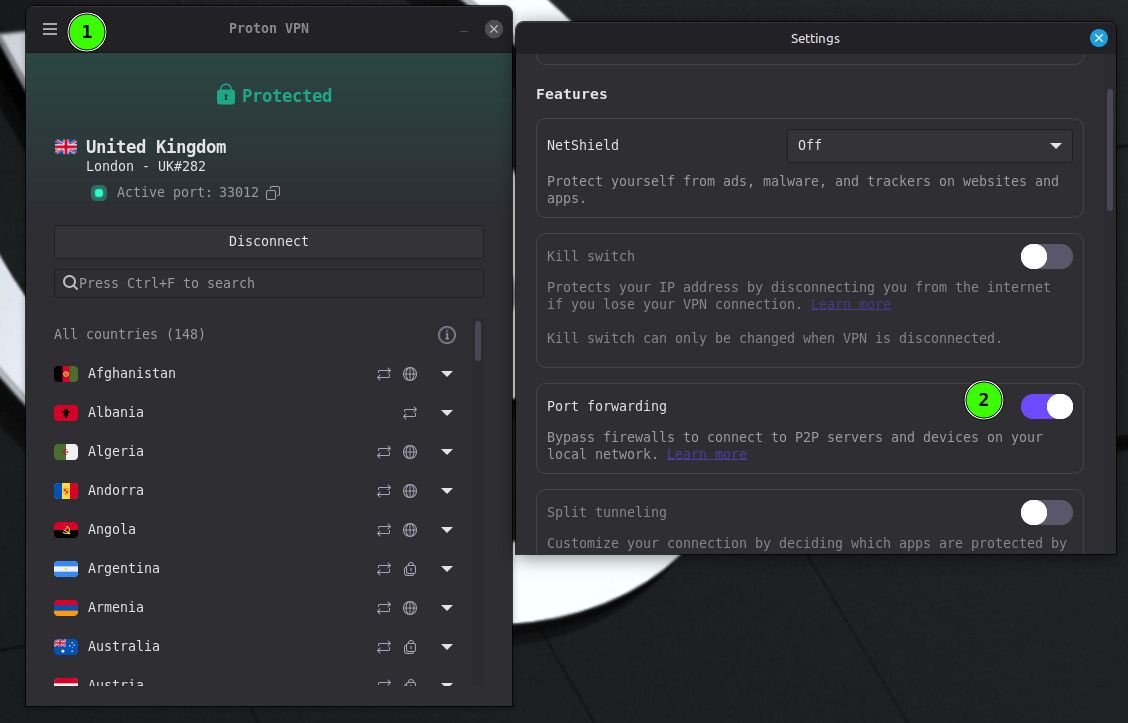
Then close settings and reconnect the VPN. You should now see "Active Port: " then a number. Yes?
-
sorry for the late reply, but I believe I've got it done! This was defo the easy part, but getting to this point was hell
-
@Aestet Sorry back, was distracted. So qB downloading and seeding, and hidden behind your VPN. Perfect.
You need to put the "Active Port" number into qB:
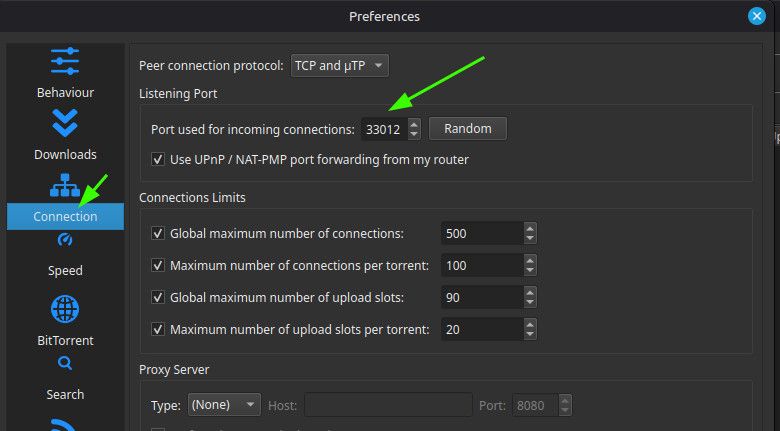
When you reboot, you need to check the number in Proton matches the number in qB. They're liable to change when you reboot, though not definitely will.
One last test that's worth doing: While qB is working - preferably actually uploading or downloading something - disconnect the VPN. qB should stop what it's doing. It'll still be open, but with no activity. This tests the binding has worked, and that qB can only work while your VPN is connected.
Other opinions are also available. They're not right, obviously, but they are available.
-
is there any promotions to test protonvpn for free?
They've got a 30-day money back policy, so if you try it and don't like it you can just get a refund anytime in the first month
-
@Kevin4fm i totally forgot what a pain in the butt it is having to set a new port number inside qbitorrent every time you connect to the VPN.....
I made a program that does it automatically for me during windows startup.
-
@ianfontinell My AI friend assures me there's a way to do it in Linux, but it's a bit of a pain. (My words, not Foan's.) I don't need to reboot often enough for me to start getting annoyed at the moment, but no doubt those days are not far off.
Maybe it's something you could share with @aestet? Though he'll likely need assistance with setting it up.
-
Just out of interest, since I'm using Proton, do I still need to have port-forwarding set up on my router if I'm using the port from Proton?
-
@frostycab You don't, and by the way most routers have a feature called UPnP which is an interface through which each app can add its own port rules directly to the router.
When you connect without the VPN, qbittorrent will add the port rules automatically to your router's settings, granted you have UPnP enabled. But when you are connected via VPN it will not add any rule since it's not the device qbittorrent is using.
-
@frostycab You don't, and by the way most routers have a feature called UPnP which is an interface through which each app can add its own port rules directly to the router.
When you connect without the VPN, qbittorrent will add the port rules automatically to your router's settings, granted you have UPnP enabled. But when you are connected via VPN it will not add any rule since it's not the device qbittorrent is using.

Erm.... OK? LOL
I'll leave it alone then. -
Just a few things to chime in on here...
-
UPnP does not always work the way you would think it should. Some routers implement a different variation of it than others, and the same is true for the apps themselves. Not all UPnP support is the same, so while it may work in some cases, I wouldn't count on it working all the time, or even across all apps. This is why it is important to map the necessary port forwarding manually if you're using your regular internet connection.
-
Not all VPN services are the same, so it is important to choose them wisely, depending on a few factors. The biggest of these factors is port forwarding. This is an essential step with our system, which is necessary to be able to get proper upload traffic. You need to make sure that the port your torrent client is using is forwarded through the VPN, just the same as you would if you were using your regular internet connection. Some VPN services do not port forward at all, while others port forward only ONE port. Some however will allow for port forwarding of all ports... So it is very important to make sure that the VPN service and server location that you are using forwards at least one port, and that your torrent client is using the port that is forwarded.
-





Hello! It looks like you're interested in this conversation, but you don't have an account yet.
Getting fed up of having to scroll through the same posts each visit? When you register for an account, you'll always come back to exactly where you were before, and choose to be notified of new replies (either via email, or push notification). You'll also be able to save bookmarks and upvote posts to show your appreciation to other community members.
With your input, this post could be even better 💗
Register Login