QTM Questions / Answers and suggestions
-
an update has just been released resolving the login problem (cookie management error message)
-
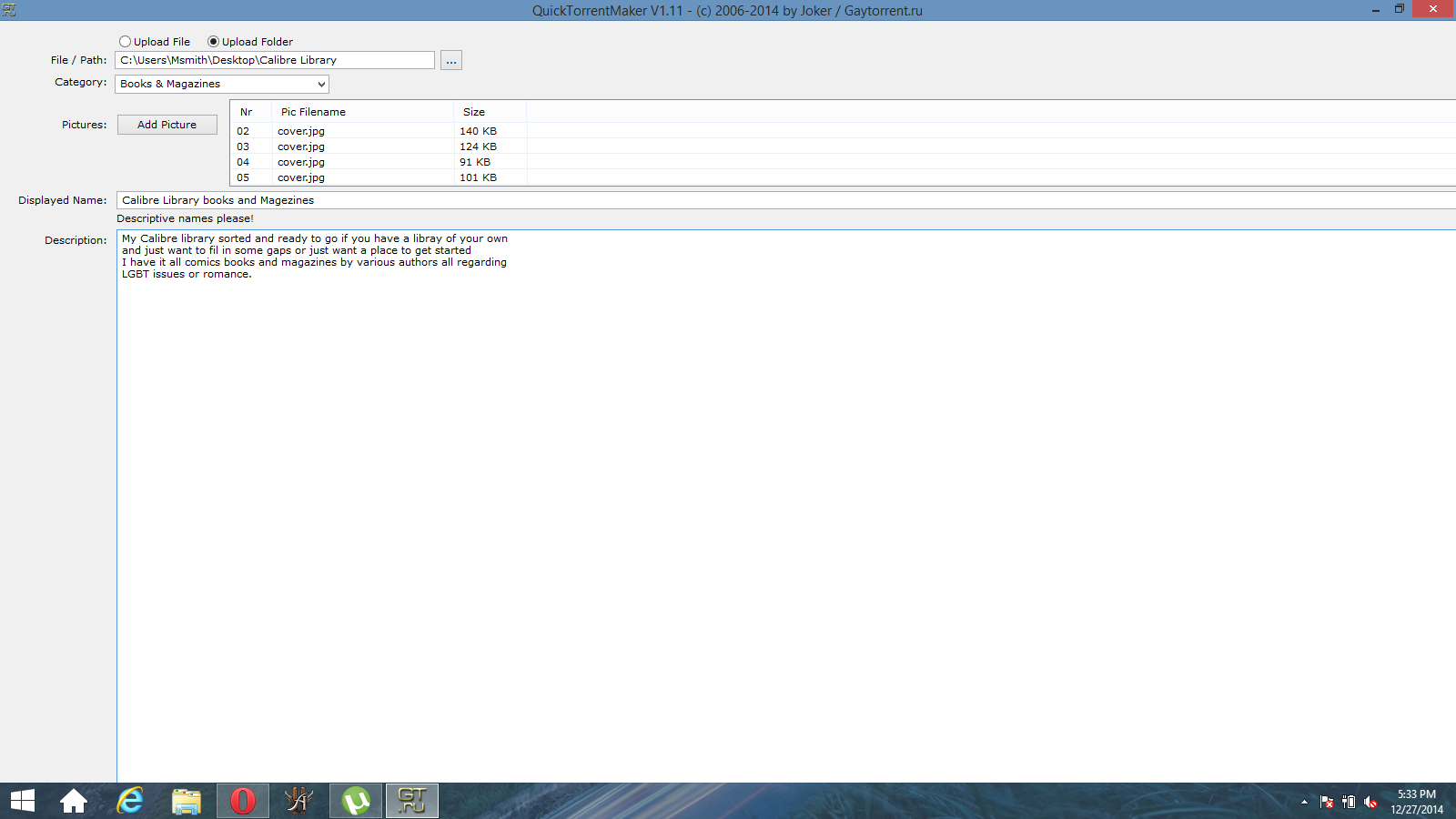
All right I tried QTM for the first time, I'm running windows 8.1 and on a HP latest version of QTM at the time of this post. a picture attached is my issue there is no button to click to upload the torrent like there was when I opened QTM.
-
If I'm not mistaken, this is a known issue that is somehow caused by minimizing QTM after being opened. You may need to try running QTM again as an administrator, and make sure that you do NOT miniize it at any point.
If this fails, you may need to uninstall QTM, then re-install it to somewhere OTHER than the Program Files or Program Files(x86) folder. Be sure you run the installer as an administrator to avoid potential issues when finalizing the install process.
-
All right ran as administrator and hit upload it complied then showed no message didn't close the window and im NOT seeding. Is uninstalling and reinstalling the best way I always install as admin so I dont think that is the issue. Thank you for informing bout the no minimization thing.
-
If just running the app as an administrator and not minimizing it seems to work, it would stand to reason that you should be able to get away with just doing that. If you need to re-install it a later point, I would deal with it then as long as it works when you run as an administrator.
-
sadly I forgot to input the not into that posts
-
Haha… My bad... In that case, yes... I would suggest uninstalling QTM, then installing it again by running the installer as an admin and putting it in C:\QTM when it asks where to install it. From there, you shouldn't have to run QTM as an admin, but if it fails when you reinstall it as an admin, as a last ditch effort, then try running it as an admin. There is also a way to tell Windows to automatically run QTM as an admin when you open it normally. If you'd like, I can help you with that if running QTM as an admin is required to make it work after installation.
-
Well I put it in c I installed as admin and I ran as admin no luck
-
I am using Windows 7 64bit. I'm not sure what happened to my QTM, but I can't find it anywhere on my hard drive. When I try reinstalling, I don't get the option to re-install, it just runs the .exe file as if I have QTM on my computer already. Then it doesn't populate the drop down menus, such as Select Category, so it won't actually create any torrents. I don't have a QTM folder or an uninstall option that I can find.
-
You should find it here
C:\Program Files (x86)\QuickTorrentMaker
and all that is there is an .exe file.
-
You should find it here
C:\Program Files (x86)\QuickTorrentMaker
and all that is there is an .exe file.
I have checked there and there is no folder or file. I also don't see the program on my Programs list in Control Panel. There is a .exe file in my downloads folder, but, as I said, it just gives me the log in window as if QTM is already installed, it doesn't actually install the program. If I log in through that window, I get the upload screen, but it's not functional. I have read that I should uninstall and re-install to try to fix bugs, but I can't find the program to uninstall it, and running the installer doesn't do any kind of installing, just that log-in window.
-
That is because it is a stand alone program.
The file you downloaded should be named
QuickTorrentMaker_1.11.exe
The one it places on your computer
QuickTorrentMaker.exe and it should have placed a shortcut on your desktop and made a start menu entry.
Doing a search of your PC you should have those entries.
-
That is because it is a stand alone program.
The file you downloaded should be named
QuickTorrentMaker_1.11.exe
The one it places on your computer
QuickTorrentMaker.exe and it should have placed a shortcut on your desktop and made a start menu entry.
Doing a search of your PC you should have those entries.
Unfortunately, I do not. All I have is the .exe that is in my downloads folder, that is the file that downloads when I click the link from the QTM page here. When I activate the .exe in my downloads folder, it opens up the log-in screen for QTM, but the program is not functional, it doesn't load the Category drop-down so I cannot upload a torrent. I have no way to uninstall and re-downloading from the website doesn't change anything except make a copy of the same .exe file. There is no start menu entry, no shortcut, no folder. A complete search of my computer all drives only turns up the downloads folder.
-
Here is something you might try.
-
I am wondering if somehow your program folder and start menu option was deleted, however, your registry still contains the lines for QTM and that is why when you run the installation package it starts QTM, but doesn't install anything.
-
Here is a suggestion.
When QTM finishes it opens up the "My Torrent" page
-
I just stumbled on this and couldn't help but mention one key thing. With some computers (depending on how your OS is installed), you may need to install QTM by right clicking the install package, then clicking "Run as Administrator" to force it to give the installer admin rights. From there, pay close attention to where you install QTM in the process. I personally recommend installing it into C:\QTM to avoid a few potential problems, however this is up to you. As long as you run the installer as an administrator in that manner, you should be able to install it without any issues.
If you're not sure what version of the installer that you're running, you can always download the current version of QTM HERE at any time.
-
Suggestion
Maybe if you could choose to upload a group of pictures instead of having to do it one by one. Same with removing. It's kind of tedious…
Also, can the Word Wrap be turned off in the description?
And adding more than one category?P.S: Anyway to get the source code? ;D
-
It would be awesome if you could add the ability for people to upload multiple pictures at once with QTM! Having to select individual screenshots one at a time is tedious, especially if you have one screenshot per video and you have a lot of videos in the same torrent!
Can you add this in the next release of QTM? Just like you can select multiple screenshots to upload on the Upload Torrents page!
-
HELP !
 Ok so I got QTM and I tagged ONE folder it is a full siterip of alexboys.com (all photosets and all video's)… I asked the helpdesk If I could UL, its ok... the problems....
QTM (newest)... and the FOLDER is a total of 50Gb...
It gets to the END of making the torrent and I get a error:
Error on the HttpEndRequest 12007e
Im using win10enterprise. (as admin).So I tried the WEB Upload.... It gets to the end and goes to a blank page and that is it ;(
any suggestions ?
and yea I put in all the info for both... tracker announce,name (no weird dashes etc), I included a few pics etc ;(
any thoughts ?
thanks... waiting to send up a 50Gig torrent ! :crazy2: :crazy2: :crazy2: :crazy2:






Hello! It looks like you're interested in this conversation, but you don't have an account yet.
Getting fed up of having to scroll through the same posts each visit? When you register for an account, you'll always come back to exactly where you were before, and choose to be notified of new replies (either via email, or push notification). You'll also be able to save bookmarks and upvote posts to show your appreciation to other community members.
With your input, this post could be even better 💗
Register Login