• Categories
    • Recent
    • Tags
    • Popular
    • Users
    • Groups
    • Torrents
    • Login

    QTM Questions / Answers and suggestions

    Scheduled Pinned Locked Moved Uploading
    90 Posts 48 Posters 4.1k Views 1 Watching
    Loading More Posts
    • Oldest to Newest
    • Newest to Oldest
    • Most Votes
    Reply
    • Reply as topic
    Log in to reply
    This topic has been deleted. Only users with topic management privileges can see it.
    • P Offline
      Popper Global Moderator
      last edited by

      I think you got two possible work around:

      1/ uninstall QTM and reinstall it into a not system directory (by default it is installed into the protected "Program files" or "Program files x86" directory and that works with Windows Vista or 7.Not sure if that helps, QTM might try to save the .torrent file into a protected user directory

      2/ Right mouse button click on QTM and select "Run as administrator", that is a special system account with more elevated rights and a user account with Administrator right (!) …

      1 Reply Last reply Reply Quote 0
      • P Offline
        p90
        last edited by

        decided to get QTM as I was told you can bulk upload images (I upload collections and people keep asking for me to upload thumbnail views for all videos not just a few)
        which you can but you still have to manually add them one at a time :(.

        Please can the Add Picture button be changed to Add Picture(s) and the resulting dialog be set to multiple files = true, these can then be handled with a foreach loop like

        C#.NET Example
        foreach (string file in dlgPictures.files)
        {
          //do current add image code
        }

        1 Reply Last reply Reply Quote 0
        • F Offline
          frostlips
          last edited by

          Hi, Self confessed noob here. I'm having trouble finding QTM on my system. I've downloaded and installed it three times but it's not showing up in the directory. Searches for it on my hard drive/control panel come up blank also. It's probably very obvious to you guys but not to me. Perhaps doing torrent the longer way is easier.

          1 Reply Last reply Reply Quote 0
          • angelxx5A Offline
            angelxx5 Global Moderator
            last edited by

            Have you tried searching for '' QuickTorrentMaker ''? That might do the trick 😉

            1 Reply Last reply Reply Quote 0
            • W Offline
              washingbeard
              last edited by

              Alright, using windows 7 and when I try to install the latest version of QTM a pop-up appears saying "Failed to Create registry keys (183)". Thank you in advance for the help

              1 Reply Last reply Reply Quote 0
              • S Offline
                slimguylv
                last edited by

                I try to download this app and it wont let me, doesn't do anything. would like to upload but I tried with manual and upload fails everytime.

                1 Reply Last reply Reply Quote 0
                • P Offline
                  Popper Global Moderator
                  last edited by

                  You mean you don't get QTM downloaded? That can be due to your anti-virus software, not liking unsigned home-brew software like QTM.

                  1 Reply Last reply Reply Quote 0
                  • JokerJ Online
                    Joker
                    last edited by

                    an update has just been released resolving the login problem (cookie management error message)

                    1 Reply Last reply Reply Quote 0
                    • M Offline
                      Masonmason
                      last edited by

                      All right I tried QTM for the first time, I'm running windows 8.1 and on a HP latest version of QTM at the time of this post. a picture attached is my issue there is no button to click to upload the torrent like there was when I opened QTM.
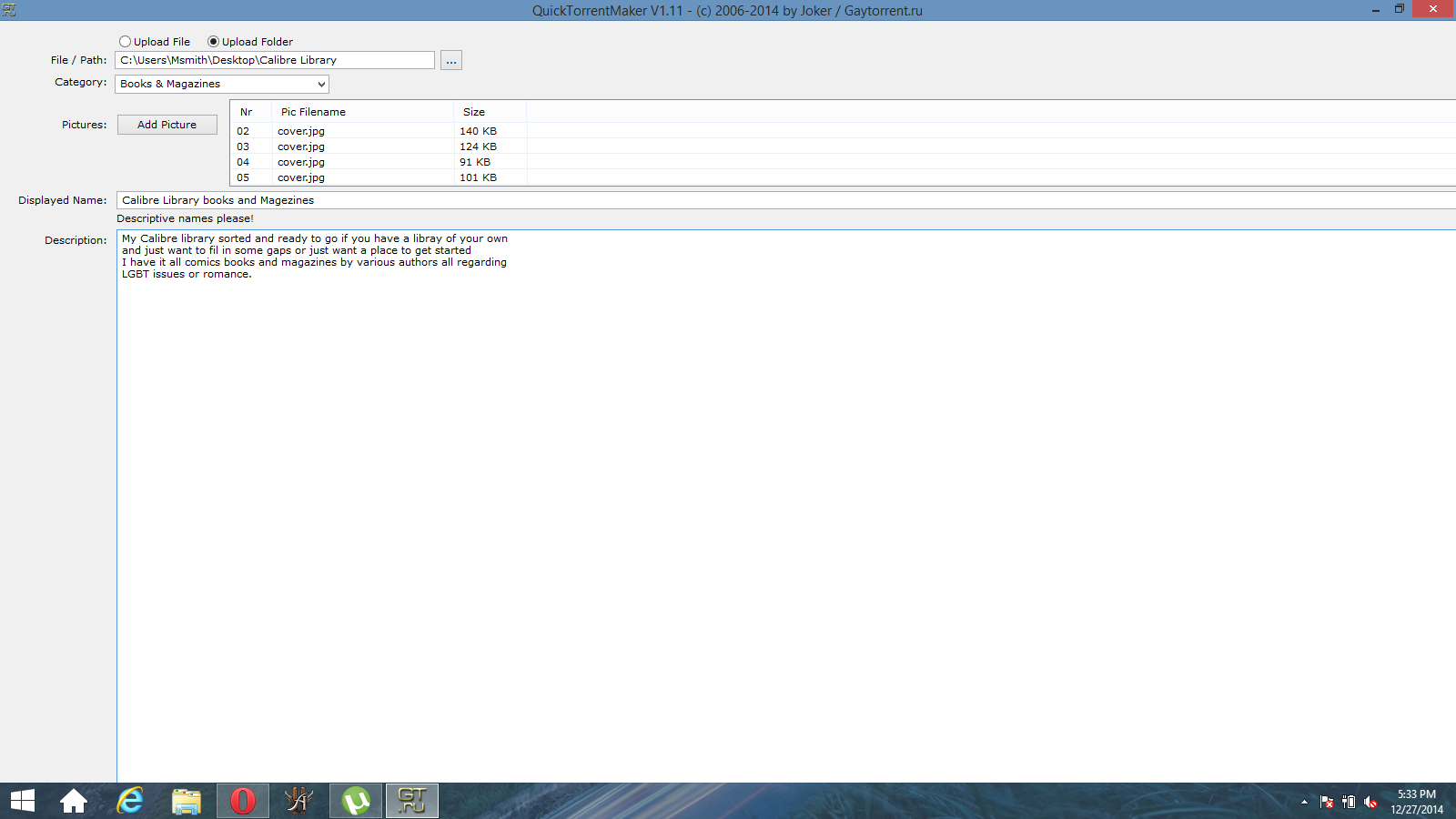
                      QTM help.png

                      1 Reply Last reply Reply Quote 0
                      • MrMazdaM Offline
                        MrMazda Global Moderator
                        last edited by

                        If I'm not mistaken, this is a known issue that is somehow caused by minimizing QTM after being opened. You may need to try running QTM again as an administrator, and make sure that you do NOT miniize it at any point.

                        If this fails, you may need to uninstall QTM, then re-install it to somewhere OTHER than the Program Files or Program Files(x86) folder. Be sure you run the installer as an administrator to avoid potential issues when finalizing the install process.

                        Whap The User
                        The only difference between martyrdom and suicide is press coverage!

                        1 Reply Last reply Reply Quote 0
                        • M Offline
                          Masonmason
                          last edited by

                          All right ran as administrator and hit upload it complied then showed no message didn't close the window and im NOT seeding. Is uninstalling and reinstalling the best way I always install as admin so I dont think that is the issue. Thank you for informing bout the no minimization thing.

                          1 Reply Last reply Reply Quote 0
                          • MrMazdaM Offline
                            MrMazda Global Moderator
                            last edited by

                            If just running the app as an administrator and not minimizing it seems to work, it would stand to reason that you should be able to get away with just doing that. If you need to re-install it a later point, I would deal with it then as long as it works when you run as an administrator.

                            Whap The User
                            The only difference between martyrdom and suicide is press coverage!

                            1 Reply Last reply Reply Quote 0
                            • M Offline
                              Masonmason
                              last edited by

                              sadly I forgot to input the not into that posts

                              1 Reply Last reply Reply Quote 0
                              • MrMazdaM Offline
                                MrMazda Global Moderator
                                last edited by

                                Haha… My bad... In that case, yes... I would suggest uninstalling QTM, then installing it again by running the installer as an admin and putting it in C:\QTM when it asks where to install it. From there, you shouldn't have to run QTM as an admin, but if it fails when you reinstall it as an admin, as a last ditch effort, then try running it as an admin. There is also a way to tell Windows to automatically run QTM as an admin when you open it normally. If you'd like, I can help you with that if running QTM as an admin is required to make it work after installation.

                                Whap The User
                                The only difference between martyrdom and suicide is press coverage!

                                1 Reply Last reply Reply Quote 0
                                • M Offline
                                  Masonmason
                                  last edited by

                                  Well I put it in c I installed as admin and I ran as admin no luck

                                  1 Reply Last reply Reply Quote 0
                                  • D Offline
                                    discreetmpls
                                    last edited by

                                    I am using Windows 7 64bit.  I'm not sure what happened to my QTM, but I can't find it anywhere on my hard drive.  When I try reinstalling, I don't get the option to re-install, it just runs the .exe file as if I have QTM on my computer already.  Then it doesn't populate the drop down menus, such as Select Category, so it won't actually create any torrents.  I don't have a QTM folder or an uninstall option that I can find.

                                    1 Reply Last reply Reply Quote 0
                                    • LEVIL Offline
                                      LEVI
                                      last edited by

                                      You should find it here

                                      C:\Program Files (x86)\QuickTorrentMaker

                                      and all that is there is an .exe file.

                                      1 Reply Last reply Reply Quote 0
                                      • D Offline
                                        discreetmpls
                                        last edited by

                                        @LEVI:

                                        You should find it here

                                        C:\Program Files (x86)\QuickTorrentMaker

                                        and all that is there is an .exe file.

                                        I have checked there and there is no folder or file.  I also don't see the program on my Programs list in Control Panel.  There is a .exe file in my downloads folder, but, as I said, it just gives me the log in window as if QTM is already installed, it doesn't actually install the program.  If I log in through that window, I get the upload screen, but it's not functional.  I have read that I should uninstall and re-install to try to fix bugs, but I can't find the program to uninstall it, and running the installer doesn't do any kind of installing, just that log-in window.


                                        1 Reply Last reply Reply Quote 0
                                        • LEVIL Offline
                                          LEVI
                                          last edited by

                                          That is because it is a stand alone program.

                                          The file you downloaded should be named

                                          QuickTorrentMaker_1.11.exe

                                          The one it places on your computer

                                          QuickTorrentMaker.exe and it should have placed a shortcut on your desktop and made a start menu entry.

                                          Doing a search of your PC you should have those entries.

                                          1 Reply Last reply Reply Quote 0
                                          • D Offline
                                            discreetmpls
                                            last edited by

                                            @LEVI:

                                            That is because it is a stand alone program.

                                            The file you downloaded should be named

                                            QuickTorrentMaker_1.11.exe

                                            The one it places on your computer

                                            QuickTorrentMaker.exe and it should have placed a shortcut on your desktop and made a start menu entry.

                                            Doing a search of your PC you should have those entries.

                                            Unfortunately, I do not.  All I have is the .exe that is in my downloads folder, that is the file that downloads when I click the link from the QTM page here.  When I activate the .exe in my downloads folder, it opens up the log-in screen for QTM, but the program is not functional, it doesn't load the Category drop-down so I cannot upload a torrent.  I have no way to uninstall and re-downloading from the website doesn't change anything except make a copy of the same .exe file.  There is no start menu entry, no shortcut, no folder.  A complete search of my computer all drives only turns up the downloads folder.

                                            1 Reply Last reply Reply Quote 0

                                            Hello! It looks like you're interested in this conversation, but you don't have an account yet.

                                            Getting fed up of having to scroll through the same posts each visit? When you register for an account, you'll always come back to exactly where you were before, and choose to be notified of new replies (either via email, or push notification). You'll also be able to save bookmarks and upvote posts to show your appreciation to other community members.

                                            With your input, this post could be even better 💗

                                            Register Login
                                            • 1
                                            • 2
                                            • 3
                                            • 4
                                            • 5
                                            • 2 / 5
                                            • First post
                                              Last post