• HOW TO DOWNLOAD VIDEOS (for new members!)

    Pinned Locked
    1
    1 Votes
    1 Posts
    2k Views
    No one has replied
  • RESEED REQUESTS: ONE REQUEST, PER VIDEO, PER DAY, please.

    Pinned
    1
    0 Votes
    1 Posts
    383 Views
    No one has replied
  • Downloading Torrents Stuck on Finding Peers ===>> SOLVED

    Pinned
    7
    2
    0 Votes
    7 Posts
    2k Views
    D
    @MrMazda the second solution fixed it or something. i uninstalled with those 2 torrent dns trackers. its good now
  • Unregistered torrent pass

    11
    0 Votes
    11 Posts
    61 Views
    JokerJ
    Glad it works now, billythick. For anyone who finds this later: "unregistered torrent pass" means the tracker does not recognise the passkey inside that .torrent file. That usually happens with an old .torrent from before a passkey reset, or when the tracker URL got edited. Remove the torrent from your client (keep the data), download the .torrent again from the site and add it, that fixes it. Thanks Kevin4fm and ianfontinell for helping out.
  • My uTorrent has disappeared.

    5
    0 Votes
    5 Posts
    65 Views
    Q
    @ianfontinell Thanks!
  • No Download for all torrent

    4
    0 Votes
    4 Posts
    81 Views
    N
    @Jakolero Hi! What VPN are you using? We're from the same country and wanted to look at what options I had. Thanks!
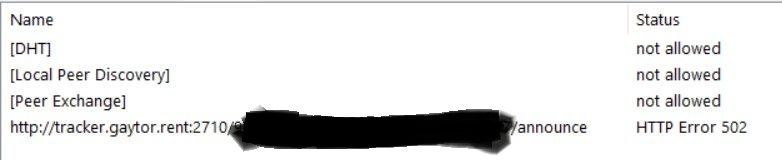
  • Tracker is giving a HTTP Error 502

    5
    1
    2 Votes
    5 Posts
    74 Views
    MrMazdaM
    We had some issues with the tracker in the last 24 hours, but they seem to be resolved now. If you're getting stuck trying to refresh the trackers since it came back up, restarting your torrent client should resolve the issue.
  • Anyone has more sets?

    Locked
    2
    0 Votes
    2 Posts
    31 Views
    F
    Yet another member new to the forums (and site?) who agreed to the rules when they signed up without ever bothering to read them. Tell you what, go and read them now, then come back and tell us which one your post breaks. If you can do that before a mod reads this you might get leniency. Otherwise they'll probably just ban you like all the others.
  • My utorrent isn't working....

    9
    0 Votes
    9 Posts
    129 Views
    MontanaJonesM
    I was a devoted µTorrent user for years since v.1, as it became overgrown and bloated I continued using v.2.2.1 for years more but annoying issues such as yours kept popping up, finally, reluctantly switched to qBittorrent and been using it happily and trouble free for a number of years now.
  • Torrents with few seeders forever stalled

    21
    0 Votes
    21 Posts
    221 Views
    MrMazdaM
    @Kevin4fm To be fair though, port forwarding on IPv4 is a bit more complex than the issue you usually face on IPv6. On IPv4, you usually have to also establish a static IP address on your LAN subnet so that your port forwarding rules never have to be played with once they're set. This in and of itself can overwhelm a lot of people. With IPv6 on the other hand, you don't need to do that part. You merely need to tell your firewall to allow inbound traffic on a specific port. Realistically, your IPv6 address can change every time that you turn on your device and connect it to the internet (in cases where the configuration is done with DHCPv6), or if you use the more "traditional" or "standard" method using SLAAC, your address can change every time you reboot your modem/router. Regardless of what way your network is setup (which largely depends on your provider), you don't need to track down IP addresses, set a static assignment, or any other such thing like that. You only need to tell your router to accept connections from the internet on port X. So it's actually easier because effectively your LAN IP address is also your public WAN (internet) IP address with IPv6, so if your address changes, so too does how you show up to the internet. The same does not hold true with IPv4. It may also be worth noting that when enabling the port in your firewall, you enable the policy to allow the port your torrent client uses in the FORWARD table and that it is just a blanket policy of DESTINATION PORT. So for example, in the case of my one server that uses port 22971, you need add only two simple rules to the FORWARD table. Destination Port = TCP 22791, ACCEPT Destination Port = UDP 22791, ACCEPT There's no need to have to even specify what device it's going to, no need to know the IP address it's got to go to, or even know the particular /64 block on your /56 block that the device sits on... You ONLY need to know the port number and that it's the DESTINATION port you want to enable.

  • Site shows leeching on torrents I am seeding?

    8
    0 Votes
    8 Posts
    94 Views
    MrMazdaM
    @tbear87 Removing them from your torrents in your torrent client WILL make them disappear from the leeching list. It just takes a little while for the torrent to time out on the server side once you stop it in your torrent client.
  • Trackers Offline

    35
    0 Votes
    35 Posts
    353 Views
    MrMazdaM
    @frankdavao48 said: I'm blocked again, using google dns. When testing https://tracker.gaytor.rent/stmdd/ results to "the connection has timed out." I actually have trouble accessing some sites at work last week, same time I encountered the issue on the trackers. I've seen some posts online as well, that some people are blocked and cant access specific work related sites/apps. Can't be a coincidence, this ISP is sht. As somebody who is working from home, I can't rely on this ISP. I am switching. Yes... It sounds like they may be trying to force DNS requests to redirect to their servers specifically, which aren't always answering requests reliably.
  • Torrent stalled at 99.9% for over 10 days

    7
    0 Votes
    7 Posts
    80 Views
    weirdthallW
    @ianfontinell As usual, you provide the best info. You were spot on...removing the !qb extension 'fixed' the files due to client padding and they 'seem' to be functioning like any other video file. Going to do a torrent recheck on my client and see if that fools it into thinking it's complete although doubtful due to size disparities created by BitComet. Again many thanks for the assist.
  • downloaded

    5
    0 Votes
    5 Posts
    52 Views
    S
    @ianfontinell said: @Shepard69 correct! i started typing faster when i saw the keyboard icon below your name Laughing my ass off!
  • Can't add torrents - qBittorrent docker container

    2
    0 Votes
    2 Posts
    31 Views
    ianfontinellI
    @BeetleJuice what version of qbittorrent and libtorrent? also if possible link one of the torrents you attempted to load to confirm it's not a file-specific scenario.
  • [Reseed request] Precious Seiya

    Locked
    3
    0 Votes
    3 Posts
    44 Views
    raphjdR
    @frostycab You are correct.
  • This topic is deleted!

    3
    1
    0 Votes
    3 Posts
    15 Views
  • What is the best client to use in 2026?

    13
    1 Votes
    13 Posts
    279 Views
    ianfontinellI
    @zwinna try some downloads on a different client to be 100% sure that the problem is qbt
  • Tracker: Not Working

    7
    0 Votes
    7 Posts
    121 Views
    JokerJ
    Joker here. I tested this from our side today rather than assuming, so here is where it actually stands. Every announce URL we hand out is up and answering right now. I checked all four of them: https://tracker.gaytor.rent/<passkey>/announce http://tracker.gaytor.rent:2710/<passkey>/announce https://tracker.gaytorrent.ru/<passkey>/announce http://tracker.gaytorrent.ru:2710/<passkey>/announce All four answer normally, on both the HTTPS port and on 2710. So there is no outage here, and @ianfontinell called it correctly: "no such host is known" is your machine failing to resolve the name, before any connection to us is even attempted. The one thing that may actually help you: the tracker answers on two different hostnames, tracker.gaytor.rent and tracker.gaytorrent.ru. It is the same tracker behind both. If your provider is filtering one of the two names, the other one often still resolves. So it is worth editing the tracker URL in your client and swapping the hostname, keeping the rest of the URL and your passkey exactly as it is. Also worth doing either way: redownload the .torrent file from the site and load that one. That always gives you the current announce URL with your passkey in it, which rules out an old file pointing somewhere retired. @Nothinglose if that still leaves you stuck, I can dig further, but I need a bit more than "not working": The exact announce URL your client shows in the torrent's tracker tab, with the passkey part replaced by xxxx before you post it. Which of the two hostnames you tried, and whether either of them resolves for you. Roughly which country and which provider you are on, and whether you are on a VPN. Post that and I will take it from there.
  • freeleech

    8
    0 Votes
    8 Posts
    99 Views
    C
    @Kevin4fm Thank you replying, I'll try doing this because yeah, I don't wanna play for getting more radio... ️