Downloading Torrents Stuck on Finding Peers ===>> SOLVED
-
Your downloading torrents STUCK on FINDING PEERS due to not being able to connect to our tracker can be one of three issues, or some combination of all:
1) SSL torrents
Why don't you try this: (this has fixed this problem for many members)-
Delete the torrents that aren't working for you, then
-
Go to your profile page here: https://www.gaytor.rent/my.php
-
UNCHECK the "SSL Tracker [_]" (Uncheck to Turn off SSL Announce Urls) setting.
-
Scroll down and click on the "Submit Changes!" button
-
then re-download the torrents again, and see if they will download now.
===================================================================================================
2) DNS
Some ISPs DNS servers seem to have some difficulty with resolving the IP address for our tracker. We are not aware of the exact cause of why this is, but only that there seems to be a number of users who experience this issue.As a way of getting around this, I would suggest that you manually add two lines to your computer's hosts file so that it can resolve both the HTTP and HTTPS trackers for you. The lines you need to add are as follows:
77.247.179.58 tracker.gaytor.rent
77.247.179.58 tracker.gaytorrent.twOnce you have added the above two lines to your hosts file, you should be able to connect to the tracker again, without needing to use your ISP's DNS servers to resolve the IP address for you. If you are unsure of how to modify your computer's hosts file, I would encourage you to check out this comprehensive guide, which should walk you through the process of adding these lines to your computer's hosts file.
===================================================================================================
3) Port Forwarding: this is explained here:
https://community.gaytor.rent/topic/29909/port-forwarding-mini-tutorial-updated-11-13-2017===================================================================================================
4) IF THE ABOVE ADVICE DOES NOT RESOLVE YOUR PROBLEM, please write the helpdesk, after following the NEXT advice packet:I would suggest you activate certain columns in your torrent client**, so as to be able to understand what's actually going on with your torrents, in the future. On most torrent programs, you can right-click in the column headings and choose additional columns to be able to view.
I personally recommend "Name", "Size", "Done", "Added on", "Status", "Completed", "Down Speed", "Up Speed", "Seeds", "Ratio", "Peers", "ETA", and Tracker" as essential information and sort-columns. On most torrent programs, you activate these headings by right-clicking on the headings, and selecting and de-selecting your headings, as needed. You can also re-size the headings, by clicking and holding down on the right side of the heading, and dragging it a little bit to the left. You can reposition the columns by clicking (on the column heading) and holding down the mouse button, dragging the column left or right, as desired.
The HelpDesk always needs the following information of the specifics at your end, to give a definitive description as to what's going on, such as the exact error message you received, and at what stage of the attempted downloading process you received it.
If your torrent client program just doesn't seem to want to download the torrent, let's get the information from there. Here's how:
In your torrent client program, click once on the torrent in question, to highlight it, then halfway down the screen, click on the ""Trackers" tab; in Transmission, you have to right click the torrent, then click "Properties", then go to the "Trackers" tab.
The information you read below, there, as illustrated in this screen shot from my computer, below, will give us some clue as to what's going on at your end:
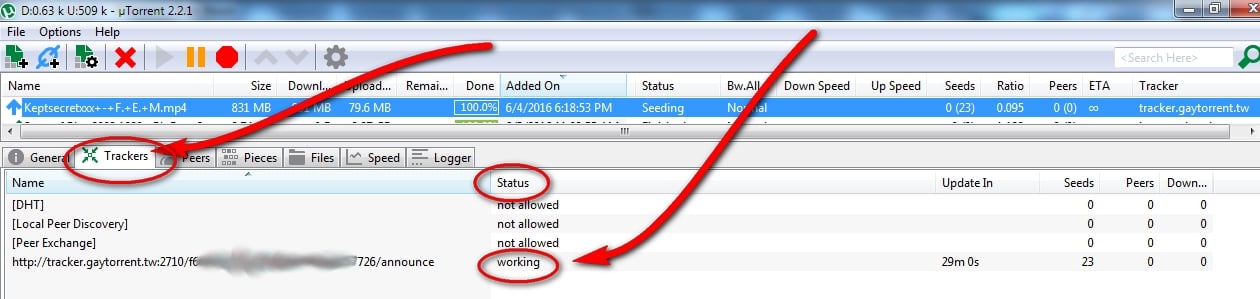 …and will better explain what's going on with that specific torrent.
In the future, if you include this exact information in your helpdesk requests concerning torrent connectivity, it will be a big assist to our helpdesk staff.
Please follow the above instructions, and write us back with the information that is shown there, FOURTH line being the important line to quote, in detail, (or send a screen capture).
You can send us graphic images by
- save your screen shot using Alt-Print Screen, then opening your favorite graphics program (even paint will work) and edit, paste as new image, then save the screenshot image using a file name with NO spaces.
- use our bit-bucket software here: https://www.gaytor.rent/bitbucket.php to upload the image, then get a "http;\…... " address for that image, and include it in your help desk request.
Best regards,
Pawpcorn
GayTorrent.ru
-
-
This worked for me, thank you! ;D
-
It works really well for me. Thank you
-
S sparda referenced this topic on
-
im having the strangest problems, becuase its me and of course it would happen to me, but some files download , but most wont
-
@dorftimbre Your issue is that you are using uTorrent 3.6.0, which has known compatibility issues with our site and system. To fix this, please roll it back to version 3.5.5 or earlier.

The only difference between martyrdom and suicide is press coverage! -
@MrMazda kinda off-topic but it's interesting to see how utorrent to this day still is pretty much the standard app even after so many controversies regarding to privacy and cryptomining, I always thought people who torrent a lot were a bit more concerned about the software they use.
-
@MrMazda the second solution fixed it or something. i uninstalled with those 2 torrent dns trackers. its good now
-
A Arconix referenced this topic on


Hello! It looks like you're interested in this conversation, but you don't have an account yet.
Getting fed up of having to scroll through the same posts each visit? When you register for an account, you'll always come back to exactly where you were before, and choose to be notified of new replies (either via email, or push notification). You'll also be able to save bookmarks and upvote posts to show your appreciation to other community members.
With your input, this post could be even better 💗
Register Login