Practical qBitorrent Limit to Number of Torrents Available to Seed?
-
Has anyone come across a practical limit to the number of torrents that can be made available for seeding, after which your machine suffers performance issues? I'm not talking about the number of torrents actually seeding, but those in qBitorrent announcing their availability, should anyone want them.
I currently have around 840 of these, of which on average 10-20 are actually seeding. This number is creeping up steadily as I'm adding more and more to my "long term" seeding list. These are mainly multi-file BL torrents. They're not called for often, but they're also relatively low seeded, so I try to keep them alive.
I run qB on my regular working machine - an HP EliteDesk 800 G4 Mini, with an 8th-generation Intel Core i5 processor, 32 GB RAM and a 256 GB SSD. It uses a Linux Mint Cinnamon OS.
I'm now using qB v.5.2.3, recently upgraded from a v.4 as part of my attempts to cure the problem. All of the files being seeded are on a couple of removable USB drives attached to another Linux machine accessed via a network, not directly plugged in to the PC qB is running on. It's further complicated by a large number of them being accessed indirectly through symbolic links.
For the last several weeks, other apps on my system frequently run painfully slowly, seemingly worsening the longer it is between reboots. This is particularly apparent in a couple of file managers I use - Nemo, the default, and Double Commander. I've found that these issues usually dramatically improve if I close qB.
So I'm wondering if I've finally hit a (soft) limit and need to start being more selective in what I seed.
Any suggestions, thoughts and comments gratefully received.
Other opinions are also available. They're not right, obviously, but they are available.
-
@Kevin4fm it really comes down to how many torrents are active at a given time. the list size barely affects performance other than delaying the app readiness after launch. The app is very memory efficient, you can have a thousand torrents to the list and if they are all idle the memory consumption will still be around 100 or 200 megabytes. It is only once a torrent is active that it truly affects memory usage, but with 32GB of RAM installed not even that should be a problem.
-
@ianfontinell Yeah, that's pretty much what I thought, and I've had 500+ torrents available for ages without problems. The number actually seeding at any one time has maybe ticked up just a little since I finally got a port forwarding capability, but not by a significant amount. That has more affected which torrents I'm seeding at any one time, and that I'm always at or around my upload speed limit.
But if I stop those torrents actually uploading, it doesn't improve performance elsewhere, so this doesn't seem to be the issue.
I may be adding a significant additional processing load by using symlinks, especially over a network connection which seems to complicate things even more, but changing that setup to see if it's a major factor is a huge undertaking. Even bigger adding in changing it back should it not be a factor!
-
@Kevin4fm I find there's a lot that will make a difference in how the system handles that goes far beyond just the number of active torrents. For example, once you get to more than about 700 or so, sometimes what will happen is the odd one here and there will time out when it tries to announce to the tracker because of all the other torrents that are doing their thing at the same time.
See, your torrent client will not announce everything all at once, otherwise it would not only cripple your connection while this process is going on, or it could possibly create a server overload. So when a torrent hits the 30 minute mark at just the wrong time as compared to a number of other torrents, it will sometimes time out. The greater the number of torrents, the greater the number of torrents that have timed out. Usually, the only way to fix them is to remove then re-add the tracker.
Outside of that, we also have the issue of disk transfer capacity. If you're using an SSD rather than a conventional SATA, this will improve the speed at which the drive can be loaded significantly. If you get really fancy and upgrade to something like say an NVMe drive, the amount of crank you'll get out of the drive before it starts to disk overload will also increase. The biggest difference though is in the same mechanical SATA drive when it is in a USB case (even USB 3) as compared to if the exact same physical drive is mounted as an internal drive on the system.
When the drive is an internal, you can actually run quite a number of torrents active at the same time, without any issue, and the speeds at which they can reach will be far greater, especially if you do not have anything downloading at the same time. RAM only plays into the equation to a very small extent believe it or not. That is, of course, until you hit the point of having thousands of torrents running all at the same time.
Processor is also a big factor. The speed and number of cores in the processor will have a direct impact on how far you can ramp things up before the overall system performance will start to run down. I have noticed that even from one machine to the other, there is a notable difference in the performance with different numbers. Believe it or not, the type of drive that your OS is on will also impact how many torrents you can have running, especially if the torrent data you are transferring is on the same drive as the OS, or a different drive.
Even if the contents of the torrent are on an internal SATA drive (the mechanical kind), if your OS is a SATA SSD, it will run to a higher point than the same drive being run with the OS installed on an NVMe drive. So there's really a lot that plays into the equation here, and no two setups are ever quite the same, especially for a custom build. As strange as this may sound, the amount of free space on your OS drive in particular also seems to have a direct effect on how many torrents you can have active at the same time, and the speeds you can get from them.
If you want a "safe" blanket policy where everything will consistently work on the most part, you're looking at anywhere between 500 to 1000 torrents actively announcing, even if you have some that are actively transferring data.
-
@MrMazda Many thanks. Lots to think about there.
It occurs to me that I've not run the obvious next test of pausing a large chunk of the torrents so that the number actually announcing is back under 500, to see if that results in a noticeable improvement. That will definitely be at least worth trying.
If that fails, I'll have to think about which is the greater "evil", paying for better hardware, or investing time to undo my carefully created symlinks!
-
@Kevin4fm torrents taking longer to announce will not affect disk I/O operations, the issue is likely a real bottleneck caused not by the network setup but the fact that the drives are removable, the practical speeds of each drive is reduced significantly when mounted externally compared to an actual network setup like a NAS.
The torrents don't need to be actively downloading or seeding in order for it to cause a big queue of I/O operations, specially if most of the files are sitting in the same drive or same interface. That's because before a torrent becomes active you're constantly exchanging information with several peers, and it keeps checking the availability of pieces and whatnot.
Reducing the number of torrents will decrease the number of announces, which will inevitably reduce the I/O queuing, but a more efficient and permanent solution would be moving those drives to a NAS so they can achieve their best performance.
Also worth noticing that your OS is on a small SSD, and as it fills, it becomes slower and is less capable of handling cache operations, which further degrades the performance and reduces both reading and writing speeds. It's never a good idea to keep the OS drive running on the storage limit, specially if it's an entry level SSD.
-
@ianfontinell Yes... It should also be noted that the difference between a mechanical SATA being mounted as an external USB (even 3.0) is significant compared to taking the exact same drive out of the external casing and attaching it to a motherboard as an internal drive directly to the SATA interface.
For example, on my now internal drive in my porn PC, when it would run as an external, sometimes it only took 2 - 3 torrents moving at a pace that wasn't all that significant to get the drive to start to max out and overload. The moment I took that same drive out of the casing and mounted it inside the tower itself, the difference became such that I usually need to have more than 15 torrents going, AND they can get to a much higher speed before I start to run into drive overload issues.
The number of torrents that are downloading as well as apparently, the size of the torrents being downloaded somehow plays into it as well. The larger the torrent, the more it seems to suck from the drive when it's downloading, even if it is at a slower speed. I still do not quite understand WHY this is though.
-
Many thanks, both, for the further insights and thoughts.
Reading between the lines it seems the answer to my original question, at its simplest level, is yes there is a practical limit to the number of torrents I can make available to seed, at least within my current setup, above which a noticeable degradation of performance spills into other areas of computer activity.
The number of torrents actually seeding at any one time has never seemed to be an issue. What has changed over the last few months is both a gradual increase in the number of torrents I'm announcing as available if wanted, and a switch to having the drives containing the files to be seeded plugged into a different machine to that running qB.
In the short term, I'll experiment by reducing the number of torrents being offered to seed to see if that does indeed mitigate the problem. If it does, then I can look at alternatives, such as running a qB instance on the machine I'm using as a server and seeding my long-term torrents on that.
Once I understand what, if any, affect that has, then I can start considering hardware options, etc.
-
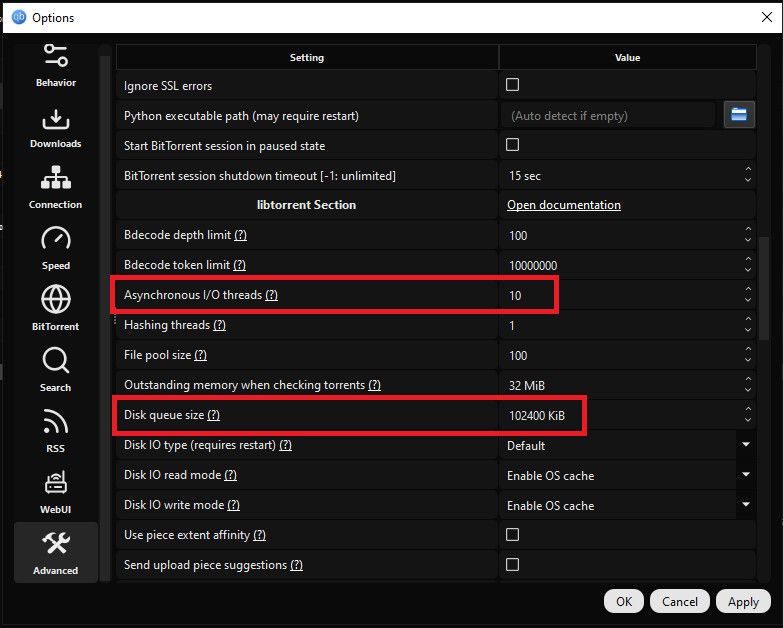
reducing those two settings can offer more stability, but it might impact your speeds. It's worth giving a try though, since you are using USB drives it'd be best to cut those values in half, so 5-6 for asynchronous I/O and around 51200 for disk queue.




Hello! It looks like you're interested in this conversation, but you don't have an account yet.
Getting fed up of having to scroll through the same posts each visit? When you register for an account, you'll always come back to exactly where you were before, and choose to be notified of new replies (either via email, or push notification). You'll also be able to save bookmarks and upvote posts to show your appreciation to other community members.
With your input, this post could be even better 💗
Register Login