• Categories
    • Recent
    • Tags
    • Popular
    • Users
    • Groups
    • Torrents
    • Login

    What torrent client should I use?

    Scheduled Pinned Locked Moved BitTorrent & Internet News
    115 Posts 7 Posters 100 Views 2 Watching
    Loading More Posts
    • Oldest to Newest
    • Newest to Oldest
    • Most Votes
    Reply
    • Reply as topic
    Log in to reply
    This topic has been deleted. Only users with topic management privileges can see it.
    • Kevin4fmK Online
      Kevin4fm @Aestet
      last edited by Kevin4fm

      @Aestet Absolutely. It costs a few pounds / euros / dollars, but it's only money. Seems like you have no choice anyway, as McAfee doesn't support you, but I gave up on ExpressVPN with about 18-20 months left on a 24m contract, mainly for the port forwarding.

      You won't experience this, but I've been torrenting for ages without it, and having to really work on keeping my ratio up, and issues connecting to torrents with only one or two seeders. With port forwarding, I'm constantly seeding 15-20 torrents at my highest upload speed most of the time!

      Other opinions are also available. They're not right, obviously, but they are available.

      1 Reply Last reply Reply Quote 0
      • A Offline
        Aestet
        last edited by

        so, I've got the proton installed. However, it seems like it's still not working??
        Like now, the qbittorrent is telling me 'server can't be found'

        Kevin4fmK 1 Reply Last reply Reply Quote 0
        • A Offline
          Aestet
          last edited by

          nvm! It's working, I put it on my home country instead and now it's working!

          Kevin4fmK 1 Reply Last reply Reply Quote 0
          • Kevin4fmK Online
            Kevin4fm @Aestet
            last edited by

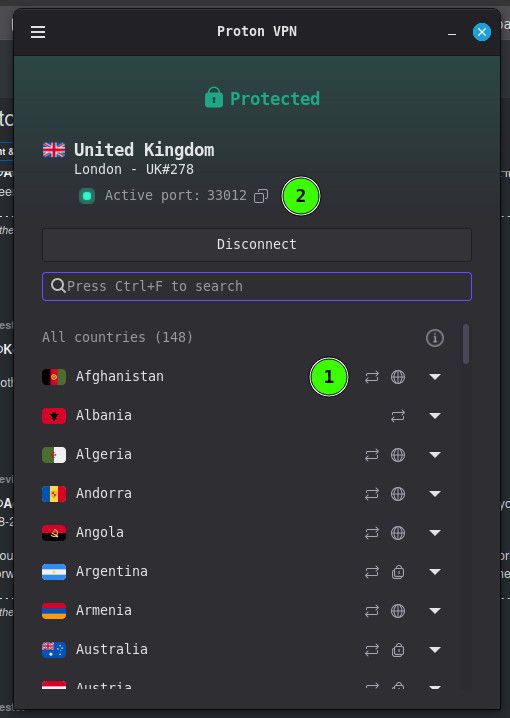
            @Aestet OK. Like McAfee, not every server supports P2P and port forwarding, but at least they tell you which ones do.
            e70228ed-de90-4baa-b961-1b3cf1bb58e7-image.jpeg

            Launch the VPN, if you haven't already, and select a server that has the kinda "recycling arrows, next to (1). It doesn't have to be in the country you're in, but the closet that has it is probably best. The VPN may have already pre-selected hte fastest, so first check if that has the arrows.

            Other opinions are also available. They're not right, obviously, but they are available.

            1 Reply Last reply Reply Quote 0
            • Kevin4fmK Online
              Kevin4fm @Aestet
              last edited by

              @Aestet Oh, cool. qB is working? with the VPN on? Major step forward.

              Now we'll set up binding and port forwarding, OK?

              Other opinions are also available. They're not right, obviously, but they are available.

              A 1 Reply Last reply Reply Quote 0
              • A Offline
                Aestet @Kevin4fm
                last edited by

                @Kevin4fm alr!

                Kevin4fmK 1 Reply Last reply Reply Quote 0
                • Kevin4fmK Online
                  Kevin4fm @Aestet
                  last edited by Kevin4fm

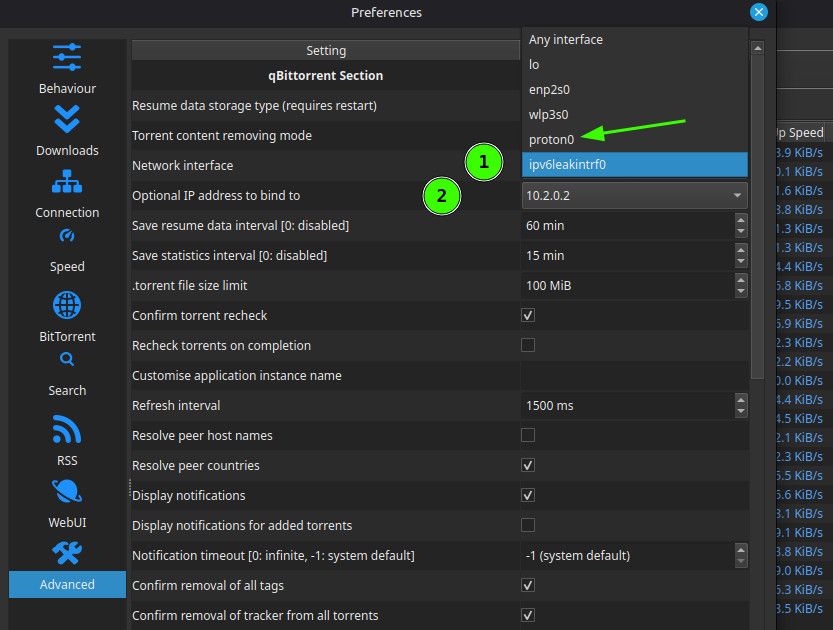
                  @Aestet First "binding". Remember that setting you looked at earlier, under Tools > Preferences > Advanced? (1) Click the dropdown and look for "Proton0" ... o "Proton...." something. It might have named yours differently. Select that.
                  001c6e33-4391-4e52-8e01-75ff8c5f17bd-image.jpeg

                  Then take a look at your options on the one below it - Optional IP (2). Is one of them an actual IP number? I can't remember what I did to find out mine, but if it's not there already, I can ask my AI. If there is a number, set it to that.

                  **Actually, I think I can now remember... that might be the second step in port forwarding. If there isn't a number, don't worry about it. Our next step should give us one.

                  Other opinions are also available. They're not right, obviously, but they are available.

                  A 1 Reply Last reply Reply Quote 0
                  • ianfontinellI Offline
                    ianfontinell
                    last edited by

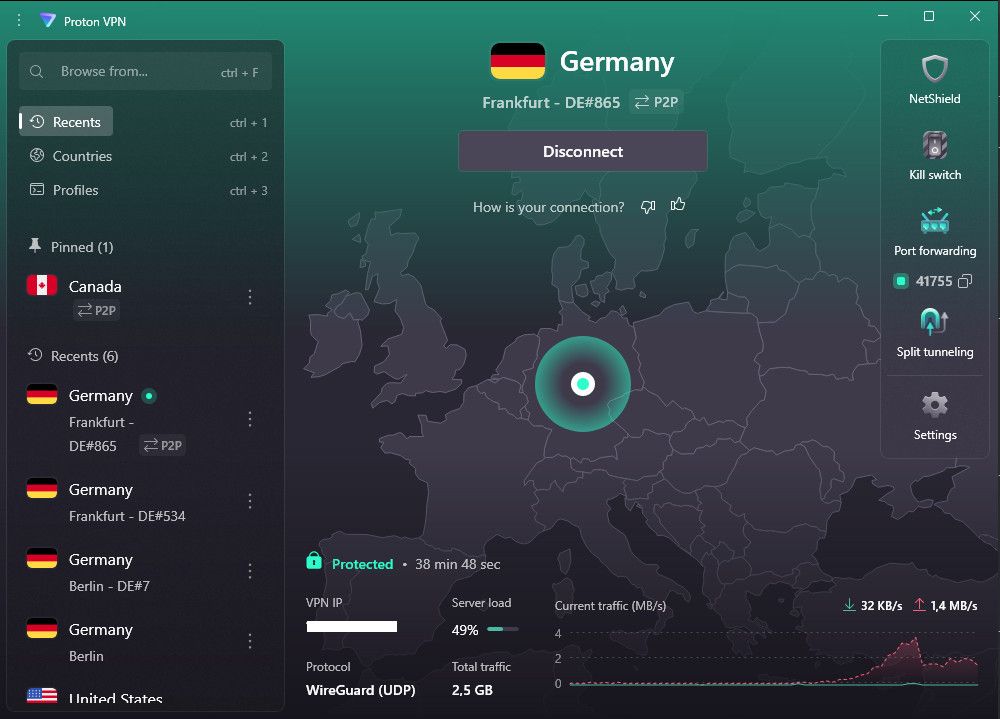
                    @aestet just make sure that you are connected to a P2P server and that you have a port number assigned to your connection like in this screenshot:
                    f108f178-e132-471d-bbc9-a69c2eb178b0-image.jpeg

                    If you made changes to the network interface binding settings inside qbittorrent i advise you to revert back to allow it to bind to all networks.

                    Kevin4fmK 1 Reply Last reply Reply Quote 0
                    • Kevin4fmK Online
                      Kevin4fm @ianfontinell
                      last edited by

                      @ianfontinell Oooh. How did you get the map? I don't have that showing on mine, and I miss it from ExpressVPN.

                      Other opinions are also available. They're not right, obviously, but they are available.

                      ianfontinellI 1 Reply Last reply Reply Quote 0
                      • ianfontinellI Offline
                        ianfontinell @Kevin4fm
                        last edited by

                        @Kevin4fm i didn't do anything at all, it is just there when the app launches, maybe it's because I'm on Windows.

                        Kevin4fmK 1 Reply Last reply Reply Quote 0
                        • Kevin4fmK Online
                          Kevin4fm @ianfontinell
                          last edited by

                          @ianfontinell Ah... yeah. I forget I'm now part of the "lesser" crowd. Roll on EU switch to Linux!

                          Other opinions are also available. They're not right, obviously, but they are available.

                          1 Reply Last reply Reply Quote 0
                          • A Offline
                            Aestet @Kevin4fm
                            last edited by

                            @Kevin4fm Yes, I've done that!

                            Kevin4fmK 1 Reply Last reply Reply Quote 0
                            • J Offline
                              jokuihmemies
                              last edited by

                              is there any promotions to test protonvpn for free?

                              Kevin4fmK F 2 Replies Last reply Reply Quote 0
                              • Kevin4fmK Online
                                Kevin4fm @jokuihmemies
                                last edited by

                                @jokuihmemies said:

                                is there any promotions to test protonvpn for free?

                                Not that I'm aware of, but it might be worth looking at their site. They have their own AI offering, so it would be worth asking that. It should have a better idea of what's available than most!

                                Other opinions are also available. They're not right, obviously, but they are available.

                                1 Reply Last reply Reply Quote 1
                                • Kevin4fmK Online
                                  Kevin4fm @Aestet
                                  last edited by Kevin4fm

                                  @Aestet said:

                                  @Kevin4fm Yes, I've done that!

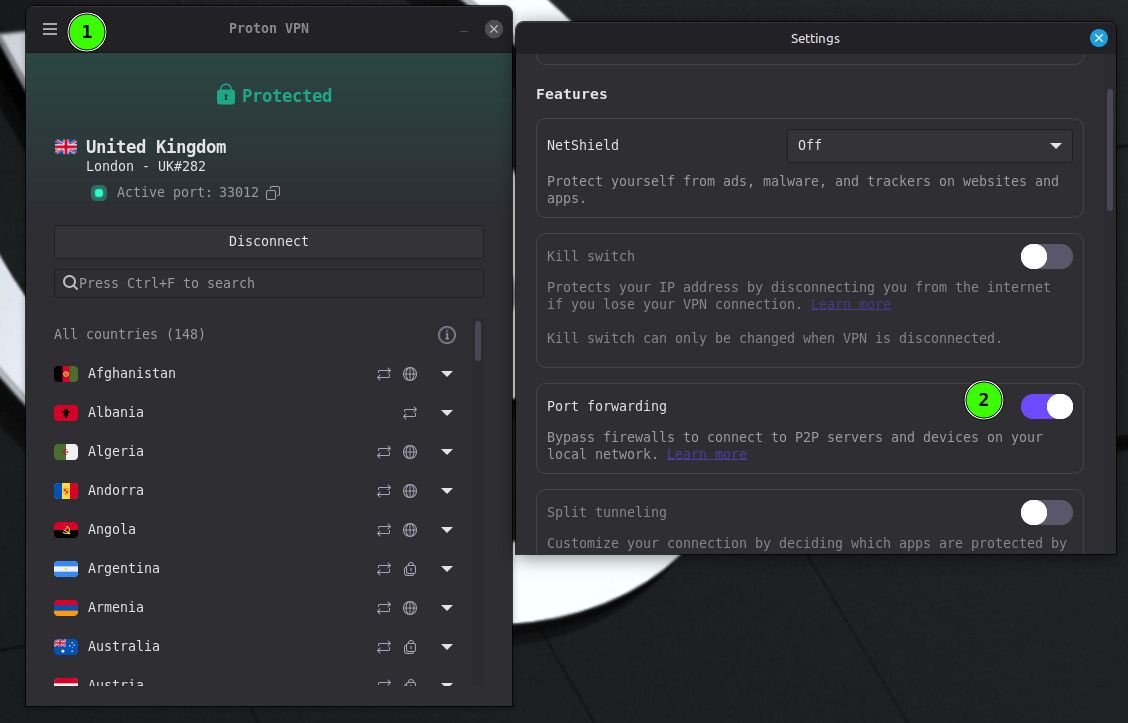
                                  OK. Next is port forwarding. Ian has made me realise that as I'm using Linux, what you're seeing won't be identical to mine. But it should be close enough.

                                  You probably need to first disconnect the VPN. Don't "close" it, just click on "Disconnect". Then go into the menu - hamburger bar (1) then turn on port forwarding (2). This MAY be where I got the IP address from. If one pops up, make a note of it, to enter into that Advanced" field I pointed to earlier.
                                  7896e9a8-7da7-4893-82a5-fd0a9b1b0029-image.jpeg

                                  Then close settings and reconnect the VPN. You should now see "Active Port: " then a number. Yes?

                                  Other opinions are also available. They're not right, obviously, but they are available.

                                  A 1 Reply Last reply Reply Quote 0
                                  • A Offline
                                    Aestet @Kevin4fm
                                    last edited by

                                    @Kevin4fm said:

                                    sorry for the late reply, but I believe I've got it done! This was defo the easy part, but getting to this point was hell

                                    Kevin4fmK 1 Reply Last reply Reply Quote 0
                                    • Kevin4fmK Online
                                      Kevin4fm @Aestet
                                      last edited by Kevin4fm

                                      @Aestet Sorry back, was distracted. So qB downloading and seeding, and hidden behind your VPN. Perfect.

                                      You need to put the "Active Port" number into qB:
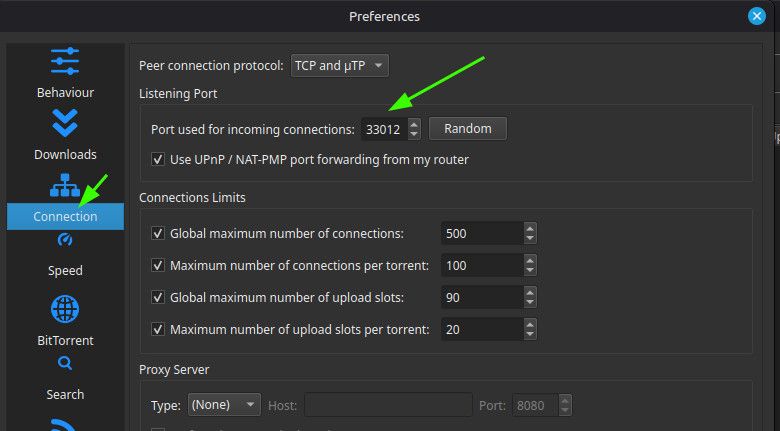
                                      4ae61d47-65e3-47b9-949e-8476edea60cc-image.jpeg

                                      When you reboot, you need to check the number in Proton matches the number in qB. They're liable to change when you reboot, though not definitely will.

                                      One last test that's worth doing: While qB is working - preferably actually uploading or downloading something - disconnect the VPN. qB should stop what it's doing. It'll still be open, but with no activity. This tests the binding has worked, and that qB can only work while your VPN is connected.

                                      Other opinions are also available. They're not right, obviously, but they are available.

                                      ianfontinellI 1 Reply Last reply Reply Quote 0
                                      • F Offline
                                        frostycab @jokuihmemies
                                        last edited by

                                        @jokuihmemies said:

                                        is there any promotions to test protonvpn for free?

                                        They've got a 30-day money back policy, so if you try it and don't like it you can just get a refund anytime in the first month

                                        Taste the rainbow! Eat crayons!

                                        1 Reply Last reply Reply Quote 1
                                        • ianfontinellI Offline
                                          ianfontinell @Kevin4fm
                                          last edited by

                                          @Kevin4fm i totally forgot what a pain in the butt it is having to set a new port number inside qbitorrent every time you connect to the VPN.....

                                          I made a program that does it automatically for me during windows startup.

                                          Kevin4fmK 1 Reply Last reply Reply Quote 0
                                          • Kevin4fmK Online
                                            Kevin4fm @ianfontinell
                                            last edited by Kevin4fm

                                            @ianfontinell My AI friend assures me there's a way to do it in Linux, but it's a bit of a pain. (My words, not Foan's.) I don't need to reboot often enough for me to start getting annoyed at the moment, but no doubt those days are not far off.

                                            Maybe it's something you could share with @aestet? Though he'll likely need assistance with setting it up.


                                            Other opinions are also available. They're not right, obviously, but they are available.

                                            F 1 Reply Last reply Reply Quote 0

                                            Hello! It looks like you're interested in this conversation, but you don't have an account yet.

                                            Getting fed up of having to scroll through the same posts each visit? When you register for an account, you'll always come back to exactly where you were before, and choose to be notified of new replies (either via email, or push notification). You'll also be able to save bookmarks and upvote posts to show your appreciation to other community members.

                                            With your input, this post could be even better 💗

                                            Register Login
                                            • 1
                                            • 2
                                            • 3
                                            • 4
                                            • 5
                                            • 6
                                            • 1 / 6
                                            • First post
                                              Last post