How to configure default sort order in search results?
-
So the default sort order seems to be by relevance. I have to manually change it to by date every time I do a search (the order is kept if I do several searches in a row but if I leave the search page, go back to homepage, and then do a new search, a new search resets the sort order to by relevance). Is it possible to configure this anywhere to always sort by most recent?
Thanks.
-
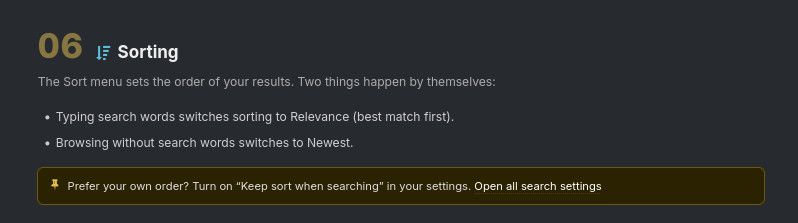
@MaleMan Have you read the search guidance which you can access by clicking on the question mark to the right of the yellow pin.

Amongst other useful info, you'll find:
-
I had looked through my account parameters but didn't see the option.
-
@MaleMan Yeah, we're rather spoiled for choice now with all the new things we can do for ourselves to customise things to our own personal preferences. It's fantastic but can seem a little daunting.
For a good starting point | overview, search "Change Log" here in the forum posts. It doesn't go into the "How to..." but gives a very good flavour of what can be done where.
-
-
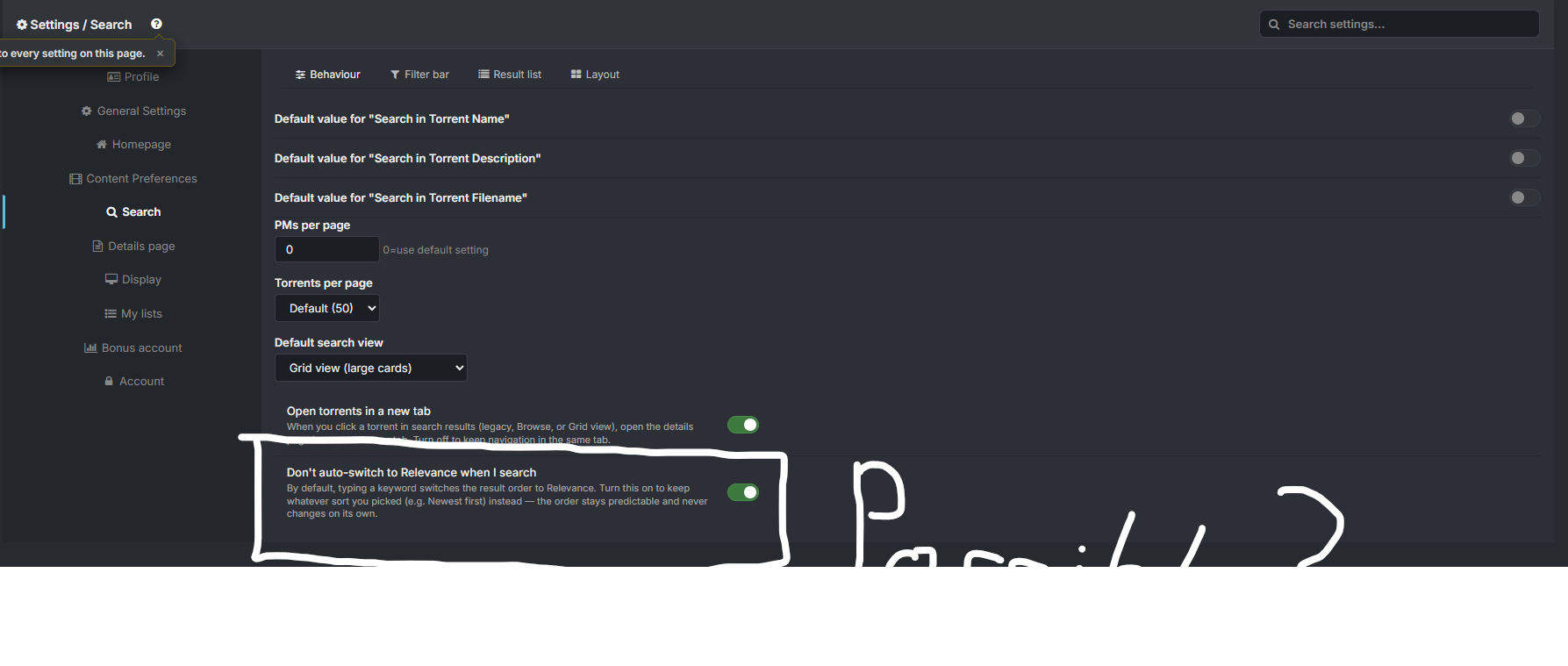
@frostycab Sorry, I understand my second post was not clear. I meant to say that I had looked through the parameters before creating this topic and did not see the option, but after Kevin4fm's first reply, I was able to find it.
Thanks though for trying to help

-
@Kevin4fm Sorry, I understand my second post was not clear. I meant to say that I had looked through the parameters before creating this topic and did not see the option, but after your first reply, I was able to find it.
Thanks
-
So sorry for bumping this, but the site seemingly has introduced another setting that seems to break the current settings and resorts to always sorting by relevance regardless of settings :
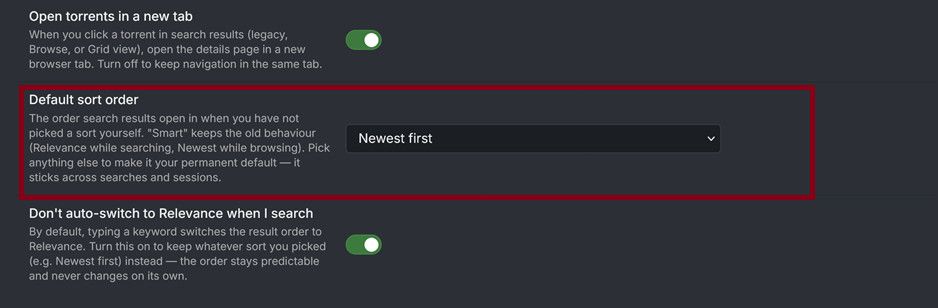
The default was Smart (Relevance when searching, Newest otherwise). I've changed mine to Newest first, but search does not keep this setting. Going to homepage and doing a search :

still results in results being sorted by relevance, and this despite changing the sort order of the results to Newest first and having activated the "Don't auto-switch to Relevance when I search".
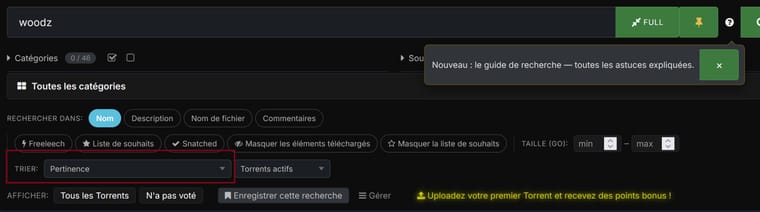
It's very frustrating. Why does this site keep wanting to sort by relevance? Can the owners correct this?
-
So sorry for bumping this, but the site seemingly has introduced another setting that seems to break the current settings and resorts to always sorting by relevance regardless of settings :
The default was Smart (Relevance when searching, Newest otherwise). I've changed mine to Newest first, but search does not keep this setting. Going to homepage and doing a search :
still results in results being sorted by relevance, and this despite changing the sort order of the results to Newest first and having activated the "Don't auto-switch to Relevance when I search".
It's very frustrating. Why does this site keep wanting to sort by relevance? Can the owners correct this?
That is a known bug, ever since the search bar was introduced in the home page, it always resorts to relevance sort regardless of your preferences. But in the proper search page your settings should work as expected.
-
Hi all,
fixed as of today: the search box on the homepage now respects your own choice. If you set a "Default sort order" or switched on "Don't auto-switch to Relevance when I search" (Settings, Search, Behaviour), a search from the homepage opens in that order, the same as from the search page. If you have not set anything, a homepage search still opens in Relevance (best match first), as before.
Thanks to ianfontinell and MaleMan for spelling out exactly where it went wrong.
Joker



Hello! It looks like you're interested in this conversation, but you don't have an account yet.
Getting fed up of having to scroll through the same posts each visit? When you register for an account, you'll always come back to exactly where you were before, and choose to be notified of new replies (either via email, or push notification). You'll also be able to save bookmarks and upvote posts to show your appreciation to other community members.
With your input, this post could be even better 💗
Register Login