[Software Release] GayTor.rent Upload Utility
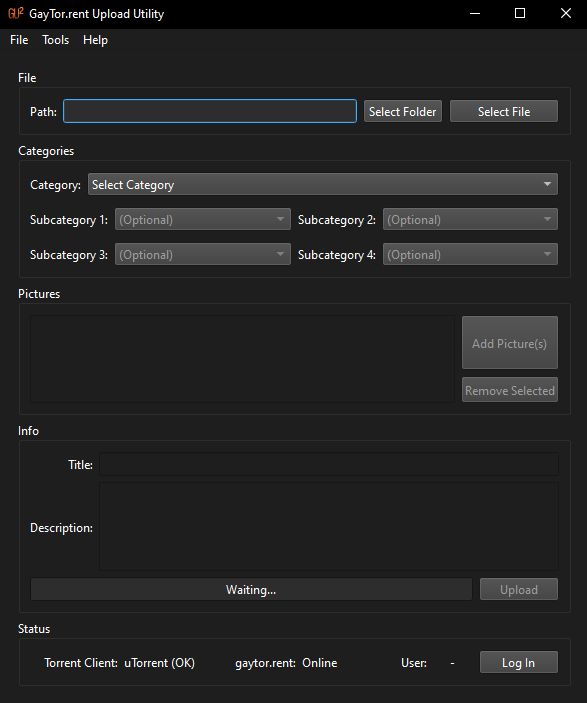
-
@ianfontinell-0 Unforunately no, still crashes everytime I launch it!
-
@guya-0 press Winkey+R, run this and paste the log content here in the topic:
%appdata%\guu\log.txt -
@ianfontinell-0 Here's the log ...
INFO | (null) | "GayTor.rent Upload Utility" 18
INFO | (null) | Showing splash screen
INFO | (null) | Loading settings
INFO | (null) | Loaded settings
INFO | (null) | Checking for updatesThanks for helping by the way, much appreciated.
-
@guya-0 that definitely looks like something is force-killing the app when it connects to its server to check for updates, most likely it's your antivirus, or windows defender in case you don't have any AV software installed.
-
T tnar referenced this topic on
-
System referenced this topic on
-
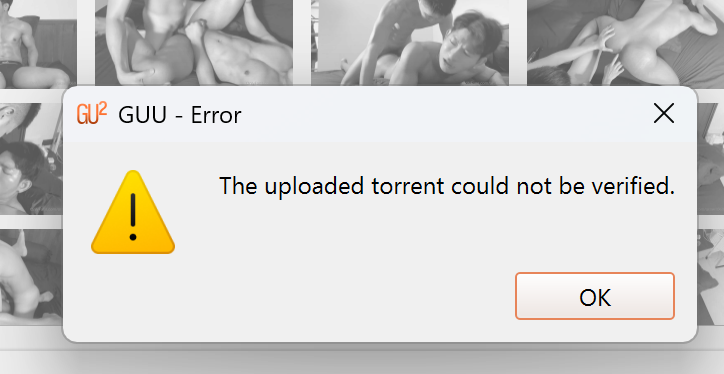
HELLO GETTING THIS ERROR -
HERES THE LOG MESSAGE CRITICAL | (null) | Error downloading torrent: 200 ""
-
@EugeneGabija-0 check if the torrent you just created show up in this page: https://www.gaytor.rent/mytorrents.php
if it does, try downloading it and adding to your client to see if it works.
the 200 response does not indicate an error, it means OK, so GUU likely was able to download the torrent file, and it is probably something else preventing it from checking it.
-
@ianfontinell-0
DO YOU THINK reinstalling the client would help? because problem persists -
@EugeneGabija-0 I'll send you a PM
-
System referenced this topic on
-
P pot referenced this topic on
-
@EugeneGabija-0 Hi, sorry for the late reply, I saw your comment but completely forgot to message you.
Did it end up working or is it still showing the error? I can take a closer look if it still happens, so please let me know. Thanks. -
@vancer while i was assisting we discovered that he had a upload restriction. i would suggest that you add a check before raising the torrent verification error message, to see if the upload really worked, for example checking if the first entry from https://www.gaytor.rent/mytorrents.php matches what was just uploaded.
-
I am having the exact same issue with version 18 running on Windows 10. Virus & Threat Protection says that nothing has been blocked.
-
@mrsean said in [Software Release] GayTor.rent Upload Utility:
I am having the exact same issue with version 18 running on Windows 10. Virus & Threat Protection says that nothing has been blocked.
I got the program to run on Windows 11 on a different computer but I'd still like to know why it will not launch correctly on Windows 10.
-
@mrsean I use W10 and it works fine. Maybe there could be a hint in the Event Log but without being able to replicate the issue it's hard to assess.
-
@ianfontinell-0 That's basically what the verification process does. It checks if the upload attempt is successful (it checks by trying to download the uploaded torrent). Although I guess the message is kind of misleading, I will try to refine the uploading process.
-
@mrsean The logs stop right after "Checking for updates" and the program crashes?
If this is not the case could you share the logs? They can be found at%APPDATA%/guu/log.txton Windows.
I'll do some more testing to see if I can replicate it. -
@vancer said in [Software Release] GayTor.rent Upload Utility:
Checking for updates" and the program crashes?
If this is not the case could you share the logs? They can be found at %APPDATA%/guu/log.txt on Windows.
I'll do some more testing to see if I can replicate it.
Yeah. The logs end right at "Checking for updates" which is the same as the other guy I quoted. -
System referenced this topic on
-
I'm having trouble uploading. Program doesn't accept my credentials, any suggestions?
-
@RiBu22 I believe its a new glitch, so i think we just have to wait for an update
-
@RiBu22 I'm having the same issue.
The error log says, “Could not login: 404.”
Since the official website is currently undergoing a redesign, I think it's possible that this software isn't able to access the authentication page.
As monemoneymon pointed out, I'm hoping for an update.

Hello! It looks like you're interested in this conversation, but you don't have an account yet.
Getting fed up of having to scroll through the same posts each visit? When you register for an account, you'll always come back to exactly where you were before, and choose to be notified of new replies (either via email, or push notification). You'll also be able to save bookmarks and upvote posts to show your appreciation to other community members.
With your input, this post could be even better 💗
Register Login