Dysfunctional external SSD not responding to any fix

-
@Gaylmah-0 I don't know how familiar you are with SATA SSDs specially older ones, so I think it's important to say that it has a finite amount of writing cycles. This is due to a limitation of the circuits where data is stored. After this number of cycles is reached the whole disk becomes read-only as the data already present in it is preserved.
Before that cycle is reached the disk can be "reconditioned" to look healthy, that is done by tampering with usage data and making bad sectors announce themselves as healthy.
Then, when the SSD is being used and the OS tries to write data to those bad sectors, it might corrupt the entire partition or the entire disk.
In situations like this, it MIGHT be possible to recover the stored data using specialized software, but you can't actually recover the storage system's integrity.
The only good advice I can give is: Don't try to save money buying cheap storage, that includes second-hand as well as dubious chinese brands. They are 100% unreliable, you can lose your stuff at any moment.
-
@john32123666 Hi, thank you for your answer. It's one of the first operation I tried. Formatting using Disk Manager failed every time.
-
@ianfontinell Hello, thanks you for your answer.
I didn't know what you said about the finite life of SSDs.
As there is no data I want to recover on this disk I'm not worried about that. What worries me is if I can repair and use this disk but, with what you're saying, it's seems compromised. Damn !Do you know any way to diagnose the disk and find if it is irremediably broken ?
-
Overview of Disk Management :
https://learn.microsoft.com/en-us/windows-server/storage/disk-management/overview-of-disk-management -
@Gaylmah-0 Usually when I've bought SSD's in the past the manufacture has free software specifically for checking the health of the SSD, in particular the total uptime and number of read/write cycles as well as the overall health of the drive. As @ianfontinell said, if it's been reconditioned (hacked, if you prefer to look at it that way) then you probably can't rely on that data now. My understanding is that after too many cycles the storage degrades and becomes physically unviable, not something you can fix through software.
In all honesty I would consider that drive to be a brick and remember this entire lesson in the future. If you have data you care about, don't buy second-hand storage. At least you found out before you put treasured files on there and deleted the originals.
-
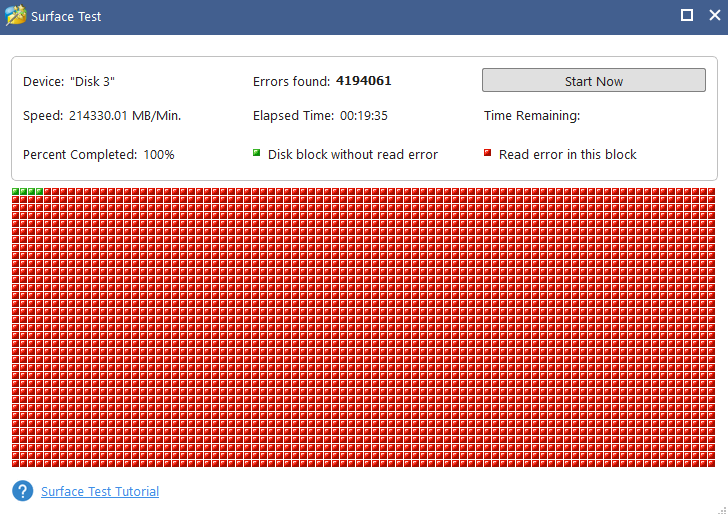
@frostycab As the disk doesn't have a brand I just got another free soft and launched a surface test. I'll put the results here when it's done.
The seller I bought the disk from has a good reputation. Maybe he just formatted his SSD after years of usage and thought it'd be good for a new life. As I bought second-hand HDD in the past with no issue (they're still working) I wasn't concerned about that.
You're right about the timing. However miffing this might be at least there no data loss, only a wound to my finances and pride

-
This is what I got with MiniTool Partition Wizard.
-
@Gaylmah-0 seems like the disk allocation unit [ SEE : https://www.howtogeek.com/136078/what-should-i-set-the-allocation-unit-size-to-when-formatting/ ]
has been altered unless you can revert it from the way it was ...
Have you tried SAFE MODE option by pressing or tapping F8 several times, before PC starts booting ...- The Advanced Boot Options screen lets you start Windows in advanced troubleshooting modes.
You can access the menu by turning on your computer and pressing the F8 key before Windows starts.
Some options, such as safe mode, start Windows in a limited state, where only the bare essentials are started.
https://neosmart.net/wiki/f8-key/
https://www.ricksdailytips.com/enable-f8-for-safe-mode-in-windows-10/
https://www.drivereasy.com/knowledge/how-to-enter-safe-mode-in-windows-10/
https://www.computerhope.com/jargon/f/f8.htm
In many cases I always rely on Windows Options I rarely used 3rd party software ... To diagnose problems ...
[ I have re-formatted several PC's w/ different OS too many times, EXTERNAL DRIVES w/ success ] ...If the hard drives you are trying to save needs over-hauling and re-conditioning ...
[electronic components are damage/altered] let it go, other than it causes severe damage from other personal items you own ...
or ask a repairman ... - The Advanced Boot Options screen lets you start Windows in advanced troubleshooting modes.
-
@john32123666 Thank you.
Will the safe mode offer me better troubleshooting tools ? -
@Gaylmah-0 I cannot guarantee and sometimes you need to learn things and figure out on your own,
However in most cases safe mode will allow you to modify that cannot be fix @normal windows start-up ...
Give it a try and be-cautious ...or if you have an older PC/OS maybe it will work ...
- New Technologies are becoming too complicated now-adays, so you'll need to buy or replace a new one if faulty condition occurs ...
- [FYI : almost all technologies are made or assembled in China due to Cost of Labor] ...
Good Luck !!! ...
 ...
...

Hello! It looks like you're interested in this conversation, but you don't have an account yet.
Getting fed up of having to scroll through the same posts each visit? When you register for an account, you'll always come back to exactly where you were before, and choose to be notified of new replies (either via email, or push notification). You'll also be able to save bookmarks and upvote posts to show your appreciation to other community members.
With your input, this post could be even better 💗
Register Login