Speedtest changes dramatically when I download torrents but doesn't match ul/dl rate.
-
I'm on OX X Ventura, the newest release. Since the change I've experienced extremely slow connection when I have my torrent client, Transmission, running in the back ground. I was wondering why and if there is anything I can do about it.
Also, I've noticed the torrents I'm seeding aren't really uploading and so my ratio is quickly changing. Is this connected to what's happening with with my upload/download rates?
Example:
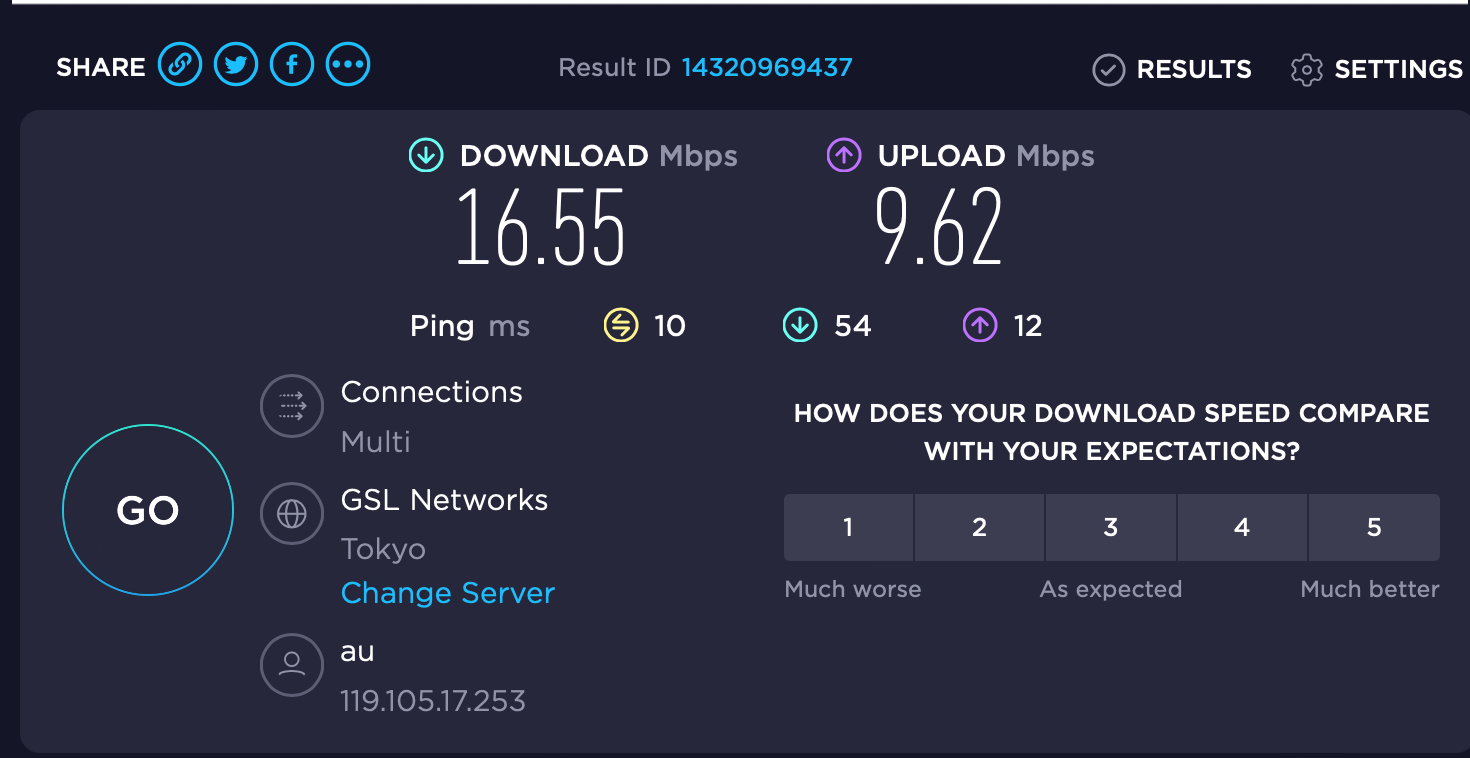
Without Transmissions running, I get UL of 9mps/DL of 16mps.
With Transmissions running, I get UL of 1.5mps/DL of 2mps
But the upload download speeds in Tranmissions is only about 50kps/1mps.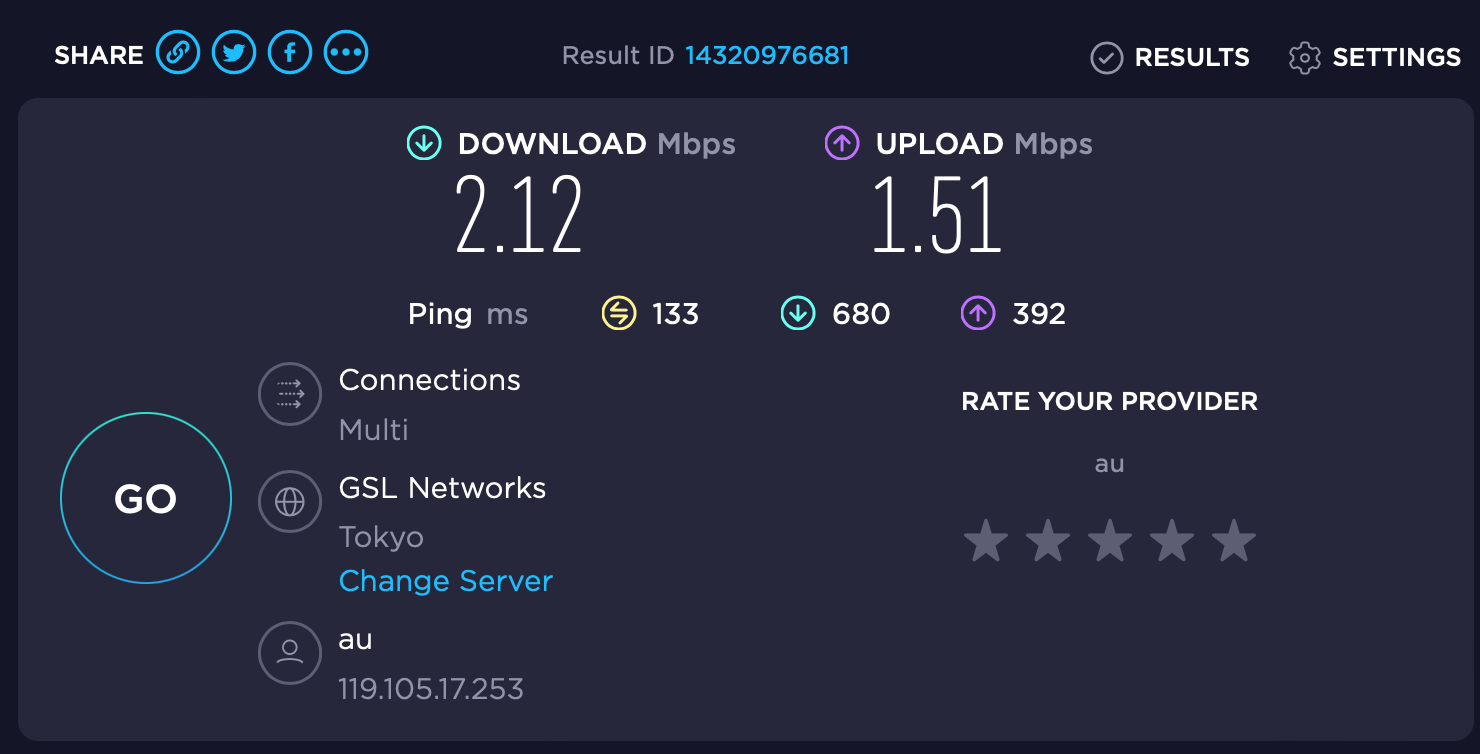
-
(Looks like I can't edit my own comment.)
I wanted to add, that when Transmissions is on, using the net becomes impossible. Everything slows so that I can't even watch YouTube on the lowest setting.
-
In computing, downloads takes a lot of resources [if active] than uploads, regardless of client ...
Finish or limit your download speed 75% or less in order to get a proper operation ...
In torrenting this is normal ...In addition it is not advisable to view or buffer media content while downloading large amount of data content,
this will drastically slows your PC ...
Too many running program will impact everything, and may result lags, freezes, and other technical causes ...
Your speed relies on your bandwidth ... -
I'm not sure if I've totally understood your issue, but I'l give you my take.
In all honesty, speed-testing your connection will only ever give a meaningful result if you don't have anything else using that connection. You have a finite amount of bandwidth, both up and down. If you have any software running that uses some of that bandwidth then you're more than likely going to see your results drop.
To give you an example, for the last 4 years I have suffered under the yoke of an old copper-wire ADSL connection. It started out at about 12Mb/s and has "improved" recently to around 17 or 18. If I have torrents downloading then I can forget using the internet for ANYTHING else. Netflix? Nope. YouTube? Nope. Checking emails? Nope. If I want to stream a film or anything then I have to pause or exit my client until I'm finished. Same thing if I even just want to check the forums or refresh a page.
As for why you're seeing different up/down speeds in your client, I'm not sure. I use BiglyBT, and it seems as though the speed counters are displaying an average speed over the last 30 seconds to a minute rather that the actual speed at that precise moment in time. To get a better idea of where my bandwidth is being used I tend to open Resource Monitor and look at my connections in there, as I can sort them all by current speed.
On the plus side, after fighting to get fibre here for years, they're coming first thing in the morning to connect me. I'll be interested to see what I actually get on my new 500Mb/s line.
-
@frostycab Thanks for the reply. I guess I was asking if I was being throttled or if the newest update to Ventura had some kind of anti-piracy feature that was slowing me down. It doesn't seem that either is the case. From what you're saying, I'm guessing that Ventura just eats up more memory or processing power. In the previous OS X versions, I never had this issue. I could download and watch Netflix and surf.
Hope you enjoy your new connection.

-
@john32123666 Thank you. I'm guessing my issue might just have to do with OS Ventura eating up more resources because with previous OS's, I never had this problem. But what you say makes sense.
Thanks,
-
@cteavin said in Speedtest changes dramatically when I download torrents but doesn't match ul/dl rate.:
Hope you enjoy your new connection.
I wish I could. Engineer never turned up, so after Vodafone initially cancelling my first order without reason or notifying me after waiting 5 weeks, I had to re-order, wait another 5 weeks, and they didn't show up again. Now being told it'll be another 5 working days, so that's going to be next Wednesday now.
30 years ago companies would never get away with shit like this, but now all you get is some poor minimum-wage worker on the phone who can't say anything other that "Sorry." Customer service doesn't matter anymore.
-
@cteavin
Your ratio on the torrent site is not dependent on what you upload from your own computers. The ratio is "complete uploads by all" divided by "downloads by you". If I have that wrong someone will correct me. It may be calculated differently on different sites. Uncompleted downloads are sometimes counted differently - particularly important when you only download part of a torrent with many files. -
@nix54 I might have misunderstood what you said, but I think you've go t that wrong. Your ratio is entirely dependant on how much data you download and upload, and has nothing to do with with the number of individual torrents itself. It is the ratio between the total amount of data you upload across all your torrents on the site dived by the total amount of data you have downloaded via the site.
-
@frostycab
We may be saying the same thing but using ill defined terms. There are two types of upload data: (1) the amount uploaded from a torrent you have downloaded that you keep live and seeding and (2) the amount of data uploaded by others on torrents that you have created and uploaded. The 2nd usually exceeds the 1st by some margin. Your total upload (for ratio purposes) is 1 + 2. Different sites have slightly different rules on this calculation as also they do on incomplete downloads. -
@cteavin This is probably because your ISP is super shady and has started throttling P2P traffic over their network as they are unable to distinguish the difference between legal and illegal P2P traffic.
The only known way to get around this is to use a VPN so that your ISP sees the VPN session and not the P2P traffic within the VPN session. This type of traffic shaping is illegal in Canada without technical justification.




Hello! It looks like you're interested in this conversation, but you don't have an account yet.
Getting fed up of having to scroll through the same posts each visit? When you register for an account, you'll always come back to exactly where you were before, and choose to be notified of new replies (either via email, or push notification). You'll also be able to save bookmarks and upvote posts to show your appreciation to other community members.
With your input, this post could be even better 💗
Register Login