Blank page after uploading a torrent
-
I have tried searching for a similar issue, but the only similar thread lead to nothing substantial.
I am trying to upload a torrent with collection of Yaoi comics, mostly jpg files inside folders, some pdf and a few avi, but whenever I click "Do it!" - it just results in a blank page.
Any suggestions on why this might be happening?
-
It is possible that your session expire:
Clear your browser history cache and try again ...
https://www.pcmag.com/how-to/how-to-clear-your-cache-on-any-browserDO NOT create torrents with following symbols in torrent name: / \ " ' _ , ! These torrents will have problems with seeding on tracker!
If you use µTorrent, don't leave the tracker url box blank, just write http://tracker.gaytor.rent:2710/announce or you may get "missing dictionary key error" after upload!SEE: https://www.gaytor.rent/upload.php |
https://www.gaytor.rent/uploadguide.phpAny other question feel free to write helpdesk: https://www.gaytor.rent/helpdesk.php
-
@john32123666 I have refreshed the page and I do not have issues with uploading other torrents. I did not use any special characters in torrents name. I am not using utorrent, but again - no issues so far with uploading any other torrents.
-
Try to provide a screenshot next time when ever an issue occurs that way someone else can provide a solution ...
Have A Great Day !!! ... -
@john32123666 Screenshot of a blank browser page?

-
@Yura1988 Screenshots. (/assets/uploads/files/1671043525772-www2.jpg)
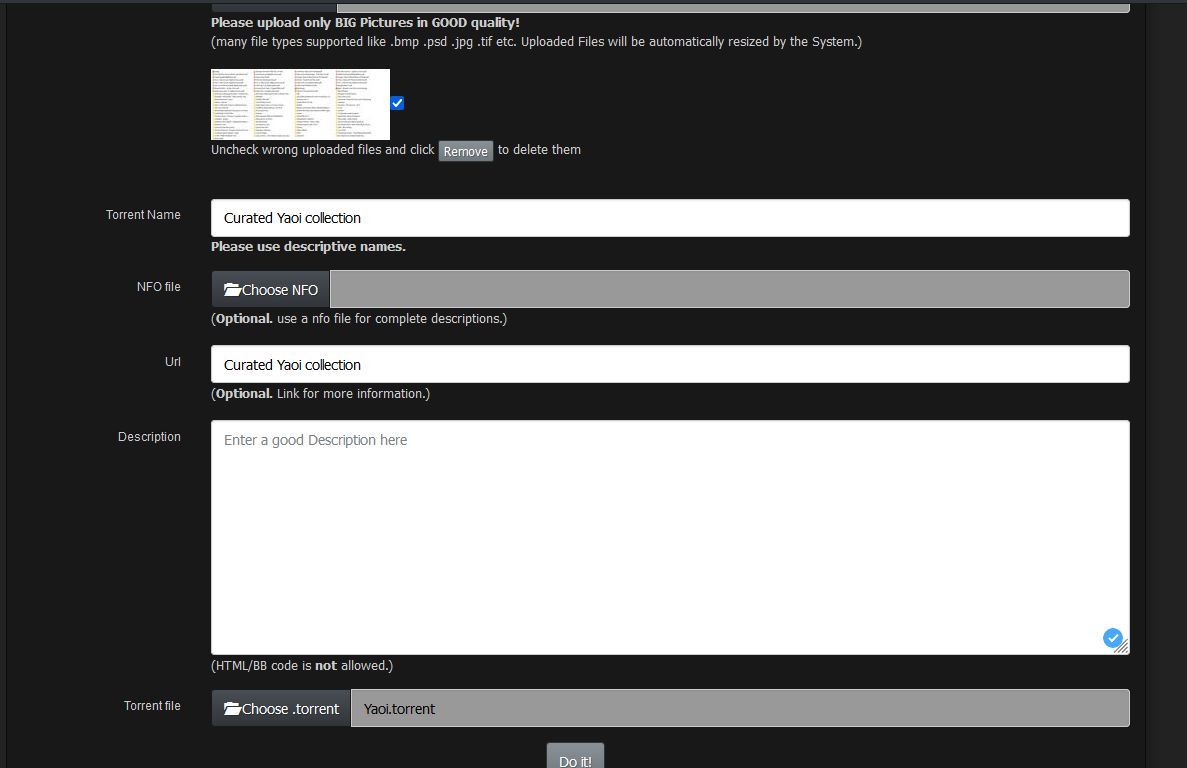 image url)
 -
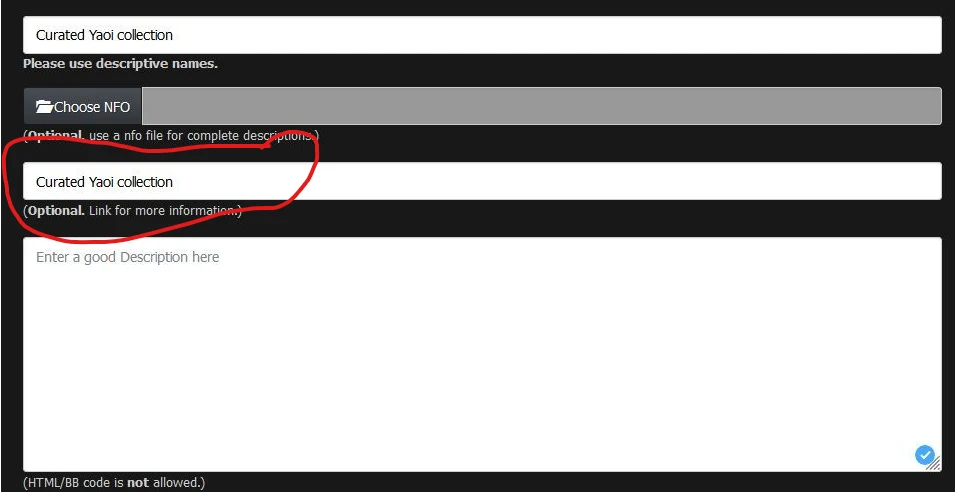
@Yura1988 Screenshots2 because you can't edit or delete posts, which is very bad.

-
Thanks for the screenshot you provided, it is helpful ...
All I can say is that something is preventing you from posting ...
It might be your browser / add-ons / plug ins or your anti-virus ...please write to helpdesk: https://www.gaytor.rent/helpdesk.php
I do not have solution on this and wait for someone who had experience regarding your issue ...
-
In addition leave URL/NFO blank instead, and specify a description [important ...
Locate the torrent file correctly ... upon submission ... -
@john32123666 said in Blank page after uploading a torrent:
In addition leave URL/NFO blank instead, and specify a description [important ...
Locate the torrent file correctly ... upon submission ...After trial and error, I found that it wouldn't let me post a torrent if it had folders, inside folders. I was trying to post a collection of yaoi, which had a lot of authors, and they were sorted by folder, but I had to put them all in the main folder, and it worked then. Kinda weird.
-
Keep in mind : [when posting a torrent] ...
Do not modify or make any changes after torrent is created ...
Otherwise it will result in error and issues ... -
@john32123666 I didn't of course. It simply wouldn't work if there were folders inside folders. I did not touch or modify the torrents, nor I was able to post them, since this resulted in blank page and torrents never appeared.
-
Here's your problem. If this field is filled in, it needs to be a valid URL. Generally, it would start https://
So... Leave this field blank and put what you have in that field in the big description box. This should fix your problem.
-
 M MrMazda marked this topic as a question on
-
@MrMazda Hey. Yeah it was just on screenshot, I corrected it after. It wasn't it. Even worse - after I managed to upload it, next time I got the issue again... then I simply tried again and there was no issue. So it wasn't even folders. I have no idea now honestly and just gave up.


Hello! It looks like you're interested in this conversation, but you don't have an account yet.
Getting fed up of having to scroll through the same posts each visit? When you register for an account, you'll always come back to exactly where you were before, and choose to be notified of new replies (either via email, or push notification). You'll also be able to save bookmarks and upvote posts to show your appreciation to other community members.
With your input, this post could be even better 💗
Register Login