How to seed?
-
I am new to this site and have a warning about my ratio being on the minimum. Now, I am looking for a way on how to increase that through seeding but I definitelt don't know how? Can somebkdy help me? Only have 2 days left.
-
Seeding a torrent is simple: After you've completed downloading a torrent, keep it in your torrent client and leave the torrent client open.
Exchange any seed bonus you have for GB credited to your account.
Check out the Freeleech section and DL a few torrents and seed them to boost your ratio.Vote on your completed torrents to revise 2 seedpoints per vote. >Click ratio > Show completed torrents >click through the list and vote.
If all else fails. you can add missing photos to torrent listings for seed bonus points and exchange them for GB Seeded.
Donate: Donate to the site for GB credited to your account.
As always, be sure to use a VPN/Seedbox for security and to prevent possible DMCA Letters.
-
@dracocksz perhaps the greatest way to build a ration is to download all NEW freeleech torrents, even if you hate them, and seed them for a few days.
Also, make sure your torrent client is actually seeding your torrents. Often, you have to manually FORCE them to seed or FORCE resume.
-
@albo thank you for explaining it.
-
@Dracocksz keep in mind. you can seed until you turn blue.. if nobody is downloading / leeching from you.. you don't get any credit for it.
I would advise you to activate the "freeleech" filter.. and download all NEW freeleech torrents. and seed them for at least 3 days. delete them.. and get more freeleech torrents. That way, you can't lose.
-
@lololulu19 great idea.. I couldn't have explained it better myself!
-
 R raphjd moved this topic from Rules and Information on
-
So how do I do all that stuff about seeding and torrenting? I don't fully understand it.
From what I DO understand, I can download ANY torrent, preferably Freeleech, and then use something like Qbittorrent (I was recommended this a year or two ago) to open/seed the file?
Are there any precautions I need to take, like using a VPN to ensure my own safety?
-
@DeepSeaTide torrenting is basically direct file sharing between computers. You need to torrent client, and Qbit is perfect use that.
When you download a torrent, you download a .torrent file which you open in the torrent client. After a few clicks, you start downloading it (also called leeching). Depending on your internet connection and how many seeders (people who have 100% of the files and are uploading to others) the torrent has, it might complete very fast.
Once a torrent finishes downloading at 100%, you in turn start to seed, ie sharing those files to others.
Now, when you download things on a private tracker like this one, you have to worry about your ratio: the amount you upload / the amount you download. Usually, you need a ratio of at least 1 on average to be able to download (meaning you upload as much as you download. This is to ensure everyone helps each other.
To make this easier, there is a freeleech system where some torrents are made freeleech. This means that when you download a freeleech torrent, the tracker doesn't increase the amount of total bytes attached to your account, however when you seed it, your upload amount increases. If your ratio falls below the minimum, this is how you can get it back up.
About using a VPN, if you're in a country where torrenting is illegal and can get you fined, yes you do need one. If you're unsure about your country, look it up. If you do use a VPN, make sure to bind it to your torrent client (if VPN connection drops, any torrenting activity halts).
-
@DeepSeaTide Interestingly, Albo hasn't been online since a day after his post here, so I'll try to answer for him. If I've read that wrong and I'm stepping on toes, apologies in advance.
First thing: Yes, a VPN is kinda essential as it hides who you are so protects you against legal action by copyright holders.
[Side note: If you don't yet currently have a VPN but plan to, try to find a provider that offers "port forwarding". It's not an absolute requirement to torrent, and few VPNs offer it, but it's a good feature to have. I won't go into why here, so I don't overload you with information!]
How are you currently downloading your torrents? Whichever app you use is often referred to as your 'client'. qBittorrent is one popular client, but there are others such as uTorrent and Transmission. Which is best for you depends a lot on your device, your operating system, and things like that. Personally I do prefer qBittorrent over other apps.
Whichever client you are using to download ("leech") should just as readily upload ("seed"). Once you have fully downloaded a torrent you cease to be a "leecher" and become a "seeder", for as long as you keep the torrent running and you have all of those files available, with their names and file types, etc., unaltered.
At this point, you get to two different seeding states: Availability and actual seeding. You get a small amount of bonus points here just for having them available should anyone want them. You get direct credit for the volume you actually "seed" (upload).
So to maximise what you upload, others need to want download it. A good way to ensure this is to grab new torrents, or newly freeleeched torrents. The advantage of the latter is that whatever you download doesn't count against your ratio. Once you've got them you can seed for as long as you like, but if your storage space is limited it's best to delete them once no-one else is downloading them from you, and replace them with newer torrents there's a demand for.
I may be explaining things you already understand, so I'll stop there. If anything is still unclear, or there's something you think I've missed, feel free to ask.
-
What free VPN do you recommend? I've tried to download a torrent with Proton VPN active, but it wouldn't let me, saying something about how I need to upgrade to premium to unlock peer to peer downloads and file sharing.
-
@DeepSeaTide you can't seed with a free VPN because port-forwarding is a premium feature and only a handful of providers offer, like Proton and PIA. Most VPN providers don't have port-forwarding even for their premium subscribers.
-
So does that mean I can't seed and earn the funny seed bonus here since I don't have a consistent income to pay for a premium VPN and whatnot?
Does this also mean if I try to seed or torrent anyway it'll be VERY risky?
-
@DeepSeaTide said:
So does that mean I can't seed and earn the funny seed bonus here since I don't have a consistent income to pay for a premium VPN and whatnot?Does this also mean if I try to seed or torrent anyway it'll be VERY risky?
About the first part, it is more than just the funny bonus... If you are unable to seed, your ratio will plummet very quickly and eventually you won't be able to download anything.
About it being risky without a VPN, it depends a lot on where you live and what you are downloading. If you are in the US, it is very risky, a VPN is a basic requirement to torrent if you live there.
On most other countries it's not as risky, if you only use torrent for downloading stuff on this site. But if you also use it to download movies, tv shows, music, then it is very risky to do it without a VPN.
-
So since I can't use a VPN and I only plan to torrent and seed stuff from here, I should be reasonably safe as long as I don't do it too much to arouse suspicion from the network providers?
(I'm not in the US)Also, do you know if VPNs like Windscribe or Privado are good? They seem to allow torrenting with the free versions.
-
@DeepSeaTide said:
Also, do you know if VPNs like Windscribe or Privado are good? They seem to allow torrenting with the free versions.I don't know, you could try... Just be aware that free VPNs limit your total traffic so when you download/upload traffic reaches that limit the VPN will stop working.
-
By the way, do you know how to make it so that my VPN's data is ONLY used for seeding/torrenting? I'm currently using Windscribe so I have to conserve my 15 GB of data.
Seeding requires the VPN to be active, right?
-
On a side note, Is it a normal thing to have every download be "Stalled"? Can't quite figure out what's wrong.
-
"Stalled" means there's no activity.
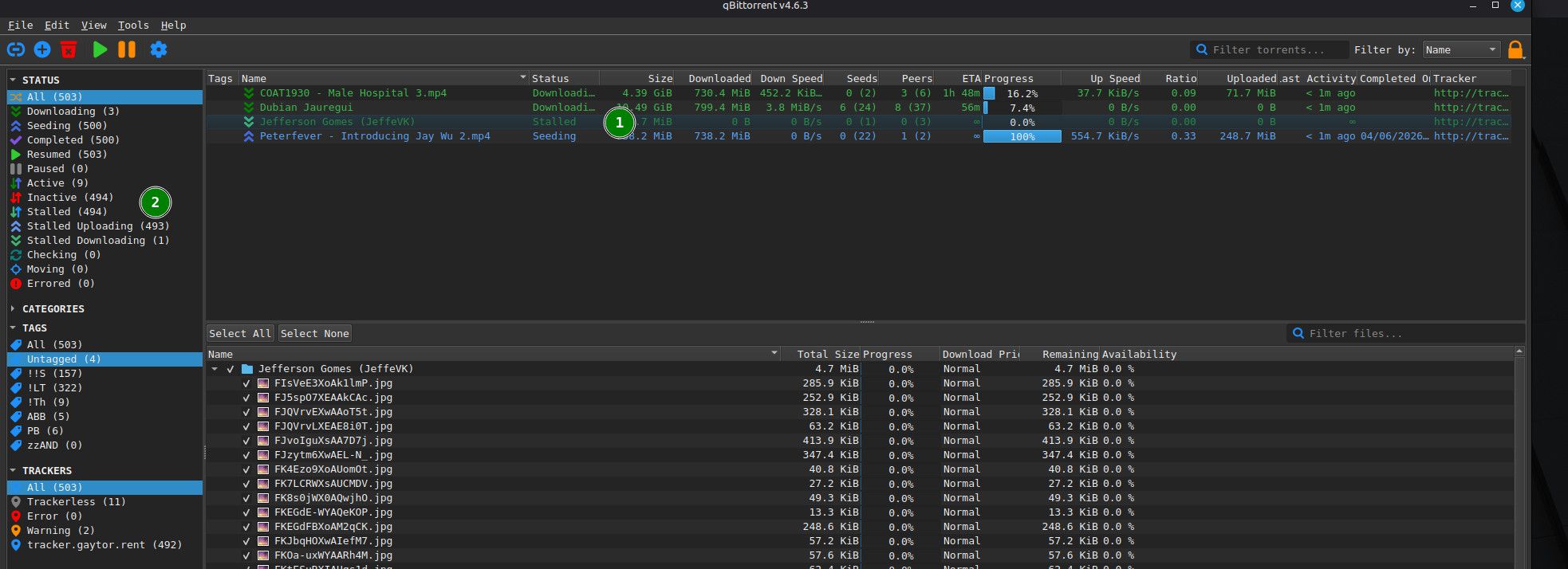
If it's showing in the main window against an individual torrent (1), it means that a torrent either hasn't started downloading yet or the download has been interrupted - for instance the seeder you were downloading from has temporarily disconnected. You're downloading "leeching") it, but it hasn't yet completed.
"Stalled" in the left-hand summary panel is a total of torrents that are not currently active (2). In my qBittorrent, it shows the total, and the split between stalled downloading and stalled uploading. Uploading (or in this case available for upload) show against the individual torrents as "seeding", but with no current activity. These are the torrents you'll get bonus points for - you're not actually seeding them, but are ready to, should anyone want them.
-
Problem with mine is that ALL of them are stalled at 0% and just won't start at all. I've tried to download some from the freeleech section so that I could try out seeding, but nothing is downloading. I think the status in the tracker said "Not working"
But strangely, it started working now as I was typing this and I still have no clue what made it work.
-
Strangely, it seems to go down whenever I switch on my VPN, for some reason. As I mentioned before I'm using Windscribe and I'm pretty sure that is one of the few that allows torrenting with it active. Hmm...



Hello! It looks like you're interested in this conversation, but you don't have an account yet.
Getting fed up of having to scroll through the same posts each visit? When you register for an account, you'll always come back to exactly where you were before, and choose to be notified of new replies (either via email, or push notification). You'll also be able to save bookmarks and upvote posts to show your appreciation to other community members.
With your input, this post could be even better 💗
Register Login