How to seed?
-
You don't get points for seeding. You get points for a torrent being AVAILABLE to seed. So if it's listed as "Seeding" in qB, you get points regardless of whether someone is downloading it or not. There are also other ways of getting bonus points, listed in the Rules here. You get no upload credit for seeding availability, except when you have earned enough points to exchange them for this.
You get no bonus points for the amount of data you actually seed (upload). That is added to the total shown in your member info bar at the top (and in your profile).
Your ratio is the total amount you have uploaded divided by the total downloaded.
-
I think I understand the points thing now. Thanks for the help!
As for the ratio, I'm aaaaaaalmost there.
Since ratio = Uploaded/Download, is the only way to improve my ratio to Seed for someone, not Seeding Availability?
To put it simply:
Seeding Availability = Points
Seeding = Upload Score (Let's call it that) -
So what does this mean in summary? that Port Forwarding is really good and shouldn't be underestimated?
Yes... Especially with a tracker like ours.
-
Seeding Availability = Points
Seeding = Upload Score (Let's call it that)Yup, that's it in a nutshell. You can exchange points for upload credit when you have enough, but the most you can earn per day that way in 40. You can exchange 600 points for 10gb upload credit. So you'd have to be seeding the maximum number of torrents for 15 days to be able to earn enough for it. 10gb is significant when you're new, but the more you upload and download, the less significant it is. I've currently uploaded about 32tb, so an additional 10gb wouldn't have any noticeable effect on my ratio.
The main way to maintain / improve your ratio is, yes, seeding. You can also buy upload credit. Oops. I mean, you can "donate", and as a thank you for doing so, you're given upload credit.
The easiest way to upload is to seed other people's torrents but, as mentioned before, if you have stuff that's not already here you can also upload that as a torrent yourself. The first time you do so, you're entered into a (monthly?) draw, and have a chance of winning a 600 point First Timer bonus.
-
But then how do I earn more Seeding Score quickly or as much as you did? It feels like no one is downloading what I've seeded even though I followed your previous advice of sorting the Freeleech list by "Freeleech most recent".
All of my seeds have an "uploaded" stat of 0, except two which only uploaded a little bit.
-
"Peers" is the number of people that are trying to download the seed, right? What's the difference between the number in and out of the brackets for both Peers and Seeds?
-
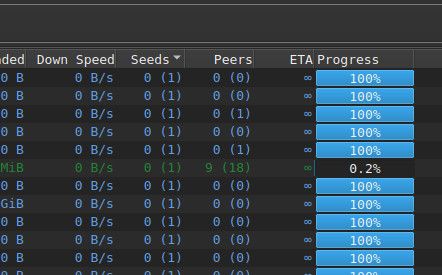
@DeepSeaTide Correct. Peers are "leechers" - i.e. the people trying to download the torrent. Not sure why they're given a different name which only adds to the potential for confusion. Seeds are - as one would expect - the people who have the full torrent contents and are available to upload to others. The total number of each is the number shown in brackets.

So in the line shown in green above, there are 8 people in that torrent's swarm - one seeder and seven peers/leechers.
The number NOT in brackets, is how many I'm connected to. So there is only one person seeding. There are seven people trying to leech, of which I'm one.
Once I have all the files, I become a seeder and there's no reason for me to connect to other seeders, which is why all the blue lines show zero seeder connections. I'm seeding one leeching person in each of the swarms that are shown.
-
So my hunch IS right!
Anyway, I've managed to get SOME seed traffic, but a lot of them is still at 0 B uploaded.Currently, it feels like I must get lucky with a freeleech to have people actively seeding AND leeching at the same time so my upload "Score" can increase.
What would you say is the best way to CONSISTENTLY get people to download your seeds? Like, even if I sort according to Freeleech most recent, Highest Rated, Most Leechers, and a lot more, A lot of my seeds still get no traffic and I've gotta increase my ratio before I'm outta time so my downloads don't get disabled. (I think Freeleech also gets reduced to only allowing 1 download per day?) -
But then how do I earn more Seeding Score quickly or as much as you did? It feels like no one is downloading what I've seeded even though I followed your previous advice of sorting the Freeleech list by "Freeleech most recent".
All of my seeds have an "uploaded" stat of 0, except two which only uploaded a little bit.

Does your qB show the above at the of the app? This is the "Status bar". If not, you turn it on from "View" in the main menu at the top.
Going from right to left, the numbers to the right of the blue 'up' arrows show how much you're uploading right now, as a speed. The number in brackets is how much in total you've uploaded in this session (i.e. since you started qB this time round. It resets to zero when you fully close the app and begins again from zero when you next start it. The numbers next to the green 'down' arrows are the same stats for downloading.
The next one to the left, that looks like a speedometer, is a toggle to switch between standard and alternate up/down speed limits / caps (for times you want to restrict how much you're seeding/downloading. Make sure it's set to the green "Global" option for now, so we know that's not part of the mix.
The icon to the left of that one is your connection status. Is it green like this? Or orange? Hover your cursor over it. A tool tip should pop up to say "Connection Status: ..." What does it say? You may need to fiddle about a bit to get it to pop up - i.e. click something else then come back to it a few times - at least, I often have to on mine.
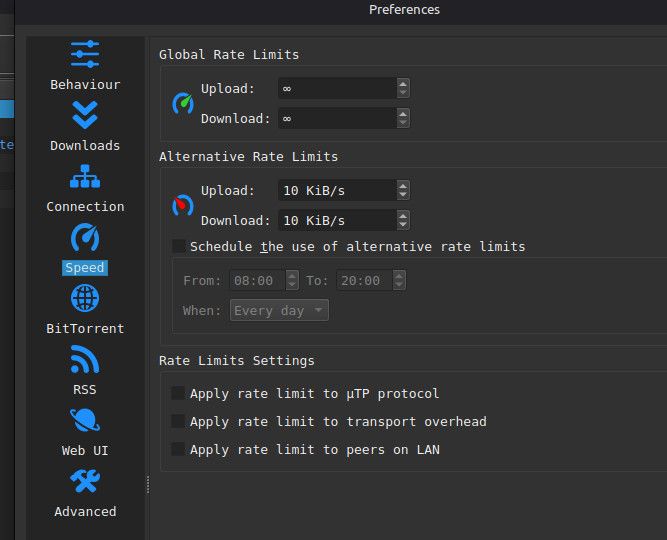
-
Yep, it shows all that. Speedometer is on green and whatnot.
The connection status is perpetually orange if my VPN is on, but sometimes turns green when off. It only ever turns red if the wifi is out.
Like I mentioned, I feel like I gotta get lucky with the torrent for it to get leech traffic. (0% of the time there's absolutely no leech traffic at all.
There was a bit of traffic earlier today, but it's back to zero now. -
@DeepSeaTide OK. The connection thing is a bit confusing (to me!). For ages, mine was also orange too, even though I was uploading and downloading fine. Now it is nearly always green.
Can we start a real time chat? It might be helpful to get some answers to somew specific questions, which it probably won't be helpful to other readers to have to scroll through here in the public forum? I'll send you a DM. Hopefully the old "3 DMs per day" max in the main site doesn't apply here! If it's OK, reply in that. If you'd rather not, just ignore me there!

-
Point of clarification.... Peers are the number of people who are in the pool, whether they're downloading (leeching) or seeding (uploading). The distinction comes in whereas someone who is leeching has not yet completed the download of 100% of ALL the files (and is usually still downloading), whereas a seeder is someone who has downloaded the torrent in its entirety and is able to share the whole thing out with others.
-
@MrMazda But if that's the casew, how can I have torrents with one person seeding (me) but showing no-one as peers? If peers include both seeders and leechers, peers must surely be at least one.
-
@Kevin4fm The particular torrent client you are using is likely calling leechers "peers", even though the "peer pool" consists of any device that can be connected to for that torrent. When you look at the peer pool, you will see a list of IP addresses associated with the torrent, regardless of how many pieces they have, or whether they are seeding or leeching the torrent.
Some torrent clients (such as the one you are using) apparently don't conform to the "standard" terms.



Hello! It looks like you're interested in this conversation, but you don't have an account yet.
Getting fed up of having to scroll through the same posts each visit? When you register for an account, you'll always come back to exactly where you were before, and choose to be notified of new replies (either via email, or push notification). You'll also be able to save bookmarks and upvote posts to show your appreciation to other community members.
With your input, this post could be even better 💗
Register Login