qBitTorrent GT.ru Guide
-
@WikiDude but, how to use rss in qbittorrent? when I double click link in rss page,will return 404 tip.
-
@diulenakexin When you are creating your RSS link there are two fields in the bottom. One is feed type, the other one is login type.
For feed type, selecting web link the feed links will merely go to the specified torrent's download page. The torrent client cannot know if the link leads to a torrent file or not, so it will try to download the given link anyways. In this case you'll have a 404 error. So in feed type you should set it to download link.
For login type, selecting standard (cookies) will make so that the torrent client cannot authenticate with the website because it has no cookie. Instead you should set it to alternative (no cookies).
This will give you a XML file that has both valid download links and the required authentication to download them.
But it will not work because GayTorrent RSS Feed is broken since 2011 and nobody ever cared.
Why: Currently the links inside the XML are valid but they make the XML file invalid. That's because all gaytorrent download links contains the character "&" for identifying and validating portions of the URL. But in XML files "&" marks the start of a reference, meaning it has to end with a semicolon. They need to update their RSS code to add "amp;" right after every single "&" character in the generated XML. This way the XML will be able to be parsed and show valid links.
-
Can you kindly tell what you think is making my qbt client slow and freeze from the jump? It's been like this for 3+ yrs despite updates. could it be the number of torrents? it's in win10

-
@stam8 said in qBitTorrent GT.ru Guide:
Can you kindly tell what you think is making my qbt client slow and freeze from the jump? It's been like this for 3+ yrs despite updates. could it be the number of torrents? it's in win10
The only time I've had performance issues with qBitTorrent myself was when I ran it on a virtual machine with not enough RAM and/or swap space.
-
 W WikiDude referenced this topic on
-
 B bi4smooth referenced this topic on
-
I used qBitTorrent for years but it would create some strange data files whenever it felt like it. I figure that it happens when I select not all, but some of the files to download of a multi-file torrent. Researched but could not solve the problem, so I switched to Tixati.

-
I've been having some really frustrating issues with qbittorrent recently, and I don't really know the cause, because it started recently and resisted to multiple re-installations of different versions.
I noticed that my speeds always start blazing fast when the app launches, and over time it just keeps dropping to mere dozens of kylobytes per second. I also started to experience very poor performance with frequent freezes and the app refusing to close at all, staying in memory forever and forcing me to use the reset button because not even windows can unload it during a regular restart/shutdown.
I refuse to switch to a different client because apart from this big inconvenience it has everything i need, i tried other clients and they all fall short.
-
I used qBitTorrent for years but it would create some strange data files whenever it felt like it. I figure that it happens when I select not all, but some of the files to download of a multi-file torrent. Researched but could not solve the problem, so I switched to Tixati.
thought i'd explain this since i'm already here. torrent files have a fixed piece size, like 4MB, or maybe 8MB, and you cannot ever download "half" a piece, when a piece is request you have to download it fully. Because of this, some files' boundaries share the same torrent piece.
So, suppose you have 10 files, you select only files 2 to 10... In order to get the very first bytes of the 2nd file, you need to download the last bytes of the 1st file, even though you opted for not downloading it. Those parts that you are forced to download even though you don't want, are stored in a special .parts file. When you select all files, there's no need for such file, naturally.
All clients create those files, if you don't see them using tixati it only means the client is storing them somewhere else.
-
@ianfontinell
I'll be damned. Thank You very much for this info, was wondering why this was happening for Years and never found an answer.
 -
@ianfontinell said:
I also started to experience very poor performance with frequent freezes and the app refusing to close at all, staying in memory forever and forcing me to use the reset button because not even windows can unload it during a regular restart/shutdown.I trashed Windows decades ago, switched to Linux Mint Cinnamon and could not be happier. Used qBitTorrent on it for over 15 years and the only problem I 'thought' I had, was that data file thingy you solved for me.
-
hey is it possible to change .torrent files image? now its hard to see if i have photo and torrent on the same folder.
im on windows 11

-
@jokuihmemies Do you mean the icon that represents ".torrent" files?
-
@Kevin4fm yup
as u can see on the picture white and blue... hard to notice which is which in quick look -
@jokuihmemies I've certainly assigned icons to my own "pretend" file type (".xxx" files) but I can't remember how. Give me a sec and I'll ask my AI friend.
Other opinions are also available. They're not right, obviously, but they are available.
-
@Kevin4fm
 ️
️
chatgpt said i cant change it in windows unless i download 3rd party software -
This is what my AI says. I can't test it myself cos I've switched to Linux now. (I'm assumng you use Windows.)
"If you mean changing the icon for an entire file type (e.g. all .txt files or all .xyz files), that's done through the Registry.
Press Win + R, type regedit, and press Enter.
Navigate to:
HKEY_CLASSES_ROOT
Find the extension, for example:
.txt
The (Default) value tells you the file class. For .txt it's usually:
txtfile
Now navigate to:
HKEY_CLASSES_ROOT\txtfile\DefaultIcon
(If DefaultIcon doesn't exist, create it as a new key.)
Set the (Default) value to the icon you want, for example:
C:\Icons\MyText.ico
or
C:\Windows\System32\shell32.dll,70
where the number is the icon index within the DLL.
Restart Explorer (or sign out/in) to see the change."
-
LOL. My AI is also ChatGPT. You realise you can argue with them, right?
Is it possible you're not phrasing the question right? "How do I change the icon used to represent a file type when displayed in MS Explorer?"
-
@Kevin4fm well i copy paste urs to my chatgpt and it say oh yeah ure definitely right u can do it via regedit XDDD duh? xD
but it didnt work tho. ill try again tomorrow gotta sleep now
-
hey is it possible to change .torrent files image? now its hard to see if i have photo and torrent on the same folder.
im on windows 11
just skip the hard work and switch to a different image viewer, imageglass is the best viewer extremely customizable and versatile, and the icons are very distinctive:
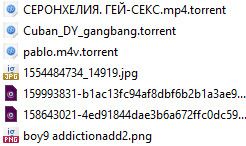
-
 K kanevk crossposted this topicto Gay Topics on



Hello! It looks like you're interested in this conversation, but you don't have an account yet.
Getting fed up of having to scroll through the same posts each visit? When you register for an account, you'll always come back to exactly where you were before, and choose to be notified of new replies (either via email, or push notification). You'll also be able to save bookmarks and upvote posts to show your appreciation to other community members.
With your input, this post could be even better 💗
Register Login