• Categories
    • Recent
    • Tags
    • Popular
    • Users
    • Groups
    • Torrents
    • Login

    Tracker offline?

    Scheduled Pinned Locked Moved GayTorrent.ru Discussions
    113 Posts 64 Posters 2.8k Views 1 Watching
    Loading More Posts
    • Oldest to Newest
    • Newest to Oldest
    • Most Votes
    Reply
    • Reply as topic
    Log in to reply
    This topic has been deleted. Only users with topic management privileges can see it.
    • D Offline
      dwest666
      last edited by

      The tracker's been 99% down for 2 days for me.  My client will occasionally seed for a few seconds, but downloads are not occuring at all. It's like this regardless of whether or not my VPN is running. My client runs 24/7 & I'm seeding 596 torrents, downloading 10 but my stats on this page say 0 up & 0 down.

      1 Reply Last reply Reply Quote 0
      • MrMazdaM Offline
        MrMazda Global Moderator
        last edited by

        Based on a number of user reports, users who are running Transmission 3.0 are having no end of difficulty with the tracker. As well, users who are using NordVPN have also reported that they are unable to connect to the tracker as well.

        When you do try to connect and seed or leech a torrent, is there an error message that you're getting from the tracker, and if so, what is the error message?

        Whap The User
        The only difference between martyrdom and suicide is press coverage!

        1 Reply Last reply Reply Quote 0
        • J Offline
          jordanb911
          last edited by

          I am having the same problem I use surfshark vpn and µTorrent.

          1 Reply Last reply Reply Quote 0
          • DouseikekkonD Offline
            Douseikekkon
            last edited by

            @MrMazda:

            Based on a number of user reports, users who are running Transmission 3.0 are having no end of difficulty with the tracker. […]

            When you do try to connect and seed or leech a torrent, is there an error message that you're getting from the tracker, and if so, what is the error message?

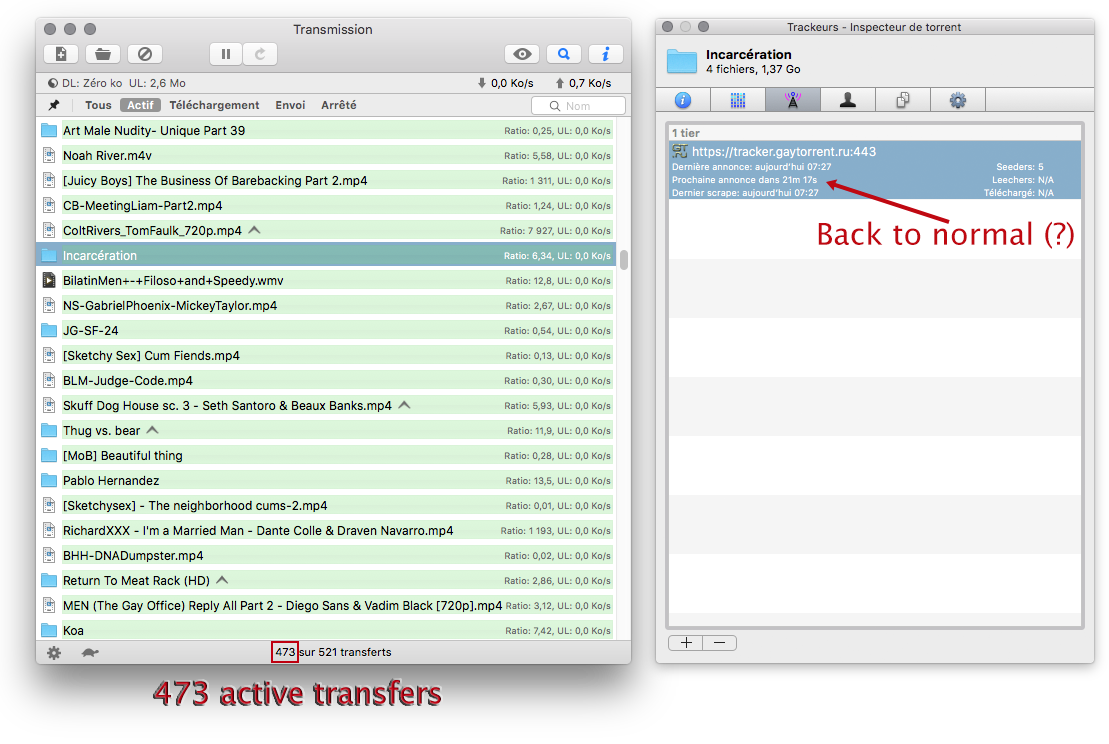
            I'm back to v. 2.94 and, surprisingly, things look back to normal (crossing fingers…).

            I've never had error message per se. But the “announce” process was failing for most torrents:
            • sometimes being delayed by 2 hours, again and again;
            • sometimes the inspector window showing “announce en cours” (announce waiting) indefinitely.

            Also, the number of active torrents seen by the site would appear ridiculously low; I'm seeding several hundreds (now 473) but the site would see only a tiny fraction of that.

            (The attached picture reflects the back to normal situation.)
            Transmission.png

            1 Reply Last reply Reply Quote 0
            • L Offline
              londor
              last edited by

              @MrMazda:

              When you do try to connect and seed or leech a torrent, is there an error message that you're getting from the tracker, and if so, what is the error message?

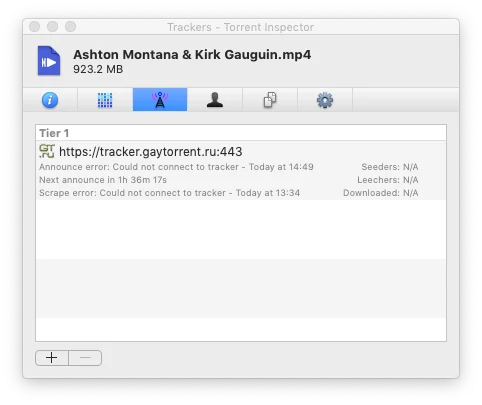
              It just says "Could not connect to tracker"
              1 Reply Last reply Reply Quote 0
              • Y Offline
                yalenxxx
                last edited by

                @MrMazda:

                This will connect to the regular tracker, rather than the SSL tracker.

                IT WORKED!!! sorry for my english.. so everytime i download a torrent I have to change the tracker?

                1 Reply Last reply Reply Quote 0
                • D Offline
                  Daftken
                  last edited by

                  I thought it was an issue on my side! I can seed but download doesn't seem to be working 😕

                  1 Reply Last reply Reply Quote 0
                  • G Offline
                    Girakai
                    last edited by

                    I can download but I can't seed, and I seem to have tried most of the advice in this thread, including disabling the ssl tracker, editing existing torrent trackers to include http://tracker.gaytorrent.tw:2710/ before announce, updating the DNS, rolling back transmission, bouncing around to different VPN endpoints. I'm hoping to be able to get back to seeding/sharing soon 🙂

                    1 Reply Last reply Reply Quote 0
                    • Z Offline
                      zannor
                      last edited by

                      Still not working for me. I'm using the updated tracker but with Bigly or Deluge and I have set my dns to google and cloudflare. But all I get is "Error: Timeout".  I tried using tunnelbear and that seemed to work, but I generally don't use a vpn. I saw that some ips are being blocked because of the ddos attack. Is there any way to get my ip whitelisted?

                      nvm tunnelbear nolonger working

                      …aaaand it worked for a second then stopped working. I changed the tracker to the old url, then back to the new one, and a torrent started downloading, then stopped. I'm just going to assume the issues are persisting and hope they get fixed. Thanks for your hard work!  :dick:

                      1 Reply Last reply Reply Quote 0
                      • P Offline
                        pleniluniosx
                        last edited by

                        Still  not working for me. Im using a Seedbox and my torrents arent downloading/seeding. I cant change the IP address.

                        1 Reply Last reply Reply Quote 0
                        • W Offline
                          winter
                          last edited by

                          same here, been having issues on and off for weeks. 😞

                          1 Reply Last reply Reply Quote 0
                          • S Offline
                            subway1
                            last edited by

                            On my end it started to work yesterday (TM3 client), now all torrents work fine with the default https://tracker.gaytor.rent/ tracker.

                            1 Reply Last reply Reply Quote 0
                            • A Offline
                              Achro2
                              last edited by

                              Not working here either (qBittorent).

                              Tried the tips already (also was already using the regular tracker).

                              1 Reply Last reply Reply Quote 0
                              • T Offline
                                tempdownload
                                last edited by

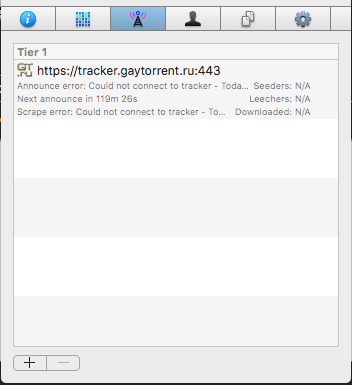
                                I'm using Transmission 3.0 and all torrents still say cannot connect to tracker
                                Screen Shot 2020-06-03 at 11.12.20 AM.png

                                1 Reply Last reply Reply Quote 0
                                • MrMazdaM Offline
                                  MrMazda Global Moderator
                                  last edited by

                                  @yalenxxx:

                                  @MrMazda:

                                  This will connect to the regular tracker, rather than the SSL tracker.

                                  IT WORKED!!! sorry for my english.. so everytime i download a torrent I have to change the tracker?

                                  You can make this change permanent by clicking the "Profile" tab at the top of the page, then disabling the SSL tracker, and saving the changes at the bottom of the page.

                                  Whap The User
                                  The only difference between martyrdom and suicide is press coverage!

                                  1 Reply Last reply Reply Quote 0
                                  • MrMazdaM Offline
                                    MrMazda Global Moderator
                                    last edited by

                                    @tempdownload:

                                    I'm using Transmission 3.0 and all torrents still say cannot connect to tracker

                                    You may find you have no end of difficulty with Transmission 3.0. You may need to roll back to version 2.94

                                    Whap The User
                                    The only difference between martyrdom and suicide is press coverage!

                                    1 Reply Last reply Reply Quote 0
                                    • A Offline
                                      andy2110
                                      last edited by

                                      @jeffr001:

                                      Im using a Seedbox (Pulsedmedia) and my torrents arent downloading/seeding either.

                                      As it's a seedbox I cant change the IP address.

                                      Any ideas? Thanks

                                      I assume you are using rutorrent - if you are go to torrent and then below select tracker tab and you can edit the tracker details

                                      1 Reply Last reply Reply Quote 0
                                      • P Offline
                                        pleniluniosx
                                        last edited by

                                        @andy2110:

                                        @jeffr001:

                                        Im using a Seedbox (Pulsedmedia) and my torrents arent downloading/seeding either.

                                        As it's a seedbox I cant change the IP address.

                                        Any ideas? Thanks

                                        I assume you are using rutorrent - if you are go to torrent and then below select tracker tab and you can edit the tracker details

                                        this is my case, tested and it worked. Thank you

                                        1 Reply Last reply Reply Quote 0
                                        • J Offline
                                          jimmyjames
                                          last edited by

                                          Had the same issue with Transmission 3.0 - redownloaded 2.94 again and is working fine.  :cool2:

                                          @MrMazda:

                                          @tempdownload:

                                          I'm using Transmission 3.0 and all torrents still say cannot connect to tracker

                                          You may find you have no end of difficulty with Transmission 3.0. You may need to roll back to version 2.94

                                          1 Reply Last reply Reply Quote 0
                                          • D Offline
                                            danielhiles
                                            last edited by

                                            For me, I'm using deluge 2.0.3 trying to seed 500+ torrents. Usually about 200 of them report a tracker error and I have to manually "Update Tracker"  or force another announce. Only about 16 torrents get re-announced without error at a time so I just keep re-announcing until all my torrents return OK tracker status. It's probably the DDOS protection feature that's causing it so it's a bit tedious, but manageable.


                                            1 Reply Last reply Reply Quote 0

                                            Hello! It looks like you're interested in this conversation, but you don't have an account yet.

                                            Getting fed up of having to scroll through the same posts each visit? When you register for an account, you'll always come back to exactly where you were before, and choose to be notified of new replies (either via email, or push notification). You'll also be able to save bookmarks and upvote posts to show your appreciation to other community members.

                                            With your input, this post could be even better 💗

                                            Register Login
                                            • 1
                                            • 2
                                            • 3
                                            • 4
                                            • 5
                                            • 6
                                            • 2 / 6
                                            • First post
                                              Last post