Creating a files list
-
A lot of you probably know this, and if you know of a quicker method I would love to hear it!
Say you are uploading a folder containing a collection of files and you want to include a list of them in your torrent description, obviously typing the names individually can be time consuming.
For the purpose of simplicty the collection is stored in c:\collection (collection can be any named folder)
open a dos prompt
cd\collection
dir >list.txtThis will create a text file called 'list' (you can choose any name you desire) containing the directory listing of all files in the folder 'collection', you can now open it with any document editor, select the text you want and then copy and paste it into the torrent description.
-
 Information!!
 -
A lot of you probably know this, and if you know of a quicker method I would love to hear it!
Say you are uploading a folder containing a collection of files and you want to include a list of them in your torrent description, obviously typing the names individually can be time consuming.
For the purpose of simplicty the collection is stored in c:\collection (collection can be any named folder)
open a dos prompt
cd\collection
dir >list.txtThis will create a text file called 'list' (you can choose any name you desire) containing the directory listing of all files in the folder 'collection', you can now open it with any document editor, select the text you want and then copy and paste it into the torrent description.
To include subfolders add /s:
dir/s >list.txt -
Hi all

Old time is back again, with all those /a /b /o /p and many others I forgot lol
James, as you will see in the attached pic (it's one of your torrent), you can also click on "File List" and it automatically displays all files names and corresponding sizes, ordered alphabetically, another great feature in this wonderful site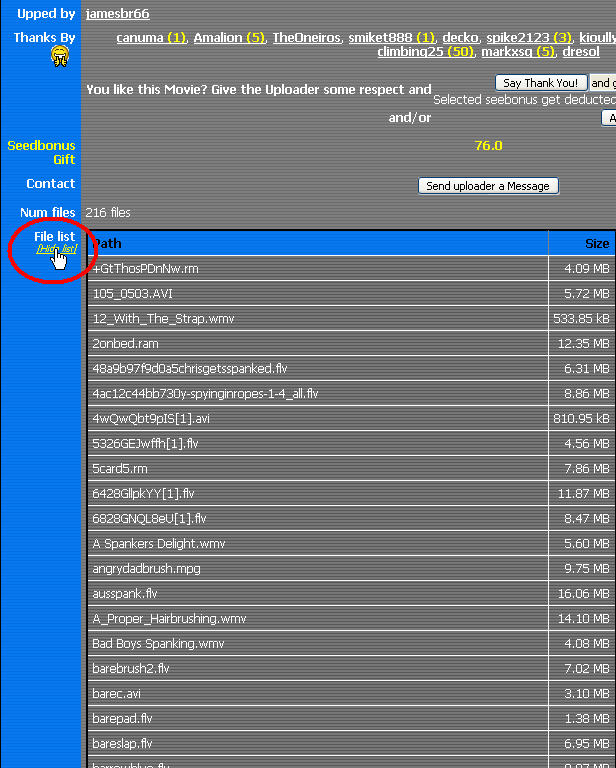
-
I'm kinda lazy when it comes to this so I let my computer do it for me.
How, do you ask?
This article shows an easy way to set it up in the context menu if you use windows explorer.
hxxp://www.theeldergeek.com/file_list_generator.htmI use this in the batch file to get only the filenames.
dir /a /b /-p /o:gen >filelisting.txt -
Hey Brandon
Well I wasn't really far with my "abop" lol
As far as I remember, Noughty's /s is very important in case there are sub-folders.What's incredible is this : how is it Micro$oft NEVER added a native Windows utility to create those folders/files lists since Windows appeared (in 199x ?)
Because some guys just never know anything about .bat files or Dos Prompt . I know users that start to shake as soon as the screen is black as night and it displays C:>
During the years, I found a couple of Windows external utilities to manage that kind of listing, but I always come back to the "old" dir command, after entering the Dos Prompt
And if I forget the switches, then dir /? is a big help
Especially if you redirect the help in a txt file for future analysis: dir /? > dirhelp.txtThe most difficult part when you're back in Windows ?
Where was this dirhelp.txt saved ? I can't find it anymore :crazy2:That's why I changed the Properties of the Dos prompt to always start in C:\ ;D
-
Generally it will either save in your user account folder, or in the folder you execute the command from
-
Anyone had a problem with folders like [Downloads]? Can't I use this if there are "[" in a folder name? This is kinda stupid, they shouldn't allow "[" in folder names if it messes everything up. And it does as the path can be found only till this folder.
-
I'm thinking that may be something either specific to your machine or specific to Microsnot Winbows Vista as I have not been able to duplicate such a problem running in a Winblows XP or Winblows 7 environment.
-
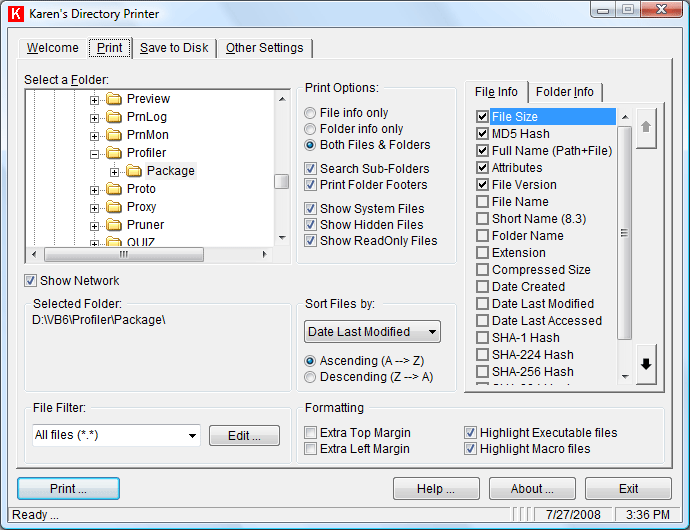
I'm not sure if it's allowed to post or mention, but there is a free program out there called Directory Printer. Its Fantastic!!! The features allow you to print only those things you want.
There are a lot of free programs offered here, but here's the link to Directory Printer.
hxxp://www.karenware.com/powertools/ptdirprn.asp
If I'm not suppose to post this type of thing, please delete this post. I just figured since its free and open source it would be ok.
-
AS long as the link is not a "live Link" ~ does not go to Wooptydoo as a redirection to the site.
-
I'm not sure if it's allowed to post or mention, but there is a free program out there called Directory Printer. Its Fantastic!!! The features allow you to print only those things you want.
There are a lot of free programs offered here, but here's the link to Directory Printer.
hxxp://www.karenware.com/powertools/ptdirprn.asp
If I'm not suppose to post this type of thing, please delete this post. I just figured since its free and open source it would be ok.
Thanks for the program, will try it out






Hello! It looks like you're interested in this conversation, but you don't have an account yet.
Getting fed up of having to scroll through the same posts each visit? When you register for an account, you'll always come back to exactly where you were before, and choose to be notified of new replies (either via email, or push notification). You'll also be able to save bookmarks and upvote posts to show your appreciation to other community members.
With your input, this post could be even better 💗
Register Login