Uploading only when download
-
hi,
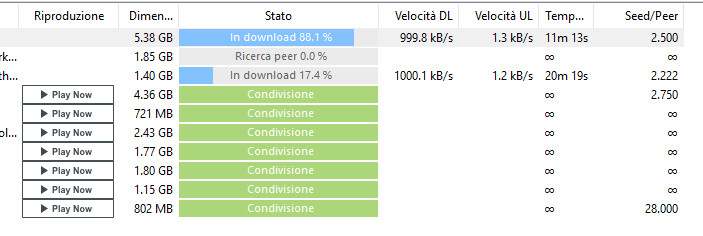
i have a problem for upload (sharing).
When add a torrent in my client (have tried utorrent, bitorrent, and other), the download and upload starts.. but when finish the download and leave the files in share, the upload is stopped or sometimes is very very slow (0,1 / 0,2 Kb).
can help me to solve ?
tksps
sorry for my english
-
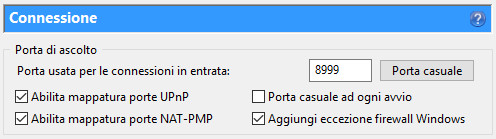
This often happens when you do not have the correct ports forwarded through from your router to your computer. Check what ports your torrent client uses and forward that same port number both in TCP and UDP to your computer. This should resolve this problem and get you up and running in no time.
-
This often happens when you do not have the correct ports forwarded through from your router to your computer. Check what ports your torrent client uses and forward that same port number both in TCP and UDP to your computer. This should resolve this problem and get you up and running in no time.
Just a suggestion for adding to your response about the port forwarding. You wrote a fantastic post explaining how to do port forwarding in TCP and UDP a couple of months ago (and I wish I had saved it) but it helped me solve all my problems. It contained info about the port forwarding program and the information being on their site as well as some great suggestions. Just hoping you have the info handy to add to your response. By the way, thank you for the help you provided in the previous post, it was clear, easy to follow an solved all my problems. I would have posted a thank you to your post but was new to the forum and didn't know how to find the thread to say thank you there. :thx:
-
hi, tks.. have checked again the port number and the forwarding into the router.. but it's all ok (i think).. need to use another number port ??

-
If 192.168.1.10 is the local IP of your computer, yes. You can check that on your computer's network connection settings.
There might be another firewall than the windows firewall on your computer, e.g. from your internet security suite (aka anti virus software).
Check if there is an exception for incoming connections on that port. -
already checked.. nothing.. also if i disabled all software antivirus/firewall.
Also the check of the connection (inside torrent client) is all correct.
The strange things is that sometimes start the upload .. but only for a bit seconds/minutes


Hello! It looks like you're interested in this conversation, but you don't have an account yet.
Getting fed up of having to scroll through the same posts each visit? When you register for an account, you'll always come back to exactly where you were before, and choose to be notified of new replies (either via email, or push notification). You'll also be able to save bookmarks and upvote posts to show your appreciation to other community members.
With your input, this post could be even better 💗
Register Login