How big is your porn folder?
-
@cp2000 if you live in U.S. try main store like Walmart or Best Buy ...
Amazon External HDD or SSD drives are expensives ...
I am using those portable Toshiba/Canvio & SeaGate External HDD not SSD ... They have highest capacity however I'm not into ... { I prefer 2 TB - 5 TB individual }-
https://www.walmart.com/c/kp/toshiba-external-hard-drives |
https://www.walmart.com/browse/electronics/seagate-external-hard-drives/3944_1089430_132959_1956376_3011786
They are portable cheaper and save space ...
Edit :
AI Overview
The highest capacity external storage towers currently available feature massive capacities, with HDD towers reaching 28TB+ (e.g., Seagate Expansion 28TB) and high-end enterprise SSD solutions reaching 60TB-100TB (e.g., LaCie 60TB, Nimbus ExaDrive 100TB). Desktop HDD towers like the WD Elements are best for cost-effective, high-capacity archival, while external NVMe SSDs provide superior speed for active editing.Highest Capacity Options by Type
External SSD Towers/RAID (Highest Performance): LaCie 6-bay/8-bay rigs are among the highest capacity, offering up to 60TB or more using SSDs for extreme speeds in a tower format. Enterprise-grade drives like the 122TB Solidigm D5-P5336 are also available but designed for specialized data center use.
External Desktop HDD Towers (Highest Capacity/Value): The Seagate Expansion 28TB (single drive) offers some of the highest single-unit consumer capacity. For multi-drive towers, options typically hold 20TB+ per bay.
Best High-Capacity Choices:
Best Enterprise/Workstation SSD: LaCie 6big/12big (48TB-60TB+).
Best High-Cap Desktop HDD: Seagate Expansion 28TB or 22TB.
Best High-Cap Desktop HDD: WD Elements 18TB-20TB.When choosing, consider that HDD towers offer the best price-per-TB for backups, while SSD towers provide significantly faster transfer speeds for media production, albeit at a much higher price point.
The highest capacity external storage available currently reaches up to 28TB–36TB for HDDs and over 30TB for specialized external SSDs. Seagate Expansion offers external HDDs up to 28TB, while enterprise-grade drives like the Seagate Exos reach 36TB. For SSDs, high-capacity enterprise units like the Glyph Blackbox Plus offer up to 30.72TB.
Top Highest Capacity External Storage Options (As of early 2026):
Highest Capacity HDD (Desktop/Archive):
Seagate Expansion: Up to 28TB (3.5-inch desktop).
WD Elements/easystore: Commonly available in 14TB–18TB options.
Enterprise External Units: Specialized units can house 36TB+ drives.
Highest Capacity SSD (Portable/Production):
Glyph Blackbox Plus: Up to 30.72TB SSD.
Common High-Capacity SSDs: Models from SanDisk and Samsung (e.g., T7 Shield) usually cap out around 4TB for mainstream portable use.
Key Considerations:
HDD: Ideal for cost-effective, massive storage (20/TB deals available) but slower.
SSD: Ideal for speed, durability, and portability (1,000+ MB/s), but much higher cost per terabyte.
Form Factor: 3.5-inch desktop drives offer the highest capacity (require power outlets), while 2.5-inch portable drives cap around 5TB–6TB. -
-
around 3 terabytes

-
49.64 TBs as of August '26.
Built out a huge home lab for professional certifications. TrueNAS with 3 expansion shelves on an R730xd.
Sad thing is, that 50TiBs doesn't account for 20% of total storage.
I think the real problem is, that gay porn folder is almost 2x the size of my Plex content, both TV & Movies. I gotta put my *arrs to work better.
Anyone who has experience with StashApp: How difficult is it to generate hashes for a massive library? Also, I have a lot of OF content; is there an indexer / scrape for the fan sites?
-
@epdravis2 With Stash you just tell it which folders to scan into your library and it will index them all. While it's doing that it can also be set to generate all of these, though be aware that it will take a looooooong time with a library of that size.
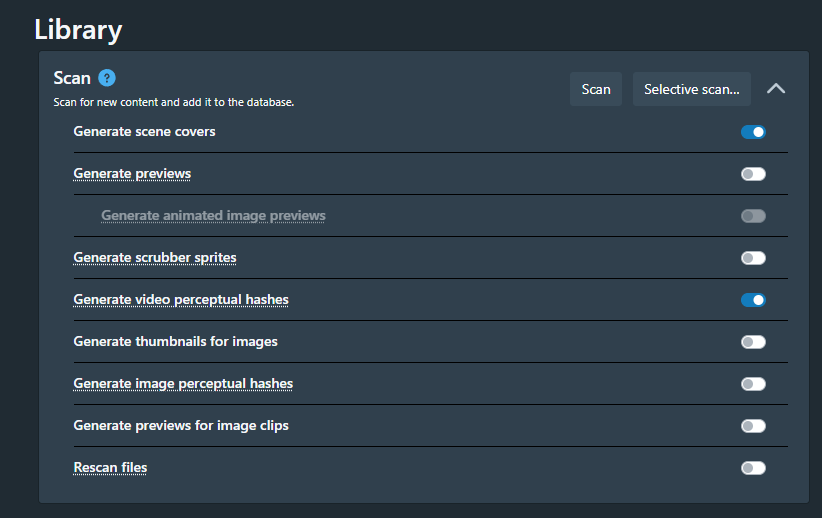
I just get mine to make a scene cover and phash for each one and it can take a while just to do a couple of thousand files. It can also start to eat up disk space quite rapidly if you include animated previews and scrubber sprites, but they're nice to have. My advice is if you're going to give it a go then just start with a small folder and see how long it takes to churn it out, then decide if you want to let it run for a couple of weeks to do your whole library. LOL
As far as I know there aren't any scrapers for the fan sites, but that's hardly surprising as the perceptual hashes would struggle to differentiate between a lot of the cam shows and such given that if you've seen one show from a performer then there isn't much difference between that and the others. I have all my amateur stuff sorted into folders, so I just point at a folder, select all the entries and tag them with the performer. If I had a few years to spare I'd go through and add tags to all of them, but I don't think it's worth the time and effort.
If you need help then drop me a DM, but be aware that I've barely scratched the surface with some of the features. I've got it doing what I need it to so happy to live with it as is, but I occasionally try to play with something new before I realise I lack the know-how.
-
@frostycab I didn't know about stash. Pretty neat. I used to use plex ages ago but now I guess they've become some sort of netflix thing? I miss when it was less... corporate. Hopefully stash doesn't go that way.
-
@frostycab
I think my real challenge behind it is, I'm a Perma-Seeder; I never stop seeding once I've downloaded. As a result, I don't have any organization or sub-folders within my collection; it's all just dumped into one giant folder I use for seeding it all out. (I suppose I could start to use categories in qBT and organize that way, but...)
I'm assuming that once Stash finds a match, it'll rename the file(s), the way Sonarr and Radarr do? Doing so breaks the ability to seed it out.
Hmm. I could hard-link a copy of the library, which would let me continue to seed the original file name, and then have a mirror I could play with using Stash...
The box that would be hosting Stash is also my storage array, and it's got plenty of compute and RAM available, so i might just turn it loose on a copy of the library and see what happens.(Also, mods, if this needs to move to a new thread, apologies, and will do.)
-
@epdravis2 Stash doesn't rename files unless you want it to and use a plugin to do it. As standard the files retain all their original properties, so when you use scrapers to ID vids any names or metadata it pulls with scrapers just affect the internal database entries. The original file isn't modified in any way. Be warned though that if you use the delete button you will first get a warning dialogue and clicking delete there WILL delete the file itself. Should you end up with entries for files that you have actually deleted yourself then use the CLEAN function in the Tasks screen as that will just remove broken associations within Stash itself.
Having everything in a single folder won't stop Stash from doing its thing. It will make it harder to run tasks on a small section of the library though. Bear in mind that whenever you run a scan to find newly added files it will walk through the entire directory structure unless you tell it to limit the scan to specific folders. I already had my folder partially sorted before I started with Stash so just continued on, and it has made it easier to attribute amateur stuff to the right performers.
I reckon that so far I've only organised about a third of my library thanks to Stash. It's not a silver bullet that will solve all of your curating needs, but it does do a lot for you. When I first worked out that I didn't need to go and scrape every individual scene manually and instead just ran the Identify task it filled in data for over 30000 files that were on my to-do list.
It currently only scrapes scenes, not full films, so if you have an entire DVD rip you often need to enter data manually, though I often find that if I have a quick look I'll already have the whole thing as individual scene somewhere anyway.
My advice, since you seem to have the space and runtime to do it, is to create a new folder and copy/paste a small chunk of your stuff (literally just 10-20 files) into there then let Stash run loose on there so you can get a feel for it. If you like it then you can throw it over the fence at the main repository.
-
This post is deleted! -
@epdravis2 said:
Also discovered that there's a distributed node script you can run to move the phash function across multiple CPU nodes. Since there's a 40Gb backplane here, might have to put that to use.
Uhhhhhh...... OK?

-
I'm sorry, but now it's around 2TB

-
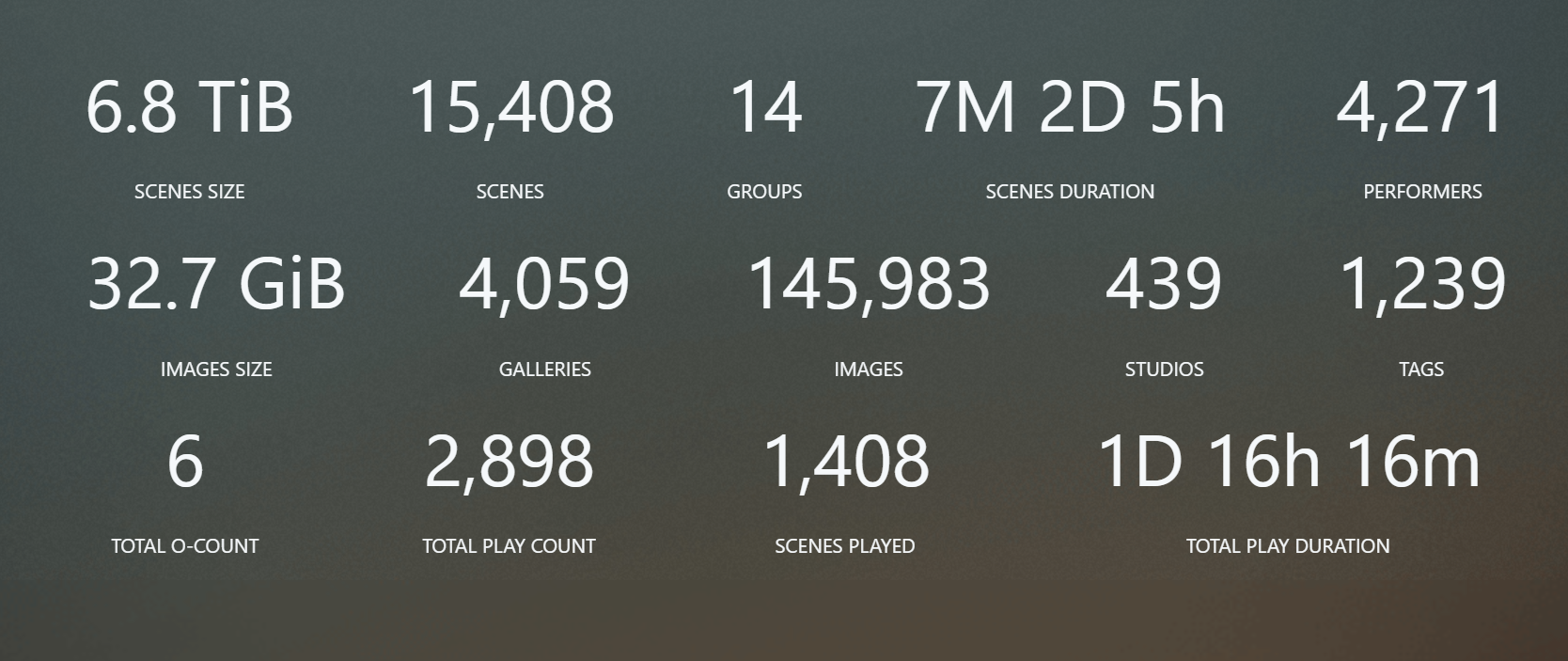
I've been collecting stuff since i was 15 in 2002(mainly photos then). if i had the storage, it would be way more.
These statistics are from my stash.
-
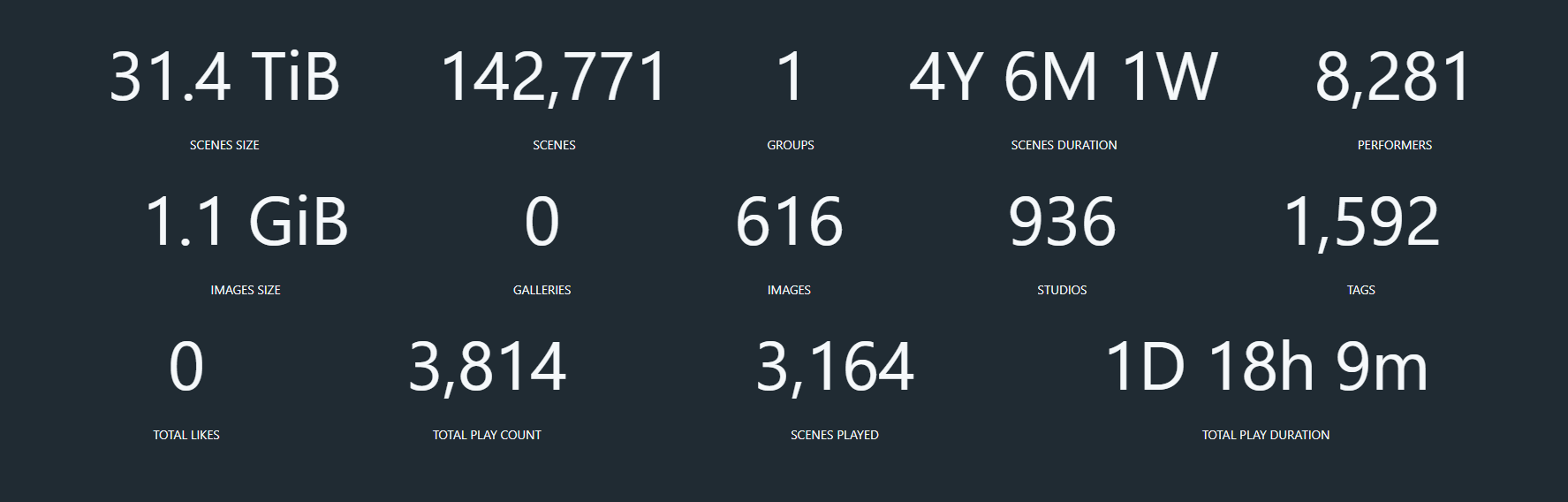
I've been collecting stuff since i was 15 in 2002(mainly photos then). if i had the storage, it would be way more.These statistics are from my stash.
Amateur
-
@frostycab i can see im with good company.

-
I have 2.50 TB LOL!!!
-
I have 2.50 TB LOL!!!

-
According to TreeSize, my drive is 5.1TB, with 6,002 videos. Everything is categorized by Studio/Website




Hello! It looks like you're interested in this conversation, but you don't have an account yet.
Getting fed up of having to scroll through the same posts each visit? When you register for an account, you'll always come back to exactly where you were before, and choose to be notified of new replies (either via email, or push notification). You'll also be able to save bookmarks and upvote posts to show your appreciation to other community members.
With your input, this post could be even better 💗
Register Login