Difference between utorrent upload stats and my profile
-
Hi all,
I've been reading through the forums to try to build my ratio back up. I removed all of my old available seeds (all downloaded, no original uploads) and downloaded 3 torrents. Once they finished I left them seeding. The stats in utorrent show I've uploaded 1.49GB of the "Cory vs Shane with Sean" torrent but my profile shows I've only uploaded 399.76MB.
What can cause such a great gap between the two numbers?
Any help is greatly appreciated,
JR -
This site uses only 'per session' (on the fly) statistics; what you see, is how much you have seeded per session (until you close your client), thus once you stop your seedings, rest statistics credentials are sent to the tracker and added to your previous records.
-
I was counting the statistics of how much I was uploading and noticed that several of the files showed a very large discrepancy between what was uploaded and what is being shown on my list of torrents. I am using uTorrent 1.8.1. I read another topic "the bad news" about uTorrent. So to insure that I could get the correct statistics. I closed everything properly (i.e.) pause the torrent and then exit. Now everything I am seeding shows a zero statistic. Can someone help?
Thanks, Alex -
There are 2 types of ratio on the site; overall ratio and current session ratio. On site, you only really need to worry about your overall ratio. To keep from over seeding, keep an eye on what your client says.
The overall ratio always updates and stays current, while the current session ratio resets every time you close down your client. I believe the current session ratio resets {for that particular torrent} every time you stop a torrent, even if your client is still active.
-
I noticed that the ratio stats (in the grey bar at the top of the page) are updating but only occasionally…I seem to remember this being discussed on demonoid forums but forgotten what the reason was...but if I stop the torrent it seems to update there and then (tracker gets it's update flag turned on??)...
Updated:
Now it is updating almost with every page refresh :o....this is strange because I didn't do anything ...I have 4 torrents seeding 2 of which are actively u/l -
OK - thanks now I understand the statistics and differences - makes sense..btw I noticed our u/l speeds are about the same so I don't feel so bad (that my bt client is doing a bad job)…what a great site !!

-
@ mikeemountie
There are several reasons that the your stats updated slowly {internet congestion, etc}. Without checking your profile and knowing exactly you had the problems, I can't give you any more info on why it happened.
We don't use the same system as Demonoid. Ours updates every 30 minutes {based on when you turned your client on}, while theirs updates every 24 hours {about 9am UK time}.
-
Would you please explain, again, the reason why there is a difference between the u/l stats calculated by the my software and my profile? In my case, the software says 1.4 G was uploaded while my profile says 133 MB. Thank you, Grandpa
-
There are different items to consider:
A/ Your torrent programme updates our tracker each 30 minutes about up- and download. If you don't STOP a torrent before closing the torrent programme is closed, you will loose the stats since the last update. Note each torrent runs on it's own schedule. In Vuze/Azureus you can see that schedule counter in the "Details" view, in µTorrent/BitTorren in the "Tracker" tap on the bottom of the main window
B/ The UL and DL below the blue band shows the accumulated statistics of all these updates for all your torrents since the account was created.
C/ The UL and DL in your Profile's torrent list or a torrents peer list shows only the stats since your actual start of the torrent., e.g. lets say today 15h00 until now, minus missing since last tracker update (it is what is meant with session based). This compares to your torrent programme, which accumulates per torrent all stats since you put it into it, e.g. yesterdays and before days activity before you stopped shutting down your torrent programme or PC, too.
D/ Note there is a short delay between tracker update and it get's visible on the site. In addition once you reach important absolute UL and DL amounts only long time periods will give a visible change because of the resolution only large UL and DL changes are visible, e.g. if expressed in TB you need a change > 10 GB to see a change in the last digit.
Hoping this clarifies a little.
Uwe
-
Hi, new here but not to torrents….
I'm currently seeding 5 files. All have uploaded something--a few, very small amounts; several, 3+ gigs each. That is according to uTorrent (most recent version)... on my end. Here, however... the amounts seeded are not accurately reflected on my Profile page. Neither do they show up if I go to the torrents and look under the list for peers.
So basically I can't tell if things are working quite as they should or not, because my overall stats are in--approximately--the right range, and I am getting bonus points for hours spent seeding.
--I have tried normal things like pausing, then stopping torrents while logged in here; then logging off; shutting down browser; clearing cache; logging back on; and then restarting torrents, one by one.
--I am connectable, ports forwarded correctly
--I seed at other sites, all private. All are reflecting statistics accurately.
Again, it is quite possible this site is also reflecting statistics accurately in a big-picture way: I've uploaded 5.5gig, according to the site, & downloaded 2.65gig. That's at least in the ballpark.
But basically: I'd like to know if this is a common problem here, or just me. Some sites seem to never miss a trick, & reflect upload statistics very accurately. Others can be erratic. Thanks for any suggestions!
--bgxc52 -
What you see on your Profile page for each torrent and on the peer list in the torrent description are only the last seeding session amounts, while µTorrents is accumulating all the data seeded or leeched since you first loaded the torrent into it.
The global upload and download amount on your Profile page is accumulating all the torrents and all the seeding sessions.Then the discrepancy between µTorrent GayTorrent.ru torrents amounts added up and your Profile global amounts can come from inproper stop of the torrents and/or µTorrent (e.g. just shutting down µTorrent without upon stopping the torrents and waiting a minute or so) making loosing the update since last update (every 30 minutes). Stopping the torrent forces such update out of schedule. Lost connection (e.g. WiFi) may result in loss of updates to the tracker, too.
-
@Uwe:
What you see on your Profile page for each torrent and on the peer list in the torrent description are only the last seeding session amounts
Ahah! ok, so that's where part of my confusion came from, thank you for clarifying.
@Uwe:
Then the discrepancy […] can come from inproper stop of the torrents and/or µTorrent (e.g. just shutting down µTorrent without upon stopping the torrents and waiting a minute or so) making loosing the update since last update (every 30 minutes). Stopping the torrent forces such update out of schedule. Lost connection (e.g. WiFi) may result in loss of updates to the tracker, too.
It wouldn't be WiFi, but it could be the other things, of course. So then the issue seems to be intermittent, rather than ongoing or structural: just something that happens now & then. Ok, very good.
Thanks again for your help! -
every [desc=there may NO crash occure]proper[/desc] closing your uTorrent generates the same STOP-signal just like stopping torrents manually, so it's not necessary to wait. statistics gets updated after a minute or so, but this is just a visible demonstration of already stored records. some clients and some versions of uTorrent are capable to send so called "manual announce" which can display actual results without waiting 30 minutes. common versions of torrenting clients can only start/stop/pause. as already told, every sending the start/stop signals resets the counters and you start from 0.00 again; this doesn't affect your account ratio, it was already stored to database with the last stop-signal. this is the main difference between GT.ru and other trackers which display statistics similarily to software clients.
-
Thanks guys for your answers (and thx for Leatherbear/Michael for moving this topic to its right place)
@Uwe:
It is because the stats are session based. So if the torrent clients stops the downloading and then later restarts, only the later download will be shown. Just look on old torrents with no leecher, the seeder have 0 for both up and download.
Thanks Uwe, you'll always astonish me !
So this brings another question : why are GT stats session based ?
Wouldn't it better to get same stats as in our utorrent client, based on all cumulative sessions for a same torrent ?After Uwe's explanation, I understand better why GT can't indicate (in the snatched window) the total uploaded and downloaded for each user concerning 1 torrent, it's because…this information doesn't exist in the database, right ?
If those 2 "grandtotal" existed in the database, then you could easily transfer them from the "leecher" window to the "snatched" window as soon as the user ends his download and becomes a seeder . As GT stats are session based, you can't do that because what would appear in those 2 columns in the snatched window wouldn't be accurate at all, in case the users downloaded this torrent with several sessions...so you choosed to indicate in the snatched window totals concerning ALL torrents related to each user (in fact, the same totals found in his profile), even if this info doesn't make sense in a snatched window related to ONE torrent only.
In the attached pic (prepared several weeks ago), I was downloading something and it was my 1st "session" with this torrent. We notice that the 3 columns "Down Speed", "Up Speed", "Uploaded" have their corresponding totals in the torrent line and it matches (in fact it could have not matched for the "Uploaded" column)
If I had stopped this download, GT would have shown that I uploaded 152MB (1st session : GT stats = Utorrent stats)
Then, if I had resumed my download (2nd session), this is what would have happened :-
Utorrent would have remembered my 152MB uploaded and would have indicated the grand total of what I was seeding while downloading : so utorrent is NOT session based and its results speak for themselves (it shows exactly what has happened with a torrent, i.e. the total of what you exactly uploaded in a torrent)
-
GT (the tracker) would have forgot all of my 152MB and would have started the 2nd session showing me having uploaded... 0 MB, how sad :cry2:
Btw, have you noticed there isn't a "Downloaded" total in the pic, near the "Uploaded" total on the torrent line ?
Ok, there is a "Ratio" shown on the right of the "Uploaded" total in the pic, and we should be able to calculate what has already been downloaded, but why Utorrent didn't add a simple "Downloaded" total ?
Another mystery to me ???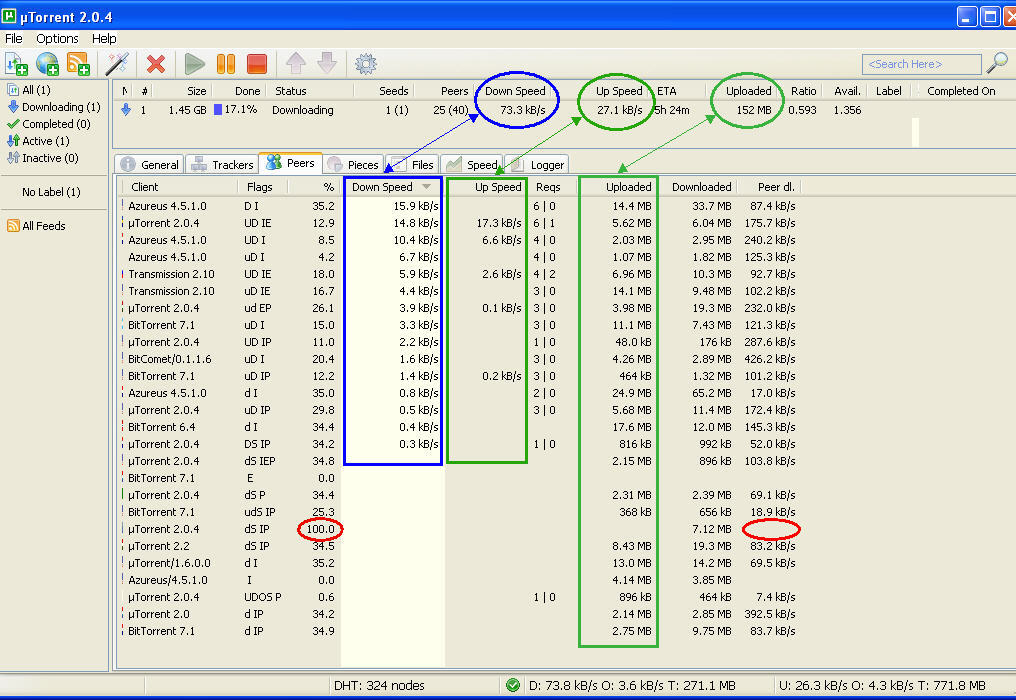
-
-
hello, our attentive observer
yes, it would be better having cumulative counters, but along with session based counters - both information is very useful for diagnostic purposes.i admit, the snatch listing of grandtotal is sort of misleading in this place. right, there is no database field for storing per-torrent totals yet. however, your concerns about what problems it would cause, are out of concept
the only problem that comes to my mind, is that this change might cause a great slowdown for the site, as it would require too many database writes {for each user, for each torrent}. i'm not sure if the current hardware is capable of it, as we can see great slowdowns during peek hours.to correct some technical details: no, STOP does NOT erase your collected ratio. there is no need to keep your torrent not restarted until completion, as each stop automatically writes/adds collected ratio to your grandtotal. only the session counters get reset to 0.00. hence we strongly encourage users to close/stop their torrents before computer resets.
reset of session counters has two phases, timeshifted. as soon as the stop signal is received, transfer speed counters get reset first. there is no way to avoid it. but: if you resume your transfers in a short time after stopping, uploaded counters remain intact. the time limit is about 1 minute.
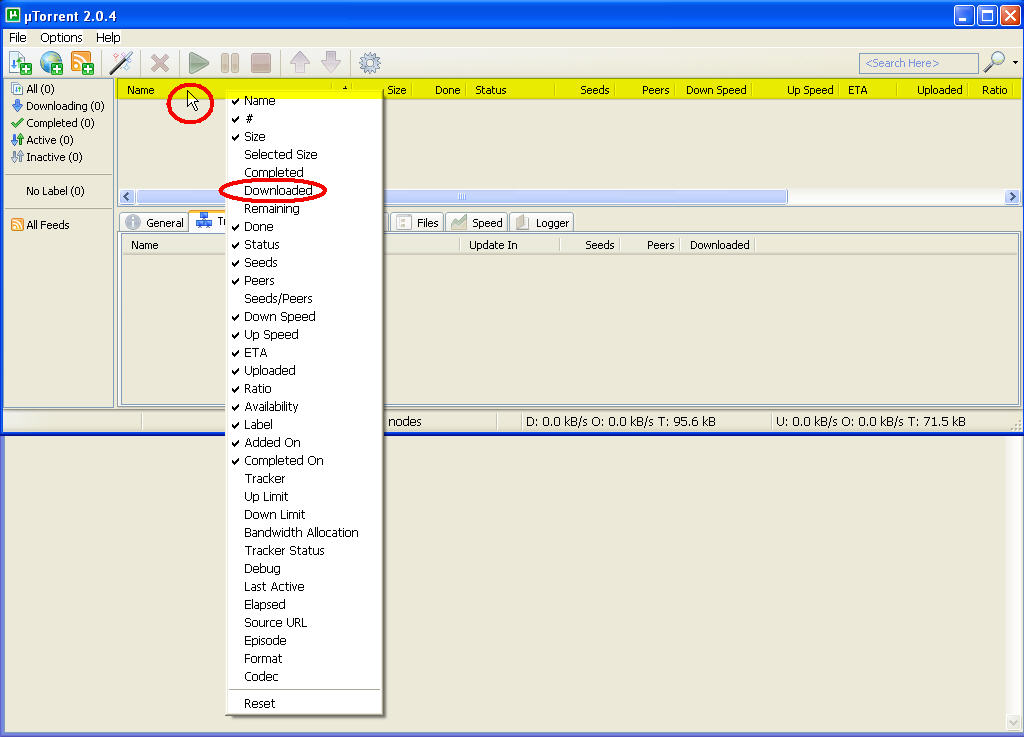
uTorrent does have the Downloaded field. right click the menu bar and enable it
-
hello, our attentive observer
Who is he ? Who are you talking about ?

Thanks for the infos you provided concerning the collected ratio !uTorrent does have the Downloaded field. right click the menu bar and enable it
Amice, oh yesssssssss, what a great find ( even if it was written somewhere in utorrent Help file, you're the great find
) . I hope reputation can be added in this topic and we won't have problems with ' or other punctuation signs in the title, or the "spread the love before adding reputation" message :crazy2: (guess I need to repeat endlessly i use this "crazy icon" coz i like it so much lol)
So, as shown in the 1st attached pic named "Amice's explanations.jpg", as soon as you right click anywhere on the highlited yellow bar, then appears an endless context menu and…we notice "Downloaded" isn't ticked, I'm gonna tick it right now...and untick a couple of others I don't use (the "label" one, and what about the "#" column, what's its use ? So many questions !)
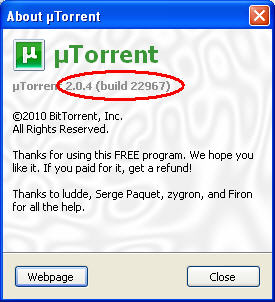
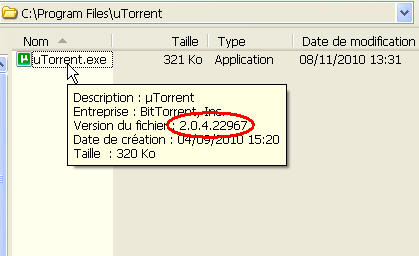
Btw, the 2nd and 3rd attached pics show last Utorrent release / build : 2.0.4 , build 22967
Why do I have to download periodically (and blindly) utorrent.exe from utorrent site, to discover a new public build each time ?
It happened a few days ago with build 22450 (mine was 22150), today it happens with build 22967My general Utorrent preferences :
- Check for updates automatically : selected
- Update to beta versions : UNselected
But these new builds aren't beta version at all, because they come directly from the BIG green "download" button found on utorrent main page (that only stipulates 2.0.4, no build # shown), which means each new user to utorrent will download the last build 22967, it's not beta at all !
So the question is : why my (our) "old" 2.0.4 version doesn't automatically upgrade to the last build when we open utorrent ?
tiaPS: I just got the message : "Please spread the love before giving it to this user again." grrr...
-
no need to worry about it - the time delay of new versions is intentional. there are 3 uTorrent streams released, each of them has its beta versions. because their development is very fast, programmers decided not to release the very new versions soon - it would bring too many client downloads, and it's actually useless. as soon as there is a greater code change, they force automatic uTorrent updates.
one detail by me more precised:
@amice:reset of session counters has two phases, timeshifted. as soon as the stop signal is received, transfer speed counters get reset first. there is no way to avoid it. but: if you resume your transfers in a short time after stopping, uploaded counters remain intact. the time limit is about
1 minute.it's 15-20 seconds only, sorry.
-
okkkkkk ty amice, I won't worry anymore.
Btw, in "amice" you find "ami" at the beginning and "ami" means "friend" in french.Guys, can you imagine you got a Mod whose nick is "friendly" ?
Well to me it's same when I read "ami"Hmm no…not this little smiley, he deserves more :
Well to me it's same when I read "ami"
-
okkkkkk ty amice, I won't worry anymore.
Btw, in "amice" you find "ami" at the beginning and "ami" means "friend" in french.Guys, can you imagine you got a Mod whose nick is "friendly" ?
Well to me it's same when I read "ami"Hmm no…not this little smiley, he deserves more :
Well to me it's same when I read "ami"I didn't even notice that until you pointed it out lol
-
you hit the nail - it was the intention



Hello! It looks like you're interested in this conversation, but you don't have an account yet.
Getting fed up of having to scroll through the same posts each visit? When you register for an account, you'll always come back to exactly where you were before, and choose to be notified of new replies (either via email, or push notification). You'll also be able to save bookmarks and upvote posts to show your appreciation to other community members.
With your input, this post could be even better 💗
Register Login