Guidance Needed (Likely from Mod) Re Seeding Recently Freeleeched torrent
-
hoping to get the same download so i'll leave things running here too

-
Yay! Someone with everything - or at least who can fill in the gaps - has joined the party, so everyone can reach 100%.
-
If there's only one seed and you're not able to connect to them, then it's most likely that both of you do not have your port forwarding settings in order. When the only seed(s) do not have their port forwarding settings in order, the only way to get around this is to have yours in place because one way or the other, one of your devices will need to be able to connect to the other, whether it's the traditional "active" way where you connect to the seed, or the "passive" way where the seed connects directly to you, and the traffic is sent through the follow back path of the connection.
You need to be sure that the port your torrent client uses is forwarded through your home router or VPN to your computer, both in TCP and UDP. This is a critical step for getting proper upload, and in some cases, even being able to download properly.
-
@MrMazda Thanks.
I believe my port forwarding settings are correct now. Since I moved to a VPN that supports it, I've seen a dramatic and continued upsurge in how many torrents I'm seeding. Most of the time, I'm at my maximum upload speed, and there are a few torrents I'm seeding where a sole leecher had been trying for ages, and soon after setting up port forwarding, these completed.
Having said all that, I'll take a look at it again, especially my router settings, as I don't recall having to do anything with them. There may be some additional tweaks I can make to improve things even further.
. -
@Kevin4fm If you use a VPN to connect your torrent client at the very least, then the port forwarding settings of whatever network you're on become irrelevant, so there's no need to ensure that anything is even setup at all on your home network.
-
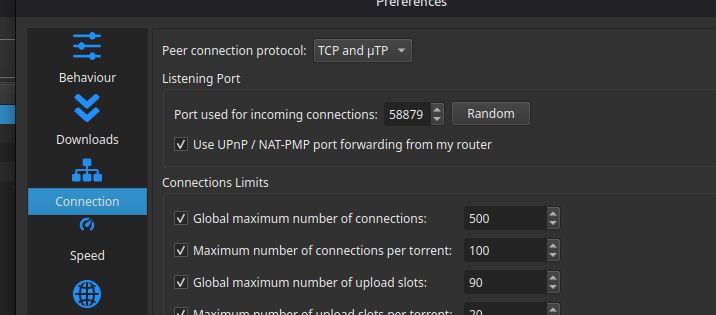
@MrMazda So if my VPN is set to port forward to "12345", it doesn't matter what the listening port is set to on my instance of qBittorrent? I'm fairly sure this isn't correct. My VPN's port forwarding isn't fixed, so changes most times I reboot.Unless I change the port number in qBittorrent to match, I see none of the benefits of port forwarding.
-
@MrMazda So if my VPN is set to port forward to "12345", it doesn't matter what the listening port is set to on my instance of qBittorrent? I'm fairly sure this isn't correct. My VPN's port forwarding isn't fixed, so changes most times I reboot.Unless I change the port number in qBittorrent to match, I see none of the benefits of port forwarding.
He specifically said "network settings" as in your router, if you're connected to a VPN, whatever port rules are set in your router will have no effect.
-
@ianfontinell I suppose it depends on how you interpret those words. In qB, port forwarding comes under "Connection". That, I've always assumed, means how my computer connects to whatever network it is connecting to. So, to my mind, that's a network setting.
-
No.. Not quite what I was saying. What I was getting at is the fact that when you use a VPN for your torrent client (or anything else for that matter), the VPN overrides the need for any port forwarding settings on your local network, because all traffic for the torrent client is routed through the VPN. For this reason, it only matters what the VPN is forwarding when using a VPN.
Some VPN services and locations will forward all ports, but most will only forward one port. If your VPN only forwards ONE port, then it is absolutely critical that the port your torrent client is set to use is the same as the port that your VPN is forwarding, otherwise, you'll have the same problem.
So simply put, port forwarding on your local home network is irrelevant when you're using a VPN, as the VPN session takes precedence over your local network. From the internet side of things, other users will only see and try to connect to your VPN session. Once they do, the VPN will forward things through, regardless of what port forwarding settings (if any) are setup on your home network. It may seem strange, but port forwarding on your home network only matters if you are NOT using a VPN, but rather are using your home network directly.
-
@MrMazda Gotcha. The reason for my comment is that it could have been interpreted by someone as "If you set up port port forwarding on your VPN, you don't need to do anything with your home setup.", which is not the case. You need to set the port forwarding on your client to match that of the VPN. It was simply a case of distinguishing between "your router" (most people's 'home network') and "your computer", in this case your client app.
As you say, whether or not you've previously set port-forwarding on your home network without that VPN becomes irrelevant, as the VPN's port forwarding bypasses whatever router settings may previously have been in use.




Hello! It looks like you're interested in this conversation, but you don't have an account yet.
Getting fed up of having to scroll through the same posts each visit? When you register for an account, you'll always come back to exactly where you were before, and choose to be notified of new replies (either via email, or push notification). You'll also be able to save bookmarks and upvote posts to show your appreciation to other community members.
With your input, this post could be even better 💗
Register Login