Problem with previewing images. (Not site issue, just on my pc)
-
For several days now I've had trouble vieing preview images for torrents on the search pages. In the Detailed and Compact views the popup is just blank, and in the Grid and Browse views I just get image placeholders. I can normally fix it by clearing the site cookies followed by restarting my system, but it's getting to be a bit of a pain as it means I have to wait for other tasks I have running in the background to finish which can take several hours sometimes. (I run all my video downloads through Handbrake to save on storage space.)
Sometimes I'll get a few hours before the problem presents, but sometimes it will rear its ugly head within an hour of rebooting. Can anyone suggest a solution?
-
Another member had a similar issue a few days ago, though that was very short-lived and the cause was a change to the site's underlying code. He resolved it by simply clearing his browser cache - for this site, I think, rather than absolutely everything - then restarting his browser. Have you tried that? It might really be as simple a thing as that. I'm forever overlooking the 'blindingly obvious' because I'm so focussed on there being a dark and complex cause.
If yes, have you also tried viewing the same stuff in another browser? At least that will help you confirm for sure that the issue is your side not the site's, if it does work there.
LOL. I've just realised who posted the comment. Isn't the member I was thinking of you? If so, obviously that DIDN'T solve it. I'd still recommend trying a different browser as a good place to start though.
-
LOL. I've just realised who posted the comment. Isn't the member I was thinking of you? If so, obviously that DIDN'T solve it. I'd still recommend trying a different browser as a good place to start though.
As The Fonz would say, "Correctamundo!" LOL
I use Chrome, but I've also tried on Edge and the problem still exists. Only a full system reboot clears it. Very bloody odd.
-
@frostycab Odd indeed, especially as it requires a full reboot, not just a cache clearance / browser restart. That suggests it's a system level problem, and the browsers are just the messenger.
One thing I would try, though it's pain: Try installing and using Firefox. That's the only browser I know of (for Windows and Linux) that isn't based on Chromium. Highly unlikely it will work differently, but that would further narrow things down. Or suggest a problem window, if it actually works.
-
@Kevin4fm Just tried with Firefox, and still getting the same issue. Like I said, I don't think it's directly related to this site, as Torrentday won't load either, and a couple of live streaming channels on Plex won't work until I do a reboot. Just no idea why.

-
@Kevin4fm Just tried with Firefox, and still getting the same issue. Like I said, I don't think it's directly related to this site, as Torrentday won't load either, and a couple of live streaming channels on Plex won't work until I do a reboot. Just no idea why.
One thing you can do to try and find out the cause, using Firefox:
- Go to gaytorrent search page
- Press CTRL+Shift+E to open the Dev Tools' Network tab
- In the filter box, type tpics
- Change the filter mode from "All" to "Images"
- Should look like this:
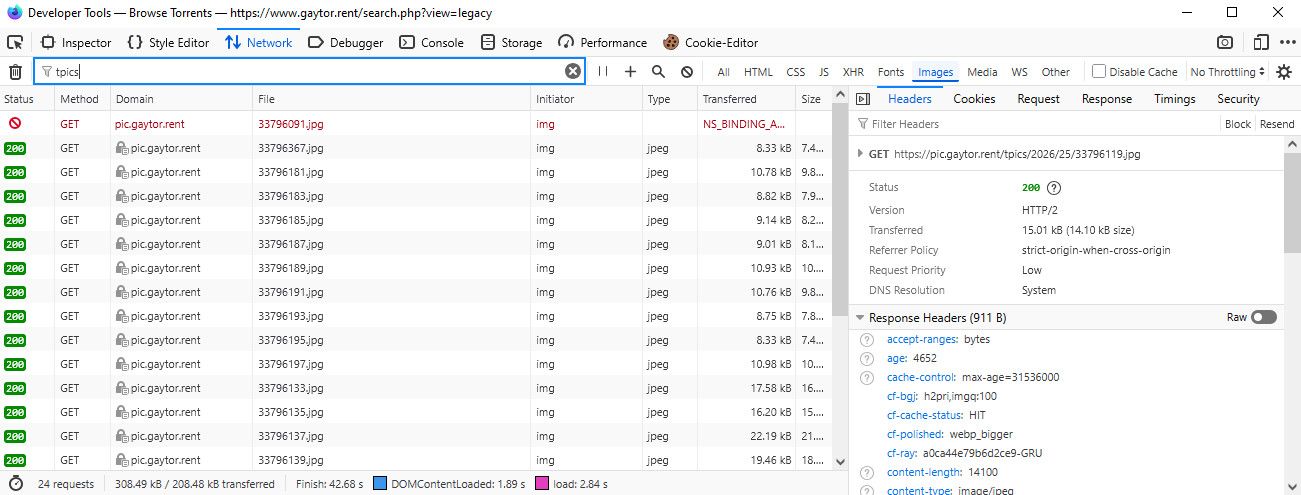
- Press CTRL+Shift+R to perform a full page reload
- Trigger the opening of the thumbnails when they aren't working
- Click any of the red entries in the Network panel, check the HTTP response status at the Headers side panel:
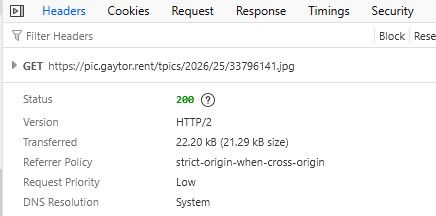
If you get a status code report it here and we'll try to figure out what's prompting it.
-
This post is deleted! -
This post is deleted! -
Odd thing is on some sites such as gay-terrents.net picture preview popups still work fine
-
Another example page
you can delete this if you're able to edit, you were not supposed to show that much info

-
@frostycab are you using a custom dns provider?
-
@ianfontinell Erm..... no? DNS server assignment is set to automatic.
-
@frostycab if your issue started right when ipv6 was introduced for the tracker, this could very well be a bad router, but in that case i don't think there's much you can do.
next time you can't see thumbnails, try to access pic.gaytor.rent to see if it will timeout or give some other error code. when the site is reachable you should get a 403 message, anything else indicate a bad router.
-
pic.gaytor.rent
I'll keep an eye on it. Thanks. Got a 403 error just now and pics are working since I recently rebooted. I'll see what it does later.
-
@ianfontinell Just tried it again. Pics have disappeared and I can't reach pic.gaytor.rent. I'm guessing that this confirms your suspicions? (Even thouygh I don't understand any of them. LOL)
-
@ianfontinell Just tried it again. Pics have disappeared and I can't reach pic.gaytor.rent. I'm guessing that this confirms your suspicions? (Even thouygh I don't understand any of them. LOL)
Specially considering that rebooting the router always fixes the problem, and with uptime it eventually resurfaces, I would say bad router indeed.
-
@ianfontinell Ah! I haven't rebooted the router itself. When I mentioned rebooting I meant the PC.
-
@frostycab yeah that changes things a bit
-
@ianfontinell Cleared cookies again, and have now rebooted PC AND router. Will have to see if things improve. It would be odd if it is the router though, as rebooting just the PC fixes it, at least temporarily. Fingers crossed, and I appreciate the help.
-
@ianfontinell Cleared cookies again, and have now rebooted PC AND router. Will have to see if things improve. It would be odd if it is the router though, as rebooting just the PC fixes it, at least temporarily. Fingers crossed, and I appreciate the help.
Yes it's leaning more towards a bad DNS request. So next time it comes up, use cmd to erase the dns cache and see if it the pic.gaytor.rent domain start connecting again
Use "ipconfig /flushdns" in cmd when the problem come back.
if this command alone fix the problem, maybe switching to a different dns provider will resolve it more permanently.


Hello! It looks like you're interested in this conversation, but you don't have an account yet.
Getting fed up of having to scroll through the same posts each visit? When you register for an account, you'll always come back to exactly where you were before, and choose to be notified of new replies (either via email, or push notification). You'll also be able to save bookmarks and upvote posts to show your appreciation to other community members.
With your input, this post could be even better 💗
Register Login