• Categories
    • Recent
    • Tags
    • Popular
    • Users
    • Groups
    • Torrents
    • Login

    Search always defaults to Relevant instead of Newest First

    Scheduled Pinned Locked Moved The Site
    14 Posts 5 Posters 122 Views 2 Watching
    Loading More Posts
    • Oldest to Newest
    • Newest to Oldest
    • Most Votes
    Reply
    • Reply as topic
    Log in to reply
    This topic has been deleted. Only users with topic management privileges can see it.
    • MrMazdaM Offline
      MrMazda Global Moderator @FAII
      last edited by

      @FAII There is a setting in your profile for this.

      Whap The User
      The only difference between martyrdom and suicide is press coverage!

      F 3 Replies Last reply Reply Quote 2
      • F Offline
        FAII @MrMazda
        last edited by

        @MrMazda Where precisely? I've looked through my settings and can't seem to find it.

        1 Reply Last reply Reply Quote 0
        • F Offline
          FAII @MrMazda
          last edited by

          @MrMazda Finally found it. The new UI is really confusing.

          ianfontinellI 1 Reply Last reply Reply Quote 1
          • ianfontinellI Online
            ianfontinell @FAII
            last edited by

            @FAII do you think the setting should be somewhere else?

            1 Reply Last reply Reply Quote 0
            • JokerJ Offline
              Joker
              last edited by

              I have written a longer word about the redesign — where it came from, what has been rebuilt, and what is next: https://community.gaytor.rent/topic/69312

              1 Reply Last reply Reply Quote 0
              • F Offline
                FAII @MrMazda
                last edited by

                @MrMazda So, it no longer defaults to Relevance if I go into the Search pages. But if I do a search from the main page, the one you're placed in when you first log in that also shows the currently most popular torrents, the site still defaults to Relevance every single time.

                Any way to prevent this?

                MrMazdaM 1 Reply Last reply Reply Quote 1
                • MrMazdaM Offline
                  MrMazda Global Moderator @FAII
                  last edited by

                  @FAII Yes... Click your username in the top right corner, then click "Profile". From the tab down the left side, click "Search". The last item at the bottom if enabled will stop this from defaulting to Relevance as soon as you start typing.

                  Whap The User
                  The only difference between martyrdom and suicide is press coverage!

                  ianfontinellI 1 Reply Last reply Reply Quote 0
                  • ianfontinellI Online
                    ianfontinell @MrMazda
                    last edited by ianfontinell

                    @MrMazda actually I replicated his report, even with the setting enabled and working as expected in the search page, the search box in the homepage will always lead to a results page sorted by relevance. It could be hardcoded in the submission form for some reason.

                    MrMazdaM 1 Reply Last reply Reply Quote 0
                    • MrMazdaM Offline
                      MrMazda Global Moderator @ianfontinell
                      last edited by

                      @ianfontinell In that case, use the ladybug button

                      Whap The User
                      The only difference between martyrdom and suicide is press coverage!

                      F 1 Reply Last reply Reply Quote 0
                      • F Offline
                        FAII @MrMazda
                        last edited by

                        @MrMazda The what button?

                        Kevin4fmK 1 Reply Last reply Reply Quote 0
                        • Kevin4fmK Online
                          Kevin4fm @FAII
                          last edited by Kevin4fm

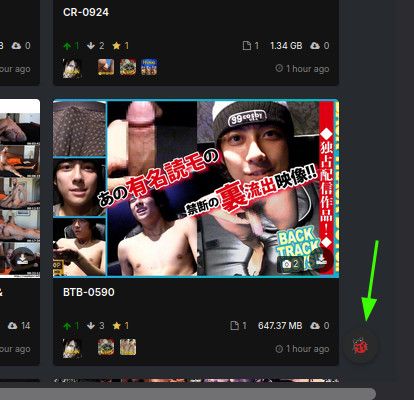
                          @FAII The button displayed when viewing the main site, by default - I think - in the bottom right-hand corner.
                          4a7d7ca9-c270-412a-b0df-f1e7f7ca748b-image.jpeg

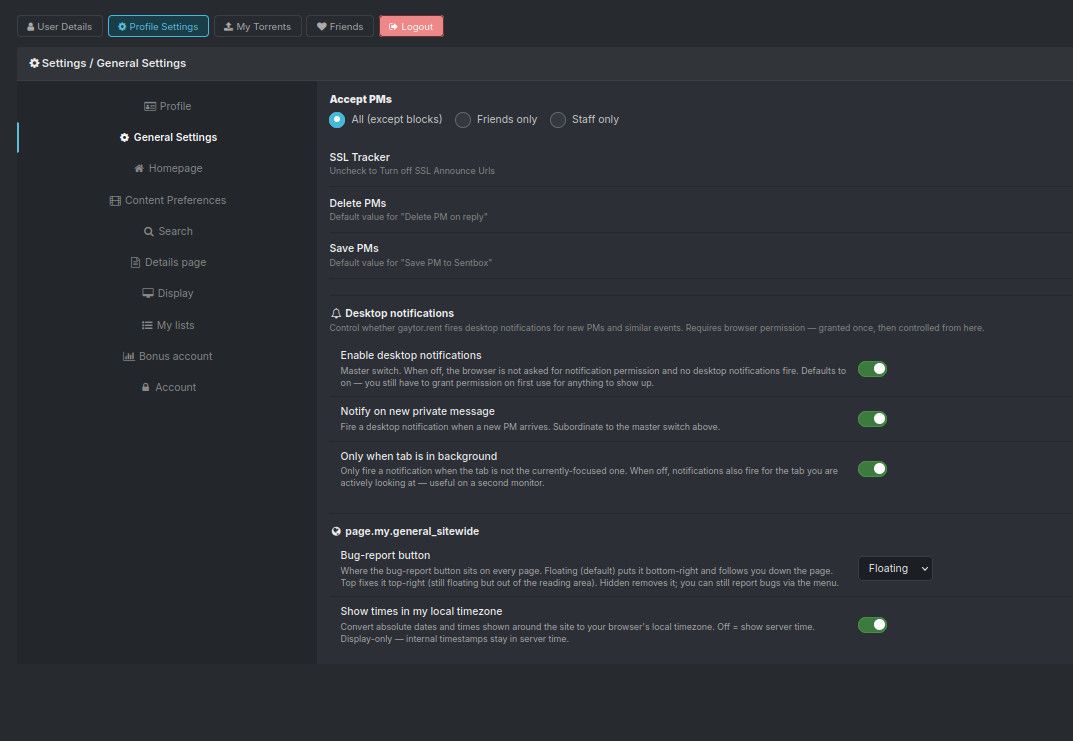
                          If it's not there, it may be disabled. You can change this by going into your profile and selecting the second tab: "Profile Settings". It's second from the bottom: "Bug-report Button".
                          fe386542-07bf-4ed3-9a88-8342a826287f-image.jpeg

                          Other opinions are also available. They're not right, obviously, but they are available.

                          MrMazdaM 1 Reply Last reply Reply Quote 0
                          • MrMazdaM Offline
                            MrMazda Global Moderator @Kevin4fm
                            last edited by

                            @Kevin4fm Yes. This is the ladybug button of which I speak. By default, it is in the bottom right corner of the page, but for some things that I do with the settings I have, it's a bit annoying there, so I have mine set to the top right corner of the page instead.


                            Whap The User
                            The only difference between martyrdom and suicide is press coverage!

                            1 Reply Last reply Reply Quote 0

                            Hello! It looks like you're interested in this conversation, but you don't have an account yet.

                            Getting fed up of having to scroll through the same posts each visit? When you register for an account, you'll always come back to exactly where you were before, and choose to be notified of new replies (either via email, or push notification). You'll also be able to save bookmarks and upvote posts to show your appreciation to other community members.

                            With your input, this post could be even better 💗

                            Register Login
                            • 1 / 1
                            • First post
                              Last post