availability is 100% but not seeding
-
here some context
- I used GUU v18 for the uploading
- and I checked auto seeding
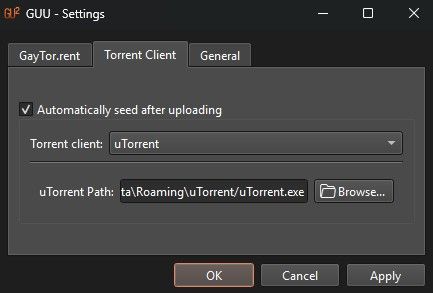
- uTorrent
- availability is 100% but not seeding
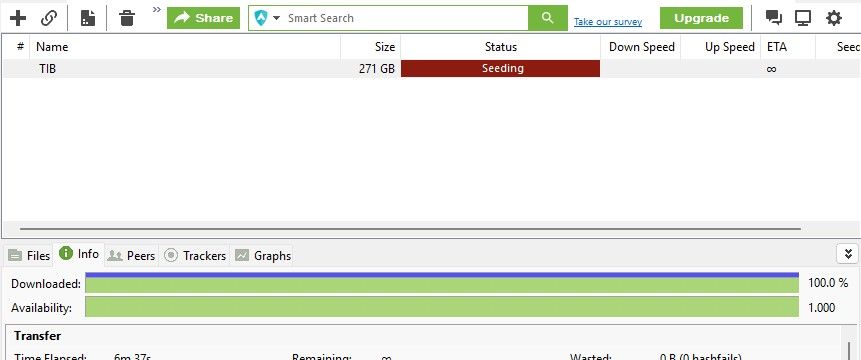
- I tried to manually download torrent and seed
- I skip hash check, still seeding is red, no seed
STAFF EDIT - removed picture for member safety - raphjd
Do I miss something? please help, thx in advance
-
while creating new torrent " do not use the torrent created by your client " it doesn't work and stop seeding ...
all you have to do is redownload the small torrent here that you posted and check ... -
@john32123666 the tracker is correct, the torrent simply was removed from the site.
@thomasdecath never post your tracker announcement URL, it's very dangerous for your account! -
I’m not very technical, but I think I ran into the same issue as you before sharing how I fixed it, let’s go through the entire seeding process step by step:
- Create the torrent file using a torrent client.
- Fill in the required information on the forum’s upload page (either via software or the web interface) and attach the torrent file you created.
- After uploading, go to the page of your uploaded torrent and re-download the same torrent file from the site.
- Drag this newly downloaded torrent file into your torrent client to start seeding. When you do this, a window will pop up asking you to select the location of your actual files.
Here’s how I solved my problem:
-
If you’re uploading a folder, when you load the site-downloaded torrent into your client, make sure to select the parent folder of the content you’re sharing.
Example: If your folder is named A and its path isC:\MYGVlibraries\A, you should selectC:\MYGVlibrariesas the location.
This applies specifically to the location-selection window that appears after loading the torrent downloaded from the site. -
If everything above is set correctly, try right-clicking the newly downloaded torrent file, going to Properties, and checking if there’s an Unblock option at the bottom.
I once had an issue where the torrent wouldn’t seed properly until I unblocked it. It might not always be the cause, but it’s worth trying since it worked for me once.
Again, I’m not tech-savvy — I’m just sharing the problem I had and how I fixed it. Hopefully this helps you out.
-
@ianfontinell shit IDK it's dangerous, please tell me how to delete forum!
-
@thomasdecath
 Above your post, next to the reply button, there’s a gear icon. Click it and there should be a "Delete thread" option — that should let you delete this post.
 -
I removed your picture above for your safety.
-
okay update
@ianfontinell I re-uploaded my torrent, and the torrent is still on the site.
-
So I did what you just said. Download torrent file from the site
And I selected E:\ because my actual folder is E:\TIB, still not working
-
I checked maybe it's my network. But I can seed and download torrents from the site without any problems.
-
I unlocked the downloaded torrent as you said, still not seeding
Anything else do I miss?

-
-
@thomasdecath in the previous picture you sent, the tracker status message was saying "unregistered torrent" can you check the tracker status and see what it's saying now?
-
FYI
-
I reset passkey due to the earlier expose, I make sure I downloaded the torrent again after I changed the passkey
-
still not working, and it shows unregistered torrent.
-
-
@thomasdecath i've not seen this problem in the past i'm not sure how to help, can you send the link to the torrent page?
-
-
@thomasdecath i downloaded, tracker message for me is also unregistered. if i can see the torrent page and download the torrent file, it shouldn't be giving this error... i think the admin will have to give it a look.
-
@ianfontinell how can I reach them?
-
@raphjd @ianfontinell @skygrind @john32123666
Hi again, to all moderator, supports or whatever
I tried my best to troubleshoot but it doesn't work.
I'm still getting the 'Unregistered torrent' error. I can download and seed other torrents from the site perfectly fine, so my client, network, and passkey are fully working.
The issue only happens when I upload a new torrent. I used qBittorrent to create the .torrent file manually, uploaded it successfully, but when I download the .torrent back from the site to seed, the tracker rejects it with 'Unregistered torrent'.
It seems the site's tracker database isn't registering the info_hash (I guess?
) of my newly uploaded files for some reason. Could the staff please look into the tracker logs or database? I'd really appreciate your help.Thank you!
-
@thomasdecath I will take a look at your profile on the Torrent Side and see what I can find out. I clicked the torrent link you posted above and it’s returning “No Torrent with that ID” which means either the upload failed or it was removed.
I’ll return and update this post with my findings
Edit: I looked at your profile and it appears this is resolved? I see current uploads went through successfully
-
@DandyLion Just for additional info, I too have this problem on 8 out of around 440 torrents.
As you can see from the screenshot above, many of these are actually seeding, but I assume because they're unregistered, I'm not earning upload credit. In most cases, once I noticed the issue I tried deleting the torrent, downloading the .torrent file again, and readding it, but the problem persists.
Just thought it might be helpful to know that this isn't an isolated incident attributable to a single user's configuration or an issue with a specific torrent.
Mod Edit: Removed picture due to Torrent Key visible
-
@Kevin4fm hmm, I will look into this further. I can see the torrent in the image (which I removed) is active and you are listed as the uploader but when I checked your active seeds, it isn’t listed. I’ll see what I can dig up on the backend when I get back to my laptop. The mod tools dislike my iPhone
 (New site is still in development so that functionality should be fixed soon)
 -
@DandyLion Interesting that I'm not listed as a seeder. As mentioned in my DM, when I paused that torrent, then after waiting a short while, refreshed my browser page, the total number of torrents dropped by one. When I then restarted it, it increased by one. So it appears it's being counted somewhere, just not where you'd expect it to be showing up.
What would be more interesting is if the numbers for how many torrents I'm seeding is calculated using the same source data as where you looked at individual seeding. If so, good luck with that!








Hello! It looks like you're interested in this conversation, but you don't have an account yet.
Getting fed up of having to scroll through the same posts each visit? When you register for an account, you'll always come back to exactly where you were before, and choose to be notified of new replies (either via email, or push notification). You'll also be able to save bookmarks and upvote posts to show your appreciation to other community members.
With your input, this post could be even better 💗
Register Login