Torrent only seeding once and then it's over
-
Hi,
I am having a problem that I fail to uinderstand why it's happening.
I have zero knowledge of how torrents work or any tech behind it, so bear with my ignorance.
When upload a new torrent to the site, someone leeches from it once, and then my torrent stops seeding. But when I check the torrent details on the site, I can see the file has been grabbed dozens of times, but my torrent stops at ratio 1.0.
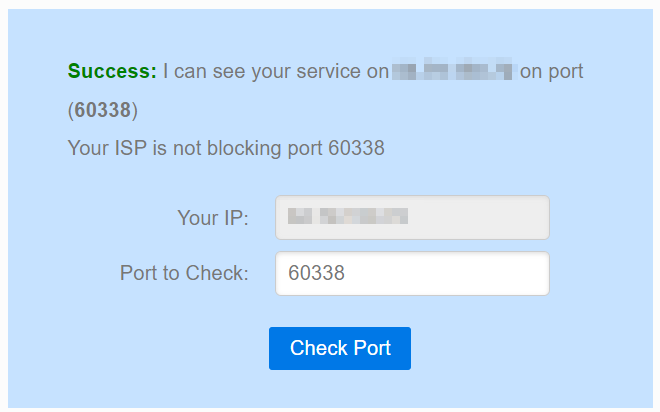
There is no issue on other sites, and my port is properly forwarded I can be seen if I check on canyouseeme.org
Any ideas why this is happening? I'ts driving me nuts.
-
When upload a new torrent to the site, someone leeches from it once, and then my torrent stops seeding. But when I check the torrent details on the site, I can see the file has been grabbed dozens of times, but my torrent stops at ratio 1.0.
It's because some members already have the same exact copy or an amount of pierce parts, once file is completed that's the time seeding starts ...
SEEDING too many torrents will throttle your distributions ...From the rules : https://www.gaytor.rent/rules.php#102
You MUST CONTINUE SEEDING YOUR TORRENT until at least three or four other members have completely downloaded the file and can continue seeding for you.[œùæ] : " Mahirap mag dunong dunongan, Kung wala kang kaalam alam " ...
-
There are 2 types of seeder :
A 100% files [you're a seeder or co-seeder] ...
seeder - 100% who have own the files ...
co-seeder - 100% who have the exact same copy ... -
Out of interest, do you mean the torrent shows as "Seeding" in your client but you're not getting any upload traffic, or do you mean it's actually stopping?
-
Sounds like someone else co-seeded it before you, w/c is unfair for those struggling from ratio ...
Unfortunately there is no rules on these ... -
@john32123666 I'm wondering if he's got something set in his client that stops or lowers the priority of the torrent once it's ratio hits 1, but no idea which client he's using.
-
@frostycab ... no idea, he didn't mention [any], what seems to be the issue, he posted ...
But once you completely seeded your torrent less chance of credit you will get until tracker updates ...
1-3 seeder you have chance over 10 seeders, less chance ... -
@john32123666 said in Torrent only seeding once and then it's over:
It's because some members already have the same copy or an amount of pierce parts, once file is completed that's the time seeding starts ...
This I actually understand. But still the behavior I am getting makes no sense. Once I've seeded my torrent once (ratio 1.0), the torrent shows as "Seeding" but there is no outgoing traffic at all. It just stops. I think it would be reasonable to assume that even if one other person has obtained all the parts from me (then we are two people seeding the same torrent), other people should still be grabbing my parts (no pun intended) and my ratio should increase.
SEEDING too many torrents will throttle your distributions ...
I am not sure if this explains this particular behavior I am getting, or if it's even related? I know GT has a limit on the amount of torrents you can have active but has no control over bandwidth limitations, no torrent sites do. And still, it would not explain this specific conundrum. On other sites, like gay-torrents.net or gay-torrents.org, I could have (for example) 10 torrents active at the same time, all of them uploading at 10-50MB/s, and ratios going over 50.0 quite quickly, using the same client and of course the same config for all sites.
You MUST CONTINUE SEEDING YOUR TORRENT until at least three or four other members have completely downloaded the file and can continue seeding for you.
That's what I am trying to do. But unable to do so because of what is happening. I understand the rules but there is nothing I can do on my end so far to prevent this problem.
@john32123666 said in Torrent only seeding once and then it's over:
There are 2 types of seeder :
A 100% files [you're a seeder or co-seeder] ...
seeder - 100% who have own the files ...
co-seeder - 100% who have the exact same copy ...Isn't that the same thing in the end? Two people who have all the parts of a file? How does this change any behavior, or how does this affect my problem? (I am not being antagonistic I am genuinely asking)
@frostycab said in Torrent only seeding once and then it's over:
Out of interest, do you mean the torrent shows as "Seeding" in your client but you're not getting any upload traffic, or do you mean it's actually stopping?
You are correct. Apologies if it was not clear. The torrents show as "seeding" but there is no outgoing traffic.
@john32123666 said in Torrent only seeding once and then it's over:
Sounds like someone else co-seeded it before you, w/c is unfair for those struggling from ratio ...
Unfortunately there is no rules on these ...I partly get what you are saying, I think. To co-seed means two people need to own the same files, but how can one co-seed before me if it has not obtained the parts yet? Or you mean that once a 2nd person obtains the parts, mine are being ignored and only this other person's are being used? If so, any idea why/how this happens? By the way, this issue is fairly new, I did not have this problem before. The only settings I changed were (I am using qBitTorrent btw):
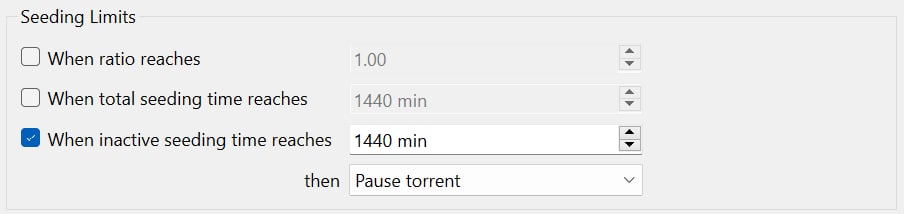
Fortunately I am not struggling with ratio, I am at 8.9, but it is super difficult to increase it with this problem going on.
And yeah it does seem unfair!


@frostycab said in Torrent only seeding once and then it's over:
@john32123666 I'm wondering if he's got something set in his client that stops or lowers the priority of the torrent once it's ratio hits 1, but no idea which client he's using.
To be 100% honest I did not even know these settings were available, nor I know where they are in qBitTorrent. Nevertheless, this issue is new and the only settings I modified are the ones mentioned just above. Nothing related to priority. And if that were the case, it would affect all torrents from all the other sites I use, which is not the case.
 If you can point out where I can find these settings I'd be happy to share a screenshot, but I cannot find anything like that.
@john32123666 said in Torrent only seeding once and then it's over:
@frostycab ... no idea, he didn't mention [any], what seems to be the issue, he posted ...
Apologies I don't understand your wording there. Maybe you meant my client? It's qBitTorrent. "What seems to be the issue" - where would you like me to elaborate? Happy to help to make things clear. "He posted" -

But once you completely seeded your torrent less chance of credit you will get until tracker updates ...
OK. These updates, is this something that GT has control over with or is it my client? I have no issues with torrents from other sites.
1-3 seeder you have chance over 10 seeders, less chance ...
Apologies again, my one brain cell does not understand what you are saying here.
Thanks a lot for your replies! And again, tone is lost on text, this is a friendly reply I don't mean to get on anyone's nerves. All questions are from genuine curiosity.
-
@dwpk20 O you right a book lol ... kidding ...
Heres a simple quick summary solution ...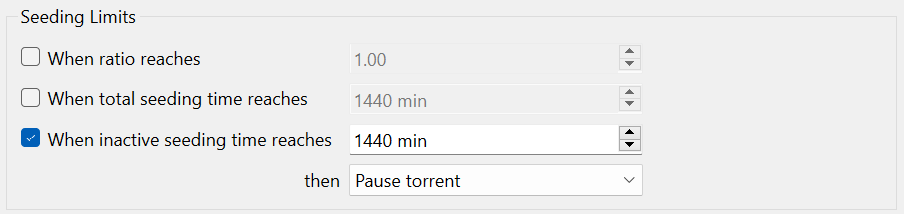
uncheck > When inactive seeding time ...
do not pause your torrent if it is inactive ... [Toggle from seeding priority]
Always force start if your client stalled what your seeding ...
Ratio of 1.0 means you completely seeded your torrent you posted and is now seeding by others ...
Seeding relies on your bandwidth ...
If you are the first seeder you'll get 100% upload traffic ...
10 or more less chance ...
Tracker updates means thats the time a new peers connecting from your peers ... -
Yes I did write a book lol
@john32123666 said in Torrent only seeding once and then it's over:
uncheck > When inactive seeding time ...
do not pause your torrent if it is inactive ... [Toggle from seeding priority]I will give it a go. Just to try and see what happens but I can't see what one things is got to do with the other. shrug
Always force start if your client stalled what your seeding ...
Nope it never gets on "stalled" mode. It' always makrked as "seeding".
Ratio of 1.0 means you completely seeded your torrent you posted and is now seeding by others ...
Yup, got that part.
Seeding relies on your bandwidth ...
Yep, I know that part too. I have 1GBit/sec upload speeds. Should not be an issue. And for other sites this problem does not exist. I upload at 60 - 80mb/sec. I am tempted to test a seedbox to see what happens.
If you are the first seeder you'll get 100% upload traffic ...
Yep.
10 or more less chance ...
If there are more than 10 seeders the lesser the chance I will be seeding? Is that what you mean? It's nice info to have but still my problem starts after just one other person has the file.
Tracker updates means thats the time a new peers connecting from your peers ...
"peers connecting from your peers"? You lost me there
-
@dwpk20 ...
Don't worry about seeding your torrent, if already snatched ... [Someone else will seed 4 you] ...
I seed torrent [that mostly my/others inactive that has a leecher] and if they can't grab my peers,
I'll jump to something else ...
The point is as long as what you posted is snatched many times theres nothing to worry ...
We are competing w/ seedboxes, bandwidth [speed], range and client ...
Regardless ... ...
...[œùæ] : " Mahirap mag dunong dunongan, Kung wala kang kaalam alam " ...
-
This sounds like a port forwarding issue. When you're a passive node, you'll be able to seed, as there is no one else in which to get the contents from, however once it gets out to people who do have their port forwarding in order, it will take those peers (active nodes) over a passive node.
To fix this, you need to make sure that the port that your torrent client uses is forwarded through your home router or VPN to your computer, both in TCP and UDP. This is a much needed step to get proper upload traffic.

The only difference between martyrdom and suicide is press coverage! -
@john32123666
Oh well. But at least now thanks to you I understand it a lot better!Thank you

-
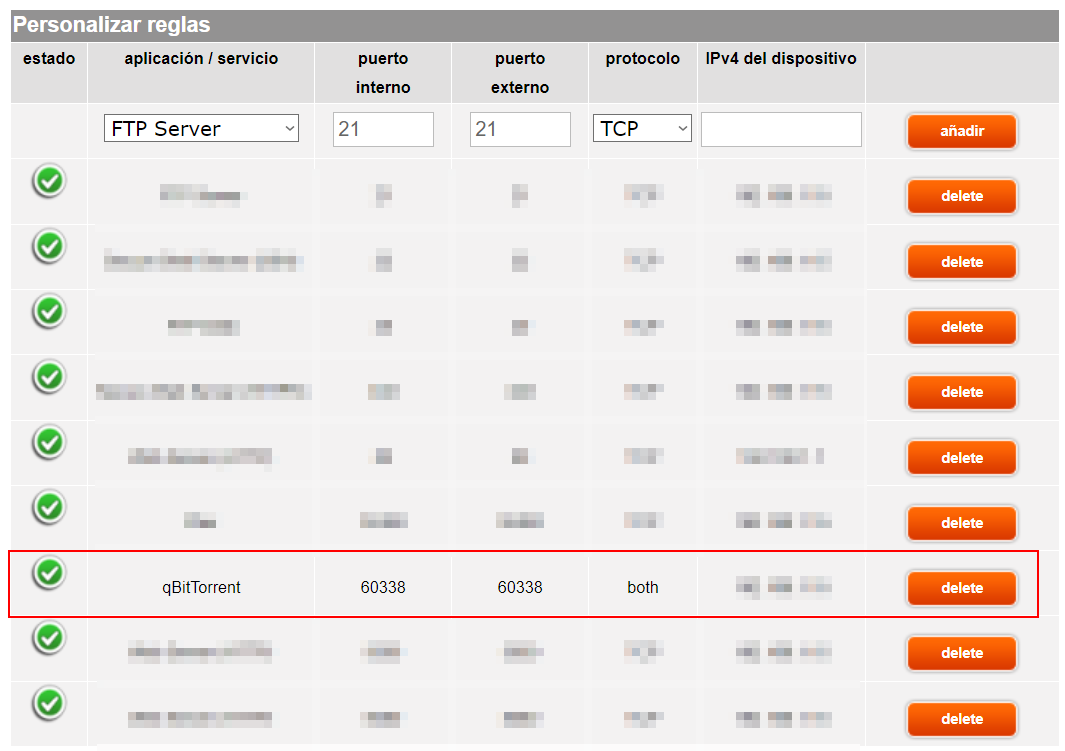
Hey there, thanks for cheaping in. I am pretty sure my ports are in order. Check it out.
Router:
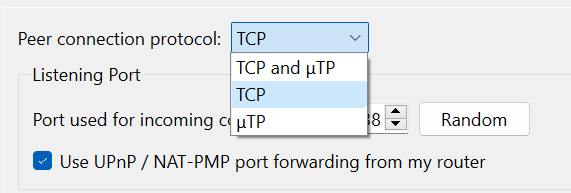
qBitTorrent:
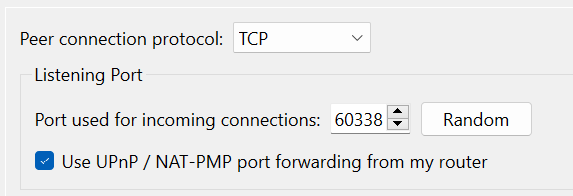
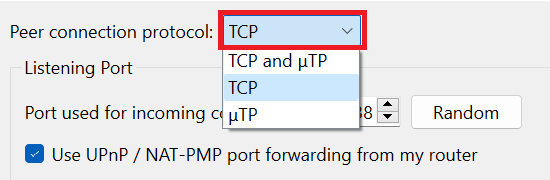
(maybe the Peer connection protocol shown above needs to be changed? see below)
Checking on https://canyouseeme.org/ all seems good as well
It all appears to be correct I think.
Also, wouldn't it also affect torrents from other sites if the configurations was wrong? It is not the case.Thanks

-
@dwpk20 It would appear so. Do you use a VPN by any chance? If so, local port forwarding will do nothing, as everything passes through the VPN, so the VPN itself would need to support port forwarding.
If not, then everything should be in place as long as your computer's IP address on your local network does not change. Looking at your profile though, it would seem it may have to do with how many other torrents you are seeding and the way your torrent client and the system will prioritize traffic. If other torrents are getting a higher priority, your speed on the uploaded torrent may fall once it gets there, in part due to the speeds of the other peers in the pool. This is not unusual.
The only difference between martyrdom and suicide is press coverage! -
The main difference between TCP (transmission control protocol) and UDP (user datagram protocol) is that TCP is a connection-based protocol and UDP is connectionless.
While TCP is more reliable, it transfers data more slowly. UDP is less reliable but works more quickly.-
TCP is best for:
Email or texting, File transfers, Web browsing -
UDP is best for:
Live streaming, Online gaming, Video chat
Transmission control protocol (TCP) and user datagram protocol (UDP) are foundational pillars of the internet, enabling different types of data transmission from a network source to the destination.
TCP is more reliable, while UDP prioritizes speed and efficiency.
SOURCE : https://www.spiceworks.com/tech/networking/articles/tcp-vs-udp/
SEE : https://en.wikipedia.org/wiki/Micro_Transport_ProtocolIs Qbit TCP or UDP?
qBittorrent uses a TCP port to establish communications with peers and trackers (except DHT, which uses various UDP ports to communicate with peers).What is the default port for qBittorrent?
By default, qBittorrent will listen on all interfaces on port 8080. Thus it is accessible at http://HOST_IP:8080 .REFERRAL LINKS :
https://github.com/qbittorrent/qBittorrent/wiki/Frequently-Asked-Questions
https://www.truenas.com/community/threads/qbittorrent-port-forwading.105878/ -
-
@MrMazda said in Torrent only seeding once and then it's over:
Do you use a VPN by any chance?
No VPN. Risky risky I know.
your computer's IP address on your local network does not change
It doesn't.
Looking at your profile though, it would seem it may have to do with how many other torrents you are seeding and the way your torrent client and the system will prioritize traffic. If other torrents are getting a higher priority, your speed on the uploaded torrent may fall once it gets there, in part due to the speeds of the other peers in the pool. This is not unusual.
OK. I do understand what you are saying, but, why isn't it happening for gay-torrents.org or gay-torrents.net? The client, the system, config, is the same. It's only for this site that I get this behavior. And priorization would not explain why my torrents stop at 1.0 ratio because it happens to all of them no matter the amount, requests, etc. Concerning speeds, I have 1Gb transfer rate
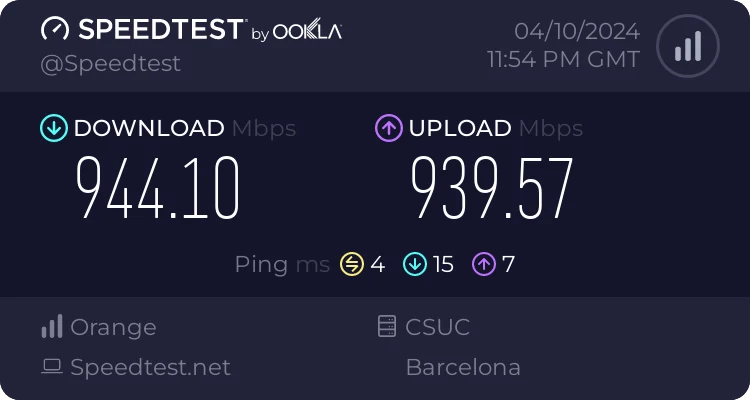
and like I said, for the other sites I am transfering at 50mb+ and getting ratios of 50 - 100 per torrent. Before this started to happen, I was getting very low outgoing speeds and very low ratios all the time for this site anyway.
OK, I am gonna do 3 tests.
- Check with a different client.
- Try a seedbox.
- Stop all torrents in current client and add only one.
I will report the results.
Next,
Thanks a lot for sharing the articles. I do think they go way beyond the scope of the subject at hand though. Sorry!
 I do appreciate the time and effort though so thank you.
The reason I was asking if I had to change the protocol was because @MrMazda mentioned that my router needed the forwarded port to be set for both TCP and UDP, and I did not know (or don't know), if these settings in the client are related/affect this at all.
Finally:
- So I am going to do those tests and see what happens.
Just out of curiosity, what ratio's are you guys getting on average/normally per torrent. And how fast do they it go?
See you on the next round!
-
Oh by the way, something I did not mention which is pretty important (sorry my mistake), is that the torrents do stop at 1.0 ratio. But they kick of again after a few hours or a day but at very low speeds. Then after a couple of days seeding they reach a ratio of around 5 - 6.
-
Unrelated: why can't I edit my posts? Am I not seeing the "edit" field? Strange.
-
Guess what? The issue has magically disappearted. I swear I have not touched anything. I just uploaded a new file and it's at 8.0 ratio. Hooray!
I am still confused but I learned a shit ton of of stucff thanks to you guys. So thanks!



Hello! It looks like you're interested in this conversation, but you don't have an account yet.
Getting fed up of having to scroll through the same posts each visit? When you register for an account, you'll always come back to exactly where you were before, and choose to be notified of new replies (either via email, or push notification). You'll also be able to save bookmarks and upvote posts to show your appreciation to other community members.
With your input, this post could be even better 💗
Register Login