Utorrent new update weird tracker
-
Hi. Today utorrent warned me of a new update. I downloaded it and,since then,to all my torrents,even the already existing ones,a weird and unknow tracker (wss://tracker.btorrent.xyz)had been added,not allowing the gaytorrent tracker to work,and this "new" tracker is also impossible to delete. Anybody does have or have had the same issue? Does somebody have any idea of how to fix this?
-
It's not uncommon for the latest version of an app to cause problems when installed on older devices.
Sometimes newer versions of apps may not work with your device due to system incompatibilities.This is not a recommendation :
- If you are currently using updated client there is a well known bug aka [wss://tracker.btorrent.xyz]
invalid URL w/c is preventing tracker from connecting ...
Point on Trackers right click [simply delete and remove] ...
If you want to downgrade from earlier version,
[simply disable your anti-virus] and disable software updates from keeping your client updated ...
In uTorrent point on Options/Preferences/General
Uncheck - Updates & Privacy / Check - Notify me before installing updates ...
[Older versions/Windows only] :
https://utorrent.en.uptodown.com/windows/versions
default connection/port [6881 - 6889]
your settings will be save ... - If you are currently using updated client there is a well known bug aka [wss://tracker.btorrent.xyz]
-
If i delete the tracker it immediately cames back on his own,an i'm not a computer geek,so don't know how to downgrade to an earlier version,and don't wanna uninstall the program and then install it again since i don't find attractive having to re-add 600+ torrents
-
@toratora2 follow the process and your settings will be save ...
don't know how to downgrade to an earlier version,and don't wanna uninstall the program and then install it again ...
- You don't have to uninstall, simply download from the recent version [w/ no issues] and install,
all your active torrents are present after downgrading is completed ...
In uTorrent point on Options/Preferences/General
Uncheck - Updates & Privacy / Check - Notify me before installing updates ...
[This will prevent your client from updating automatically] ...[Older versions/Windows only] :
https://utorrent.en.uptodown.com/windows/versionsIf you want to downgrade from earlier version,
[simply disable your anti-virus] and disable software updates from keeping your client updated ... - You don't have to uninstall, simply download from the recent version [w/ no issues] and install,
-
@toratora2 said in Utorrent new update weird tracker:
Today utorrent warned me of a new update.
I had a similar problem a while back: uTorrent installed a new version of itself (3.6, I think), filled with problems. I followed the process from john321 above and installed version 3.5.5. It's worked fine ever since. Be sure to follow that last step of unticking both boxes under "updates:"
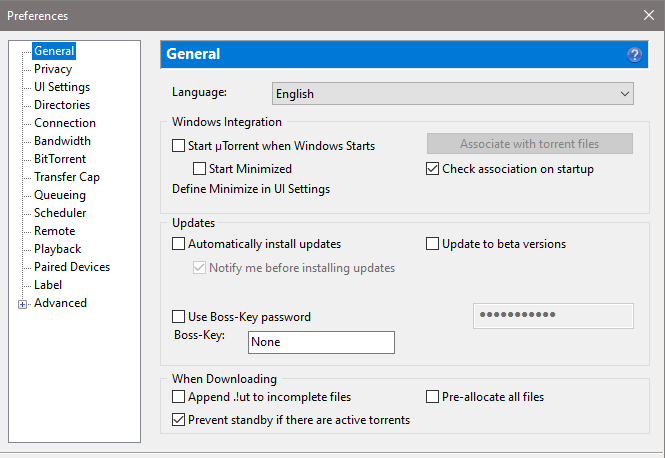
to make sure the software doesn't "help" you again in the future. -
@toratora2 downgrade asap
-
@ianfontinell said in Utorrent new update weird tracker:
@toratora2 downgrade asap
I second this.... The latest uTorrent (3.6.0) has known compatibility issues with our system. For this reason, you should roll back to version 3.5.5 or earlier.
-
 J john32123666 referenced this topic on
-
J john32123666 referenced this topic on
-
@john32123666 I've tried downloading 4 of these older versions from this link and they all just install version 3.6
-
@citydwelleer-0
Here's how :
download version from any Older Versions Of UTorrent
https://utorrent.en.uptodown.com/windows/versions
ex : uTorrent 3.5.5 Build 46348
Re-Install and will prompt you to downgrade
Do not fully uninstall to save your current settings ....
Once it's done ...- In uTorrent point on Options/Preferences/General
Uncheck - Updates & Privacy / Check - Notify me before installing updates ...
Confirm Apply and OK
[This will prevent your client from updating automatically] ...
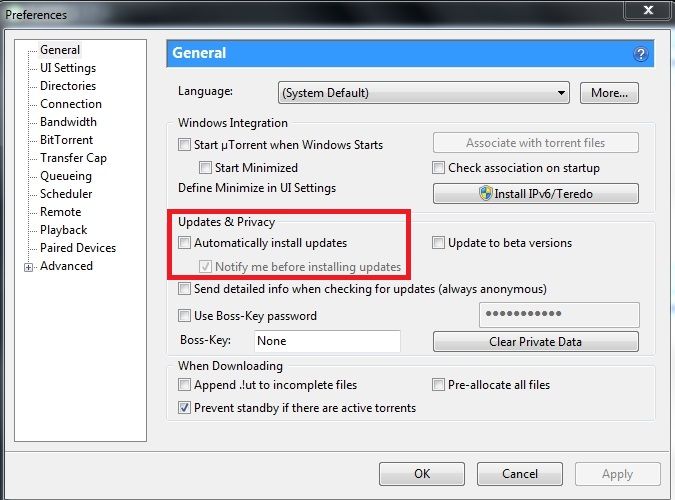
- In uTorrent point on Options/Preferences/General
-
@john32123666 thanks. this is a fresh install tho, not upgrade or downgrage. it installs 3.6 and then what do I do?
-
J john32123666 referenced this topic on
-
it installs 3.6 and then what do I do?
Download and Re-install older version ...Please read above ...
I have given you the process on how to ... and pointed out ...If your version automatically updated,
[solution] downgrade your version to a previous version immediately ...[Older versions/Windows only] :
https://utorrent.en.uptodown.com/windows/versionsHERE'S HOW :
In uTorrent [TOOLBAR]/Top left] point on Options/Preferences/General
Uncheck - Updates & Privacy / Check - Notify me before installing updates ...
[This will prevent your client from updating automatically] ...
You don't have to uninstall [updated version to avoid conflict] ...
simply download from the recent version [that works, w/ no issues] and install ...
all your active torrents are present after downgrading is completed ...https://community.gaytor.rent/topic/61431/utorrent-3-6-x-version
-
@john32123666 ok thanks. I'll try my best haha. also I had to reset my computer so I have all my torrents I was seeding in my backup external, do I just put them back in the folder where the torrents go after completed and then click the torrent files for each to get them back seeding again?
-
@citydwelleer-0 ...
If you haven't change any location your settings are save ...
Once you re-started, everything will work correctly in case of error you must specify the correct folder ... -
@john32123666 I'm trying my best man. So I installed version 3.6 by downloading version 3.5.5 from the link and unchecked the auto update and now I'm supposed to install the same file again from the link? Is that how to downgrade?
-
by downloading version 3.5.5 from the link and unchecked the auto update and now I'm supposed to install the same file again from the link? Is that how to downgrade?
If the torrent version prompted you then you don't have to make anymore changes ..
see the version on Help it will show your current version ... -
@john32123666 ok I downloaded utorrent-3-5-5-build-46348 but it installed 3.6 I downloaded utorrent-3-5-5-build-46348 again after I unchecked the update button and it didn't make any changes, still version 3.6
-
@john32123666 under help it says version 3.6 even tho I downloaded utorrent-3-5-5-build-46348 and installed it twice and unchecked auto update after the first and sceond install of utorrent-3-5-5-build-46348
-
@citydwelleer-0 ...
OMG this is becoming futile ...
I don't think you are paying attention ...In uTorrent [TOOLBAR]/Top left] point on Options/Preferences/General
Uncheck - Updates & Privacy / Check - Notify me before installing updates ...
[This will prevent your client from updating automatically] ...
You don't have to uninstall [updated version to avoid conflict] ...
simply download from the recent version [that works, w/ no issues] and install ...
all your active torrents are present after downgrading is completed ... -
@john32123666 I agree, this is way past too much. one last time breakdown and then I'll leave it. I have a fresh install of windows 10 no uTorrent. I download utorrent-3-5-5-build-46348 from the older versions link but it installs version 3.6. I then uncheck the auto update checkbox and then I install utorrent-3-5-5-build-46348 again but it does not downgrade anything. Where am I going wrong or should I just give up?
-
@citydwelleer-0 as I've said once older version is succeded uncheck auto update from that older version to stop from updating 3.6 ...


Hello! It looks like you're interested in this conversation, but you don't have an account yet.
Getting fed up of having to scroll through the same posts each visit? When you register for an account, you'll always come back to exactly where you were before, and choose to be notified of new replies (either via email, or push notification). You'll also be able to save bookmarks and upvote posts to show your appreciation to other community members.
With your input, this post could be even better 💗
Register Login