• Categories
    • Recent
    • Tags
    • Popular
    • Users
    • Groups
    • Torrents
    • Login

    Trackers not working on Qbittorrent?

    Scheduled Pinned Locked Moved Uploading
    12 Posts 5 Posters 146 Views
    Loading More Posts
    • Oldest to Newest
    • Newest to Oldest
    • Most Votes
    Reply
    • Reply as topic
    Log in to reply
    This topic has been deleted. Only users with topic management privileges can see it.
    • jrewingwannaJ Offline
      jrewingwanna @Kingcherno
      last edited by

      @Kingcherno I use qBittorrent v4.2.5 (64-bit) on my VPN'ed Debian seedbox and it's working fine as of now for both downloads and uploads (a few made a couple of hours ago)..

      1 Reply Last reply Reply Quote 0
      • MrMazdaM Offline
        MrMazda Global Moderator
        last edited by

        Just out of curiosity, are you able to open this link:

        https://tracker.gaytor.rent/stmdd/

        Does this link open a stats page, or does the page fail to load?

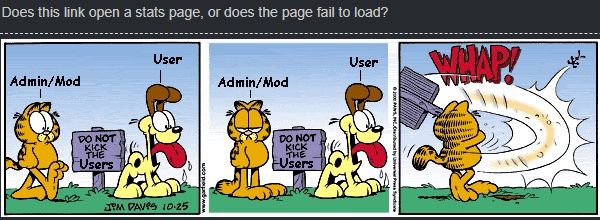
        Whap The User
        The only difference between martyrdom and suicide is press coverage!

        jrewingwannaJ john32123666J K 3 Replies Last reply Reply Quote 1
        • jrewingwannaJ Offline
          jrewingwanna @MrMazda
          last edited by

          @MrMazda it opens a stats page for me.. seems to be a global stats page.

          john32123666J 1 Reply Last reply Reply Quote 1
          • john32123666J Offline
            john32123666 @jrewingwanna
            last edited by

            • a page ex: below is how it looks like ...
              https://tracker.gaytor.rent/stmdd/
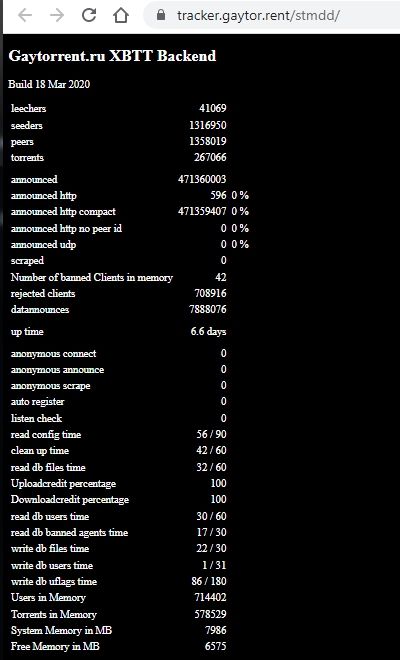
              Backend.jpg

            [œùæ] : " Mahirap mag dunong dunongan, Kung wala kang kaalam alam " ...

            1 Reply Last reply Reply Quote 0
            • john32123666J Offline
              john32123666 @MrMazda
              last edited by

              or does the page fail to load?

              • we can't load the page if you keep whacking [us] users ... 😆 ...

              whack.jpg

              [œùæ] : " Mahirap mag dunong dunongan, Kung wala kang kaalam alam " ...

              MrMazdaM 1 Reply Last reply Reply Quote 0
              • MrMazdaM Offline
                MrMazda Global Moderator @john32123666
                last edited by

                @john32123666 If you can open that page, it means the issue is not our DDoS protection software blocking the connection, as you're able to reach the tracker's back end. IIRC, when you right click the torrent, then click "Properties" there is a trackers tab that will give you the status message of the tracker. This message may go a long way to figuring out where the issue lies with the connection.

                Whap The User
                The only difference between martyrdom and suicide is press coverage!

                1 Reply Last reply Reply Quote 1
                • K Offline
                  Kingcherno @MrMazda
                  last edited by

                  @MrMazda

                  im able to open it just fine, but i have no clue why any torrents i personally make isnt working.

                  MrMazdaM ? 2 Replies Last reply Reply Quote 0
                  • MrMazdaM Offline
                    MrMazda Global Moderator @Kingcherno
                    last edited by

                    @Kingcherno When you pull up the tracker properties, do you see an error message? If so, what is it?

                    Whap The User
                    The only difference between martyrdom and suicide is press coverage!

                    1 Reply Last reply Reply Quote 0
                    • ? Offline
                      A Former User @Kingcherno
                      last edited by

                      @Kingcherno said in Trackers not working on Qbittorrent?:

                      @MrMazda

                      im able to open it just fine, but i have no clue why any torrents i personally make isnt working.

                      For the torrents you have created manually and uploaded to the site, you need to:

                      a) remove the originally created torrent from your seeding list

                      b) go to your uploaded torrents in the site and manually download the torrent file, open it in your client and direct the download location to where the source files are placed.

                      MrMazdaM 1 Reply Last reply Reply Quote 0
                      • MrMazdaM Offline
                        MrMazda Global Moderator @Guest
                        last edited by

                        @ianfontinell Fun fact: You can also change the tracker URL in the existing torrent to the announce URL for your account with your passkey. This will work as well, and sometimes works better than deleting the torrent, especially if the contents of the torrent are not in the directory your torrent downloads into by default.

                        Whap The User
                        The only difference between martyrdom and suicide is press coverage!

                        ? 1 Reply Last reply Reply Quote 0
                        • ? Offline
                          A Former User @MrMazda
                          last edited by

                          @MrMazda very good to know that, saves a lot of time and clicks! I'll give it a try on my next upload.


                          1 Reply Last reply Reply Quote 0

                          Hello! It looks like you're interested in this conversation, but you don't have an account yet.

                          Getting fed up of having to scroll through the same posts each visit? When you register for an account, you'll always come back to exactly where you were before, and choose to be notified of new replies (either via email, or push notification). You'll also be able to save bookmarks and upvote posts to show your appreciation to other community members.

                          With your input, this post could be even better 💗

                          Register Login
                          • 1 / 1
                          • First post
                            Last post