• Categories
    • Recent
    • Tags
    • Popular
    • Users
    • Groups
    • Torrents
    • Login

    Very confused about the whole seeding process...?

    Scheduled Pinned Locked Moved Uploading
    15 Posts 2 Posters 55 Views
    Loading More Posts
    • Oldest to Newest
    • Newest to Oldest
    • Most Votes
    Reply
    • Reply as topic
    Log in to reply
    This topic has been deleted. Only users with topic management privileges can see it.
    • A Offline
      alonelygay @john32123666
      last edited by

      @john32123666 It seems as though using the web version doesnt work at all. I just saw the marker icon for seeding torrents go up when i switched to the actual app 😕

      john32123666J 1 Reply Last reply Reply Quote 1
      • john32123666J Offline
        john32123666 @alonelygay
        last edited by

        I believe any type of web torrent are not supported here ...
        [correct me if I'm wrong] ...

        In addition here are some list of banned client:
        µTorrent (below versions 1.8.1)
        BitComet (below version 0.69)
        Bitlord
        ABC
        Bitspirit
        TorrentStorm
        Burst!
        BitBuddy
        Shareaza
        XBT
        TurboBT
        Thunder a.k.a. Xunlei ...
        https://www.gaytor.rent/faq.php#21

        [œùæ] : " Mahirap mag dunong dunongan, Kung wala kang kaalam alam " ...

        A 1 Reply Last reply Reply Quote 0
        • A Offline
          alonelygay @john32123666
          last edited by

          @john32123666 So according to FAQ, the tracker tab shows a download section, It's pretty much been about a day but that number is still 0 on the download section. I would see a couple of peers show up on the peers tab and now theyve disappeared. I know my seed bonus is going up though on my account. Am i doing something wrong? I'm only doing one file seeded so its not taking up all my bandwidth.

          john32123666J 1 Reply Last reply Reply Quote 0
          • john32123666J Offline
            john32123666 @alonelygay
            last edited by

            To test these peers ...
            UL-DL Bar.jpg
            Grab Freeleech sorted in size ...
            few seeders, bunch of leechers plenty of freetime ...
            This will not count against you ...
            Download partial parts [1-10 %] of the file ...
            [Choose Wisely] ...
            These is known as partial seeding ...
            https://www.gaytor.rent/browse.php?search=&incldead=1&infl=1&orderby=size&sort=desc

            [œùæ] : " Mahirap mag dunong dunongan, Kung wala kang kaalam alam " ...

            A 1 Reply Last reply Reply Quote 0
            • A Offline
              alonelygay @john32123666
              last edited by

              @john32123666 I just did some research apparently my ports are closed and my speed test failed according the utorrent setup guide. I'm guessing that's important for other people to interact on my side... i didnt realize this process involved so much tech stuff.

              john32123666J 1 Reply Last reply Reply Quote 0
              • john32123666J Offline
                john32123666 @alonelygay
                last edited by

                For the meantime write to helpdesk and be patient ...
                https://www.gaytor.rent/helpdesk.php
                and describe the problem you are dealing with ...

                Someone else will specify what causing the issue ...
                Have A Great day/night ... [jhon] ...

                [œùæ] : " Mahirap mag dunong dunongan, Kung wala kang kaalam alam " ...

                A 1 Reply Last reply Reply Quote 0
                • A Offline
                  alonelygay @john32123666
                  last edited by

                  @john32123666 Thanks I appreciate the help you've given so far!

                  john32123666J 1 Reply Last reply Reply Quote 1
                  • john32123666J Offline
                    john32123666 @alonelygay
                    last edited by

                    One more thing can you provide torrent client version
                    It can be found on Toolbar Option ...
                    Also your Operating System [OS] and screenshots ...
                    This can overview the subject ...

                    [œùæ] : " Mahirap mag dunong dunongan, Kung wala kang kaalam alam " ...

                    A 1 Reply Last reply Reply Quote 0
                    • A Offline
                      alonelygay @john32123666
                      last edited by

                      @john32123666 yeah sure. I use windows 10.
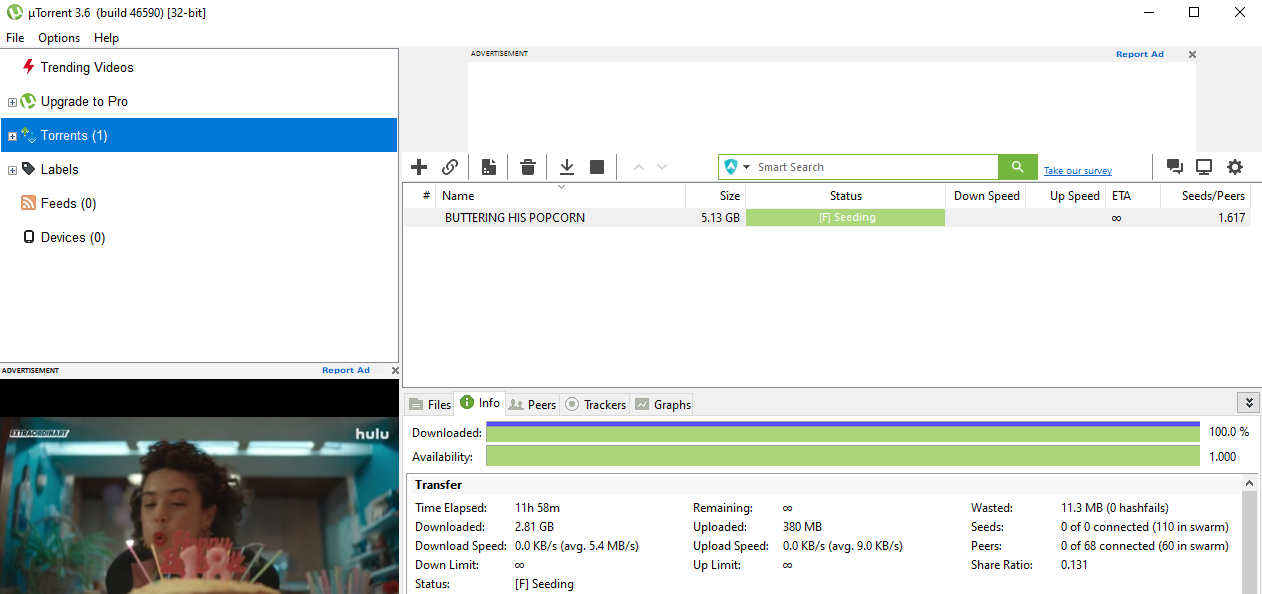
                      1ad5cd55-3f65-48c9-8777-60c6c5a591df-image.png

                      john32123666J 1 Reply Last reply Reply Quote 0
                      • john32123666J Offline
                        john32123666 @alonelygay
                        last edited by

                        Thank you ...
                        It seems that everything is normal ...
                        The reason why you can't seed others are already seeding partial ...
                        You can see the peers by clicking on it ...
                        At this time zero seeders means you are not connected ...
                        Can you exit your client and reboot your PC ...
                        If this does not help ...
                        SEE: https://community.gaytor.rent/topic/60857/my-ratio-is-0-801-but-i-do-not-seem-to-be-able-to-download? |
                        https://community.gaytor.rent/topic/60739/download-does-not-work/3?

                        [œùæ] : " Mahirap mag dunong dunongan, Kung wala kang kaalam alam " ...

                        1 Reply Last reply Reply Quote 0
                        • john32123666J Offline
                          john32123666
                          last edited by

                          TROUBLESHOOTING:

                          • disable your VPN [it is possible that you are using faulty client w/c preventing you from connectivity] ...
                          • see if your antivirus is blocking the site ...
                          • port forward : https://portforward.com/
                          • firewall setting should be [allowed] ...
                          • reset your router/modem ...
                          • Why is uTorrent not connecting to peers?
                            uTorrent often fails to download files and gets stuck on connecting to peers due to interference from your antivirus,
                            your ISP blocking torrent downloads, incorrect uTorrent client settings, or the torrent file itself is dead.
                          • Why won't my Utorrent connect to peers?
                            Check Your Firewall and Enable Port Mapping
                            A problem with uTorrent not connecting to peers can often be due to your system or network firewall.
                            For BitTorrent clients like uTorrent to work correctly, they require open network ports to allow incoming and outgoing traffic.
                          • do a web search ...
                            write to helpdesk and be patient ...
                            https://www.gaytor.rent/helpdesk.php

                          [œùæ] : " Mahirap mag dunong dunongan, Kung wala kang kaalam alam " ...

                          1 Reply Last reply Reply Quote 0
                          • raphjdR raphjd moved this topic from GayTorrent.ru Discussions on

                          Hello! It looks like you're interested in this conversation, but you don't have an account yet.

                          Getting fed up of having to scroll through the same posts each visit? When you register for an account, you'll always come back to exactly where you were before, and choose to be notified of new replies (either via email, or push notification). You'll also be able to save bookmarks and upvote posts to show your appreciation to other community members.

                          With your input, this post could be even better 💗

                          Register Login
                          • 1 / 1
                          • First post
                            Last post

