• Categories
    • Recent
    • Tags
    • Popular
    • Users
    • Groups
    • Torrents
    • Login

    QBittorrent or Utorrent it's not seending

    Scheduled Pinned Locked Moved GayTorrent.ru Support Discussions
    23 Posts 7 Posters 190 Views 1 Watching
    Loading More Posts
    • Oldest to Newest
    • Newest to Oldest
    • Most Votes
    Reply
    • Reply as topic
    Log in to reply
    This topic has been deleted. Only users with topic management privileges can see it.
    • S Offline
      swansea1960
      last edited by

      I get exactly the same problem.  I have no idea about "ports"  etc

      1 Reply Last reply Reply Quote 0
      • S Offline
        swansea1960
        last edited by

        How do i do he port thing ?

        1 Reply Last reply Reply Quote 0
        • S Offline
          swansea1960
          last edited by

          While in work, laptop left on to seed,  got home,  just  1.76GB.    These torrent software things must be a joke.  Qbitorrent just as useless as bittorrent.

          1 Reply Last reply Reply Quote 0
          • MrMazdaM Offline
            MrMazda Global Moderator
            last edited by

            As I have said before, if you do not forward the port that your torrent client uses in your network to your computer, getting any amount of upload traffic will be difficult. You need to be sure that the port that you are using is forwarded to your PC both in TCP and in UDP. This is an essential step to be able to get your uploads to work.

            Whap The User
            The only difference between martyrdom and suicide is press coverage!

            1 Reply Last reply Reply Quote 0
            • MrMazdaM Offline
              MrMazda Global Moderator
              last edited by

              @leovelascosp:

              @MrMazda I've already done it. I did put the port of qBittorrent in my router and I keep have this problem. I don't know what to do anymore.
              I even uninstalled my antivirus… I tried with another torrent client.. the same problem.
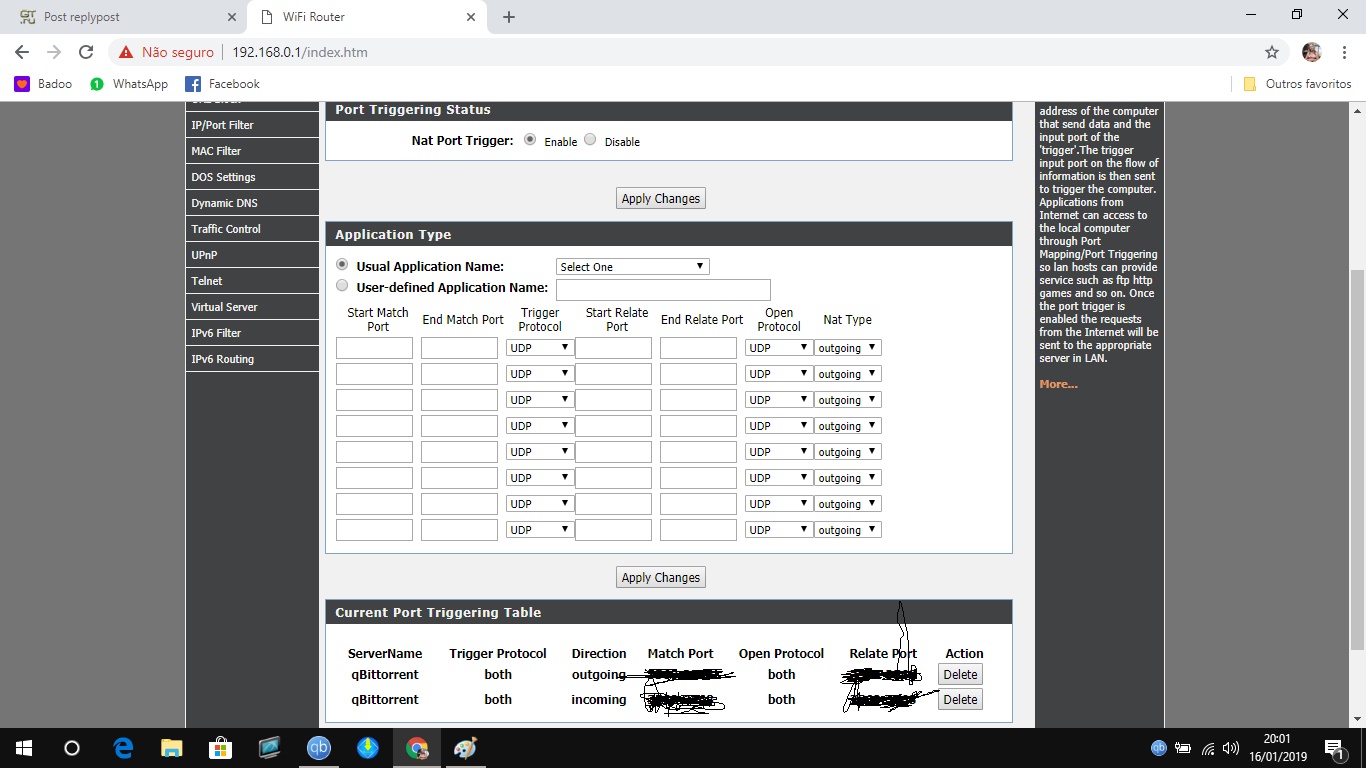
              The example you have set here is PORT TRIGGERING, not PORT FORWARDING… There is a HUGE difference. This is were you're running into trouble.

              Whap The User
              The only difference between martyrdom and suicide is press coverage!

              1 Reply Last reply Reply Quote 0
              • S Offline
                swansea1960
                last edited by

                MrMazda,  tried messaging my Teamviewer details, but nothing so far happening.  uploading is happening - but only about 2GB per day if that.

                1 Reply Last reply Reply Quote 0
                • A Offline
                  amors
                  last edited by

                  same problem cant seed any help

                  1 Reply Last reply Reply Quote 0
                  • S Offline
                    swansea1960
                    last edited by

                    And us novices know nothing about changing  "port"  settings.    It is annoying.  As I type this I have 16 torrents in seeding mode, but only 2 are seeding, and barely 40kb/s speed.

                    1 Reply Last reply Reply Quote 0
                    • L Offline
                      leovelascosp
                      last edited by

                      @MrMazda:

                      @leovelascosp:

                      @MrMazda I've already done it. I did put the port of qBittorrent in my router and I keep have this problem. I don't know what to do anymore.
                      I even uninstalled my antivirus… I tried with another torrent client.. the same problem.

                      The example you have set here is PORT TRIGGERING, not PORT FORWARDING… There is a HUGE difference. This is were you're running into trouble.

                      So, how can I find this PORT FORWARDING and solve it?

                      1 Reply Last reply Reply Quote 0
                      • A Offline
                        adrian0883
                        last edited by

                        I'm having this issue as well. I tried to do port forwarding, but my router doesn't have a port forwarding section in the internal settings. Am I screwed?

                        1 Reply Last reply Reply Quote 0
                        • MrMazdaM Offline
                          MrMazda Global Moderator
                          last edited by

                          @slapatologis:

                          I'm having this issue as well. I tried to do port forwarding, but my router doesn't have a port forwarding section in the internal settings. Am I screwed?

                          I seriously doubt this… Now, it may be that the port forwarding option is locked out to your provider, which I have seen before, but it is virtually impossible NOT to have a port forwarding option, unless there is no NAT between your local LAN and the internet, which is very unlikely.

                          I may be able to assist you with this a little more in depth, and perhaps assist you with poking around in your router.

                          Also, FWIW, if you're using a SOCKS4 or SOCKS 5 proxy server, it is very likely that the proxy itself is where your problem lies. If you are concerned about your privacy online, I would recommend a full VPN for many reasons. Simply put, it is a far superior method of protection, and it's a lot easier to get it working.

                          Whap The User
                          The only difference between martyrdom and suicide is press coverage!

                          1 Reply Last reply Reply Quote 0
                          • A Offline
                            adrian0883
                            last edited by

                            @MrMazda:

                            @slapatologis:

                            I'm having this issue as well. I tried to do port forwarding, but my router doesn't have a port forwarding section in the internal settings. Am I screwed?

                            I seriously doubt this… Now, it may be that the port forwarding option is locked out to your provider, which I have seen before, but it is virtually impossible NOT to have a port forwarding option, unless there is no NAT between your local LAN and the internet, which is very unlikely.

                            I may be able to assist you with this a little more in depth, and perhaps assist you with poking around in your router.

                            Also, FWIW, if you're using a SOCKS4 or SOCKS 5 proxy server, it is very likely that the proxy itself is where your problem lies. If you are concerned about your privacy online, I would recommend a full VPN for many reasons. Simply put, it is a far superior method of protection, and it's a lot easier to get it working.

                            I don't know what happened, but now I have seeded over 50 GB of content that I downloaded. I may still need your assistance though as I can't seed on other sites (except TPB).

                            1 Reply Last reply Reply Quote 0
                            • S Offline
                              swansea1960
                              last edited by

                              Mine still is rarely seeding.  Today, left laptop on all day, have over 40 torrents in seeding mode, but now home from work and only 1.85GB have seeded all day.

                              Not a technophobe so this talk of ports/socks/etc is  all greek to me.  It seems to seed during the initial download but then stops.

                              1 Reply Last reply Reply Quote 0
                              • L Offline
                                leovelascosp
                                last edited by

                                @MrMazda:

                                @slapatologis:

                                I'm having this issue as well. I tried to do port forwarding, but my router doesn't have a port forwarding section in the internal settings. Am I screwed?

                                I seriously doubt this… Now, it may be that the port forwarding option is locked out to your provider, which I have seen before, but it is virtually impossible NOT to have a port forwarding option, unless there is no NAT between your local LAN and the internet, which is very unlikely.

                                I may be able to assist you with this a little more in depth, and perhaps assist you with poking around in your router.

                                Also, FWIW, if you're using a SOCKS4 or SOCKS 5 proxy server, it is very likely that the proxy itself is where your problem lies. If you are concerned about your privacy online, I would recommend a full VPN for many reasons. Simply put, it is a far superior method of protection, and it's a lot easier to get it working.

                                I've tried a VPN but it hasn't worked as well. What can I do now? I have a bunch of files to upload and seed but I can do it 😞 My router doesn't have the port forward either.

                                1 Reply Last reply Reply Quote 0
                                • M Offline
                                  MasaruToshu
                                  last edited by

                                  Im also having kinda troubles. Sometimes my ports are opening by upnp and other times not. Is it required both TCP and UDP? Or only with UDP is enough port?

                                  1 Reply Last reply Reply Quote 0
                                  • MrMazdaM Offline
                                    MrMazda Global Moderator
                                    last edited by

                                    @leovelascosp:

                                    @MrMazda:

                                    @slapatologis:

                                    I'm having this issue as well. I tried to do port forwarding, but my router doesn't have a port forwarding section in the internal settings. Am I screwed?

                                    I seriously doubt this… Now, it may be that the port forwarding option is locked out to your provider, which I have seen before, but it is virtually impossible NOT to have a port forwarding option, unless there is no NAT between your local LAN and the internet, which is very unlikely.

                                    I may be able to assist you with this a little more in depth, and perhaps assist you with poking around in your router.

                                    Also, FWIW, if you're using a SOCKS4 or SOCKS 5 proxy server, it is very likely that the proxy itself is where your problem lies. If you are concerned about your privacy online, I would recommend a full VPN for many reasons. Simply put, it is a far superior method of protection, and it's a lot easier to get it working.

                                    I've tried a VPN but it hasn't worked as well. What can I do now? I have a bunch of files to upload and seed but I can do it 😞 My router doesn't have the port forward either.

                                    Every router has a port forwarding option. Depending on your provider and the equipment that the provided however, it may not be possible to access the port forwarding option.

                                    As for the VPN option, you need to be using a VPN server that supports port forwarding, and you need to be using the port that the VPN forwards, unless you are using a VPN server that forwards all ports. If that's the case, simply turning on the VPN will bypass the problem, even if port forwarding is not enabled on your home network.

                                    Whap The User
                                    The only difference between martyrdom and suicide is press coverage!

                                    1 Reply Last reply Reply Quote 0
                                    • MrMazdaM Offline
                                      MrMazda Global Moderator
                                      last edited by

                                      @MasaruToshu:

                                      Im also having kinda troubles. Sometimes my ports are opening by upnp and other times not. Is it required both TCP and UDP? Or only with UDP is enough port?

                                      You need the port to be forwarded in both TCP and in UDP. If you manually specify this in your router, you should be good to go.


                                      Whap The User
                                      The only difference between martyrdom and suicide is press coverage!

                                      1 Reply Last reply Reply Quote 0
                                      • M Offline
                                        mgr
                                        last edited by

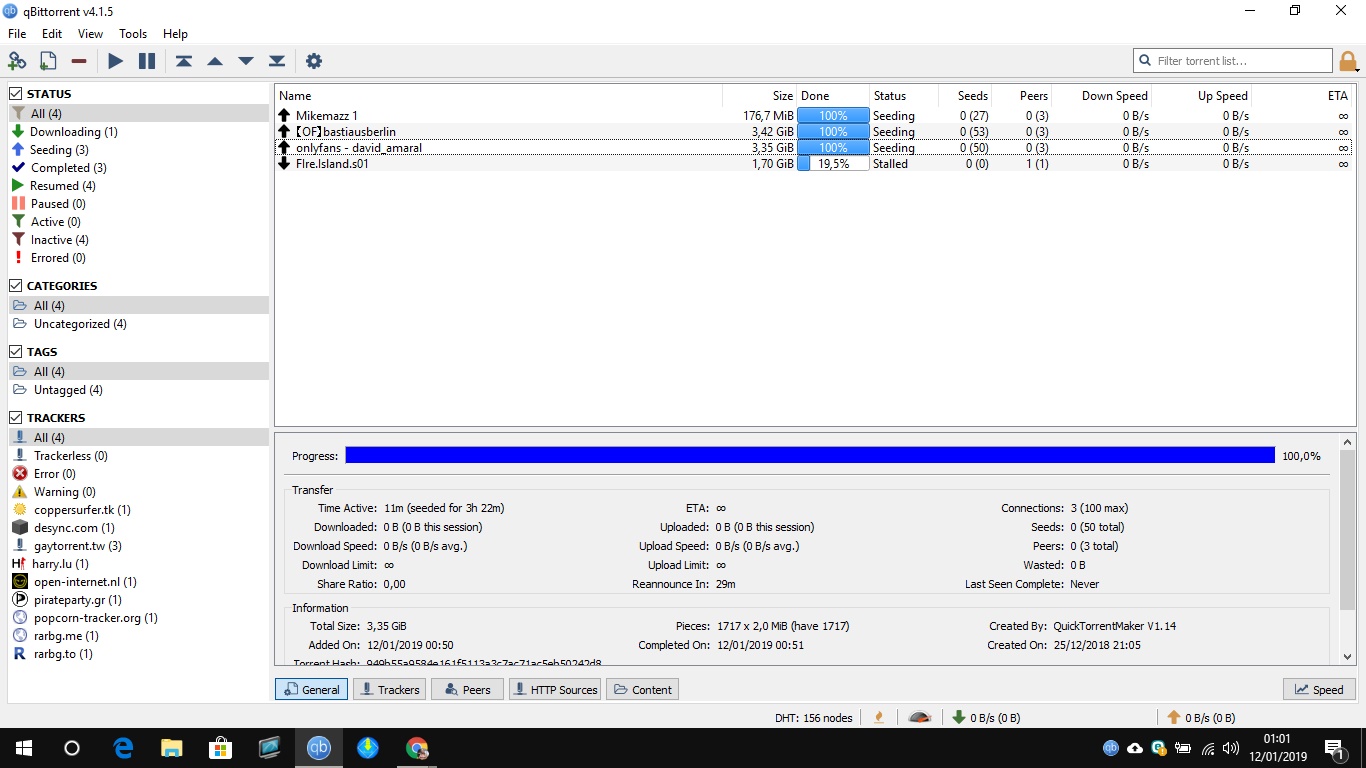
                                        Besides the technical problems, where MrMazda is a real expert in, you do need to just a tiny little bit of mathematics in your brain. On the posted screenshot of seeding torrents i see at a first glance that there are a lot more seeders than leechers. Now 3 leechers have selection to download from 53 seeders. Depending on your settings for your client (max. No. of peers for a client and some other technical parameters) there comes one feature of the protocol into the game: clients will select seeders with the best upload speed so they can get the most in the shortest time. Unless you have a symmetric IN-connection your upload speed will usually be much smaller than your download speed (in Germany about factor 10). Taking that in account could often explain seeding problems.

                                        Up to now we didn't mention the topic "hit and run" which sharpens the situation even more. Lastly I saw a member with 3TB download and only 200 seedbonus points. That is 400 hours of seeding for 3 TB download - ridiculous! Since many years I preach: download a torrent and seed, Seed, SEED! When you are ready seeding: seed some more!!! The time-restrictions for seeding time in some clients are just ridiculous: seed 1 hour after downloading :ROTFLMAO[nb]Rolling on the floor laughing my ass off[/nb]. I personally set my seeding time to at lest factor 3 (seeding amount 3 times file size) and I get a good ratio here on GT.ru without spending SBP for traffic.

                                        1 Reply Last reply Reply Quote 0
                                        • L Offline
                                          leovelascosp
                                          last edited by

                                          @MrMazda:

                                          @leovelascosp:

                                          @MrMazda:

                                          @slapatologis:

                                          I'm having this issue as well. I tried to do port forwarding, but my router doesn't have a port forwarding section in the internal settings. Am I screwed?

                                          I seriously doubt this… Now, it may be that the port forwarding option is locked out to your provider, which I have seen before, but it is virtually impossible NOT to have a port forwarding option, unless there is no NAT between your local LAN and the internet, which is very unlikely.

                                          I may be able to assist you with this a little more in depth, and perhaps assist you with poking around in your router.

                                          Also, FWIW, if you're using a SOCKS4 or SOCKS 5 proxy server, it is very likely that the proxy itself is where your problem lies. If you are concerned about your privacy online, I would recommend a full VPN for many reasons. Simply put, it is a far superior method of protection, and it's a lot easier to get it working.

                                          I've tried a VPN but it hasn't worked as well. What can I do now? I have a bunch of files to upload and seed but I can do it 😞 My router doesn't have the port forward either.

                                          Every router has a port forwarding option. Depending on your provider and the equipment that the provided however, it may not be possible to access the port forwarding option.

                                          As for the VPN option, you need to be using a VPN server that supports port forwarding, and you need to be using the port that the VPN forwards, unless you are using a VPN server that forwards all ports. If that's the case, simply turning on the VPN will bypass the problem, even if port forwarding is not enabled on your home network.

                                          What VPN program has all these settings?

                                          1 Reply Last reply Reply Quote 0
                                          • MrMazdaM Offline
                                            MrMazda Global Moderator
                                            last edited by

                                            @leovelascosp:

                                            @MrMazda:

                                            @leovelascosp:

                                            @MrMazda:

                                            @slapatologis:

                                            I'm having this issue as well. I tried to do port forwarding, but my router doesn't have a port forwarding section in the internal settings. Am I screwed?

                                            I seriously doubt this… Now, it may be that the port forwarding option is locked out to your provider, which I have seen before, but it is virtually impossible NOT to have a port forwarding option, unless there is no NAT between your local LAN and the internet, which is very unlikely.

                                            I may be able to assist you with this a little more in depth, and perhaps assist you with poking around in your router.

                                            Also, FWIW, if you're using a SOCKS4 or SOCKS 5 proxy server, it is very likely that the proxy itself is where your problem lies. If you are concerned about your privacy online, I would recommend a full VPN for many reasons. Simply put, it is a far superior method of protection, and it's a lot easier to get it working.

                                            I've tried a VPN but it hasn't worked as well. What can I do now? I have a bunch of files to upload and seed but I can do it 😞 My router doesn't have the port forward either.

                                            Every router has a port forwarding option. Depending on your provider and the equipment that the provided however, it may not be possible to access the port forwarding option.

                                            As for the VPN option, you need to be using a VPN server that supports port forwarding, and you need to be using the port that the VPN forwards, unless you are using a VPN server that forwards all ports. If that's the case, simply turning on the VPN will bypass the problem, even if port forwarding is not enabled on your home network.

                                            What VPN program has all these settings?

                                            I am using Private VPN. Most of their servers only forward one port, which it will tell you about in the VPN app itself. There are a few VPN servers that they have however, which forward ALL ports through to your computer.

                                            Whap The User
                                            The only difference between martyrdom and suicide is press coverage!

                                            1 Reply Last reply Reply Quote 0

                                            Hello! It looks like you're interested in this conversation, but you don't have an account yet.

                                            Getting fed up of having to scroll through the same posts each visit? When you register for an account, you'll always come back to exactly where you were before, and choose to be notified of new replies (either via email, or push notification). You'll also be able to save bookmarks and upvote posts to show your appreciation to other community members.

                                            With your input, this post could be even better 💗

                                            Register Login
                                            • 1
                                            • 2
                                            • 1 / 2
                                            • First post
                                              Last post