QBittorrent or Utorrent it's not seending
-
Based on the little orange flame icon in the bottom of your qBitTorrent window, combined with the behaviour that you are describing, I am willing to bet that the port that your qBitTorrent uses is not forwarded in your router to your computer, both in TCP, and in UDP. Once you get the correct port forwarding settings in place, your problems should disappear.
-
@MrMazda I've already done it. I did put the port of qBittorrent in my router and I keep have this problem. I don't know what to do anymore.
I even uninstalled my antivirus… I tried with another torrent client.. the same problem.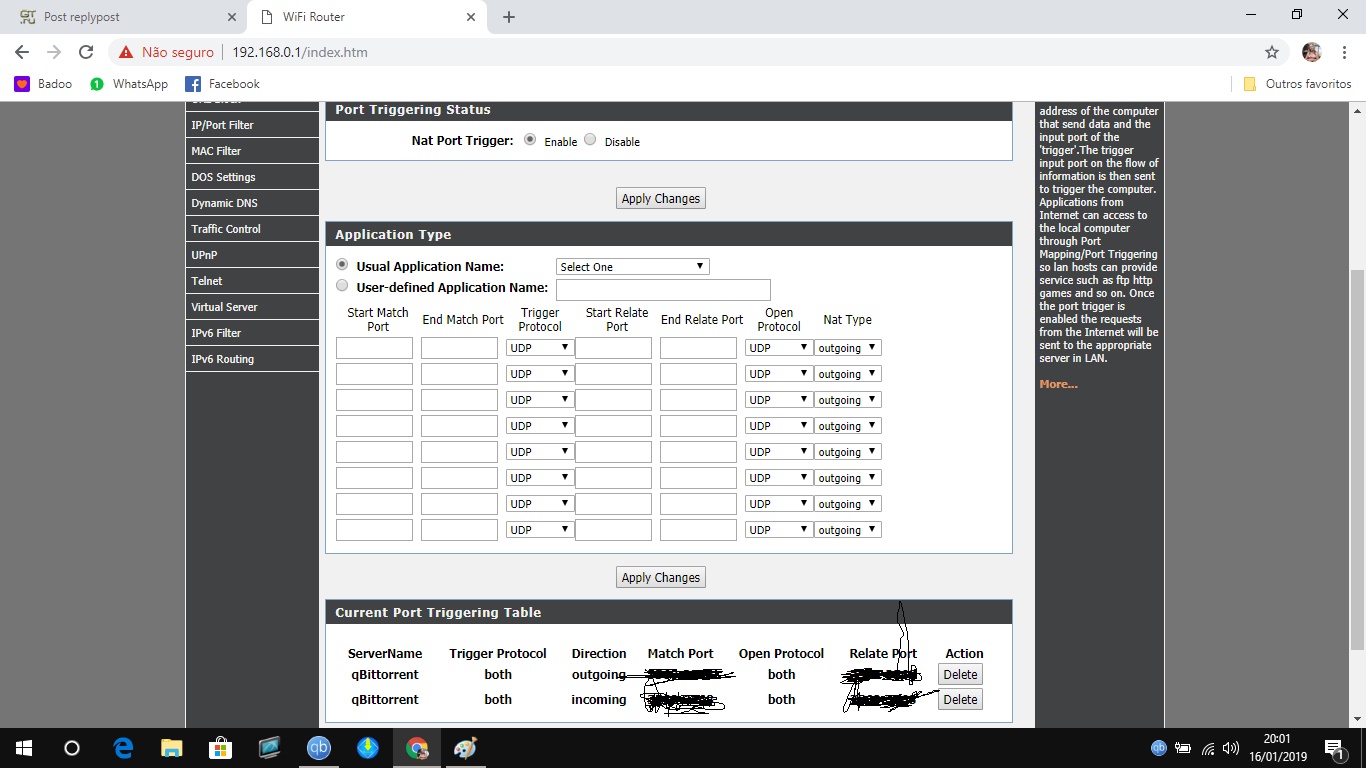
-
I get exactly the same problem. I have no idea about "ports" etc
-
How do i do he port thing ?
-
While in work, laptop left on to seed, got home, just 1.76GB. These torrent software things must be a joke. Qbitorrent just as useless as bittorrent.
-
As I have said before, if you do not forward the port that your torrent client uses in your network to your computer, getting any amount of upload traffic will be difficult. You need to be sure that the port that you are using is forwarded to your PC both in TCP and in UDP. This is an essential step to be able to get your uploads to work.
-
@MrMazda I've already done it. I did put the port of qBittorrent in my router and I keep have this problem. I don't know what to do anymore.
I even uninstalled my antivirus… I tried with another torrent client.. the same problem.The example you have set here is PORT TRIGGERING, not PORT FORWARDING… There is a HUGE difference. This is were you're running into trouble.
-
MrMazda, tried messaging my Teamviewer details, but nothing so far happening. uploading is happening - but only about 2GB per day if that.
-
same problem cant seed any help
-
And us novices know nothing about changing "port" settings. It is annoying. As I type this I have 16 torrents in seeding mode, but only 2 are seeding, and barely 40kb/s speed.
-
@MrMazda I've already done it. I did put the port of qBittorrent in my router and I keep have this problem. I don't know what to do anymore.
I even uninstalled my antivirus… I tried with another torrent client.. the same problem.The example you have set here is PORT TRIGGERING, not PORT FORWARDING… There is a HUGE difference. This is were you're running into trouble.
So, how can I find this PORT FORWARDING and solve it?
-
I'm having this issue as well. I tried to do port forwarding, but my router doesn't have a port forwarding section in the internal settings. Am I screwed?
-
@slapatologis:
I'm having this issue as well. I tried to do port forwarding, but my router doesn't have a port forwarding section in the internal settings. Am I screwed?
I seriously doubt this… Now, it may be that the port forwarding option is locked out to your provider, which I have seen before, but it is virtually impossible NOT to have a port forwarding option, unless there is no NAT between your local LAN and the internet, which is very unlikely.
I may be able to assist you with this a little more in depth, and perhaps assist you with poking around in your router.
Also, FWIW, if you're using a SOCKS4 or SOCKS 5 proxy server, it is very likely that the proxy itself is where your problem lies. If you are concerned about your privacy online, I would recommend a full VPN for many reasons. Simply put, it is a far superior method of protection, and it's a lot easier to get it working.
-
@slapatologis:
I'm having this issue as well. I tried to do port forwarding, but my router doesn't have a port forwarding section in the internal settings. Am I screwed?
I seriously doubt this… Now, it may be that the port forwarding option is locked out to your provider, which I have seen before, but it is virtually impossible NOT to have a port forwarding option, unless there is no NAT between your local LAN and the internet, which is very unlikely.
I may be able to assist you with this a little more in depth, and perhaps assist you with poking around in your router.
Also, FWIW, if you're using a SOCKS4 or SOCKS 5 proxy server, it is very likely that the proxy itself is where your problem lies. If you are concerned about your privacy online, I would recommend a full VPN for many reasons. Simply put, it is a far superior method of protection, and it's a lot easier to get it working.
I don't know what happened, but now I have seeded over 50 GB of content that I downloaded. I may still need your assistance though as I can't seed on other sites (except TPB).
-
Mine still is rarely seeding. Today, left laptop on all day, have over 40 torrents in seeding mode, but now home from work and only 1.85GB have seeded all day.
Not a technophobe so this talk of ports/socks/etc is all greek to me. It seems to seed during the initial download but then stops.
-
@slapatologis:
I'm having this issue as well. I tried to do port forwarding, but my router doesn't have a port forwarding section in the internal settings. Am I screwed?
I seriously doubt this… Now, it may be that the port forwarding option is locked out to your provider, which I have seen before, but it is virtually impossible NOT to have a port forwarding option, unless there is no NAT between your local LAN and the internet, which is very unlikely.
I may be able to assist you with this a little more in depth, and perhaps assist you with poking around in your router.
Also, FWIW, if you're using a SOCKS4 or SOCKS 5 proxy server, it is very likely that the proxy itself is where your problem lies. If you are concerned about your privacy online, I would recommend a full VPN for many reasons. Simply put, it is a far superior method of protection, and it's a lot easier to get it working.
I've tried a VPN but it hasn't worked as well. What can I do now? I have a bunch of files to upload and seed but I can do it
 My router doesn't have the port forward either.
 -
Im also having kinda troubles. Sometimes my ports are opening by upnp and other times not. Is it required both TCP and UDP? Or only with UDP is enough port?
-
@slapatologis:
I'm having this issue as well. I tried to do port forwarding, but my router doesn't have a port forwarding section in the internal settings. Am I screwed?
I seriously doubt this… Now, it may be that the port forwarding option is locked out to your provider, which I have seen before, but it is virtually impossible NOT to have a port forwarding option, unless there is no NAT between your local LAN and the internet, which is very unlikely.
I may be able to assist you with this a little more in depth, and perhaps assist you with poking around in your router.
Also, FWIW, if you're using a SOCKS4 or SOCKS 5 proxy server, it is very likely that the proxy itself is where your problem lies. If you are concerned about your privacy online, I would recommend a full VPN for many reasons. Simply put, it is a far superior method of protection, and it's a lot easier to get it working.
I've tried a VPN but it hasn't worked as well. What can I do now? I have a bunch of files to upload and seed but I can do it
My router doesn't have the port forward either.Every router has a port forwarding option. Depending on your provider and the equipment that the provided however, it may not be possible to access the port forwarding option.
As for the VPN option, you need to be using a VPN server that supports port forwarding, and you need to be using the port that the VPN forwards, unless you are using a VPN server that forwards all ports. If that's the case, simply turning on the VPN will bypass the problem, even if port forwarding is not enabled on your home network.
-
Im also having kinda troubles. Sometimes my ports are opening by upnp and other times not. Is it required both TCP and UDP? Or only with UDP is enough port?
You need the port to be forwarded in both TCP and in UDP. If you manually specify this in your router, you should be good to go.
-
@slapatologis:
I'm having this issue as well. I tried to do port forwarding, but my router doesn't have a port forwarding section in the internal settings. Am I screwed?
I seriously doubt this… Now, it may be that the port forwarding option is locked out to your provider, which I have seen before, but it is virtually impossible NOT to have a port forwarding option, unless there is no NAT between your local LAN and the internet, which is very unlikely.
I may be able to assist you with this a little more in depth, and perhaps assist you with poking around in your router.
Also, FWIW, if you're using a SOCKS4 or SOCKS 5 proxy server, it is very likely that the proxy itself is where your problem lies. If you are concerned about your privacy online, I would recommend a full VPN for many reasons. Simply put, it is a far superior method of protection, and it's a lot easier to get it working.
I've tried a VPN but it hasn't worked as well. What can I do now? I have a bunch of files to upload and seed but I can do it
My router doesn't have the port forward either.Every router has a port forwarding option. Depending on your provider and the equipment that the provided however, it may not be possible to access the port forwarding option.
As for the VPN option, you need to be using a VPN server that supports port forwarding, and you need to be using the port that the VPN forwards, unless you are using a VPN server that forwards all ports. If that's the case, simply turning on the VPN will bypass the problem, even if port forwarding is not enabled on your home network.
What VPN program has all these settings?


Hello! It looks like you're interested in this conversation, but you don't have an account yet.
Getting fed up of having to scroll through the same posts each visit? When you register for an account, you'll always come back to exactly where you were before, and choose to be notified of new replies (either via email, or push notification). You'll also be able to save bookmarks and upvote posts to show your appreciation to other community members.
With your input, this post could be even better 💗
Register Login