QTM Questions / Answers and suggestions
-
Hi,
I am not able to upload torrents inspite of downloading QTM. When I open the app,and choose installation destination, it's showing invalid even after trying lot of permutation and combinations. How should I fix this issue?
-
I personally use BitTorrent and don't want to switch to uTorrent to be able to use this program and having used 12/22/2014: Quick Torrent Maker V1.11 for the last year or so and it doesn't need to be directed to uTorrent to work.
If you set it up and point it to your BitTorrent.exe file instead, you can get QTM to work just the same. I know this because I've done it. In terms of their back-end, the two torrent programs are identical.
-
I personally use BitTorrent and don't want to switch to uTorrent to be able to use this program and having used 12/22/2014: Quick Torrent Maker V1.11 for the last year or so and it doesn't need to be directed to uTorrent to work.
If you set it up and point it to your BitTorrent.exe file instead, you can get QTM to work just the same. I know this because I've done it. In terms of their back-end, the two torrent programs are identical.
I would really appreciate any info you can provide that got the new version of QTM to work with Bittorrent as I keep getting this message "Unable to load "qtm.torrent" torrent is not valid bencoding" after every upload and I've followed all the suggestions posted here for making it work. It uploads the torrents fine but after it is complete then the message I posted above keeps coming up. Then I login and download the torrent to start the seeding, the same as I did with the previous version. Personally I would rather use the previous version as it worked like a charm and I never got error messages. I was told by the help desk that the older version doesn't work on the site any more but I'd been using it 5 minutes before installing the new version without any problems! Any advice you can give me would be greatly appreciated. I'm running Windows 10 with the latest version of Bittorrent. Thanks in advance for any advice you can give me! :thx:
-
You should try to properly uninstall QuickTorrentMaker: Start menu > All programs > QuickTorrentMaker > uninstall
Then install QTM into another directory, the C:\ root directory works well, to my experience, and setting BitTorrent.exe instead of uTorrent.exe on the first screen. Run QTM.exe as administrator:
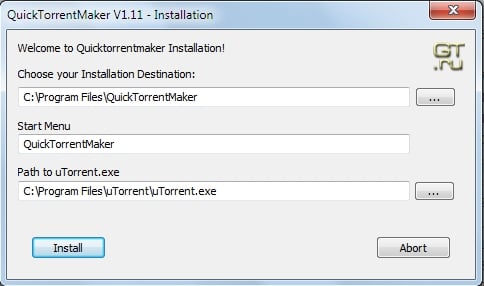
Means:
a) Change Choose the Installation Destination from "C:\Program Files x86\QuickTorrentMaker" into "C:\QuickTorrentMaker"
b) Change Path to uTorrent.exe from "C:\Program Files x86\uTorrent\uTorrent.exe" into "C:\Program Files x86\BitTorrent\BitTorrent.exe" -
You should try to properly uninstall QuickTorrentMaker: Start menu > All programs > QuickTorrentMaker > uninstall
Then install QTM into another directory, the C:\ root directory works well, to my experience, and setting BitTorrent.exe instead of uTorrent.exe on the first screen.
Run QTM.exe as administrator:
Means:
a) Change Choose the Installation Destination from "C:\Program Files x86/QuickTorrentMaker" into "C:\QuickTorrentMaker"
b) Change Path to uTorrent.exe from "C:\Program Files x86\uTorrent\uTorrent.exe" into "C:\Program Files x86\BitTorrent/BitTorrent.exe"Thanks for the advice, will give this a try and let you know how it goes, again thanks, much appreciated!! :thx:
-
Any update?
-
I"m on Windows 7, and I downloaded the QTM, but I don't think I linked it right to Utorrent, so when I upload, nothing to shows up in Utorrent, and can't find it But when I try to upload again, it says already uploaded.
On QTM though, I can't go in and change what its linked to. When I delete and uninstall QTM, and reinstall, it saved all my other stuff, and I can't figure out why… so it never lets me redo my stuff.
Help!
-
I can't logic. Help!
-
please go here: https://community.gaytor.rent/index.php?topic=26015.0
-
Hi, so im trying to login on my qtm v. 1.12 but it says: login incorrect.
What should I do? :cry2: -
Hi! When I try to download QTM I Get a message saying
this is unsafe and has been removedI use Norton Internet Security.I would like to be able to upload - is there anyways round my internet security thinking QTM is unsafe.
One more question - is QTM safe to download and use?
many thanks
-
Hi, so im trying to login on my qtm v. 1.12 but it says: login incorrect.
What should I do? :cry2:same problem(((
-
Hi, so im trying to login on my qtm v. 1.12 but it says: login incorrect.
What should I do? :cry2:This is covered here: https://community.gaytor.rent/index.php?topic=26015.0
-
Hi! When I try to download QTM I Get a message saying
this is unsafe and has been removedI use Norton Internet Security.I would like to be able to upload - is there anyways round my internet security thinking QTM is unsafe.
One more question - is QTM safe to download and use?
many thanks
YES it's safe. This issue is covered HERE: https://community.gaytor.rent/index.php?topic=26015.0
-
Hi, so im trying to login on my qtm v. 1.12 but it says: login incorrect.
What should I do? :cry2:same problem(((
This issue is covered HERE: https://community.gaytor.rent/index.php?topic=26015.0
-
Hey small suggestion , for the add picture function it will be a good idea to add a file type filter that just looks at jpgs png tif….... while uploading before i selected a 600 mb video file was wondering why it took so long to create a torrent file lol
-
Hi, I can't download QTM.
I get: "the code execution cannot proceed because mfc110.dll was not found."
-
Right; best to stick with version 1.12, as the 1.13 version still has problems with Windows 10.
-
Hello there !
I'm having issues uploading (my ratio went really low).
I downloaded the latest quick torrent maker here-on provided but everytime I tried to install it, I got an automatic system error message saying that "Unable to execute the code because mfc110.dll is nowhere to be found. Try reinstalling the program to correct this issue" then à second message with the code "MSVCR110.dll" and a third message with the following code "MSVCP110.dll".
I researched theses codes and from what I've gleened, I was supposed to install another program which required me to pay, in order to fix the problem (I uninstalled it).
I had the previous version of the Quick Torrent maker (v12), I just uninstalled it because it wouldn't let me login although my login info were right.
I deleted everything in connection with QTM then downloaded the newest version, tried to install it and got the same message.I'm using Windows 10.
Version : 1709.
Exploitation system version : 16299.192.I had to reset my computer two days ago (it didn't restart, it just kept rebooting without opening Windows so I reset it and chose the "keep personal data" option).
What can/should I do ?
-
Hi,
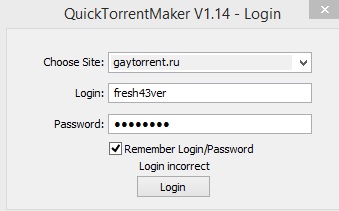
I still can't access my account in qtm_v1.14. Im using windows 8 os. I hope you can help me fix this. :cry2:
Note: I already uninstall the previous version (1.13).Thank you. :love:



Hello! It looks like you're interested in this conversation, but you don't have an account yet.
Getting fed up of having to scroll through the same posts each visit? When you register for an account, you'll always come back to exactly where you were before, and choose to be notified of new replies (either via email, or push notification). You'll also be able to save bookmarks and upvote posts to show your appreciation to other community members.
With your input, this post could be even better 💗
Register Login