Hi everyone, it seems that some recent changes to the website have affected the functionality of GUU. Although after a chat I had with the website owner about it, he told me that he will not be supporting third party applications in the future (like GUU) so there is no way for me to know the changes on the backend to update my program to reflect them.
As such GUU will not receive any further updates in the future.
The source code will continue to be available on GitHub (https://github.com/vancer0/guu-cpp) under the GPL-2.0 license, so if any other developers wish to fork it and update it they are more than welcome to do so.
V
Offline
Posts
-
RE: [Software Release] GayTor.rent Upload Utility
-
RE: [Software Release] GayTor.rent Upload Utility
GayTor.rent Upload Utility v2 has been released!
Changelog:
- Categories are now fetched from gaytor.rent to be kept updated at all times
- Changed the config path to follow each OS's standards
- Added libcrypto DLL in the Windows executable to prevent import errors when OpenSSL is not installed
- Fixed all update messages downloading the Linux executable
Note: This update will reset your settings.
Download:
- Linux: GUU-Linux-x86_64.AppImage
- Windows: GUU-Win-x86_64.exe
- macOS: GUU-Mac-x86_64.dmg
-
[Software Release] GayTor.rent Upload Utility
GayTor.rent Upload Utility (GUU) is a program that allows you to easily create, upload and seed your torrents!
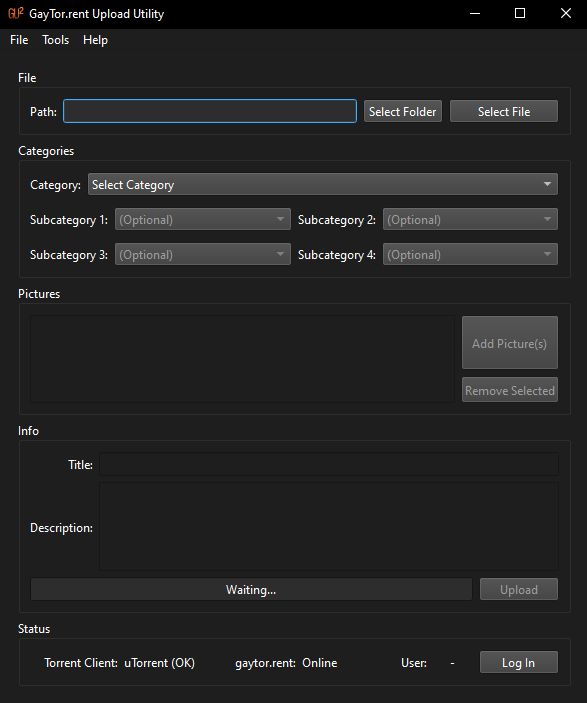
Features
- Easy, Reliable and Configurable
- Cross-Platform (Windows, macOS, Linux)
- Automatic Seeding with qBitTorrent, uTorrent (and more in the future!)
- Projects / Templates
- Automatic Login
- ...much more
Download
(The above links will always download the latest version of the program.)
GitHub Repository: https://github.com/vancer0/guu-cpp
Possible Questions
Q: How can I update when a new version is released?
A: Each time a new version is released, I will create a post/reply on this thread. To update on Windows, run the installer of the new version, and on macOS or Linux, you just replace the old executable with the new one. Your preferences will be kept.
Q: I found a bug, where do I report it?
A: You can report bugs by leaving a comment on this thread. Please make sure to include info such as: operating system, GUU version and how the bug was discovered
Q: How do I connect qBitTorrent with GUU?
A: First you need to open qBitTorrent and go to Preferences. Then select Web UI and tick on the box that says "Web User Interface (Remote control)". On the Authentication field, check "Bypass authentication for clients on localhost" and then Apply the changes. Now when you launch GUU (or you refresh the status), qBitTorrent should be connected.
Q: Why did you make this?
A: I created GUU because I wanted an easy way to upload torrents to the site since I always had issues using QTM (plus it is created for Windows only and I have moved away from it). Also I use qBitTorrent, because uTorrent is bloated and the old versions do not work for me.
Q: Didn't this already exist before?
A: Yes! The project was originally created in 2022 and written in Python. Although back then I had very little programming experience and the program wasn't very well coded, so I decided now to rewrite it completely in C++ and make it more stable and seamless.
-
RE: [Software Release] GayTor.rent Upload Utility
It seems to be an issue with the website configuration on their end as it only happens on the new domain (gaytor.rent). If I modify GUU to use the old domain (.ru) all uploads work fine, which is also the reason QTM works at this time.
I have reported this to the admin and I hope it will be addressed. There is not much I can do right now other than making a temporary update so that GUU uses the old domain, but this will complicate things so I am probably not going to do that.
-
[Software Release] GayTor.rent Upload Utility
Gaytor.rent Upload Utility (GUU) - A new way to upload your torrents
What is this?
Gaytor.rent Upload Utility is a program I created to easily create, upload and seed torrents on this website.

Features
- Automatic upload and seed
- Integration with qBitTorrent (and more clients in the future!)
- Project (template) saving and loading
- Automatic login
- Extremely configurable
- Clean and easy to understand UI
- Support for the new domain (gaytor.rent)
Why does this exist?
Here are the following reasons that drove me to create GUU:
- QTM is Windows-only | GUU is written in Python which makes it able to be run on all major operating systems
- QTM is closed-source | GUU is open-source and licensed under GPL v3, which means that anyone can make modifications or use the code for their own needs
- QTM has not been updated in 4 years and people experience bugs with QTM which are not fixed
- QTM only supports the bloatware uTorrent for automatic seeding | GUU integrates with qBitTorrent (clean and open-source)
Should I use this instead of QTM?
Yes and no. GUU is no way an official program for this website so its interaction with the latter might be limited.
Although if you use a computer that does not run Windows, or if you need the extra functionality GUU gives, then this is for you.Disclaimer(s)
- This is not meant to be a rant about QTM, I am just trying to improve the uploading experience for me and others who might find this program useful. The site owner is aware of the existence this program.
- GUU does not use any official APIs for this website, so things might not be as stable as what QTM offers
Download
- Linux: https://github.com/vancer0/guu/releases/latest/download/GUU-Linux-x86_64.AppImage
- Windows: https://github.com/vancer0/guu/releases/latest/download/GUU-Win-x86_64.exe
- macOS: https://github.com/vancer0/guu/releases/latest/download/GUU-Mac-x86_64.dmg
(The above links will always download the latest version of the program.)
GitHub Repository: https://github.com/vancer0/guu
Possible questions
Q: How can I update when a new version is released?
A: Each time a new version is released, I will create a post/reply on this thread to keep you updated. GUU does not require an installation, the entire program is stored inside a single executable, so in order to update it you just need to delete the old file and use the new one. Your preferences will be kept.
Q: I found a bug, where do I report it?
A: GUU is still a new program and it has not been tested extensively, so it is possible that you might encounter bugs. You can report them in the GitHub issues page or leave a comment on this thread. Please make sure to include info such as: operating system, GUU version and how the bug was discovered
Q: I have a feature request, where do I suggest it?
A: On GitHub issues or on this thread.
Q: How do I connect qBitTorrent with GUU?
A: First you need to open qBitTorrent and go to Preferences. Then select Web UI and tick on the box that says "Web User Interface (Remote control)". On the Authentication field, provide a password of your choice and then Apply the changes. Now on GUU, go to Preferences (Ctrl+P) and on the Client field, provide the password you just entered in qBitTorrent on the "WebUI Password" box. Click save and restart the program, the status bar should show qBitTorrent as the torrent client.
Q: Does qBitTorrent need to run on the same computer as GUU?
A: No. GUU supports remote web UI too.
-
RE: [Software Release] GayTor.rent Upload Utility
@ianfontinell Thanks for reporting the issue!
It will be fixed in the next release. A post will be made here when it is released. -
RE: [Software Release] GayTor.rent Upload Utility
GayTor.rent Upload Utility v3 has been released!
Changelog:
- Fixed crash when uploading torrent
Download:
- Linux: GUU-Linux-x86_64.AppImage
- Windows: GUU-Win-x86_64.exe
- macOS: GUU-Mac-x86_64.dmg
-
RE: [Software Release] GayTor.rent Upload Utility
GayTor.rent Upload Utility v5 has been released!
Changelog:
- Drag & Drop support for the picture list
- Picture previews
- Fixed crash when converting the config file
Download:
- Linux: GUU-Linux-x86_64.AppImage
- Windows: GUU-Win-x86_64.exe
- macOS: GUU-Mac-x86_64.dmg
-
RE: [Software Release] GayTor.rent Upload Utility
GayTor.rent Upload Utility v7 has been released!
Changelog:
- Better logging and error reporting
- Bug fixes
Download:
- Linux: GUU-Linux-x86_64.AppImage
- Windows: GUU-Win-x86_64.exe
- macOS: GUU-Mac-x86_64.dmg
-
RE: [Software Release] GayTor.rent Upload Utility
GayTor.rent Upload Utility v8 has been released!
Changelog:
- Bug fix
Download:
- Linux: GUU-Linux-x86_64.AppImage
- Windows: GUU-Win-x86_64.exe
- macOS: GUU-Mac-x86_64.dmg
-
RE: QTM (Quick Torrent Maker) Installation, Advice, Known Issues UPDATED Dec. 01, 2021
@AllThatChonk @john32123666 Also if you want you could take a look at a new tool I made (GayTor.rent Upload Utility) which automates uploading and seeding like QTM, but it works.
You can have a look here: https://community.gaytor.rent/topic/65942