• Categories
    • Recent
    • Tags
    • Popular
    • Users
    • Groups
    • Torrents
    • Login

    What torrent client should I use?

    Scheduled Pinned Locked Moved BitTorrent & Internet News
    115 Posts 7 Posters 100 Views 2 Watching
    Loading More Posts
    • Oldest to Newest
    • Newest to Oldest
    • Most Votes
    Reply
    • Reply as topic
    Log in to reply
    This topic has been deleted. Only users with topic management privileges can see it.
    • A Offline
      Aestet
      last edited by

      I set the vpn to a country closer to home, still nothing oml

      Kevin4fmK 1 Reply Last reply Reply Quote 0
      • Kevin4fmK Online
        Kevin4fm @Aestet
        last edited by

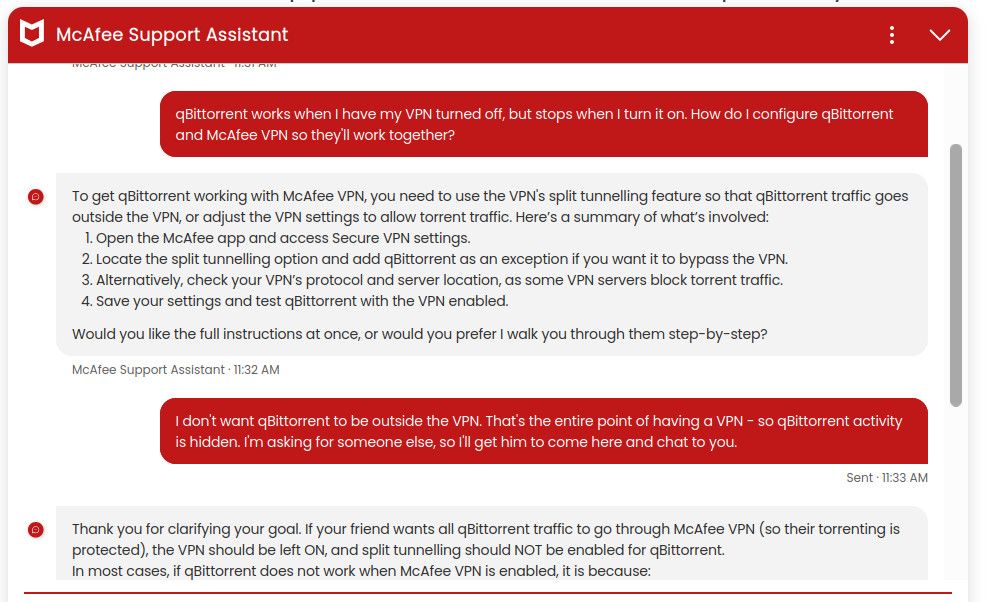
        @Aestet Can you try to share what McAfee's AI is saying to you? It may possibly click with me.

        Other opinions are also available. They're not right, obviously, but they are available.

        A 1 Reply Last reply Reply Quote 0
        • A Offline
          Aestet @Kevin4fm
          last edited by

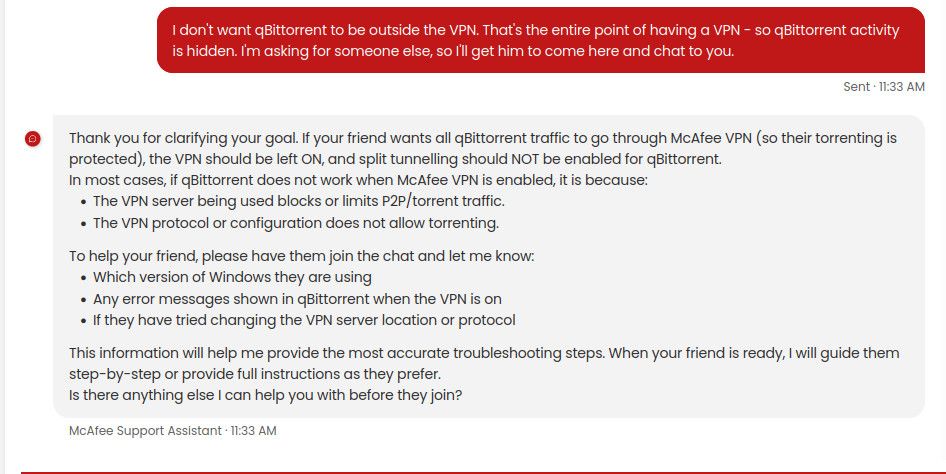
          @Kevin4fm When qBittorrent works without the VPN but not with it, and your settings allow any IP address and any interface, it is likely that McAfee Secure VPN is blocking peer-to-peer (P2P) traffic or that the VPN server you are connected to does not support torrenting. Here are the main points from McAfee’s official resources:

          Not all VPN servers allow P2P/torrent traffic. McAfee Secure VPN may block or restrict this.
          Split tunnelling in McAfee Secure VPN allows some apps to bypass the VPN, but does not force apps to use the VPN.
          There are no official instructions for binding qBittorrent to a VPN interface with McAfee Secure VPN.
          Running multiple VPN or security apps can cause conflicts.
          Firewall or network restrictions may also block connections.
          If you want to try binding qBittorrent to your VPN interface, you would need to:

          Identify your VPN network adapter name in Windows (when VPN is connected).
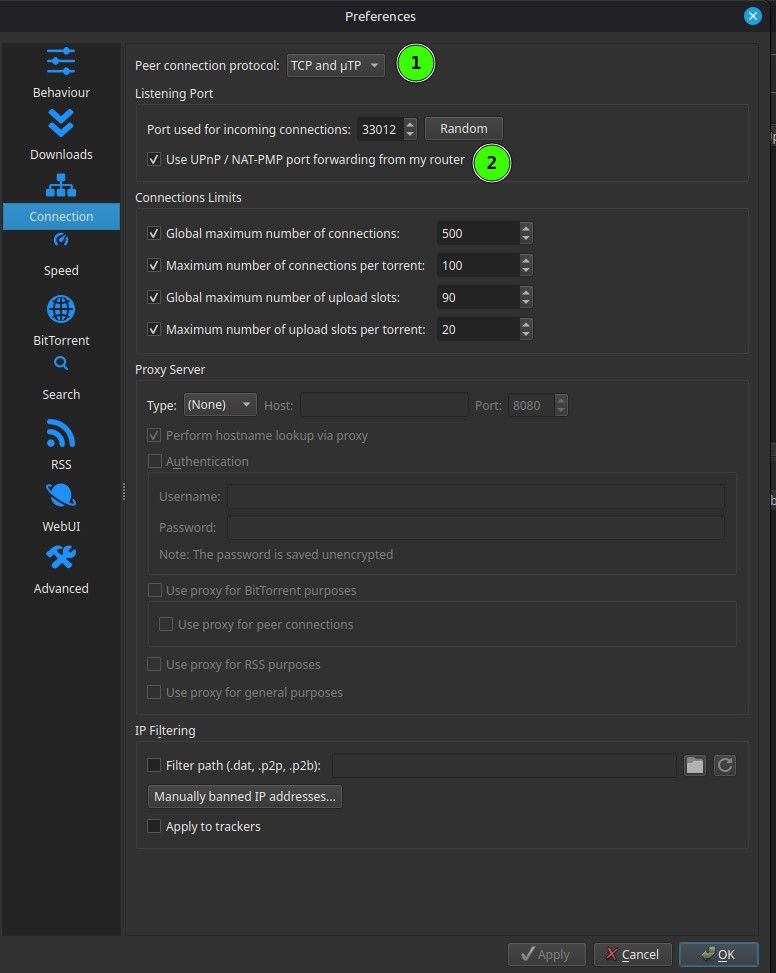
          In qBittorrent, go to Tools > Options > Advanced > Network Interface, and select your VPN adapter.
          However, if McAfee Secure VPN does not support P2P on your server, torrents will not work even with binding.

          Would you like step-by-step instructions for identifying your VPN adapter and configuring qBittorrent, or would you prefer to check if McAfee Secure VPN supports P2P on your current server?

          Kevin4fmK 1 Reply Last reply Reply Quote 0
          • Kevin4fmK Online
            Kevin4fm @Aestet
            last edited by

            @Aestet Ask the AI:

            "Which are the three fastest servers closest to me which support P2P? Is there a way to distinguish in the list of available servers I see whether each supports P2P?"

            Other opinions are also available. They're not right, obviously, but they are available.

            A 1 Reply Last reply Reply Quote 0
            • A Offline
              Aestet @Kevin4fm
              last edited by

              @Kevin4fm said:

              Which are the three fastest servers closest to me which support P2P? Is there a way to distinguish in the list of available servers I see whether each supports P2P?"

              Based on McAfee’s official support information, there is no published list of specific servers or locations that support P2P (torrent) traffic, nor a way to distinguish P2P-friendly servers from the list of available servers inside the McAfee Secure VPN app. McAfee Secure VPN may block or restrict P2P/torrent traffic on many or all servers, and this is not indicated in the server selection interface.

              Key points:

              McAfee Secure VPN does not provide a way to identify which servers support P2P.
              There is no visible indicator in the server list for P2P support.
              If torrenting is blocked, it will not work on any server you select.
              For more details, you can review McAfee’s official VPN server information here: https://www.mcafee.com/support/s/article/000001789
              If you need a VPN with guaranteed P2P support and server transparency, you may want to consider a provider that explicitly advertises this feature.

              Would you like help with any other McAfee Secure VPN settings or troubleshooting?

              Kevin4fmK 1 Reply Last reply Reply Quote 0
              • Kevin4fmK Online
                Kevin4fm @Aestet
                last edited by

                @Aestet Ok. So in summary .... McAfee is REALLY crap! How long are you tied into using their VPN? Can you afford to just drop it and pay for another?

                Other opinions are also available. They're not right, obviously, but they are available.

                A 1 Reply Last reply Reply Quote 0
                • A Offline
                  Aestet @Kevin4fm
                  last edited by

                  No, this is what everyone in my house uses, so it would be quite unhandy to get another one

                  Kevin4fmK 1 Reply Last reply Reply Quote 0
                  • Kevin4fmK Online
                    Kevin4fm @Aestet
                    last edited by

                    @Aestet OK. Is this also a cost issue, or is it just there's a multiple users in the household all using the same VPN? If so, do they have their own computer each, or is it a shared computer too?

                    Other opinions are also available. They're not right, obviously, but they are available.

                    A 1 Reply Last reply Reply Quote 0
                    • A Offline
                      Aestet @Kevin4fm
                      last edited by

                      @Kevin4fm

                      Cost. I have my own computer. I would rather spend my money on other things instead of a seperate vpn and antivirus when I have one available like this

                      Kevin4fmK ianfontinellI 2 Replies Last reply Reply Quote 0
                      • Kevin4fmK Online
                        Kevin4fm @Aestet
                        last edited by

                        @Aestet OK. Well, you have two options then:

                        Do your torrenting not hidden behind a VPN. This has big risks in that you could be identified as doing so, and face civil and criminal penalties if caught.

                        Manually connect to every McAfee server to test if that one allows P2P. And, according to what my AI has just told me, not only do they not publish a list but the ones that do allow it may be subject to change. Don't know how often this might happen, but it's another factor to consider. You may find one that works then find in a few weeks or months that it no longer does, and have to go through the process all over again.

                        Other opinions are also available. They're not right, obviously, but they are available.

                        A 1 Reply Last reply Reply Quote 0
                        • A Offline
                          Aestet @Kevin4fm
                          last edited by

                          Dang it 😢

                          Kevin4fmK 1 Reply Last reply Reply Quote 0
                          • Kevin4fmK Online
                            Kevin4fm @Aestet
                            last edited by

                            @Aestet Yeah. McAfee don't seem to be the best for this. Much closer to the bottom of the list! 😞

                            Other opinions are also available. They're not right, obviously, but they are available.

                            Kevin4fmK 1 Reply Last reply Reply Quote 0
                            • Kevin4fmK Online
                              Kevin4fm @Kevin4fm
                              last edited by

                              Hmm. One thought. You could ask here. Start a new thread: "Anyone know which McAfee VPN servers support P2P?"

                              Other opinions are also available. They're not right, obviously, but they are available.

                              A 1 Reply Last reply Reply Quote 0
                              • A Offline
                                Aestet @Kevin4fm
                                last edited by

                                alright I'll do that!

                                Kevin4fmK 1 Reply Last reply Reply Quote 0
                                • Kevin4fmK Online
                                  Kevin4fm @Aestet
                                  last edited by

                                  @Aestet Good luck with it. Don't think I can help anymore where we're at. Happy to try though, if you get new info, or once you decide how you're going to proceed and have questions like "Why did the torrent I uploaded not work?"

                                  Other opinions are also available. They're not right, obviously, but they are available.

                                  1 Reply Last reply Reply Quote 0
                                  • ianfontinellI Offline
                                    ianfontinell @Aestet
                                    last edited by

                                    @Aestet said:

                                    Cost. I have my own computer. I would rather spend my money on other things instead of a seperate vpn and antivirus when I have one available like this

                                    The problem you're not considering is this: the VPN is not only for your privacy/safety in this particular case. When you're connected to the IP that was assigned to you by your internet provider, chances are that your computer will not be reachable from other computers on the internet. This means that you'll be able to download stuff just fine, but your ability to upload will be significantly restricted.

                                    Over time the result is obvious, your ratio will plummet and your download rights will be suspended.

                                    That's why it's important that you have a VPN that supports port-forwarding. That is, it must not only "work" with P2P but also provide you with the option to get your own open port number.

                                    Many VPNs, specially free ones, have some servers that will allow P2p traffic, so you can actually use them in your client, but they don't offer port-forwarding. The result is that you're on the exact same situation as you'd be using your regular IP: you're not reachable from the internet, no one will be able to connect to your client.

                                    Hopefully this makes sense but if you have any questions feel free to ask.

                                    A 1 Reply Last reply Reply Quote 0
                                    • A Offline
                                      Aestet @ianfontinell
                                      last edited by

                                      @ianfontinell said:

                                      have some servers that will allow P2p traffic, so you can actually use them in your client, but they don't offer port-forwarding. The result is that you're on the exact same situation as you'd be using your regular IP: you're not reachable from the internet, no one will be able to connect to your client.

                                      Hopefully this makes sense but if you have any questions feel free to

                                      Uh- So should I get a seperate vpn? If it's cheap, I could do it, any recommendation that will have p2p and port-forwarding?

                                      Kevin4fmK 1 Reply Last reply Reply Quote 0
                                      • Kevin4fmK Online
                                        Kevin4fm @Aestet
                                        last edited by

                                        @Aestet I use Proton. Someone else I was chatting to a short while ago uses Torguard. There are a few around, so the best thing to do is investigate a little to find the best deal for you. The important things are that they support P2P and offer port forwarding. This sometimes depends on what package you sign up for, or is offered at an additional cost, so work out what the bottom line is before signing up.

                                        You should have no problems running whichever one you opt for while other in your household stay on McAfee. Just don't try to run both on the same computer at the same time. Things can get very complicated and confused that way!

                                        Other opinions are also available. They're not right, obviously, but they are available.

                                        A 1 Reply Last reply Reply Quote 0
                                        • JokerJ Offline
                                          Joker
                                          last edited by

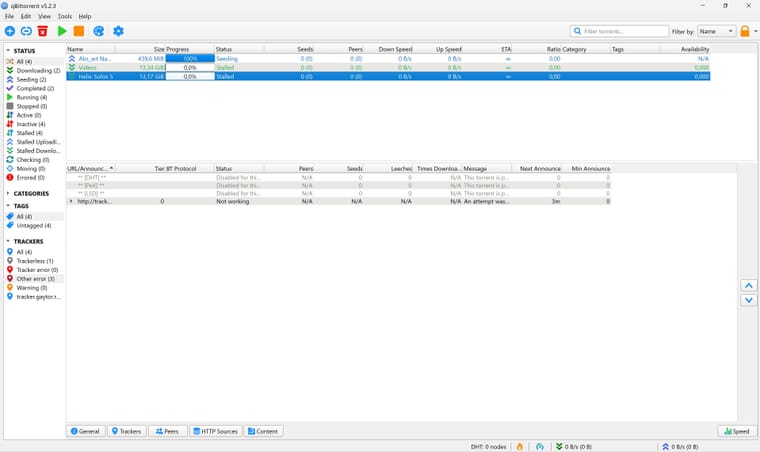
                                          Just checked this from the server side. The tracker itself is up and healthy, and your client's announces are actually reaching it right now without any problem. Your own upload registered fine too and is currently seeding with a healthy swarm. So nothing is broken on the site or your account.

                                          The 'Not working' tracker status you saw is almost always the VPN in the middle. Antivirus bundle VPNs like McAfee's are not made for torrenting: no port forwarding, and P2P traffic is often blocked or throttled. Kevin's advice is spot on. Test for a few minutes without the VPN, and if it works then, the VPN is the culprit. If you want to keep using a VPN for torrents, pick one that supports port forwarding and bind qBittorrent to it.

                                          One more thing: older torrents with only a few seeders can sit at 0 peers or 'stalled' for quite a while even when everything is configured right, so give those some time.

                                          Quick self test: if https://tracker.gaytor.rent/stmdd loads in your browser, your connection can reach the tracker fine.

                                          1 Reply Last reply Reply Quote 0
                                          • A Offline
                                            Aestet @Kevin4fm
                                            last edited by

                                            @Kevin4fm said:

                                            Proton

                                            From protonvpn.com or proton.me??

                                            Kevin4fmK 1 Reply Last reply Reply Quote 0

                                            Hello! It looks like you're interested in this conversation, but you don't have an account yet.

                                            Getting fed up of having to scroll through the same posts each visit? When you register for an account, you'll always come back to exactly where you were before, and choose to be notified of new replies (either via email, or push notification). You'll also be able to save bookmarks and upvote posts to show your appreciation to other community members.

                                            With your input, this post could be even better 💗

                                            Register Login
                                            • 1
                                            • 2
                                            • 3
                                            • 4
                                            • 5
                                            • 6
                                            • 2 / 6
                                            • First post
                                              Last post