What torrent client should I use?
-
Alright, I'll try that now!
Quick question, when I opened the program this morning, everything was small, and it still is. Can I fix this?
-
@Aestet Small as in text size? Yeah, mine's a bit small too, though I have a lot of columns displayed so that suits me. I'll go do a little research on that while you're looking into qB and McAfee playing nicely together.
-
okay, so, the ai told me to look at split tunneling,

Will this just not be the same as not using it, tho?
-
@Aestet Yes. You definitely DON'T want split tunnelling. Or at least, you don't want qB outside of it. It is, as you say, the same as not using it.
You'd use split tunnelling where you specifically don't want something to go through the VPN. Some websites won't accept VPN traffic, so you can have one browser that uses split tunnelling that you use specifically to access those websites.
For now, so as not to confuse things, I'#d just say "forget split tunnelling". One thing that might be worth trying, which the AI did mention to me, is changing the server location. I was chatting to someone using Torguard's VPN, and that wouldn't allow torrenting on US servers. When he changed it to one in Canada, it started straight away.
-
@Kevin4fm ah! That might be it! I'll try using Canada!
-
dang it doesn't work either??
-
@Aestet Oh well. Worth a try at least. It can be as useful / insightful to know what DOESN'T work as what does. Carry on with McAfee's chat to find a solution. In particular, ask him about "binding".
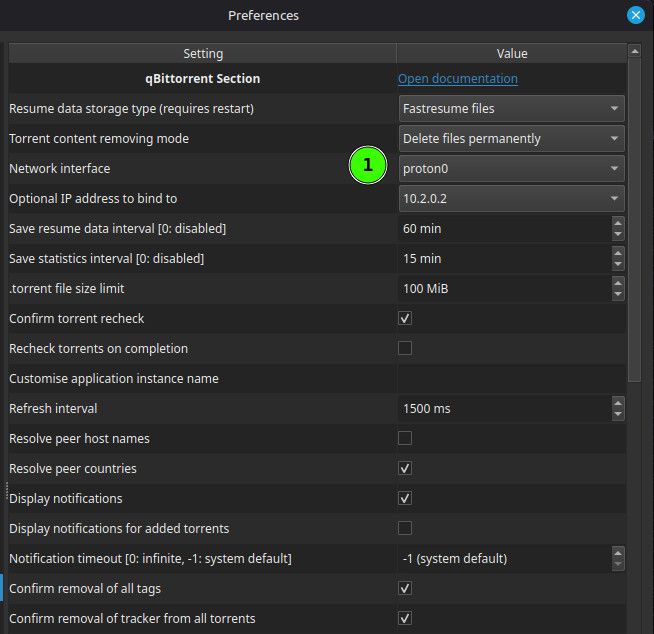
Actually, before you ask it, take a look in qB Tools > Preference > Advanced. Look at the options you have in (1). Anything look McAfee..ish? Try changing the setting to that, if so.
-

I've tried it with the vpn IP, and the mcafee vpn interface, still doesn't work??
I'm genuinely so confused
-
@Aestet OK. "Any interface" should work. That's just saying to qB "to get to the internet use this road". "Any" means rthat it will take any road that goes to the internet.
What other options are there when you dropdown that box? VPNs sometimes create their own. If there is one, and you set it to that, qB will stop working if that isn't available for some reason. This is called "binding", and it's a good thing. It stops qB carrying on happily torrenting even though you've accidentally stopped or disconnected your VPN.
If it has created one - like in my image I shared, it's set to "Proton0", which is the route set up by my Proton VPN - try using that. If there isn't one (or an obvious one) don't worry about it for now. That just adds another layer of complication.
-
@Kevin4fm There's just normal wifi, and for some reason 2 McAfee one's 'McAfee VPN' and 'McAfee_VPN' but idk the difference it's so confusing
-
@Aestet Simple test is to just change it and try it. Choose the first and select OK, or Apply and OK if that's a thing - I can't remember.
It may be worth properly closing qB once you've made the change, then restarting it. Once it starts, watch for a while and see if the torrents begin. It should only take a minute or two, if it's going to happen.
If the first one doesn't work, try the second one, in exactly the same way.
-
they both don't work. The first one says 'not working' and 'end of file'
The second one says 'unreachable'
-
@Aestet OK. By "both don't work" are you talking about the torrents in qB? Have you tried setting both "McAfee VPN" and "McAfee_VPN"?
-
yes, I've tried both 'McAfee_VPN' and 'McAfee VPN'. Then I tried downloading a torrent, and the tracker said 'not working' and 'unreachable' is that makes sense
-
@Aestet Yeah, that makes sense. Is the torrent you've added another freeleech one? No point in using up your download allowance while you're still trying to get it working.
What is the McAfee AI saying?
-
no it's just one I already had, but that might be another issue. I'll try a recent free leech one!
-
@Aestet Before you do, go back to "Advanced" and set it to "All Interfaces", or it won't work even with the VPN turned off.
-
@Kevin4fm I tried and let it just run on it's own a bit.
Guess what? Still doesn't work omg
I'm at my wits end
-
@Aestet By "still doesn't work" are you talking about not working with VPN? It still works when your VPN is turned off, yes?
-
yes, with vpn off it still works

Hello! It looks like you're interested in this conversation, but you don't have an account yet.
Getting fed up of having to scroll through the same posts each visit? When you register for an account, you'll always come back to exactly where you were before, and choose to be notified of new replies (either via email, or push notification). You'll also be able to save bookmarks and upvote posts to show your appreciation to other community members.
With your input, this post could be even better 💗
Register Login