What torrent client should I use?
-
This post is deleted! -
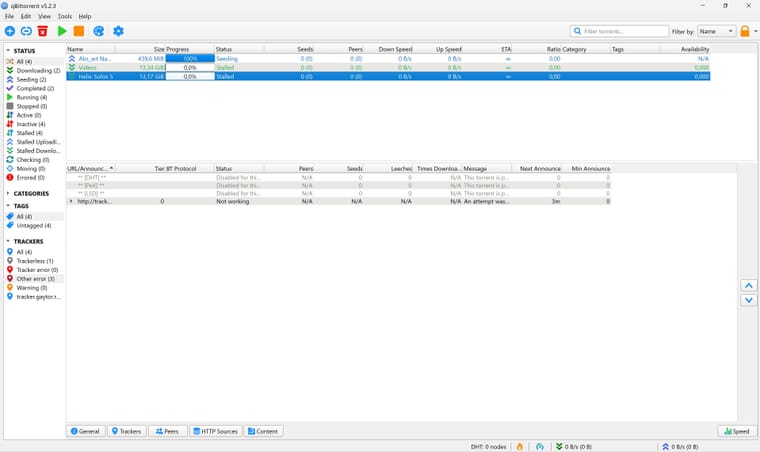
Very sorry for the late response!
-
@Aestet OK. The first problem is that the trackers are showing as "Not working". This means your computer can't talk to the site to get details about the torrent, and who has the files you want.
Go into "Tools" at the top, then "Preferences". This will open up all the settings used to configure qB.
Go to "Connections" and see if (1) is set to TCP/uTP. If not, set it to that. Then make sure the option at (2) is ticked. So long as you've not set up port forwarding up on your VPN, the port number between them shouldn't be relevant, but you can also try changing this by clicking the "Random" button.
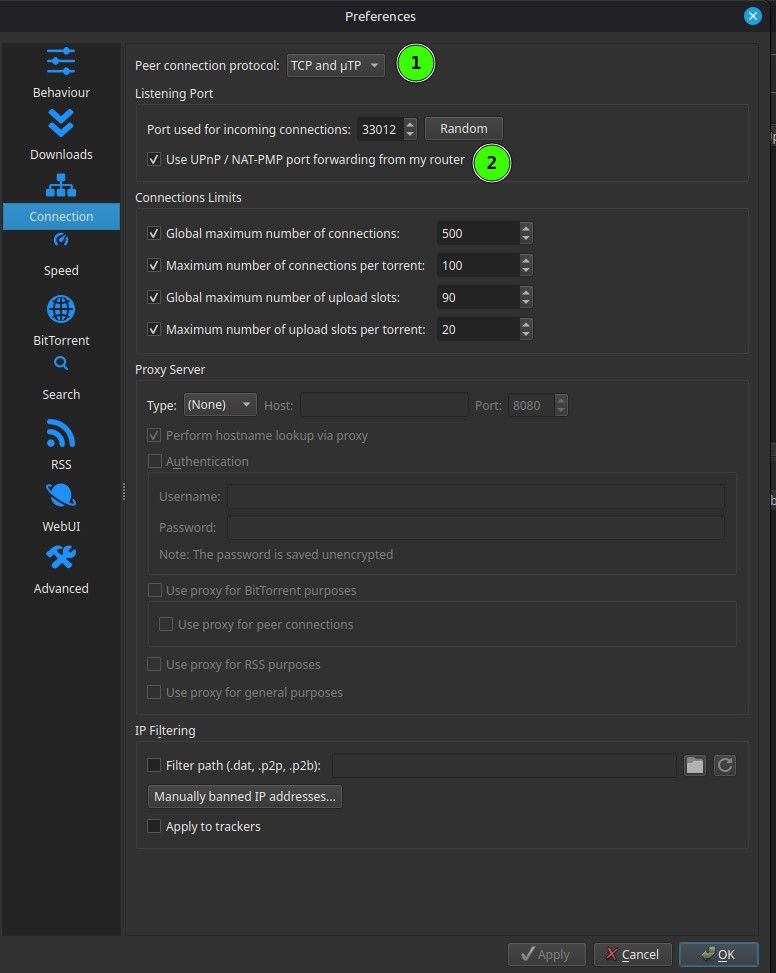
Save these settings by clicking "OK" at the bottom, then exit. See if it starts working after a few minutes. That column "Next announce" will tell you how long you nee to wait, but you can also force it by right clicking the line and selecting "Force Reannounce".
If this doesn't start things working, try a few variations of the same. For instance, change "TCP/uTP" to just "TCP" and try again. Try those options, then let me know.
Other opinions are also available. They're not right, obviously, but they are available.
-
Also, what VPN provider do you use? They sometimes have instructions on torrent client settings, so it's worth a look.
One other suggestion, and ONLY for a short time. Try turning your VPN off to see if qB works when it's not forced through there. Do this literally for just a few minutes, so your risk of exposure is very low. It would be worth setting your VPN not to start automatically on system start, then rebooting, before doing this, just to be sure everything is "clean".
-
@Kevin4fm it was already set to those options
-
@Aestet OK. Try it without the VPN for a short while. If it works when not behind the VPN, that's where the problem lies. If it doesn't, it's more fundamental.
-
@Kevin4fm
I will try it out tomorrow, it's getting quite late for me, sorry! -
@Aestet No problem. It's actually late for me too. I'm GMT+1. You?
-
@Kevin4fm UTC +1
-
@Aestet LOL. OK. Either I'm older than you or more British than you! Why mess about with perfectly good letters!?
-
@Kevin4fm I think you're both older than me, and more British, since I am not British!!
-
Aestet said:
I am not British!!
I actually am not utc+1, but technically we're utc+2, but IDGAF!! I hate the daylight saving thing it's so annoying having to wake up earlier....
-
Anyway, I'm trying without vpn, and now it's working
-
@Aestet Understood. Main thing is we're likely to be awake at similar times as we're in similar timezones.
Any change to your qB status? Or is it as we left it?
-
-
It is the same as we left it, except that the helix thing you told me to download is now downloading!
-
@Kevin4fm I use McAfee, the settings page doesn't seem very helpful
-
@Aestet OK. Let me go do a bi of research / familiarisation over at McAfee';s website. BRB.
-
OK. I've just had a quick chat with McAfee's AI assistant:
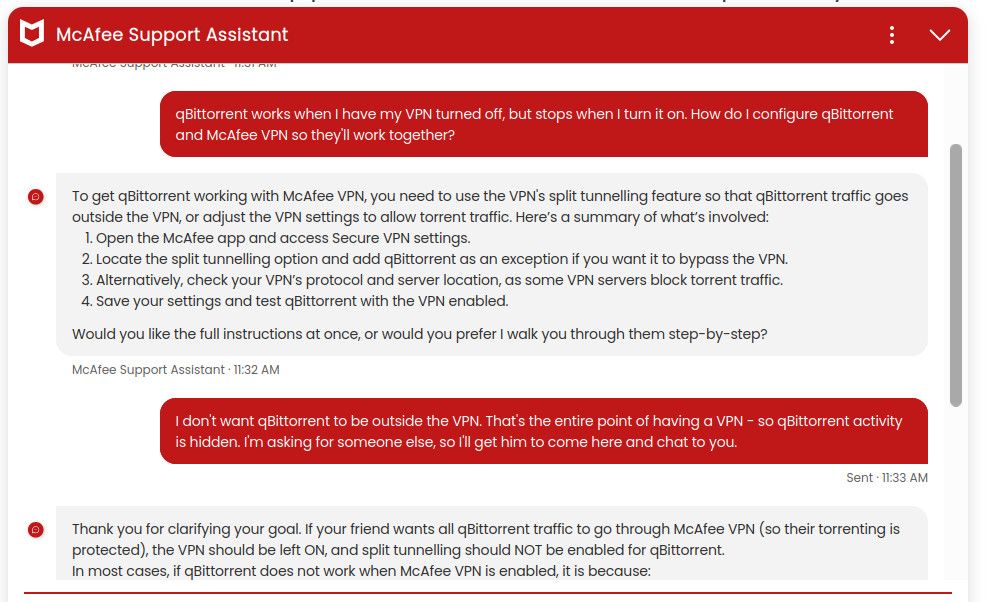
I suggest you go chat with it directly, to see if it can walk you through how to set things up for your particular needs. https://www.mcafee.com/support/s/?language=en_US should take you there. If not, simply go to McAfee's homepage and select "Contact Us" under "Support".
-
If it starts asking you questions you're unsure about, or things seem odd, feel free to come back here and I'll try to help.

Hello! It looks like you're interested in this conversation, but you don't have an account yet.
Getting fed up of having to scroll through the same posts each visit? When you register for an account, you'll always come back to exactly where you were before, and choose to be notified of new replies (either via email, or push notification). You'll also be able to save bookmarks and upvote posts to show your appreciation to other community members.
With your input, this post could be even better 💗
Register Login