help
-
torrents,After downloading via torrent, what should I use to open the download?
-
@echoone249 the media? i use VLC
-
@jokuihmemies After clicking download, choose yes, then it will download a torrent file. What software can I use to download the video?
-
@echoone249 You mean you've downloaded the .torrent file, but don't know how to use it?
Get a client such as utorrent, BiglyBT or something else and open the .torrent file in that. The client will then download the videos.
-
@echoone249 you need a torrent client, the two easiest to use are transmission and qbittorrent imo. i use qbittorrent.
do not download utorrent!!!! it's bloated with malicious code.
-
@echoone249 I'm with @ianfontinell, on both. I use qBittorrent because it gives me a lot of info and control, but it doesn't have to. You can kinda choose how easy or detailed you want things.
I use Transmission as a backup / for a quick test. I've not delved into it much, but the initial interface is really simple. Maybe start with this one for a little while, while you get to understand the basics, then qB if/when you want to get a little more detail and control.
On the other hand, members here are pretty helpful, and many of us use qBittorrent. If you decide to jump straight in with that, we'll not only know what buttons you need to press, but where they are on your screen. And we're surprisingly happy to show off what we know.

-
@Kevin4fm thank you
-
@ianfontinell thank you
-
@Kevin4fm I use qBittorrent,but the video download speed keeps stuck at 0
-
@echoone249 So the download speed (2) gets stuck at zero. What about the progress bar (1) and the total downloaded (3)? Are these at zero too? If so, nothing is being downloaded. If they show numbers, it's downloading, but slowly, or being interrupted.
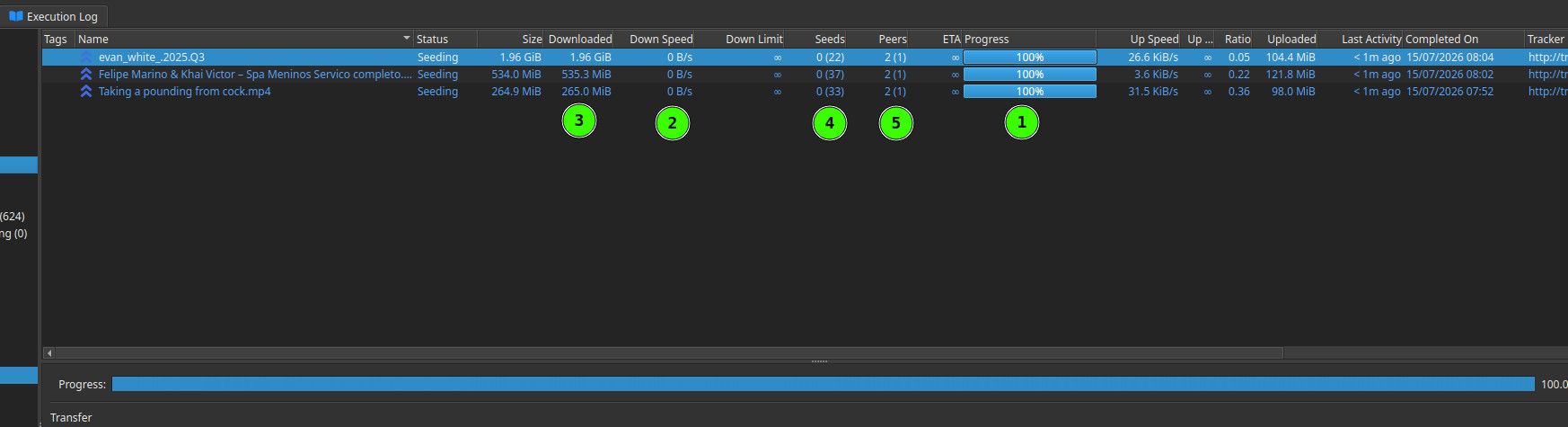
What about "Seeders" (4) and "Peers" (5)? (Seeders = those who have the file, Peers = those who want it.) The number in brackets are the total numbers of each in the "swarm" (what everyone connected to the torrent is called). The numbers not in brackets is how many of those you're connected to.
If seeders is "0(0)" it means no-one is connected for you to download from right now, so there's no-one to download from.
If you can post a screenshot like the above, we can maybe see what's (not) happening.
-
@Kevin4fm thanks ,I got it



Hello! It looks like you're interested in this conversation, but you don't have an account yet.
Getting fed up of having to scroll through the same posts each visit? When you register for an account, you'll always come back to exactly where you were before, and choose to be notified of new replies (either via email, or push notification). You'll also be able to save bookmarks and upvote posts to show your appreciation to other community members.
With your input, this post could be even better 💗
Register Login