Maximising Monitor Real Estate
-
When I first viewed the new site format, during the final testing days, it was presented in a "normal" width - i.e. the size most old fashioned websites defaulted to. This is about 60% of what my wide screen monitor can accommodate when the window is maximised.
I'm convinced that I got the width to change to use 100% of the width, meaning seven or eight torrents showed on each row in grid view. I'm fairly sure I achieved this by setting "Expanded Max Width" under Profile Settings | Display to 100%.
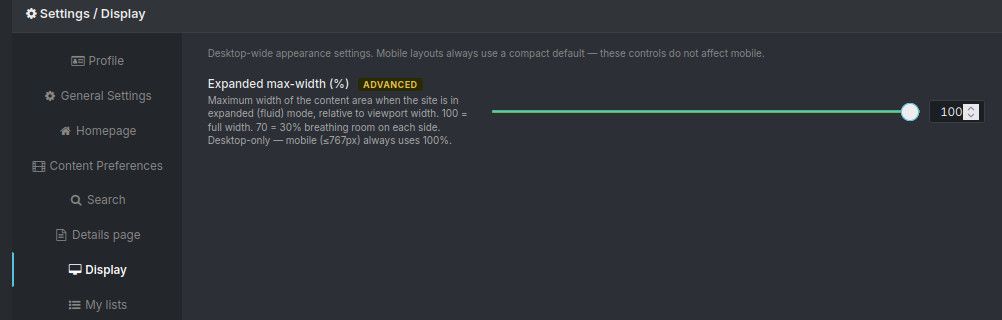
For some foolish reason, lost in the mists of time, I must have reset it at some point. Now it only displays four or five torrents, even with that setting at 100. Is my memory of having achieved this before actually just a dream? Am I mis-remembering how I set it?
I'd love to nearly double the amount of torrents I can see before I need to scroll down, so any suggestions gratefully accepted.
-
Thought, after the time allowed for editing, I should clarify that the site has reverted to taking up about 60% of my screen, thus allowing four torrents per row, rather than that there are four spanning 100%. Probably obvious, but just in case not.
-
@Kevin4fm the expanded view is toggled by a button in the navigation bar, the one right beside the support menu.
-
@ianfontinell Brilliant. Many thanks. The icon looks remarkably like the one commonly used for "full screen" so I probably mentally blanked it out.


Hello! It looks like you're interested in this conversation, but you don't have an account yet.
Getting fed up of having to scroll through the same posts each visit? When you register for an account, you'll always come back to exactly where you were before, and choose to be notified of new replies (either via email, or push notification). You'll also be able to save bookmarks and upvote posts to show your appreciation to other community members.
With your input, this post could be even better 💗
Register Login