Prowlarr and qui
-
Newbie to the site but not torrents
I'm trying to get both Prowlarr and qui working with the site i've attempted to add Gaytorrent.ru indexer to prowlarr but i get this error message
Query successful, but no results were returned from your indexer. This may be an issue with the indexer, your indexer category settings, or other indexer settings such as search freeleech only etc. See the FAQ for details.
not sure how to resolve it or even if its possible or even allowed
Apologies if this isn't in the right section please move it to the correct one.
thanks
-
@TorrentingHB the site is undergoing a massive overhaul, and as it happens the new layout is being delivered by default since a few days ago. The maintainers of the indexer database must redo their scripts to make it compatible again.
In the mean time, what you can do:
- Login to GT as usual, notice that you have the new layout.
- Go to dev tools (CTRL+Shift+I) and go to storage tab (if you're on chrome it's Application tab) and look for "cookies" in the sidebar.
- Find the cookie named "proxy" and change its value from "develgt" to "live"
- Reload the page and login again
- Go back to the Network tab and copy the new cookie strings.
Then, you can go back to prowlarr and add the indexer again, using the new string you just copied.
-
-
I suspect this has to do with some of the backend changes that break some automation tools. I looked into the indexer code that prowlarr uses and I THINK I may be able to reach out to the maintainer and suggest the fix.
The "Live" version of the site is on it's way out and I highly recommend that it is no longer used.
-
@DandyLion just wondering if you had any updates on this

-
@DandyLion Hey! Just checking in on this again, it seems it may be broken broken now

-
I noticed it stopped working for me too, it was fine until recently. Hopefully it will be fixed at some point. ^^
-
Same here, but looks like it's to do with the domain change this time? My error message is: "Unable to connect to indexer. Redirected to https://www.gaytor.rent/search.php?view=grid&incldead=1&inname=1&page=0&orderby=added&sort=desc from indexer request"
-
my prowlarr is working just fine guys
-
I tried hookup in prowler today and it didnt work. latest version of prowler. tried proxy=live and proxy=develgt with same error:
Unable to connect to indexer. Redirected to https://www.gaytor.rent/search.php?view=grid&incldead=1&inname=1&page=0&orderby=added&sort=desc from indexer requestIf I force the gaytorrentru.yml to use grid or browse view I get a different error, I think this is because the sites changed and the new views are laying out the results differently, the definition needs to be updated. https://github.com/Prowlarr/Indexers
error:
[Warn] ProwlarrErrorPipeline: Invalid request Validation failed:
-- : Query successful, but no results were returned from your indexer. This may be an issue with the indexer, your indexer category settings, or other indexer settings such as search freeleech only etc. See the FAQ for details. -
@Rambling3396 you need to set your view mode to legacy in the site, and prowlarr will work. if you switch to any other it will error out.
this is obviously a prowlarr issue, they must adapt the yml to conform to the other viewing modes.
-
@ianfontinell I don't see any cookies at all in the cookie folder
-
@engore go to gaytor.rent, press CTRL+SHIFT+I and go to the Network tab. Press CTRL+R to reload the page. Once it reloads, check the first entry (www.gaytor.rent) and look for "Cookies" in the "Request Headers" section:
Should look like this:
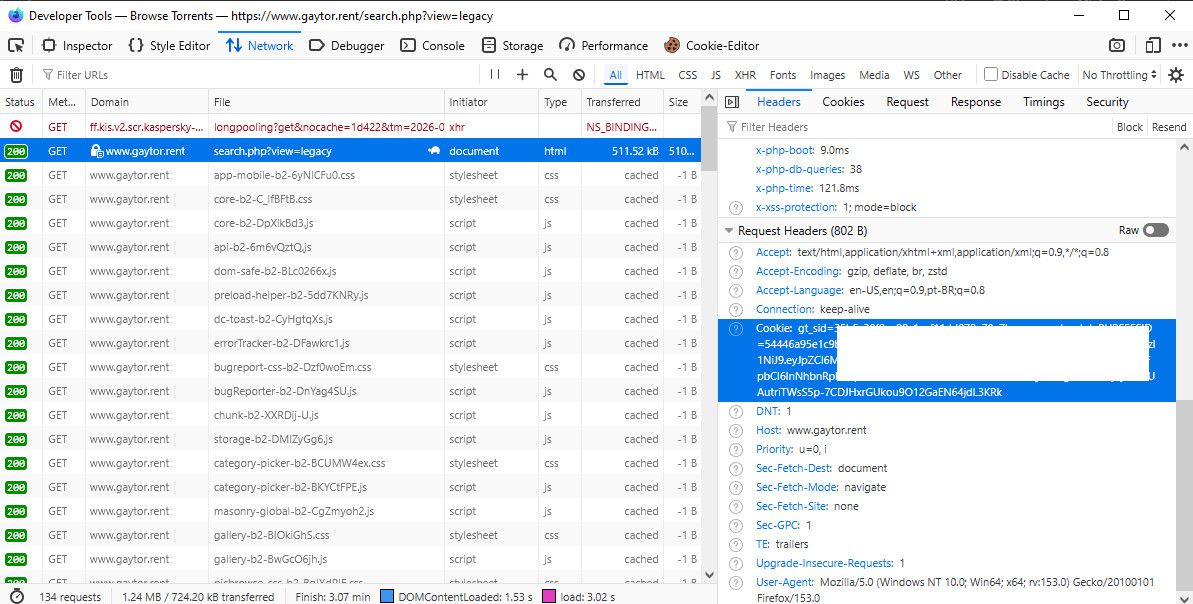
If you're on chrome it's the exact same process, but the interface will be slightly different.
You must copy everything from "cookies" and paste it on prowlarr. -
This one is on us, not on Prowlarr.
If the view mode saved on your account differs from the one Prowlarr asks for, our search page answers with a redirect to your saved view instead of the page it requested. Prowlarr treats an unexpected redirect on an indexer request as a failure, which is where "Unable to connect to indexer. Redirected to ..." comes from. That is also why it works for some of you and not for others: it depends entirely on which view you have saved.
Until we straighten that out on the server side, @ianfontinell's tip is exactly right. Set your view mode to Legacy on the site, then the two agree, no redirect happens, and the indexer works.
Thanks for the detailed error messages in this thread, they are what made it findable.



Hello! It looks like you're interested in this conversation, but you don't have an account yet.
Getting fed up of having to scroll through the same posts each visit? When you register for an account, you'll always come back to exactly where you were before, and choose to be notified of new replies (either via email, or push notification). You'll also be able to save bookmarks and upvote posts to show your appreciation to other community members.
With your input, this post could be even better 💗
Register Login