Best way to mount seedbox for file browsing?
-
I have a seedbox and I'd like to mount it as a network drive where I can view content on it without downloading it permanently on my local computer. I also plan to use Stash to organize that content.
Does anyone have suggestions for what's the best way to do this to get good performance and reliably? I've found too many softwares and services but unsure which is the best for this use case, and don't wanna try them all in case someone has already figured out an easy way.
-
@Boilovesgayp If your seedbox supports a web interface, you can make use of a wonderful software called NextCloud, which will allow you to use a WebDAV end point that you can mount to your PC like a network hard drive.
-
@MrMazda wow thanks that worked!! I didnt even need nextcloud because my seedbox offered webdav access point. I do have another question tho, how secure is it? is there hacking or exposure risk? if there is, whats the next best thing?
-
@Boilovesgayp Usually, an SSL certificate along with a username and password is sufficient.
Now... If you want to connect the WebDAV to your computer on reboot, there is one key thing you need to do, as it is not set correctly by default. Open your System Services (services.msc) and look for "Computer Browser". Change the startup setting on this service to "Automatic", then start the service. This will save you a lot of headaches when you reboot your PC.
The other thing you may need to do when you setup the WebDAV as a mapped network drive is to create a batch file that runs on startup (as your regular user account) that will disconnect then reconnect the mapped network drive, since for some reason, Windows chokes on reconnecting WebDAV endpoints as a mapped network drive. You can do this either by putting a string in the Windows Registry (HKLM\Software\Microsoft\Windows\Current Version\Run) or by adding the batch file into the startup folder within the start menu.
The commands for the batch file should be as follows (assuming that the drive letter you are using for the drive is Z
net use Z: /delete
net use Z: \<IP or Hostname>@SSL<path to folder> <password> /user:<username>So in this example, we're going to use example.com as the hostname, and remote.php\folder as the folder, Monkey69! as the password and username as the username... So the second line would be
net use Z: \example.com@SSL\remote.php\folder Monkey69! /user:username
Hope this helps
-
@MrMazda Hi the command for mapping the drive doesn't work. I've tried removing the 'remote.php', tried adding 'https:\\' before the domain name. The drive is unreacheable. Only works when I manually do it every reboot.
Also might be worth mentioning that the "Computer Browser" service doesn't appear in my system services.
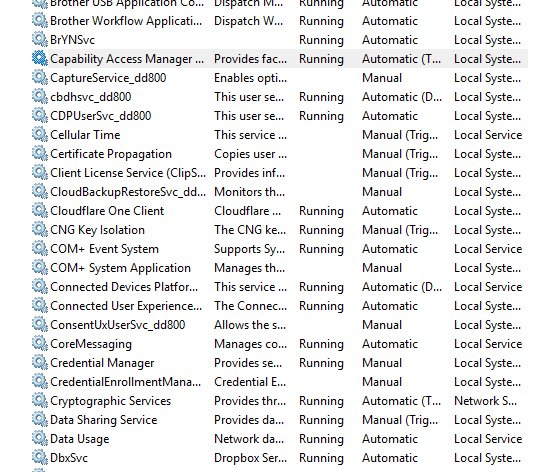
I'm on Windows 11.


Hello! It looks like you're interested in this conversation, but you don't have an account yet.
Getting fed up of having to scroll through the same posts each visit? When you register for an account, you'll always come back to exactly where you were before, and choose to be notified of new replies (either via email, or push notification). You'll also be able to save bookmarks and upvote posts to show your appreciation to other community members.
With your input, this post could be even better 💗
Register Login