I need help with a my first upload - troubleshooting help needed
-
Ok, So I want to be a good member of the community. Share my collections over the years and also download.
-
I made a torrent using qBittorent. It is uploaded on my profile. I use it with VPN on my personal laptop. I have checked the feature in qBittorent that when my personal VPN is off, qBittorent will not work. Some days I work from home via my work's vpn. So, running two VPNs causes trouble. So, on those days I have to turn off my personal VPN. This results in qBittorrent getting shut off.
My question is, when I turn off personal VPN, is my content no longer seeding for the members of this community? -
I am not even sure if my Torrent is active on this site. I have searched the title of my torrent, but nothing comes up.
However, my torrent page on the my profile shows it has been added to 4 wishlists.
All this has resulted in my downloading privilidges being takes away. Until I improve my ratio.
This is one of the genuine torrent site left for gay peeps. So, I do not want to just give it up.
-
-
@Rayshine I usually keep my vpn off when seeding, this is a private tracker... so I don't really have a need to use it and seeding works fine. Did you download the torrent after you uploaded it? The site should have flagged you if you didn't.
-
@panoptikon thanks. Nevermind I do it is in search now. Thanks
-
@Rayshine Yeah sometimes it just takes awhile to come up.
-
First question: When you view your "My Torrents" page, which looks like this:
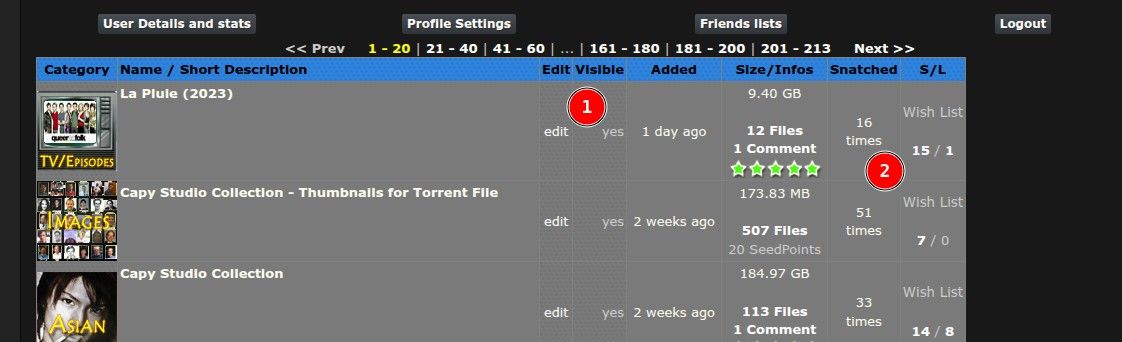
- Does it say that it's visible
- Does it give a number of times snatched? And a number like 15/1?
If (1) say "Yes", it should show up. If (2) has numbers, members have downloaded it.
If you're still not sure, post the link to the torrent here, so I can double check.
The "15/1" number is the number of people seeding / leeching. If others are also seeding, then the torrent is still alive, even though you're not personally seeding. If it's "1" when you're on your personal VPN, when you turn that off, and consequently qbittorrent, no-one is seeding it. I'm not sure if then it becomes "dead" if there are still people trying to leech it or id it stays "alive" but with no seeders. Certainly if it ever hits 0/0 then it's dead, and it can only be seen by those searching for "dead" or "all". Once you're seeding again it returns to "alive".
-
@Kevin4fm Thanks for the help. Now I know what those things mean. i am still learning. The thing is after the uploaded it last weekend. I turned off my VPN on Monday when work started. So, even people who might be trying to download it. I don't think they were able to leach it?
https://www.gaytor.rent/details.php?returnto=%2Fmytorrents.php&id=VmMbesH68O3-gLjsv3aF4g
-
@Rayshine In qBittorrent, switch to the "Trackers" tab (1) and check what it says at (2). If it says "unregistered torrent", it has likely been deleted. I'm fairly sure it has because I just got sent to a 404 page by the link you gave.
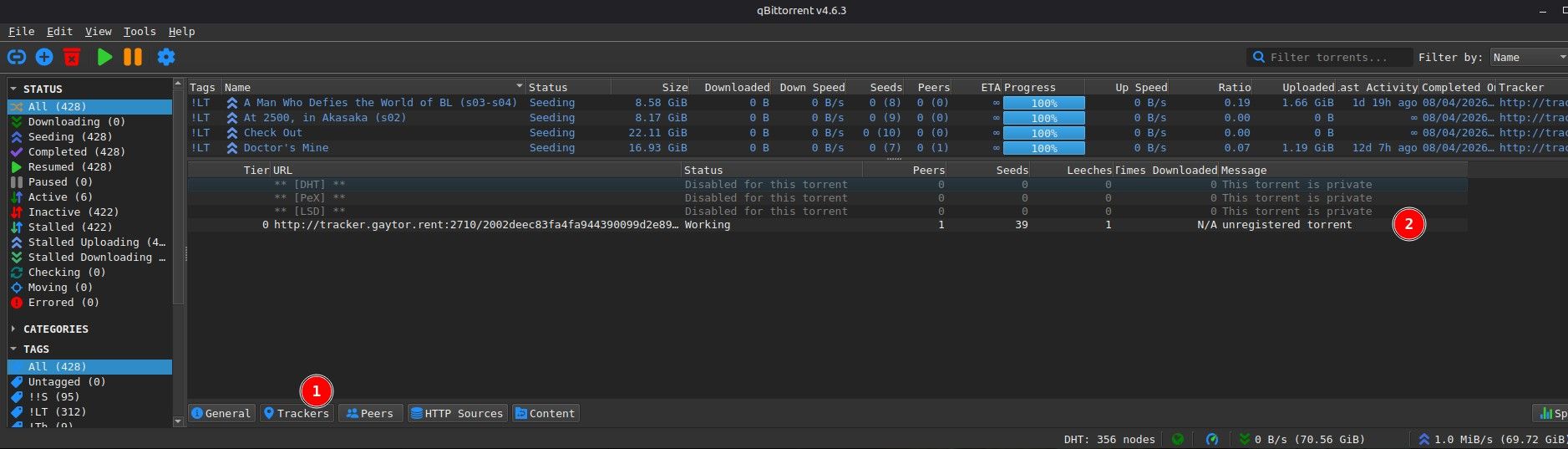
Follow the line back from "Unregistered torrent", to the "Status" column. Is that "Not working"?
This status / message is usually the result of a torrent having been deleted. That could be because of copyright strikes, site rule infringement, or simply if a new torrent isn't seeded to completion. (i.e. At least one person has downloaded it in full.)
As long as the torrent isn't huge, and it's not obscure enough that few want to grab it, it should download for someone pretty quickly, depending on your own upload speed limit. If in doubt, set it going on a Friday evening, so it has all weekend to complete.
Once you've created and uploaded it, you MUST download the torrent from the site, as if you were just grabbing any other torrent, and use that one, NOT the one you created. Once you've done that, check in "My Torrents" that "Visible" becomes "Yes". It will only do so after you've 'force rechecked' (pretended to download) your own torrent.
If at all in doubt, or you get stuck, check out the guide at https://www.gaytor.rent/uploadguide.php Go through it carefully to make sure you don't skip any of the steps.


Hello! It looks like you're interested in this conversation, but you don't have an account yet.
Getting fed up of having to scroll through the same posts each visit? When you register for an account, you'll always come back to exactly where you were before, and choose to be notified of new replies (either via email, or push notification). You'll also be able to save bookmarks and upvote posts to show your appreciation to other community members.
With your input, this post could be even better 💗
Register Login