• Categories
    • Recent
    • Tags
    • Popular
    • Users
    • Groups
    • Torrents
    • Login

    Need help uploading torrent (including screenshots)
    Scheduled Pinned Locked Moved Uploading
    29 Posts 4 Posters 146 Views 2 Watching
    Loading More Posts
    • Oldest to Newest
    • Newest to Oldest
    • Most Votes
    Reply
    • Reply as topic
    Log in to reply
    This topic has been deleted. Only users with topic management privileges can see it.
    • john32123666J Offline
      john32123666
      last edited by

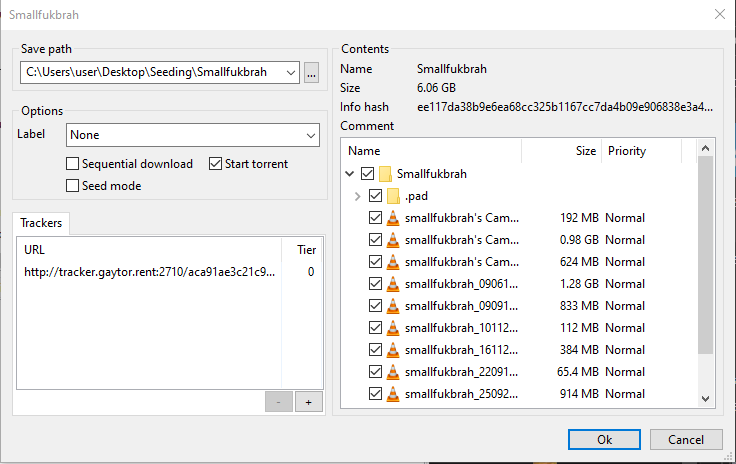
      POINT "means" to double/single click or tap folder and will become highlighted,
      to be able to locate or show and select folder destination ...
      In torrent select down arrow to locate folder
      select 3 horizontal dots to browse and locate directory ...

      C:\ - directory
      download - path folder [default]
      utorrent - subfolder
      D6 - path folder location [containing data]
      E:\ - volume directory drive
      F:\ ...

      Now re-download the small torrent here .. and try again ...
      If the QTM created is seeding in your torrent client [stop and remove the torrent not data - right click] ...

      Click on the torrent you uploaded here, point on utorrent down arrow and double click on download ...

      Once utorrent folder shows up tap slightly [do not open] and select folder and click OK in your torrent client ...
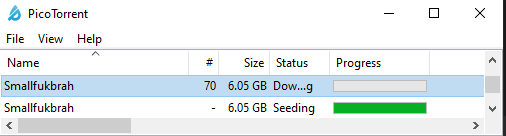
      as illustrated from above images I provided ...

      [œùæ] : " Mahirap mag dunong dunongan, Kung wala kang kaalam alam " ...

      L 1 Reply Last reply Reply Quote 0
      • L Offline
        leathro @john32123666
        last edited by

        @john32123666 Thank you for your willingness to help but I'm almost ready to give up. This is so stressful.
        When I have the torrent. I highlight the folder and then point but nothing happens, just Utorrent opens and starts downloading my torrent (at 0%).

        There is no window when I click on the torrent, Utorrent immediately start downloding it ...Capture.JPG

        john32123666J 1 Reply Last reply Reply Quote 0
        • john32123666J Offline
          john32123666 @leathro
          last edited by

          @leathro ... your best option is to stop and remove the torrent in your client and exit ...
          move the D6 folder from utorrent then point to download and select folder hit OK ...

          For additional support ...
          pls! write to helpdesk : https://www.gaytor.rent/helpdesk.php

          Have A Great Day !!! ... 🙂

          [œùæ] : " Mahirap mag dunong dunongan, Kung wala kang kaalam alam " ...

          1 Reply Last reply Reply Quote 0
          • john32123666J Offline
            john32123666
            last edited by

            @leathro I suspect your folder default are hidden or altered ...
            do a web-search on how to restore folder from default properties ...

            [œùæ] : " Mahirap mag dunong dunongan, Kung wala kang kaalam alam " ...

            L 1 Reply Last reply Reply Quote 0
            • L Offline
              leathro @john32123666
              last edited by

              @john32123666 Hi John, thanks again for your willingness to help. I'm totally on the edge of my nerves because of this issue, I've tried everything. If I may ask you again if you could write point by point what I should do. (you can use any folder names you want), just please make it clear, because I'm losing my mind.

              So, I have Quicktorrentmaker to make the torrent.

              Thanks again!

              john32123666J 1 Reply Last reply Reply Quote 0
              • john32123666J Offline
                john32123666 @leathro
                last edited by

                Question :

                1. What is your Operating System
                2. Are you uploading single file or multiple file in folder
                3. Do you see the location of your Download folder
                4. Do you able to see and open the file folder you created
                5. Does your client ask where to save the file
                6. Are you familiar with folder directory, where you
                  save, move, create, rename, organize files

                [œùæ] : " Mahirap mag dunong dunongan, Kung wala kang kaalam alam " ...

                L 1 Reply Last reply Reply Quote 0
                • L Offline
                  leathro @john32123666
                  last edited by

                  @john32123666 said in Need help uploading torrent (including screenshots):

                  What is your Operating System - Windows 10
                  Are you uploading single file or multiple file in folder - Multiple files
                  Do you see the location of your Download folder - Yes
                  Do you able to see and open the file folder you created - Yes
                  Does your client ask where to save the file - No.
                  Are you familiar with folder directory, where you
                  save, move, create, rename, organize files - Yes

                  john32123666J 1 Reply Last reply Reply Quote 0
                  • john32123666J Offline
                    john32123666 @leathro
                    last edited by

                    @leathro ...

                    1. do a full uninstallation including save settings on the torrent you are using ...
                      SEE : https://security.virginia.edu/removing-bittorrent-software
                      https://windowsreport.com/uninstall-utorrent/

                    2. download and install fresh copy
                      SEE : https://community.gaytor.rent/topic/63130/what-torrent-app-do-you-suggest/10
                      uTorrent 3.5.5.45271 for PC Windows [courtesy of @eobox91103]
                      https://www.filesoul.com/software/uTorrent/3-5-5-45271-for-PC-Windows/download/
                      [becareful modifying settings and do not use utorrent web]
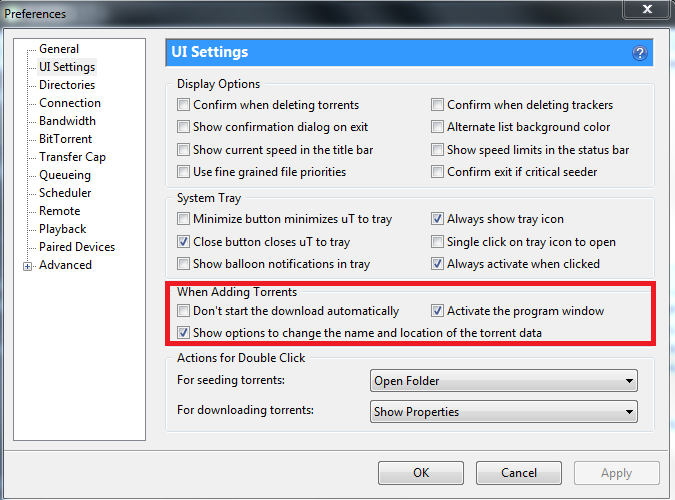
                    Preferences.png

                    Let me know ...

                    [œùæ] : " Mahirap mag dunong dunongan, Kung wala kang kaalam alam " ...

                    L 1 Reply Last reply Reply Quote 0
                    • L Offline
                      leathro @john32123666
                      last edited by

                      @john32123666 Hi John. Yes, All done.

                      L 1 Reply Last reply Reply Quote 1
                      • L Offline
                        leathro @leathro
                        last edited by

                        @leathro And now?

                        john32123666J 1 Reply Last reply Reply Quote 0
                        • john32123666J Offline
                          john32123666 @leathro
                          last edited by

                          @leathro if your client is working now and asking for prompt, you should start all over,
                          go back from these thread, review and follow the examples given ...

                          [œùæ] : " Mahirap mag dunong dunongan, Kung wala kang kaalam alam " ...

                          L 1 Reply Last reply Reply Quote 0
                          • L Offline
                            leathro @john32123666
                            last edited by

                            @john32123666 Thank you for all your help John, finally I figured it out! Pointing was the issue...

                            1 Reply Last reply Reply Quote 2

                            Hello! It looks like you're interested in this conversation, but you don't have an account yet.

                            Getting fed up of having to scroll through the same posts each visit? When you register for an account, you'll always come back to exactly where you were before, and choose to be notified of new replies (either via email, or push notification). You'll also be able to save bookmarks and upvote posts to show your appreciation to other community members.

                            With your input, this post could be even better 💗

                            Register Login
                            • 1
                            • 2
                            • 2 / 2
                            • First post
                              Last post
