VPN Effect?
-
Hey Guys: I'm fairly new to using NordVPN. How would I go about seeing how it effects my U/D speed? Is a VPN necessary here? I always use it for Piratebay and other torrent sites. Also when surfing the Dark Web. Thanks.
-
I've been looking into this recently. Nord VPN and others can be great for downloading on public trackers with great speeds. However Nord VPN and others are terrible for private trackers like here. A lot of VPNs including Nord, prevent you from seeding so you cant upload for shit, messing up your ratio.
-
@CrazyDave I've had no trouble uploading here using NordVPN. Not sure how it effects my speed though. Need to find some way to log monitor my U/D speeds to see what my max speeds are. I always get a green OK light using Utorrent. Not sure if port-fowarding would increase my speed or not. Maybe I'm already port-forwarded.
-
@IncubusAZ This is what Nord say about it "Port forwarding and triggering could work with a VPN protocol in general, but not with NordVPN. Our apps block almost all port communication from within your device except for the ones most commonly used by popular applications. This was a tough decision that may inconvenience some users, but we’d like to explain why we did this...." https://nordvpn.com/blog/port-forwarding/
I was wondering for ages why I couldn't seed for shit and I think this might be it. -
@IncubusAZ Any time you are using torrents, I would strongly recommend the use of a VPN. When downloading and seeding torrents, it is always possible that a copyright troll may look at the peer pool and see what IP addresses are registered as doing what with the torrent. When you're using your own ISP, this leaves you directly exposed to the pool, and upon request, a copyright troll may refer to your ISP to get the information on the subscriber of the service that was used to download or seed the torrent.
Now, under Canadian Law, thanks to the case of Voltage Pictures Inc vs TekSavvy Solutions Inc, we finally set the precedent that an IP address alone is insufficient to gather information about the subscriber account as the IP address alone is only sufficient to identify the subscriber of the service, and does not necessarily identify the end user of the service. Nevertheless, in other parts of the world (especially in the United States), this information is often used to identify the subscriber of the service and serve them with all kinds of notices, such as a notice of litigation.
When you use a VPN on the other hand, if you're using a good VPN that does not log any traffic or connectivity, the copyright troll will only be able to identify the VPN service that was used, and once they contact said VPN provider, the VPN provider will be able to respond to the request with "I'm sorry. We cannot give you information we do not have."
Now, with NordVPN, I should caution you that there are two potential problems with them and our service. The first is that NordVPN logs everything, which means that potentially, if a copyright troll has the VPN IP address and a date/time stamp to identify when the IP address was used, potentially, NordVPN can trace this back not only to your account, but also may be able to provide your real IP address, which potentially opens you up to the same issue.
As well, it should be noted that NordVPN does not directly support P2P traffic in that they do not have a direct port forwarding option for their servers. With our system, this can create many a problems, as we require that the port that your torrent client uses to be forwarded through your home router or VPN to your computer, both in TCP and UDP. This is a necessary step for getting proper upload traffic. While you may be able to download just fine with NordVPN, we cannot guarantee that upload traffic is going to work properly due to the nature of how NordVPN works.
If you're looking for a better VPN, I might be inclined to recommend the one I use, which is PrivateVPN. They support port forwarding for ONE port on ALL servers, then also have a list of servers which will forward ALL ports through the VPN to your computer. As well, PrivateVPN does not log anything, so in the event that a copyright troll should look into the peer pool and start cherry picking IP addresses to try to trace, PrivateVPN will not be able to give them any information on you as the subscriber or your real IP address, as none of this information is ever logged in the first place.

The only difference between martyrdom and suicide is press coverage! -
@MrMazda Wait, really?!? Nord have been claiming as recently as 3 weeks ago that their no log has been audited for the third time. https://nordvpn.com/blog/nordvpn-no-logs-audit-2022/
-
@CrazyDave I find that absolutely HILARIOUS!!! I have a neighbour who was busted for copyright infringement because NordVPN handed their information over to a copyright troll. That's how I know this information to be the case.
-
@MrMazda So this audit from Deloitte is just bs then?
-
@CrazyDave I suspect as much.
-
Whenever someone says they're using NordVPN I feel sorry for them, specially when people are using it to circumvent censorship because now they're paying to have way more data handed to the authorities.
-
NordVPN seems like the best service to use when viewing stuff from other countries.
Surf Shark is supposed to be pretty secure, but whenever I try using it to watch Amazon Prime in the US, they know I'm using a VPN and block me. Same with NetFlix and Disney+.
-
@MrMazda Thank you for your reply at length. I'll look into switching VPN once my time is up with NordVPN. I've also sought guidance from the global activist group I volunteer for. We're currently trying to help musicians/artists in Ukraine upload their work to the cloud for safekeeping. I try to keep a low profile doing such things.
I asked about VPN here because I'm very afraid of downloading something underage. I always stay away from anything "twink" or with "boi/boy" in the title/description. Because my best friend here got raided for supposed "underage porn" and took his life rather than be listed as a sex offender.
It didn't seem to matter to local law enforcement whether or not a studio had proof of legal age. His collection of porn was far too extensive for his court appointed lawyer to deal with. She just wanted him to plead guilty to lesser charges but he would still have been listed as a sex offender here.
In many courtrooms what's considered "indecent" is a matter left up to a community of local people. We're in a conservative state here and it did not bode well for him.
If he had had a good VPN they might not have caught him. Again, thanks for your reply. It is not lost on me that NordVPN isn't the best choice for me anymore. Maybe it never was....
-
@raphjd If your sole purpose is to stream other countries' catalogs I'd recommend you SmartDNS instead of a full VPN service. SmartDNS won't have any effect on your bandwidth and won't be flagged by most services.
-
But it's not recommended for illegal activities as your identity is not hidden in any way. But for streaming it's pretty safe.
-
@MrMazda said in VPN Effect?:
If you're looking for a better VPN, I might be inclined to recommend the one I use, which is PrivateVPN. They support port forwarding for ONE port on ALL servers, then also have a list of servers which will forward ALL ports through the VPN to your computer. As well, PrivateVPN does not log anything, so in the event that a copyright troll should look into the peer pool and start cherry picking IP addresses to try to trace, PrivateVPN will not be able to give them any information on you as the subscriber or your real IP address, as none of this information is ever logged in the first place.
Hello Mr. Mazda: I am taking your advice to heart and am cancelling my NordVPN subscription today by not renewing.
You obviously have much more knowledge than me about VPN. Would you be kind enough to compare this ExpressVPN link (specifically the Advanced Features) to the Private VPN you recommend?
https://www.expressvpn.com/features
Please tell me if Express VPN is any better or the same as the Private VPN that you suggest? It looks very similar and I'm left wondering if features are the same. There's also cost to consider between the two.
If it helps, I'm in the USA and use mostly public torrent servers, except for a few private gay ones, and sometimes Demonoid.
Thank you in advance for taking the time to reply. I really do appreciate your sound advice and am taking it today.
Regards,
IncubusAZ
PS: Thanks to everyone else who gave advice too on this matter. -
Found this useful link. Although, It still says in error that Nord VPN doesn't log.
Thoughts???
https://www.tomsguide.com/best-picks/torrenting-vpn-torrents
-
@MrMazda said in VPN Effect?:
If you're looking for a better VPN, I might be inclined to recommend the one I use, which is PrivateVPN. They support port forwarding for ONE port on ALL servers, then also have a list of servers which will forward ALL ports through the VPN to your computer. As well, PrivateVPN does not log anything, so in the event that a copyright troll should look into the peer pool and start cherry picking IP addresses to try to trace, PrivateVPN will not be able to give them any information on you as the subscriber or your real IP address, as none of this information is ever logged in the first place.
Hello Mr Mazda: Is this the VPN you are referring to? Thanks. I might try it. Have cancelled my Nord account today due to the good advice I'm being given here. Much appreciated.
-
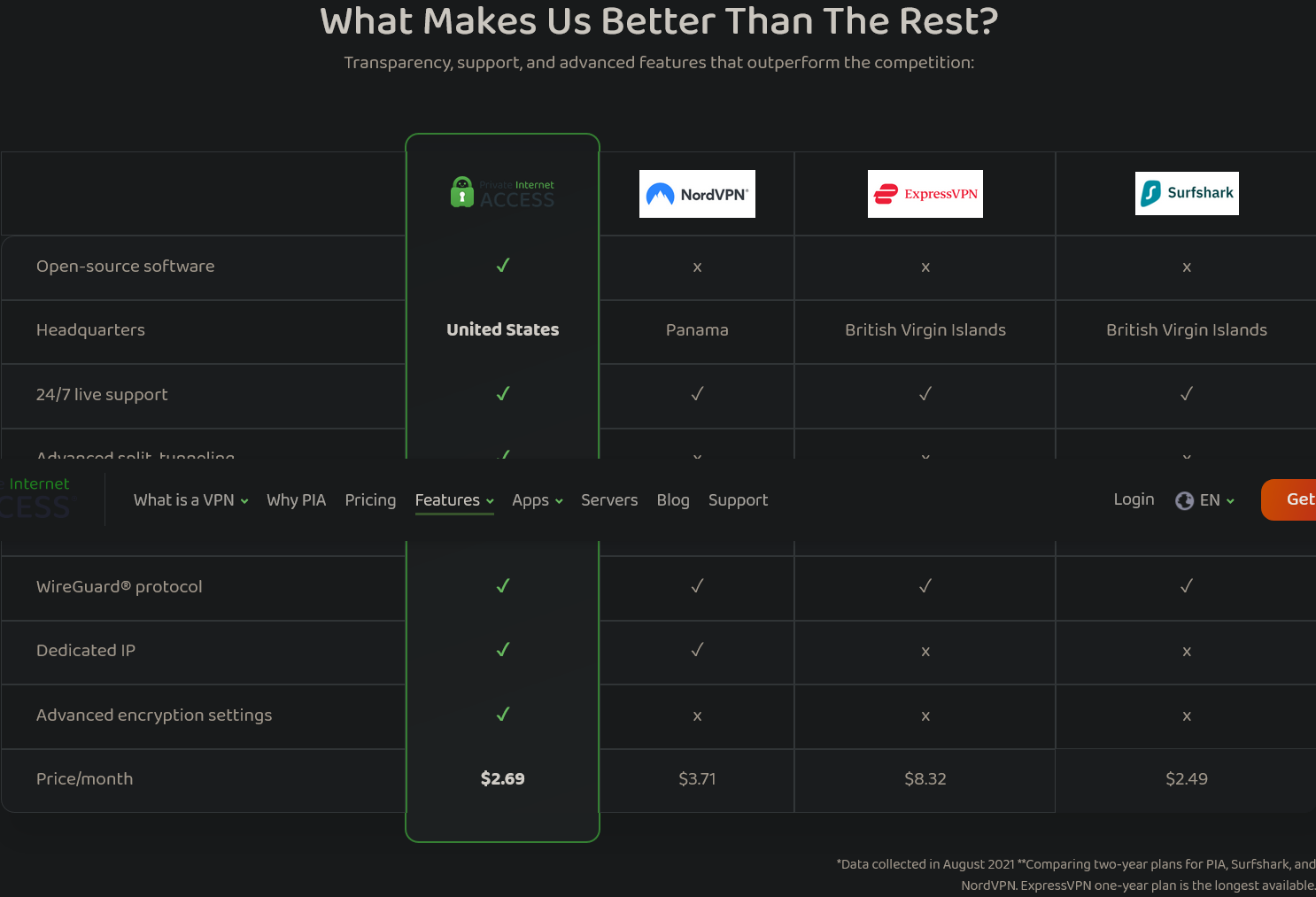
thoughts??? is it better to have a company based in USA since I'm there too??? What about tunneling and all that other stuff???
Thanks! -
-
@raphjd This is correct..... PIA is something different. They're based in the United States if I recall correctly which can be considered a red flag. Now.... That being said, they do support port forwarding, however they will randomize the port on each connection, so every time you connect, you must change the port settings in your torrent client.
PrivateVPN on the other hand from https://privatevpn.com/ will do the same on all servers, however for some servers, they support port forwarding for ALL ports, so you don't have to keep changing settings in your torrent client every time you connect.
As for ExpressVPN, they do support port forwarding, however in order to take advantage of this, you must install the VPN service on your router and setup the port forwarding within the router. Not all routers support this option, and by the same token, not all routers that support a VPN connection support ExpressVPN. This potentially makes it more expensive by having to upgrade your home network equipment and get into way more complicated setup to get it going.




Hello! It looks like you're interested in this conversation, but you don't have an account yet.
Getting fed up of having to scroll through the same posts each visit? When you register for an account, you'll always come back to exactly where you were before, and choose to be notified of new replies (either via email, or push notification). You'll also be able to save bookmarks and upvote posts to show your appreciation to other community members.
With your input, this post could be even better 💗
Register Login