• Categories
    • Recent
    • Tags
    • Popular
    • Users
    • Groups
    • Torrents
    • Login

    Quick Torrent Maker - Unable to Select

    Scheduled Pinned Locked Moved Uploading
    quicktorrentmakercantselectcategory
    5 Posts 3 Posters 58 Views
    Loading More Posts
    • Oldest to Newest
    • Newest to Oldest
    • Most Votes
    Reply
    • Reply as topic
    Log in to reply
    This topic has been deleted. Only users with topic management privileges can see it.
    • 8 Offline
      808bbboTTom
      last edited by

      Cannot select a category. When you click on it, "select category" is what comes up.
      The subcategory dropdowns are greyed out.
      Please help

      DandyLionD 1 Reply Last reply Reply Quote 0
      • DandyLionD Offline
        DandyLion Global Moderator @808bbboTTom
        last edited by

        @808bbbottom said in Quick Torrent Maker - Unable to Select:

        Cannot select a category. When you click on it, "select category" is what comes up.
        The subcategory dropdowns are greyed out.
        Please help

        Hello,

        Please try and click the arrow on the right-hand side instead of clicking in the middle of the box.

        it should open a dropdown menu where you can select the MAIN category. Once that is selected, you will be able to select the subcategories.

        DandyLion
        GTRU Moderator

        8 R 2 Replies Last reply Reply Quote 0
        • 8 Offline
          808bbboTTom @DandyLion
          last edited by

          @dandylion you are a god!!

          Thank You!!

          1 Reply Last reply Reply Quote 0
          • R Offline
            rendytar077 @DandyLion
            last edited by

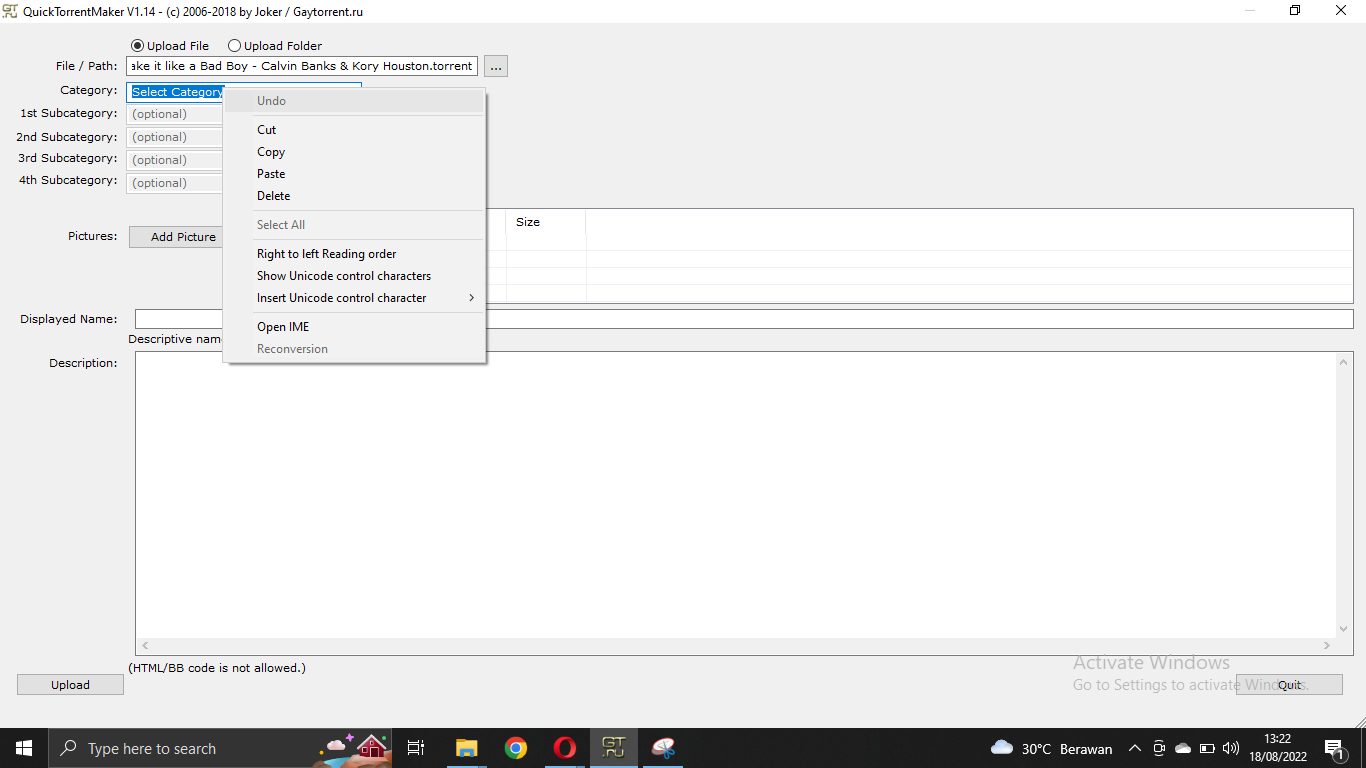
            @DandyLion image_2022-08-18_132307753.png
            how?? i can't find main category

            DandyLionD 1 Reply Last reply Reply Quote 0
            • DandyLionD Offline
              DandyLion Global Moderator @rendytar077
              last edited by

              @rendytar077 Please try left clicking the arrow on the right hand side of the box.

              The screenshot attached looks like you RIGHT clicked the box instead 🙂

              Thank you,
              DandyLion

              1 Reply Last reply Reply Quote 0

              Hello! It looks like you're interested in this conversation, but you don't have an account yet.

              Getting fed up of having to scroll through the same posts each visit? When you register for an account, you'll always come back to exactly where you were before, and choose to be notified of new replies (either via email, or push notification). You'll also be able to save bookmarks and upvote posts to show your appreciation to other community members.

              With your input, this post could be even better 💗

              Register Login
              • 1 / 1
              • First post
                Last post