Help with uploading torrent using qBittorrent
-
Hi,
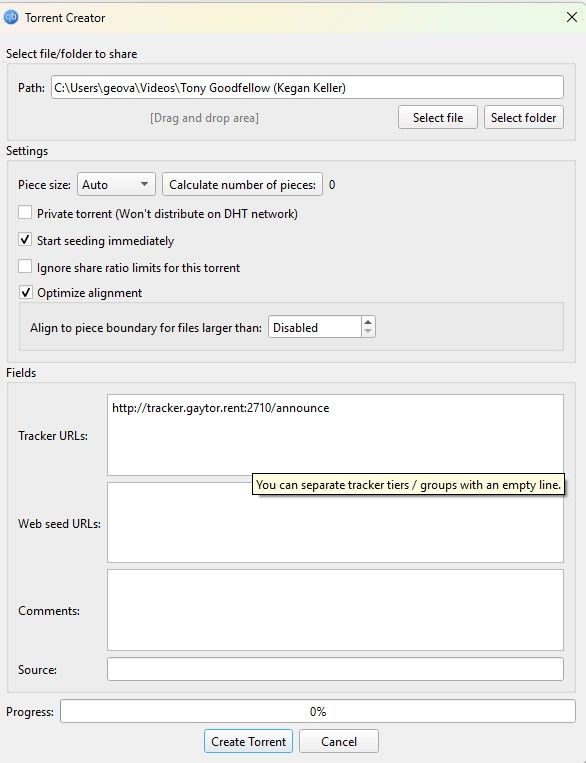
I'm trying to upload my first torrent but I'm having issues. I created the .torrent file here using qbittorent, added the tracker url, dropped the torrent file and folder into gaytorrent, hit "Do it!", and created this torrent link here https://www.gaytor.rent/details.php?id=0Umqzkb1ppTBO-ATmP555A&uploaded=1.
When i re-download the .torrent file from gaytorrent, and added it to my qbittorrent list it just says Stalled in my qbittorent and is stuck at 0%. I deleted the original qbittorent file as instructed as well so now only the new file exists. Anything else I need to do or missed?
 es.
es.

-
@geovanniem said:
Anything else I need to do or missed?Apparently yes, you need to set the download to the directory where your files are

For example, since you are uploading a folder "Tony Goodfellow (Kegan Keller)", you need to set your download path to the place where that folder is at.So, set your download path to: "C:\Users\geova\Videos" and after verifying the files it will start seeding.
-
@geovanniem I believe you should also have selected private tracker option,
but like said, point it to the folder where the file is, not the file or folder that you are sharing directly, but where it is located.
I have had no problems just using the automated system within the upload section here rather than creating via qbit and then transferring to GT -
@geovanniem and you are using your FULL tracker URL listed in your profile section under user details?

Hello! It looks like you're interested in this conversation, but you don't have an account yet.
Getting fed up of having to scroll through the same posts each visit? When you register for an account, you'll always come back to exactly where you were before, and choose to be notified of new replies (either via email, or push notification). You'll also be able to save bookmarks and upvote posts to show your appreciation to other community members.
With your input, this post could be even better 💗
Register Login