Cannot download anything...
-
Cannot download anything... I checked my ratio and it's above the minimum.
-
@cboy21boy you're on PC? Please check the trackers tab and see if there's any useful information in the "message" field
-
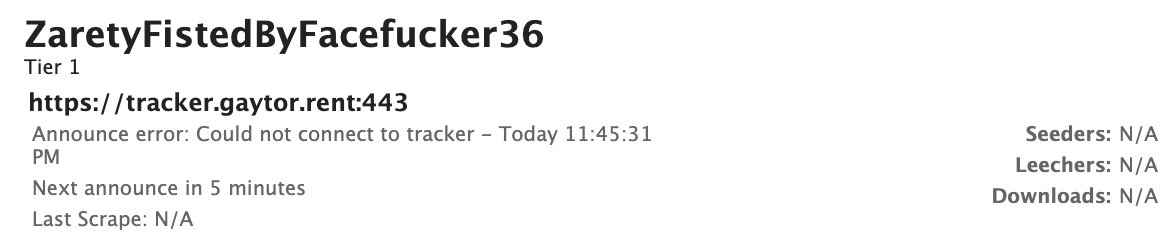
@ianfontinell thanks for looking into it. Here is what I saw:
https://tracker.gaytor.rent:443
Announce error: Could not connect to tracker - Today 10:02:55 PM -
@cboy21boy that's definitely not right, doesn't look nothing like a valid announce URL that comes with the torrent files. Please provide a screenshot of the tracker tab from your client (make sure to hide your passkey if it's there)
It should look like this:

-
@ianfontinell could IPV6 be the problem? When i connect from a laptop, it only shows the ipv6 address. But the transmission is on a tomato router, it sees the first IPV6 address.
nslookup tracker.gaytor.rent
Server: 8.8.8.8
Address 1: 8.8.8.8 dns.googleName: tracker.gaytor.rent
Address 1: 2a00:1768:1001:87::57
Address 2: 77.247.179.57 -
-
@cboy21boy are you able to view this page in your browser? https://tracker.gaytor.rent/stmdd
-
@ianfontinell on my local browser, yes. but on the router's terminal. got this:
$ curl https://tracker.gaytor.rent:443
curl: (77) Failed to connect to 2a00:1768:1001:87::57: Network is unreachable
$ curl https://tracker.gaytor.rent/stmdd
curl: (77) Failed to connect to 2a00:1768:1001:87::57: Network is unreachable -
@cboy21boy you can try forcing it to connect to the ipv4 address by adding a rule to your hosts file:
77.247.179.57 tracker.gaytor.rent -
77.247.179.57 tracker.gaytor.rent
thanks for helping out. still the same...
-
@ianfontinell after adding that IPv4 address, got a different IPv6 below. now sure why...
curl https://tracker.gaytor.rent:443
curl: (77) Failed to connect to 4df7:b339:8ea:ea7f::: Network is unreachable -
@cboy21boy i only notice that that's not even a valid ipv6 address, i'm just as confused as to how the dns lookup would end up redirecting you to that. I'm out of ideas to be honest... My only other suggestion is trying to edit your tracker URL directly in one of your torrents, and replace gaytor.rent with the ipv4 address 77.247.179.57 to see if it connects, or if it's still unreachable.
If that's the case, I can only suspect of a misconfigured router or VPN.
-
@ianfontinell thanks, man. I am out of ideas too. It is a indeed a very old router. I switched to another router and it downloads well. you are right, probably old router issue.
-
If you're getting network unreachable, it means that for some reason IPv6 DNS is resolving, however your ISP likely does not have direct support for IPv6, so disabling IPv6 on your PC or home network would force everything into IPv4 only mode, thereby eliminating the problem.
-
@MrMazda I finally upgraded the old router to a newer version of FreshTomato firmware. it's working now. Thanks.



Hello! It looks like you're interested in this conversation, but you don't have an account yet.
Getting fed up of having to scroll through the same posts each visit? When you register for an account, you'll always come back to exactly where you were before, and choose to be notified of new replies (either via email, or push notification). You'll also be able to save bookmarks and upvote posts to show your appreciation to other community members.
With your input, this post could be even better 💗
Register Login